Introduzione
This manual provides essential information for the proper setup, operation, and maintenance of your My Arcade Sonic The Hedgehog Joystick Player. Please read this manual thoroughly before using the product to ensure a safe and enjoyable gaming experience.
Prodotto finitoview
The My Arcade Sonic The Hedgehog Joystick Player is a portable retro gaming console featuring classic SEGA titles. It offers an authentic arcade experience with a joystick and dedicated buttons.
Caratteristiche principali:
- Officially licensed SEGA game console.
- High-resolution 3.5-inch full-color display.
- Include Sonic il riccio E Sonic the Hedgehog 2.
- 3.5mm headphone jack for private audio.
- Altoparlante incorporato con controllo del volume.
- Luminosità dello schermo regolabile.
- Powered by 4 AA batteries (not included) or USB-C cable (not included).
Componenti:
- Gaming Console Unit
- Leva di comando
- Action Buttons (A, B, C)
- Pulsante Home
- Credit/Start Button
- Controllo del volume (+/-)
- Controllo della luminosità
- Jack per cuffie da 3.5 mm
- USB-C Power Input (5V IN)
- Battery Compartment (requires 4 AA batteries)

The My Arcade Sonic The Hedgehog Joystick Player, a portable retro gaming console.
Impostare
Accensione della console:
- Installazione della batteria: Locate the battery compartment on the back of the console. Insert 4 AA batteries (not included), ensuring correct polarity.
- USB-C Power (Optional): Alternatively, connect a USB-C cable (not included) to the 5V IN port on the back of the console to power it.
Utilizzo iniziale:
- Peel off the protective screen sticker before use.
- Turn on the console using the power switch located on the back.

Posteriore view of the console, highlighting the battery compartment, USB-C port, and headphone jack.
Istruzioni per l'uso
Game Selection and Start:
- Once powered on, use the joystick to navigate and select your desired game (Sonic il riccio or Sonic the Hedgehog 2) from the main menu.
- Premere il tasto START/CREDIT button to add virtual coins and begin the game.
- To skip the Sonic demo mode, press the START/CREDIT pulsante.
Controlli:
- joystick: Controlla il movimento del personaggio.
- Action Buttons (A, B, C): Perform in-game actions such as jumping or attacking.
- Controllo del volume (+/-): Adjust the sound level of the built-in speaker using the buttons on the back of the console.
- Luminosità dello schermo: Adjust the screen brightness using the dedicated button on the back.
- Jack per cuffie: For private listening, connect 3.5mm headphones to the headphone jack on the back.
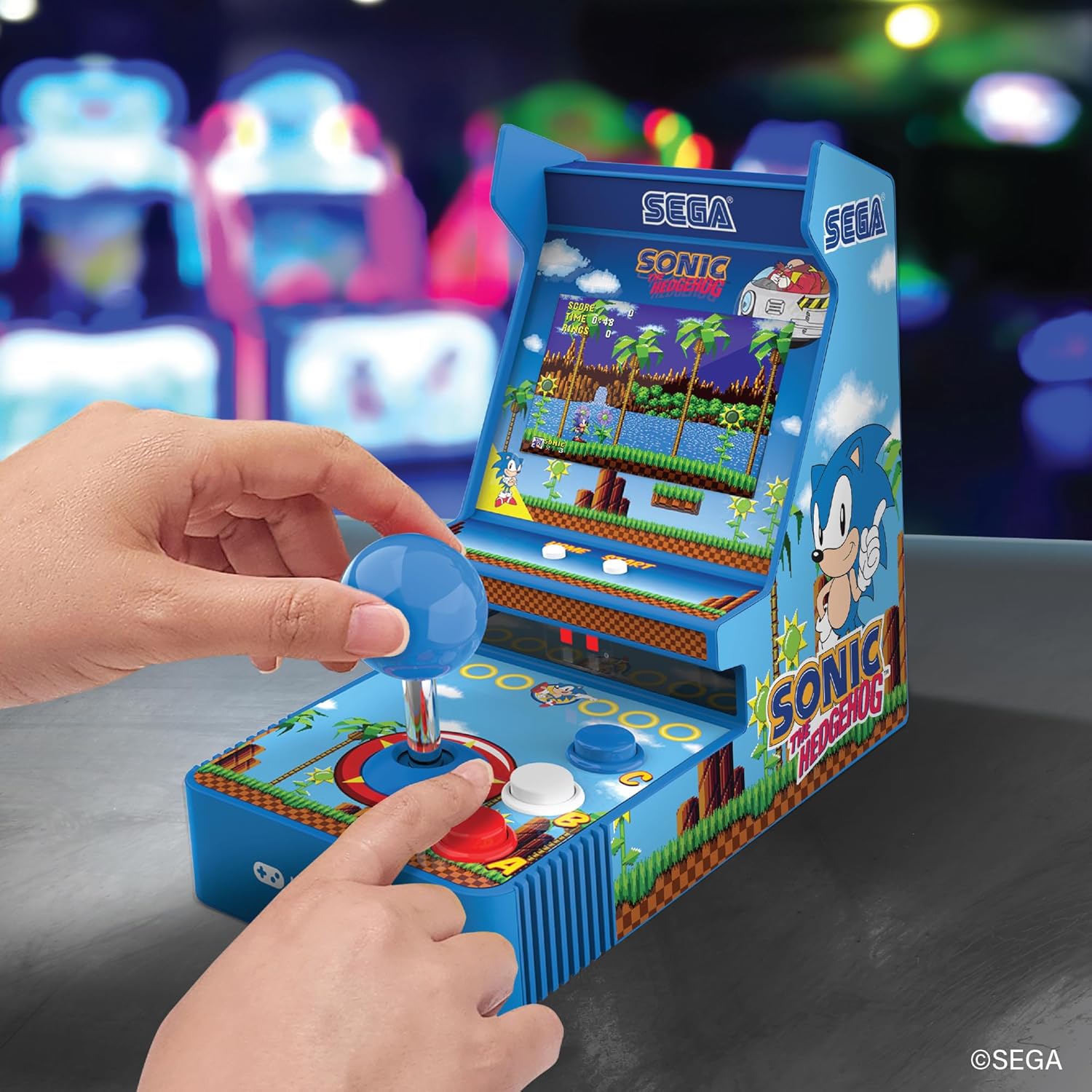
Davanti view of the console, showing the joystick, action buttons, and screen during gameplay.
Official video demonstrating the My Arcade Sonic Arcade Game in action, showcasingameplay e caratteristiche.
Manutenzione
To ensure the longevity of your My Arcade Sonic The Hedgehog Joystick Player, follow these simple maintenance guidelines:
- Keep the console clean by wiping it with a soft, dry cloth. Avoid using abrasive cleaners or solvents.
- Conservare la console in un luogo fresco e asciutto, lontano dalla luce solare diretta e da temperature estreme.
- If not in use for an extended period, remove the AA batteries to prevent leakage.
Risoluzione dei problemi
If you encounter any issues with your My Arcade Sonic The Hedgehog Joystick Player, refer to the following common solutions:
- La console non si accende: Ensure that fresh AA batteries are correctly installed or that the USB-C cable is securely connected to a power source.
- Game does not start from demo mode: Premere il tasto START/CREDIT button to exit demo mode and begin gameplay.
- Nessun suono: Check the volume control buttons on the back of the console. If headphones are connected, ensure they are fully plugged in and functioning correctly.
- Lo schermo è scuro: Adjust the screen brightness using the dedicated button on the back of the console.
If problems persist, please contact My Arcade customer support for further assistance.
Specifiche
| Caratteristica | Dettaglio |
|---|---|
| Dimensioni del prodotto | 4 cm L x 6.8 cm P x 7.6 cm A |
| Tipo di controllore | Leva di comando |
| Peso dell'articolo | 0.63 chilogrammi (1.39 libbre) |
| Dimensioni dello schermo | 3.5 pollici |
| Fonte di alimentazione | 4 AA batteries (not included) or USB Type C (not included) |
| Interfaccia Hardware | USB tipo C |
| Tipo di visualizzazione | LCD |
| Materiale | Plastica |
| Capacità di archiviazione della memoria | 4 MB |
| Numero di modello | DGUNL-7157 |
| Codice UPC | 845620071579 |
Informazioni sulla sicurezza
- Non adatto a bambini di età inferiore a 3 anni a causa della presenza di piccole parti.
- Sorvegliare sempre i bambini piccoli durante l'uso.
- Do not expose the console to water or excessive moisture.
- Avoid dropping or subjecting the console to strong impacts.
- Use only recommended battery types and ensure correct installation.
Garanzia e supporto
For warranty information or technical support, please refer to the official My Arcade websito o contattare il servizio clienti. Conservare la ricevuta d'acquisto come prova d'acquisto.


