1. Introduzione
This manual provides essential information for the safe and efficient use of your SBS Powerbank 10K Slim. Please read these instructions carefully before using the device and retain them for future reference.
The SBS Powerbank 10K Slim is a portable charging device designed to provide power to various electronic devices, including smartphones, tablets, and other USB-powered gadgets. It features a 10,000 mAh capacity, intelligent charging technology, and multiple output ports for versatile use.
2. Contenuto della confezione
Verificare che tutti gli articoli siano presenti nel pacco:
- SBS Powerbank 10K Slim
- Cavo da USB-A a USB-C
- Manuale d'uso
3. Caratteristiche del prodotto
- Capacità 10,000mAh: Capable of recharging a smartphone up to 4 times or a tablet up to 2 times.
- Intelligent Charge (IC) 10 Watts: Automatically detects the maximum power your device can accept and adjusts output accordingly, providing protection against overheating and short circuits.
- Design sottile e compatto: Portable and lightweight for easy transport in a pocket or bag.
- Ingresso/uscita USB-C: The USB-C port functions for both charging the power bank and charging external devices.
- Indicatori LED di stato: Easily monitor the remaining charge level of the power bank.
- Porte di uscita multiple: Includes 1x USB-C port and 2x USB-A ports for charging various devices simultaneously.
4. Impostazione
4.1 Ricarica iniziale del Powerbank
Before first use, fully charge the power bank. Connect the supplied USB-A to USB-C cable to the power bank's USB-C port and the USB-A end to a compatible USB wall charger (not included) or a computer's USB port. The LED indicators will illuminate to show the charging progress.

Image: The power bank being charged using the included USB-C to USB-A cable connected to a laptop.
4.2 Identificazione delle porte
The power bank features various ports for charging and discharging:
- USB 1 (USB-A 1A Standard): Output for standard charging (5W).
- USB-C (Type-C Fast Charge): Input/Output for fast charging (10W).
- USB 2 (USB-A 2.1A Intelligent Charge): Output for intelligent fast charging (10W).

Immagine: dettagliata view of the power bank's charging ports, indicating their types and power outputs.
5. Istruzioni per l'uso
5.1 Ricarica di dispositivi esterni
To charge your device, connect it to one of the power bank's output ports (USB 1, USB 2, or USB-C) using an appropriate charging cable. The power bank will automatically begin charging. You can charge up to three devices simultaneously.

Image: The power bank actively charging a smartphone and a pair of wireless earbuds.
5.2 Controllo dello stato della batteria
Press the power button once to activate the LED indicators. The blue LEDs will show the remaining charge level of the power bank. Each LED typically represents approximately 25% of the battery capacity.

Image: The power bank's side with the power button and LED indicators displaying the charge level.
5.3 Intelligent Charge (IC) Function
The Intelligent Charge feature on the USB 2 (USB-A 2.1A) and USB-C ports automatically identifies the connected device and delivers the optimal charging current up to 10W. This ensures efficient and safe charging for a wide range of devices.

Image: The power bank charging a smartphone, highlighting its 10,000 mAh capacity and recharge capability.
6. Manutenzione
6.1 Cura generale
- Tenere il power bank asciutto e lontano dall'umidità.
- Evitare temperature estreme (calde o fredde).
- Pulire il dispositivo con un panno morbido e asciutto. Non utilizzare prodotti chimici aggressivi o materiali abrasivi.
- Non far cadere, smontare o tentare di riparare autonomamente il power bank.
6.2 Conservazione
When storing the power bank for extended periods, ensure it is charged to approximately 50-75% capacity. Recharge it every 3-6 months to maintain battery health.
6.3 Precauzioni di sicurezza
- This power bank includes built-in protections against short circuits, overcharging, and over-discharging.
- Do not expose the power bank to fire or direct sunlight.
- Tenere fuori dalla portata dei bambini.
7. Risoluzione Dei Problemi
7.1 Il power bank non si carica
- Assicurarsi che il cavo di ricarica sia collegato saldamente sia al power bank sia alla fonte di alimentazione.
- Prova un adattatore USB da parete o una porta USB diversi.
- Verificare che la fonte di alimentazione sia attiva.
7.2 Il dispositivo non si carica dal power bank
- Check if the power bank has sufficient charge (press the button to check LEDs).
- Ensure the charging cable connecting your device to the power bank is functional and correctly inserted.
- Prova una porta di uscita diversa sul power bank.
- Alcuni dispositivi potrebbero richiedere un cavo di ricarica o un adattatore specifico.
7.3 Ricarica lenta
- Ensure you are using the appropriate port for faster charging (USB-C or USB 2).
- The charging speed can be affected by the cable quality, the device being charged, and the power bank's remaining charge level.
8. Specifiche
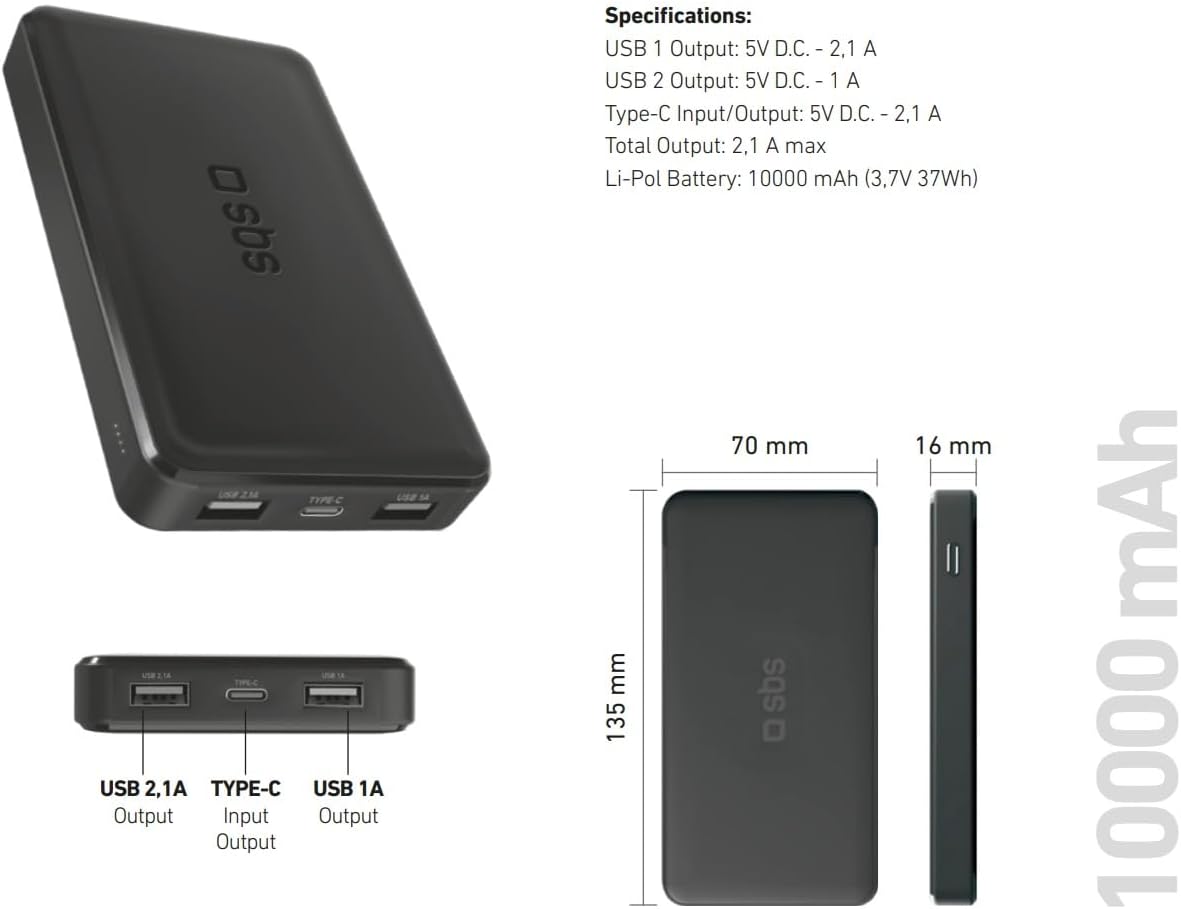
Image: Technical specifications and physical dimensions of the power bank.
| Caratteristica | Dettaglio |
|---|---|
| Nome del modello | TTBB10000TCK |
| Capacità della batteria | 10,000 mAh (3.7 V 37 Wh) |
| Tipo di batteria | Litio-polimero |
| Uscita USB 1 | 5V D.C. - 1A (5W) |
| Uscita USB 2 | 5V D.C. - 2.1A (10W Intelligent Charge) |
| Ingresso/uscita USB-C | 5V D.C. - 2.1A (10W Fast Charge) |
| Produzione totale | 2.1A max |
| Colore | Nero |
| Dimensioni | Dimensioni: 135 mm x 70 mm x 16 mm |
| Peso | 230 grammi |
| Caratteristiche speciali | Fast Charge, Lightweight, Short-circuit Protection, Over-discharge Protection, Slim Design |
| Dispositivi compatibili | Smartphone, Tablet, Smartwatch, Speaker, Laptop (charging only) |
9. Garanzia e supporto
9.1 Garanzia del produttore
This SBS Powerbank 10K Slim comes with a Garanzia del produttore di 2 anniSi prega di conservare la prova d'acquisto per eventuali reclami in garanzia. La garanzia copre difetti di materiali e fabbricazione in normali condizioni d'uso.
9.2 Assistenza clienti
For further assistance, technical support, or warranty inquiries, please visit the official SBS website or contact their customer service department. You can find more information and products from SBS by visiting their official store: SBS Brand Store.