1. Informazioni sulla sicurezza
Please read and understand all safety instructions before operating the VOLTCRAFT PMM 6010-60. Failure to follow these instructions may result in electric shock, fire, or personal injury.
- This device is rated CAT II 600 V. Always adhere to the specified voltage e limiti di corrente.
- Assicurarsi che il dispositivo sia adeguatamente messo a terra prima dell'uso.
- Non utilizzare il dispositivo in ambienti bagnati o damp condizioni.
- Inspect test leads and power cables for damage before each use. Replace any damaged components immediately.
- Il dispositivo è dotato di overvoltage, overcurrent, and short-circuit protection. Do not attempt to bypass these safety features.
- La manutenzione e le riparazioni devono essere eseguite solo da personale qualificato.
- Keep the ventilation openings clear to prevent overheating. The intelligent fan regulates speed based on temperature.
2. Prodotto finitoview
The VOLTCRAFT PMM 6010-60 is a versatile 2-in-1 device, combining a digital multimeter (DMM) with a programmable power supply. It is designed for accurate electrical measurements and providing stable power to external circuits.
2.1 Caratteristiche principali
- Multimetro digitale: 60,000 counts, True RMS for AC voltage and current, measures DC voltage, resistenza, diodo, continuità e capacità.
- Alimentazione regolabile: Single output, 0-60 V output voltage, 0-10 A output current, maximum power 300 W.
- Display: 7.11 cm (2.8 inch) TFT-LC display for clear result visualization.
- Connettività: USB 2.0 interface, SCPI compatible for remote control.
- Sicurezza: CAT II 600 V rating, overvoltage, overcurrent, and short-circuit protection, temperature-controlled intelligent fan.
2.2 Componenti del dispositivo

Figura 1: Pannello frontale. This image shows the front panel of the VOLTCRAFT PMM 6010-60, featuring the TFT-LC display, control buttons (F1-F4, DISP, Mode, On/Off), rotary knob, input/output terminals for multimeter and power supply functions, and a 5V 1A USB port.
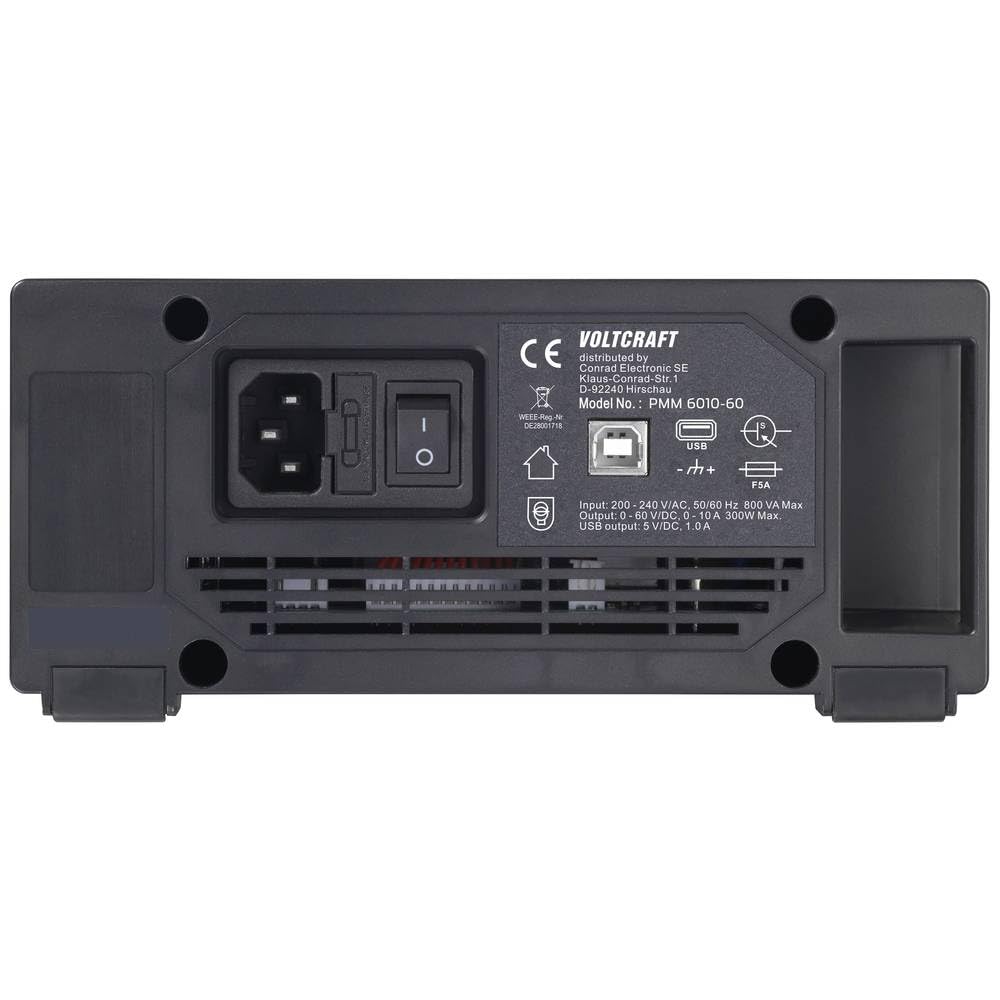
Figura 2: Pannello posteriore. This image displays the rear panel of the VOLTCRAFT PMM 6010-60, including the AC power input, power switch, USB port for PC connection, and ventilation grille.
2.3 Contenuto della confezione
Dopo aver disimballato, assicurarsi che siano presenti tutti i seguenti elementi:
- VOLTCRAFT PMM 6010-60 Digital Multimeter and Power Supply
- Cavo USB
- Cavo di alimentazione
- Coppia di puntali
- 250 V Fuse
- Software CD
- Manuale dell'utente (questo documento)
- Scheda di sicurezza

Figure 3: Device and Accessories. This image shows the VOLTCRAFT PMM 6010-60 unit alongside its included accessories: power cable, USB cable, and test leads.
3. Impostazione
3.1 Collegamento di alimentazione
- Ensure the device's power switch on the rear panel is in the OFF position.
- Connect the provided power cable to the AC input on the rear panel of the PMM 6010-60.
- Plug the other end of the power cable into a suitable grounded AC power outlet.
3.2 Collegamento dei puntali di prova
For multimeter functions, connect the test leads to the appropriate input jacks on the front panel. For power supply output, use the dedicated output terminals.
- Ingressi multimetro: Connect the red test lead to the VΩ/OVP or A terminal and the black test lead to the COM terminal. Ensure correct polarity for DC measurements.
- Uscita alimentazione: Connect your load to the red (+) and black (-) output terminals.
3.3 Installazione del software (facoltativa)
The included software CD contains drivers and applications for PC communication. Insert the CD into your computer's optical drive and follow the on-screen instructions for installation. Connect the device to your PC using the provided USB cable to enable remote control via SCPI commands.
4. Istruzioni per l'uso
4.1 Accensione/Spegnimento
Flip the main power switch on the rear panel to the ON position. Then, press the Acceso/Spento button on the front panel to power on the device. Press it again to power off.
4.2 Funzioni del multimetro
Utilizzare il Modalità button to cycle through different measurement functions. The display will indicate the active measurement mode.
- Volume DCtage Measurement (V DC): Select DCV mode. Connect test leads in parallel with the circuit.
- Volume ACtage Measurement (V AC True RMS): Select ACV mode. Connect test leads in parallel with the circuit. The True RMS feature ensures accurate readings regardless of waveform.
- Misurazione della resistenza (Ω): Select resistance mode. Ensure the circuit is de-energized. Connect test leads across the component.
- Prova del diodo: Select diode mode. Connect test leads across the diode.
- Test di continuità: Select continuity mode. Connect test leads across the circuit. An audible tone indicates continuity.
- Misurazione della capacità: Select capacitance mode. Ensure the capacitor is discharged before connecting test leads.
4.3 Power Supply Operation
The power supply section allows you to set precise voltage and current limits for your external circuits.
- Impostazione voltage e corrente: Utilizzare la manopola e il DISP or arrow buttons to select and adjust the desired output voltage (0-60 V) and current (0-10 A) limits. The display shows the set values.
- Abilitazione dell'output: Press the dedicated output ON/OFF button (often labeled with a power symbol or 'Output') to enable or disable the power supply output. The display will indicate if the output is active.
- Monitoraggio: The TFT-LC display continuously shows the actual output voltage e corrente erogata al carico.
4.4 Comunicazione USB
Connect the device to a computer via the rear USB port. Using compatible software and SCPI commands, you can remotely control the power supply and retrieve multimeter readings.
5. Manutenzione
5.1 Pulizia
To clean the device, disconnect it from all power sources and test circuits. Use a soft, damp cloth with a mild detergent. Do not use abrasive cleaners or solvents. Ensure the device is completely dry before re-connecting power.
5.2 Sostituzione del fusibile
If the device fails to power on or a specific function stops working, check the fuse. Refer to the full user manual for detailed instructions on how to safely access and replace the 250 V fuse. Always replace with a fuse of the identical type and rating.
5.3 Ventilazione
Ensure the ventilation openings on the rear and sides of the device are not obstructed. The intelligent fan system requires clear airflow to prevent overheating and maintain optimal performance.
6. Risoluzione Dei Problemi
This section provides basic troubleshooting steps for common issues. For more detailed diagnostics, please consult the comprehensive user manual provided on the software CD.
- Il dispositivo non si accende: Check the power cable connection, the rear power switch, and the front panel On/Off button. Verify the fuse (see Section 5.2).
- No power supply output: Ensure the output is enabled via the front panel button. Check the set voltage and current limits. Verify connections to the load.
- Letture errate del multimetro: Ensure test leads are correctly connected to the appropriate terminals for the selected measurement function. Verify the circuit is properly connected and within the device's measurement range.
- USB communication issues: Ensure the USB cable is securely connected to both the device and the PC. Verify that the correct drivers are installed on your computer.
7. Specifiche
| Caratteristica | Specificazione |
|---|---|
| Numero di modello | VC-15445405 |
| Display | 7.11 cm (2.8 inch) TFT-LC, 60,000 counts |
| Valutazione di sicurezza | CATII 600 V |
| Funzioni del multimetro | DCV, ACV (True RMS), Resistance, Diode, Continuity, Capacitance |
| Uscite di alimentazione | 1 |
| Volume di uscitatage | 0 - 60 V |
| Corrente di uscita | 0 - 10 A |
| Potenza di uscita massima | 300 L |
| Resolution (V/A) | 10 mV / 1 mA |
| Interfaccia | USB 2.0 (SCPI compatible) |
| Dimensioni (L x P x A) | Dimensioni: 18.5 x 20 x 9.2 cm |
| Peso | 1.2 kg |
8. Garanzia e supporto
VOLTCRAFT products are designed for quality and reliability. This product comes with a standard manufacturer's warranty. For specific warranty terms and conditions, please refer to the documentation included with your purchase or visit the official VOLTCRAFT websito.
For technical support, troubleshooting assistance beyond this manual, or warranty claims, please contact your retailer or the VOLTCRAFT customer service department. Contact information can typically be found on the manufacturer's websito o nella confezione del prodotto.


