Introduzione
Thank you for choosing the WONLINK WL-NE3502 WiFi Range Extender. This device is designed to expand your existing WiFi network coverage, eliminate dead zones, and provide a stable, high-speed internet connection throughout your home or office. With dual-band support (2.4GHz and 5GHz) and speeds up to 1200Mbps, it is ideal for 4K streaming, online gaming, and connecting multiple devices. This manual provides detailed instructions for setup, operation, maintenance, and troubleshooting to ensure optimal performance.

Image: The WONLINK WL-NE3502 WiFi Range Extender, a black device with four external antennas and LED indicators, designed to boost WiFi signals.
Informazioni sulla sicurezza
- Non esporre il dispositivo all'acqua, al fuoco, all'umidità o ad ambienti caldi.
- Non tentare di smontare, riparare o modificare il dispositivo.
- Utilizzare solo l'adattatore di alimentazione fornito o raccomandato dal produttore.
- Garantire un'adeguata ventilazione attorno al dispositivo per evitare il surriscaldamento.
- Tenere il dispositivo lontano da forti campi elettromagnetici.
- Questo dispositivo è destinato esclusivamente all'uso in ambienti interni.
Contenuto della confezione
Si prega di controllare attentamente il contenuto della confezione. Se qualche articolo risulta mancante o danneggiato, contattare il rivenditore.
- 1 x WONLINK WL-NE3502 WiFi Range Extender
- 1 x cavo Ethernet
- 1 x Guida di installazione rapida
- 1 x Scheda di garanzia
Prodotto finitoview
The WL-NE3502 features a compact design with multiple antennas for enhanced signal transmission and reception. It includes LED indicators for power, WiFi signal strength, and connection status, providing clear visual feedback on its operational state.
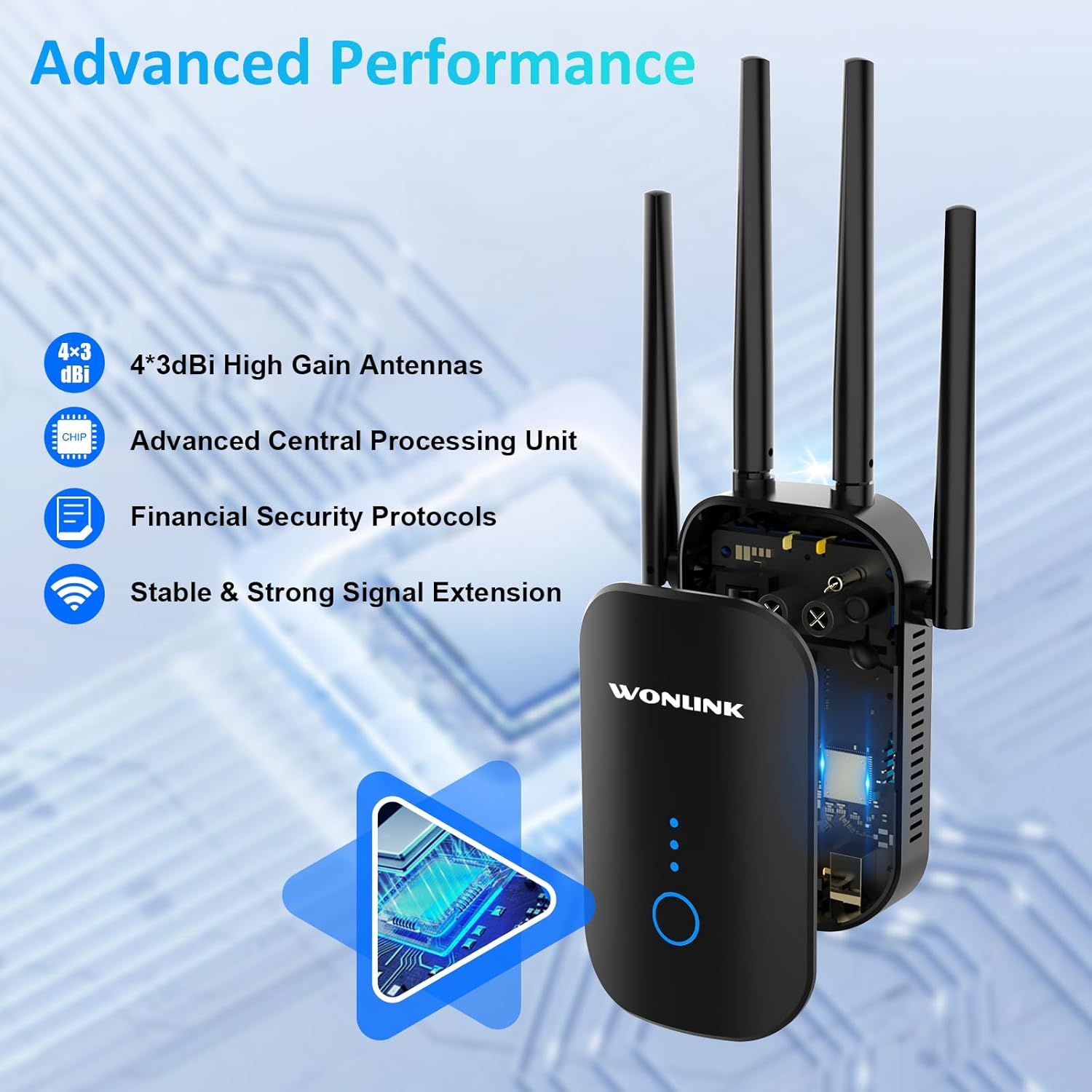
Image: An illustration highlighting the advanced performance features of the WONLINK WL-NE3502, including 4x3dBi high gain antennas, an advanced CPU, financial security protocols, and stable signal extension.
Indicatori LED:
- LED di potenza: Indica lo stato dell'alimentazione.
- LED Wi-Fi: Indicates WiFi signal status.
- LED di potenza del segnale: Indicate the strength of the extended WiFi signal.
Pulsanti e porte:
- Pulsante WPS/Reset: Used for quick setup via WPS or to reset the device to factory settings.
- Porta Ethernet: Per connessioni cablate ai dispositivi o al router principale.
Impostare
The WONLINK WL-NE3502 can be set up using a web browser or via WPS.
Metodo 1: Web Browser Setup (Recommended)
- Accensione: Plug the extender into a power outlet near your main router. Wait for the Power LED to turn solid.
- Connettiti al WiFi dell'Extender: On your computer or mobile device, connect to the WiFi network named "XXXXX-2G" or "XXXXX-5G" (the default SSID of the extender). No password is required for the initial connection.
- Accesso Web Interfaccia: Aprire un web browser (ad esempio, Chrome, Firefox) e tipo 192.168.10.1 nella barra degli indirizzi, quindi premere Invio.
- Login: Enter "admin" for both the username and password (default credentials). Click "Login".
- Seleziona modalità: Choose your desired operating mode (Repeater, AP, or Router). For extending existing WiFi, select "Repeater Mode".
- Seleziona la rete WiFi: The extender will scan for available WiFi networks. Select the WiFi network you wish to extend from the list.
- Inserisci la password: Enter the password for your main WiFi network.
- Configurare la rete estesa: You can choose to keep the same SSID as your main network or create a new one for the extended network.
- Applica impostazioni: Click "Apply" or "Save". The extender will restart.
- Riposizionare l'extender: Once restarted, unplug the extender and move it to a location halfway between your router and the WiFi dead zone. Ensure the Signal Strength LEDs indicate a good connection.
- Connect to Extended WiFi: Reconnect your devices to the newly configured extended WiFi network.

Image: A visual guide demonstrating the web-based setup process for the WONLINK WL-NE3502, showing connection to the extender's WiFi, accessing the web interface, and selecting the network to extend.

Image: Screenshots illustrating the easy setup process for the WONLINK WL-NE3502 using a smartphone, detailing steps to connect to the extender's WiFi, access the web interface, and select the WiFi signal to extend.
Method 2: WPS Setup (If your router supports WPS)
- Accensione: Plug the extender into a power outlet near your main router. Wait for the Power LED to turn solid.
- Premere WPS sull'Extender: Press the WPS button on the WONLINK WL-NE3502 extender. The WiFi LED will start blinking.
- Premere WPS sul router: Entro due minuti, premi il pulsante WPS sul router principale.
- Attendi la connessione: The extender will automatically connect to your router. The Signal Strength LEDs on the extender will light up, indicating a successful connection.
- Riposizionare l'extender: Once connected, unplug the extender and move it to a location halfway between your router and the WiFi dead zone. Ensure the Signal Strength LEDs indicate a good connection.
Modalità operative
The WONLINK WL-NE3502 supports multiple operating modes to suit various networking needs:
- Modalità ripetitore: Extends the coverage of an existing wireless network. This is the most common mode for eliminating WiFi dead zones.
- Modalità punto di accesso (AP): Converts a wired network connection into a wireless one. Ideal for creating a new WiFi hotspot from an Ethernet port.
- Modalità router: Functions as a basic router, creating a new private network. This mode is less common for an extender but can be useful in specific scenarios.
Istruzioni per l'uso
Once set up, the WL-NE3502 operates automatically to provide extended WiFi coverage. Here are some key aspects of its operation:
Posizionamento ottimale:
For best performance, place the extender in a location where it can receive a strong signal from your main router and also effectively transmit to the areas needing coverage. A good indicator is when the Signal Strength LEDs show at least two or three bars.

Image: Illustrations showing optimal placement of the WONLINK WL-NE3502 WiFi extender in various rooms of a home, including the living room, kitchen, bedroom, and bathroom, to ensure comprehensive coverage.

Image: A cross-section diagram of a multi-story house illustrating how the WONLINK WL-NE3502 WiFi extender eliminates dead zones by extending the WiFi signal from the main router to all areas, including basements and courtyards.
Connettività doppia banda:
The WL-NE3502 supports both 2.4GHz and 5GHz WiFi bands. The 2.4GHz band offers wider coverage, while the 5GHz band provides faster speeds for demanding applications like 4K streaming and online gaming.

Image: A graphic illustrating the 1200Mbps ultra-speed internet capability of the WONLINK WL-NE3502, showing 5.8GHz band at 867Mbps and 2.4GHz band at 300Mbps, suitable for HD streaming, gaming, and video calls.

Image: A comparison graphic showing the high-speed performance of the WONLINK WL-NE3502, highlighting 802.11ac standard with 867Mbps on 5.8GHz and 300Mbps on 2.4GHz, improving speed by 35% over 802.11n.
Dispositivi di connessione:
Once the extender is set up, your devices (smartphones, tablets, laptops, smart TVs, gaming consoles, etc.) can connect to the extended WiFi network just as they would to any other WiFi network. Look for the SSID you configured during setup.

Image: A collage showing various WiFi-enabled devices, including mobile phones, desktops, gaming consoles, smart TVs, and security cameras, enjoying a lag-free connection provided by the WONLINK WL-NE3502 extender.

Image: A diagram illustrating MU-MIMO technology, showing how the WONLINK WL-NE3502 improves network utilization by allowing simultaneous communication with multiple wireless terminals, unlike older technology.
Manutenzione
To ensure the longevity and optimal performance of your WONLINK WL-NE3502, follow these maintenance guidelines:
- Pulizia: Pulire delicatamente il dispositivo con un panno morbido e asciutto. Non utilizzare detergenti liquidi o spray.
- Ventilazione: Ensure the ventilation holes are not blocked. Avoid placing the device in enclosed spaces.
- Aggiornamenti del firmware: Controllare periodicamente il sito ufficiale WONLINK webSito per gli aggiornamenti del firmware. L'aggiornamento del firmware può migliorare le prestazioni, aggiungere nuove funzionalità e correggere bug.
- Riavvio: Se riscontri problemi di rete, prova a riavviare l'extender scollegandolo per 10 secondi e ricollegandolo.
Risoluzione dei problemi
If you encounter issues with your WONLINK WL-NE3502, refer to the following common problems and solutions:
| Problema | Possibile causa/soluzione |
|---|---|
| Nessun LED di alimentazione | Assicurati che l'extender sia correttamente collegato a una presa di corrente funzionante. Prova una presa diversa. |
| Impossibile accedere web management page (192.168.10.1) |
|
| Segnale debole dall'extender |
|
| Extended network not visible or no internet |
|
| Slow speeds on extended network |
|
Specifiche
| Caratteristica | Dettaglio |
|---|---|
| Numero di modello | WL-NE3502 |
| Marca | WONLINK |
| Velocità di trasferimento dati | Fino a 1200 Mbps (867 Mbps su 5 GHz, 300 Mbps su 2.4 GHz) |
| Bande di frequenza | 2.4 GHz e 5 GHz (doppia banda) |
| Standard wireless | IEEE 802.11ac/a/b/g/n |
| Antenne | 4 antenne ad alto guadagno da 3 dBi |
| Protocolli di sicurezza | WPA3, WPA2-PSK, WPA-PSK, WEP (64/128-bit) |
| Porti | 1 porta Ethernet 10/100Mbps |
| Modalità operative | Ripetitore, AP, Router |
| Dispositivi compatibili | Smartphones, Tablets, Computers, WiFi-enabled Devices |
| Dimensioni | 8.15 x 3.82 x 3.03 pollici (circa) |
| Peso dell'articolo | 7 once (circa) |
Garanzia e supporto
WONLINK products come with a standard manufacturer's warranty. Please refer to the warranty card included in your package for specific terms and conditions. For technical support, product inquiries, or warranty claims, please contact WONLINK customer service.
- Supporto online: Visit the official WONLINK website for FAQs, drivers, and firmware updates.
- Supporto via e-mail: Refer to your warranty card or the quick installation guide for the support email address.
- Supporto tecnico 24 ore su XNUMX: WONLINK offers online technical support.

Image: A graphic highlighting key features: wide compatibility with 99% of routers, advanced security with 64/128bit WEP, WPA/WPA2 encryption, and 24-hour online technical support.


