Introduzione
Barra luminosa USB-C ALOGIC Illuminate con messa a fuoco automatica 4K Webcam è progettata per migliorare il tuo spazio di lavoro fornendo un'illuminazione regolabile e un'alta qualità webcam. This device offers warm or neutral lighting without screen glare, intuitive touch controls, and a magnetic remote dial for precise adjustments. The integrated 12MP (4K) autofocusing webcam is compatible with Mac and Windows, suitable for video calls, streaming, and recording. A magnetic privacy cover is included for the webcam, and a bright status LED indicates when the camera is active. The light bar is compatible with monitors 8-30mm thick and connects via a single USB-C cable.

Image: The ALOGIC Illuminate USB-C Light Bar with 4K Autofocus Webcam, mostraasing its sleek design and integrated webCamera.
Contenuto della confezione
Si prega di controllare la confezione per verificare la presenza dei seguenti elementi:
- Barra luminosa ALOGIC Illuminate USB-C con messa a fuoco automatica 4K Webcamma
- Cavo USB-C
- Quadrante magnetico del telecomando
- Copertura magnetica per la privacy
Impostare
- Fissare la barra luminosa: Gently place the Illuminate light bar on top of your monitor. The adjustable clamp mechanism is designed to securely fit monitors between 8-30mm thick. Ensure the light bar is centered for optimal lighting and webcam positioning.
- Connetti alimentazione e dati: Connect the provided USB-C cable to the USB-C port on the light bar and then to an available USB-C port on your computer or monitor. This single cable provides both power and data for the light and webCamera.
- Position the Remote Dial: Place the magnetic remote control dial on your desk within easy reach. It will automatically connect to the light bar.
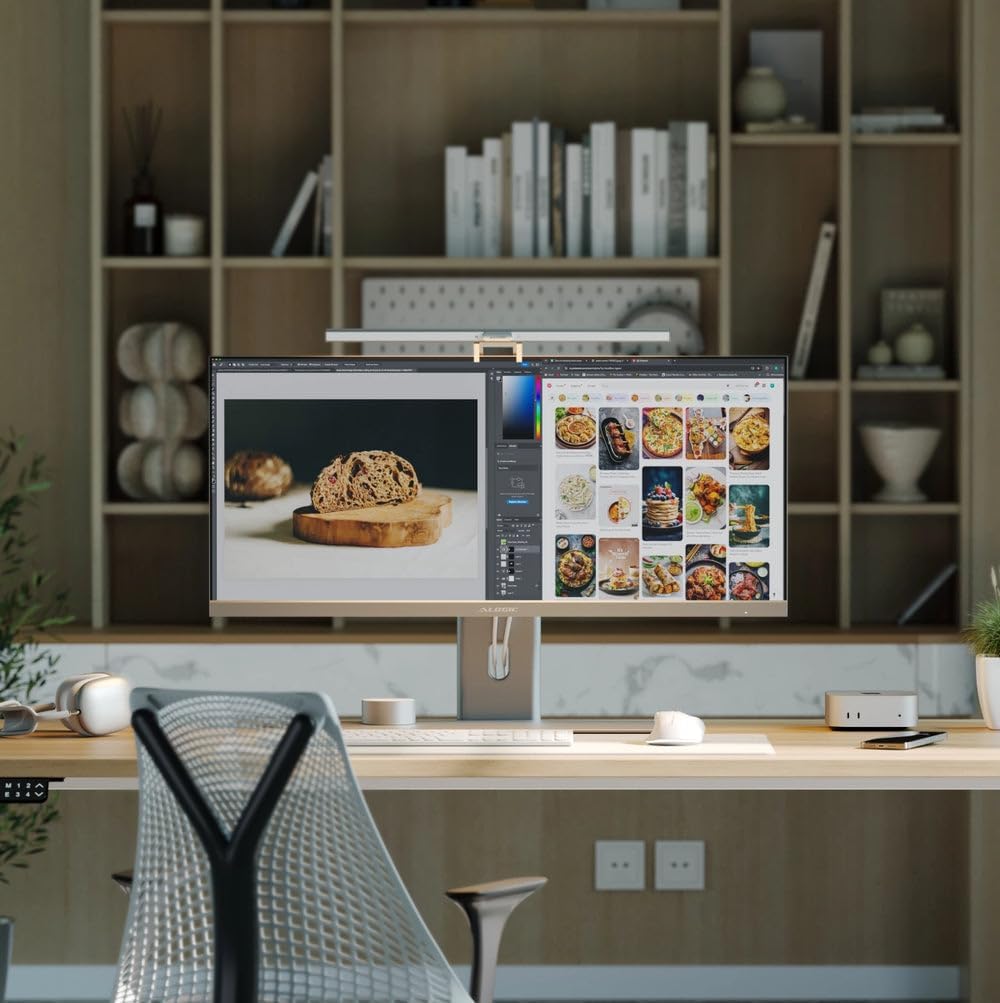
Image: The Illuminate light bar securely mounted on top of a monitor, integrated into a modern workspace.

Image: Diagram illustrating the USB-C connection for power and data, simplifying setup.
Istruzioni per l'uso
Controllo della luce
The Illuminate light bar offers flexible lighting options to suit your environment.
- Controlli touch: The light bar features intuitive touch controls located on its surface. Use these to quickly adjust brightness and color temperature.
- Remote Dial: For fine-tuned adjustments, use the magnetic remote control dial. Swipe your finger along the adjustment bar on the dial to change brightness or color temperature. Press the power button to turn the light on/off, and the mode switch button to cycle through color temperature presets.
- Temperatura del colore: Adjust the light from warm to neutral tones to match your preference or environment.

Image: A diagram highlighting the touch-sensitive buttons on the light bar for adjusting power, brightness, and color temperature.

Image: The magnetic remote control dial, detailing its power button, mode switch button, and adjustment bar for light settings.

Image: Visual representation of the light bar providing various color temperatures, from warm to cool, on a monitor.
WebUtilizzo della camma
The integrated 4K autofocus webcam is ready for use once connected to your computer.
- Compatibilità: IL webcam is fully compatible with Mac and Windows operating systems. It functions as a standard USB webCamera.
- LED di stato: A bright status LED on the light bar indicates when the webla cam è attiva e sta condividendo il video.
- Copertura privacy: For privacy, attach the magnetic privacy cover over the weblente della camma quando non in uso.

Immagine: un primo piano view demonstrating the magnetic privacy cover snapping onto the webcam per una maggiore privacy.
Video ufficiale del prodotto
Video: An official product video from ALOGIC USA demonstrating the features and functionality of the Illuminate USB-C Light Bar with 4K Autofocus WebCamera.
Manutenzione
To ensure the longevity and optimal performance of your ALOGIC Illuminate device, follow these simple maintenance guidelines:
- Pulizia: Use a soft, dry, lint-free cloth to clean the surface of the light bar and webcam lens. Avoid using abrasive cleaners, solvents, or aerosol sprays, as these can damage the finish or optical components.
- Magazzinaggio: Quando non viene utilizzato per lunghi periodi, conservare il dispositivo in un luogo fresco e asciutto, lontano dalla luce solare diretta e da temperature estreme.
- Cura del cavo: Evitare di piegare o schiacciare eccessivamente il cavo USB-C per evitare danni interni.
Risoluzione dei problemi
If you encounter issues with your ALOGIC Illuminate, refer to the following common solutions:
- Light or Webcam Not Functioning:
- Ensure the USB-C cable is securely connected to both the light bar and your computer/monitor.
- Try connecting to a different USB-C port on your computer or monitor.
- Verify that your computer's operating system recognizes the webcam (check Device Manager on Windows or System Information on Mac).
- Riavvia il computer.
- Webcam Image Quality Issues:
- Assicurare il webcam lens is clean and free from dust or smudges.
- Check your video conferencing software settings to ensure the ALOGIC webcam is selected and configured for 4K resolution if supported.
- Assicurare un'illuminazione adeguata nell'ambiente.
- Remote Dial Not Responding:
- Ensure the remote dial is within close proximity to the light bar.
- Check if the light bar itself is powered on.
Specifiche
Detailed specifications for the ALOGIC Illuminate USB-C Light Bar with 4K Autofocus WebCamera:
| Caratteristica | Specificazione |
|---|---|
| Marca | ALOGICA |
| Peso dell'articolo | 2.2 libbre |
| Numero di batterie | 1 batteria non standard (inclusa) |
| Stile | Moderno |
| Numero di sorgenti luminose | 1 |
| Angolo del fascio | 120 gradi |
| Connettività | USB-C |
| Sistemi operativi | Windows®, macOS®, Android, Linux |
| Materiale | ABS / Alluminio |
| Dimensioni del pacco | 21.81 x 6.34 x 2.28 pollici |
| ASIN | B0DT9PS68Y |
| Data prima disponibilità | 17 gennaio 2025 |
Garanzia e supporto
For warranty information and technical support, please refer to the ALOGIC official websito o contattare direttamente il servizio clienti. Conservare la ricevuta d'acquisto per eventuali reclami in garanzia.