1. Introduzione
Thank you for choosing the THOMSON WS302 Cosy Wooden Home Speaker. This manual provides essential information for the safe and efficient operation of your new speaker. Please read it thoroughly before use and retain it for future reference.

Image 1.1: The THOMSON WS302 speaker in a home setting, showcasing its wooden design.
2. Informazioni sulla sicurezza
- Fonte di energia: Only use the provided power cable and connect the speaker to a 230V AC power outlet.
- Acqua e umidità: Do not expose the speaker to water, rain, or excessive moisture. This product is not waterproof.
- Fonti di calore: Tenere l'altoparlante lontano da fonti di calore quali radiatori, bocchette di riscaldamento, stufe o altri apparecchi (inclusi amplificatori) che producono calore.
- Ventilazione: Assicurare una ventilazione adeguata. Non ostruire le aperture di ventilazione.
- Pulizia: Unplug the speaker from the power outlet before cleaning. Use a dry, soft cloth. Do not use liquid cleaners or aerosol cleaners.
- Manutenzione: Non tentare di riparare questo prodotto da soli. Affidare tutte le operazioni di manutenzione a personale di assistenza qualificato.
3. Contenuto della confezione
Carefully unpack your speaker and check that all items are present and in good condition. If any item is missing or damaged, contact your retailer.
- THOMSON WS302 Cosy Wooden Home Speaker
- Cavo di alimentazione

Image 3.1: The THOMSON WS302 product packaging.
4. Caratteristiche del prodotto
The THOMSON WS302 speaker offers a blend of classic design and modern audio technology:
- Bluetooth 5.3: For stable and efficient wireless audio streaming.
- 50 Watts Musical Power: Delivers rich and powerful sound.
- Removable Front Grille: Allows for aesthetic customization and easy cleaning of the speaker drivers.
- Separate Treble and Bass Adjustment: Fine-tune your audio experience to your preference.
- Ingresso ausiliario da 3.5 mm: Connect non-Bluetooth devices easily.
- Porta USB: For additional connectivity options.

Image 4.1: Detail of the THOMSON logo on the speaker grille.
5. Impostazione
5.1 Posizionamento
Place the speaker on a stable, flat surface. For optimal sound quality, avoid placing it in enclosed spaces or directly against a wall, which can affect bass response. Ensure there is adequate space around the speaker for ventilation.
5.2 Collegamento di alimentazione
- Connect the provided power cable to the power input port on the back of the speaker.
- Collegare l'altra estremità del cavo di alimentazione a una presa a muro standard da 230 V CA.
- Flip the power switch on the speaker to the 'ON' position.
6. Istruzioni per l'uso
6.1 Associazione Bluetooth
- Assicurati che l'altoparlante sia acceso. La spia Bluetooth inizierà a lampeggiare, indicando che è in modalità di associazione.
- On your audio device (smartphone, tablet, laptop), enable Bluetooth and search for available devices.
- Select "THOMSON WS302" from the list of devices.
- Una volta effettuata la connessione, la spia Bluetooth sull'altoparlante diventerà fissa e verrà emesso un tono di conferma.
- Ora puoi trasmettere l'audio in streaming wireless al tuo altoparlante.
6.2 Ingresso ausiliario (AUX)
- Collegare un'estremità di un cavo audio da 3.5 mm (non incluso) alla porta di ingresso AUX dell'altoparlante.
- Connect the other end of the 3.5mm audio cable to the headphone jack or audio output of your device.
- The speaker will automatically switch to AUX mode, or you may need to select it using a mode button if available.
6.3 Controlli audio
The top panel of the speaker features controls for adjusting the audio output:
- Manopola del volume: Ruotare in senso orario per aumentare il volume, in senso antiorario per diminuirlo.
- Manopola dei bassi: Adjusts the low-frequency audio output. Rotate to increase or decrease bass levels.
- Manopola degli alti: Adjusts the high-frequency audio output. Rotate to increase or decrease treble levels.
- Interruttore di alimentazione: Attiva o disattiva l'altoparlante.
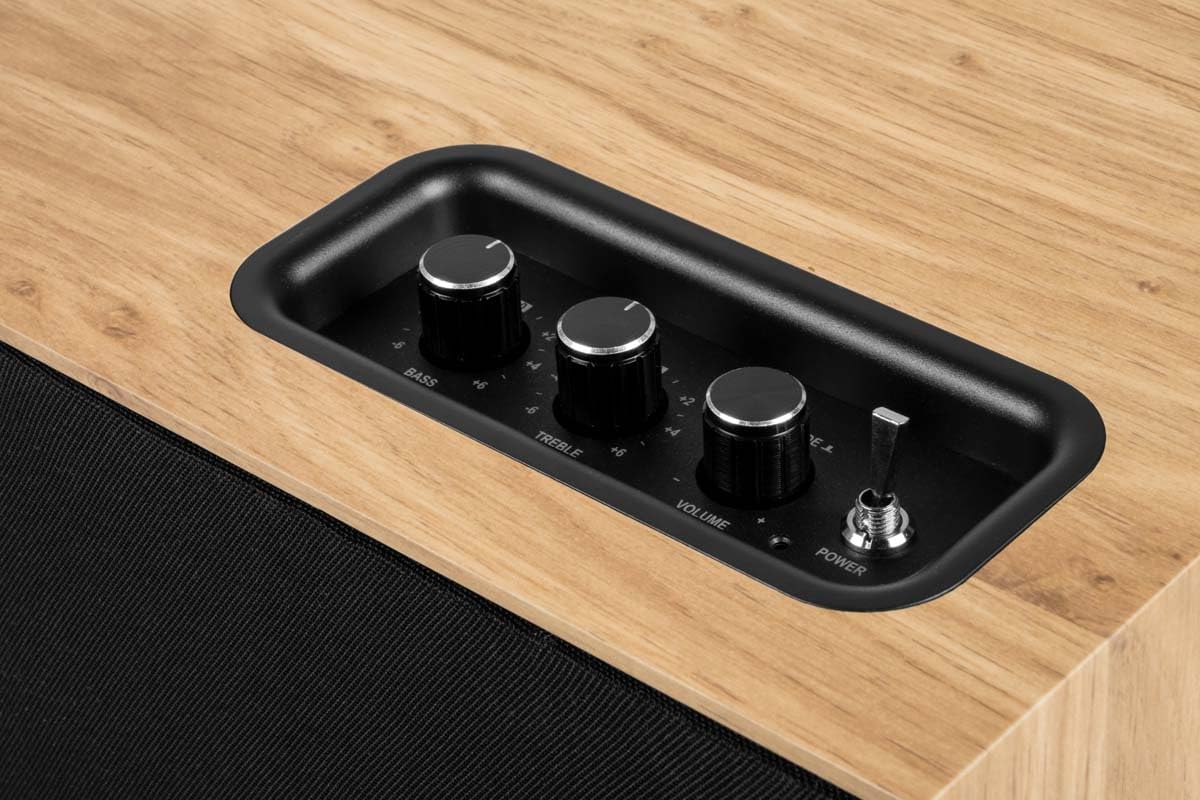
Image 6.1: Top control panel with Bass, Treble, Volume, and Power controls.
7. Manutenzione
- Pulizia: Always unplug the speaker before cleaning. Use a soft, dry, lint-free cloth to wipe the exterior surfaces. Do not use abrasive cleaners, waxes, or solvents.
- Polvere: Regularly dust the speaker, especially the grille, to prevent accumulation that could affect sound quality. The front grille is removable for easier cleaning.
- Magazzinaggio: If storing the speaker for an extended period, unplug it and store it in a cool, dry place, away from direct sunlight and extreme temperatures.
8. Risoluzione Dei Problemi
| Problema | Possibile causa | Soluzione |
|---|---|---|
| Nessun potere | Cavo di alimentazione non collegato; Interruttore di alimentazione spento; Presa non funzionante. | Assicurarsi che il cavo di alimentazione sia collegato saldamente; accendere l'interruttore di alimentazione; testare la presa con un altro dispositivo. |
| Nessun suono | Volume too low; Incorrect input mode; Device not playing audio; Bluetooth not connected. | Increase volume; Select correct input (Bluetooth/AUX); Ensure audio is playing on source device; Re-pair Bluetooth. |
| Bluetooth non associato | Altoparlante non in modalità di associazione; Dispositivo troppo lontano; Interferenza; Già connesso a un altro dispositivo. | Ensure speaker is flashing (pairing mode); Move device closer; Turn off other Bluetooth devices; Disconnect from other devices. |
| Suono distorto | Volume too high (speaker or source); Poor audio source quality; Treble/Bass settings too high. | Reduce volume on speaker and/or source device; Use a higher quality audio source; Adjust Bass/Treble knobs. |
9. Specifiche
| Nome del modello | WS302 |
| Marca | TOMSONITA |
| Tecnologia di connettività | Bluetooth 5.3, ausiliario (3.5 mm) |
| Potenza di uscita dell'altoparlante | 50 Watt |
| Risposta in frequenza | Frequenza 40 Hz |
| Modalità di uscita audio | Stereo |
| Metodo di controllo | Tactile (Knobs) |
| Materiale | Legna |
| Colore | Marrone |
| Dimensioni (L x P x A) | Dimensioni: 30 cm x 25 cm x 15 cm |
| Peso dell'articolo | 1150 grammi |
| Fonte di alimentazione | Electric Cable (230 Volts Input) |
| Dispositivi compatibili | Smartphone, Tablet, Laptop, MP3 Player, Television |
| Caratteristiche speciali | USB Port, Removable Front Grille, Bass/Treble Adjustment |
10. Garanzia e supporto
10.1 Informazioni sulla garanzia
This THOMSON WS302 speaker comes with a Garanzia limitata. Please refer to the warranty card included in your package or contact your retailer for specific terms and conditions. Spare parts availability is guaranteed for 3 anni dalla data di acquisto.
10.2 Assistenza clienti
If you encounter any issues not covered in the troubleshooting section or require further assistance, please contact THOMSON customer support or your authorized retailer. Have your product model number (WS302) and purchase details ready when contacting support.


