1. Introduzione
This manual provides instructions for the ECONTROLLY RC-974R replacement infrared remote control. This remote is designed to be compatible with various Pioneer AV Receiver models, offering a straightforward solution for controlling your audio-video system without the need for complex programming.
Modelli di sintoamplificatori AV Pioneer compatibili:
- VSX-LX504
- VSX-LX104
- VSX-LX304
- VSX-935
- VSX-934
- VSX-LX504-S
- VSX-LX504-B
- VSX-LX304-B
The RC-974R operates using infrared technology and is pre-programmed for immediate use with the listed models. No additional setup or code entry is required.
2. Impostazione
2.1 Installazione della batteria
The remote control requires two AAA ALKALINE batteries for operation. Batteries are not included with the remote control.
- Individuare il vano batterie sul retro del telecomando.
- Per aprire il coperchio del vano batteria, farlo scorrere verso il basso o nella direzione indicata dalla freccia.
- Insert two AAA ALKALINE batteries, ensuring the positive (+) and negative (-) terminals align correctly with the markings inside the compartment.
- Chiudere il coperchio del vano batteria facendolo scorrere nuovamente in posizione finché non scatta in posizione.
Important: Do not use rechargeable batteries. Only AAA ALKALINE batteries are recommended for optimal performance and to prevent potential damage to the remote control.

Immagine: Posteriore view of the RC-974R remote control, illustrating the location of the battery compartment for battery insertion.
3. Utilizzo del telecomando
To operate your Pioneer AV Receiver, point the RC-974R remote control directly at the receiver's infrared sensor. Ensure there are no obstructions between the remote and the receiver.
3.1 Funzioni chiave oltreview
The RC-974R remote control features a comprehensive set of buttons for various functions. Refer to the image below for a visual guide to the button layout.
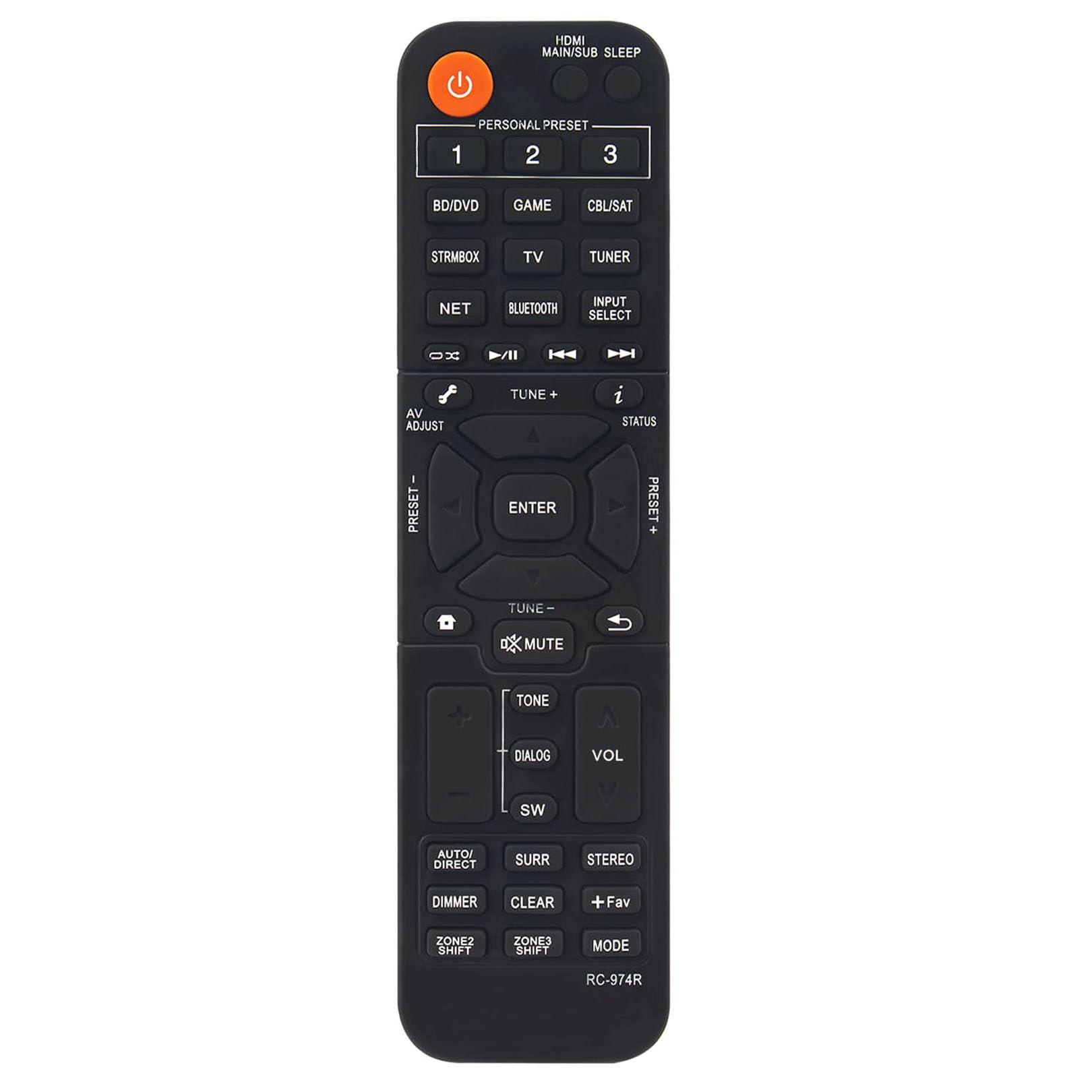
Immagine: Frontale view of the ECONTROLLY RC-974R remote control, displaying the full button layout and labels.
- Pulsante di accensione (arancione): Accende o spegne il ricevitore AV.
- HDMI MAIN/SUB SLEEP: Controls HDMI output and sleep timer functions.
- PERSONAL PRESET (1, 2, 3): Accesses stored personal settings or favorite configurations.
- Input Select Buttons (BD/DVD, STRMBOX, TV, NET, BLUETOOTH, GAME, CBL/SAT, TUNER): Selects the desired input source for the AV Receiver.
- Navigation Cluster (Up, Down, Left, Right, ENTER): Utilizzato per la navigazione e la selezione del menu.
- AV ADJUST: Adjusts audio/video settings.
- SINTONIA +/-: Adjusts radio frequencies or other tuning parameters.
- STATO: Displays current status information on the receiver's display.
- MUTO: Disattiva o attiva l'audio in uscita.
- TONO: Accesses tone control settings (bass/treble).
- DIALOGO: Migliora la chiarezza del dialogo.
- SW (Subwoofer): Regola il livello del subwoofer.
- VOL +/-: Aumenta o diminuisce il volume principale.
- AUTO/DIRECT: Switches between automatic sound modes and direct audio playback.
- SURR (Surround): Cycles through various surround sound modes.
- STEREO: Selects stereo audio mode.
- DIMMERATORE: Regola la luminosità del display del ricevitore.
- CHIARO: Clears current selections or settings.
- +Fav: Adds or accesses favorite settings.
- DIREZIONI: Passa attraverso diverse modalità operative.
- CAMBIO ZONA2 / CAMBIO ZONA3: Controls multi-zone audio output if supported by your receiver.
4. Manutenzione
4.1 Pulizia
Per pulire il telecomando, utilizzare un panno morbido e asciutto. Per lo sporco ostinato, utilizzare un panno leggermente dampPulisci il panno con acqua o un detergente delicato e non abrasivo. Non utilizzare prodotti chimici aggressivi, solventi o materiali abrasivi, poiché potrebbero danneggiare la superficie del telecomando o i componenti interni.
4.2 Sostituzione della batteria
Replace the batteries when the remote control's response becomes sluggish or stops working. Always replace both AAA ALKALINE batteries at the same time. Do not mix old and new batteries, or different types of batteries.
4.3 Conservazione
When not in use for extended periods, remove the batteries from the remote control to prevent leakage and potential damage. Store the remote in a cool, dry place away from direct sunlight and extreme temperatures.
5. Risoluzione Dei Problemi
If you experience issues with your RC-974R remote control, please refer to the following common problems and solutions:
- Il telecomando non risponde:
- Controllare che le batterie siano inserite correttamente con la polarità corretta (+/-).
- Replace the batteries with fresh AAA ALKALINE batteries.
- Ensure there is a clear line of sight between the remote control and the AV Receiver's infrared sensor. Remove any obstructions.
- Make sure you are within the effective operating range of the remote control (typically up to 20 feet).
- Funzionamento intermittente:
- Spesso indica che la batteria è scarica. Sostituire le batterie.
- Ensure no strong light sources (like direct sunlight or fluorescent lights) are interfering with the infrared signal.
6. Specifiche
| Numero di modello | Modello RC-974R |
| Dimensioni del prodotto | 6.95 x 1.79 x 0.56 pollici |
| Peso dell'articolo | 1.76 once |
| Caratteristica speciale | Pre-programmato (nessuna programmazione richiesta) |
| Colore | Nero |
| Numero massimo di dispositivi supportati | 1 (Pioneer AV Receiver) |
| Dispositivi compatibili | Pioneer Home Theater AV Receivers |

Image: RC-974R remote control with its approximate length (6.9 inches) and width (1.77 inches) indicated.
7. Garanzia e supporto
For warranty information or technical support regarding your ECONTROLLY RC-974R remote control, please contact the seller or manufacturer directly through your purchase platform. Keep your purchase receipt or order details handy as proof of purchase.


