1. Prodotto finitoview
The Grandstream WP816 is a compact, portable Wi-Fi phone designed for clear communication. It features dual-band Wi-Fi 6 for reliable connectivity, supports two SIP accounts and two lines, and delivers HD voice quality with dual microphones, Acoustic Echo Cancellation (AEC), and Noise Shield Technology. The phone includes integrated Bluetooth for headset connectivity, a long-lasting 1500mAh rechargeable battery providing 6 hours of talk time and 120 hours of standby time, and a configurable push-to-talk button. It is equipped with a Type C USB port for fast charging and a 3.5mm headset jack. Additional features include an accelerometer and an emergency button.
Caratteristiche principali:
- Dual-band Wi-Fi 6 with efficient antenna design and advanced roaming support.
- Supports 2 SIP accounts and 2 lines.
- HD voice with dual MIC design, AEC, and Noise Shield Technology.
- Integrated Bluetooth for headset connection.
- Rechargeable 1500mAh battery: 6 hours talk time, 120 hours standby.
- Configurable button for push-to-talk functionality.
- Type C USB port (supports fast charging) and 3.5mm headset jack.
- Built-in accelerometer and emergency button.
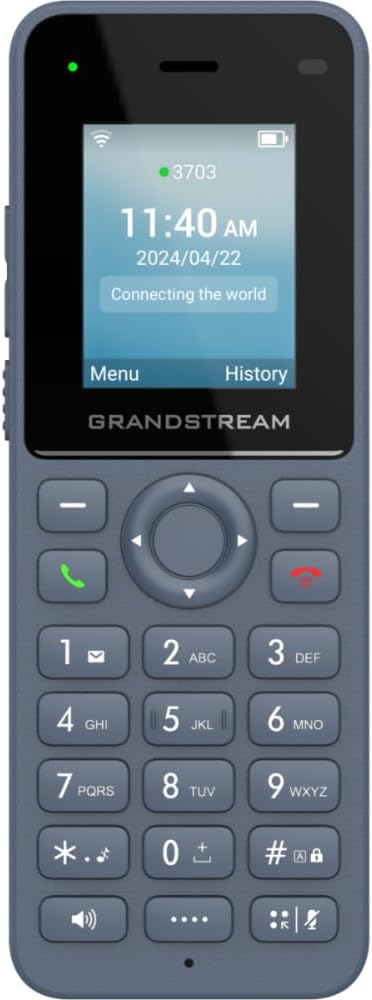
Figura 1: Fronte view of the Grandstream WP816 Wi-Fi Phone, displaying its screen, keypad, and branding.
2. Impostazione
2.1. Contenuto della confezione:
- Grandstream WP816 Wi-Fi Phone
- (Additional accessories such as power adapter, charging cradle, and battery are typically included but not explicitly detailed in the provided 'whats_in_the_box' field, which only states "Phone". Assuming standard phone accessories.)
2.2. Caricare il telefono:
- Collegare l'adattatore di alimentazione alla base di ricarica e a una presa di corrente.
- Place the WP816 phone into the charging cradle. Ensure the phone is seated correctly and the charging indicator illuminates.
- Allow the phone to charge fully before initial use. This typically takes several hours. The Type C USB port also supports fast charging.
2.3. Configurazione iniziale:
- Accensione: Tenere premuto il pulsante di accensione/fine chiamata finché lo schermo non si illumina.
- Connessione Wi-Fi: Navigate to the "Settings" menu, then "Wi-Fi". Select your desired Wi-Fi network and enter the password if prompted. The phone supports dual-band Wi-Fi 6.
- Configurazione dell'account SIP: Access the "Settings" menu to configure your SIP accounts. The phone supports 2 SIP accounts. Refer to your VoIP service provider for specific SIP settings (SIP server, User ID, Password).
- Data e ora: Assicurarsi che la data e l'ora siano impostate correttamente, manualmente o tramite sincronizzazione di rete.
3. Istruzioni per l'uso
3.1. Effettuare chiamate:
- Composizione: Inserire il numero di telefono utilizzando la tastiera.
- Avvia chiamata: Press the Green Call button to place the call.
- Termina chiamata: Press the Red End Call button to terminate the conversation.
3.2. Ricezione chiamate:
- Quando il telefono squilla, premere il pulsante verde di chiamata per rispondere.
- To reject an incoming call, press the Red End Call button.
3.3. Speakerphone Function:
- During a call, press the Speaker button (often indicated by a speaker icon) to activate the speakerphone.
- Press the Speaker button again to switch back to the earpiece.
3.4. Push-to-Talk (PTT):
- The WP816 features a configurable button for Push-to-Talk functionality.
- Consult your system administrator or service provider for configuration details and usage of the PTT feature.
3.5. Bluetooth Headset Connectivity:
- Assicurati che l'auricolare Bluetooth sia in modalità di associazione.
- On the WP816, navigate to "Settings" > "Bluetooth".
- Attiva il Bluetooth e cerca i dispositivi disponibili.
- Select your headset from the list and follow any on-screen prompts to complete pairing.
4. Manutenzione
4.1. Cura della batteria:
- Per massimizzare la durata della batteria, evitare temperature estreme.
- Charge the phone regularly. Do not let the battery completely drain for extended periods.
- Se il telefono non verrà utilizzato per un lungo periodo, caricarlo fino al 50% circa e conservarlo in un luogo fresco e asciutto.
4.2. Pulizia:
- Per pulire la parte esterna del telefono, utilizzare un panno morbido e asciutto.
- Evitare l'uso di prodotti chimici aggressivi, solventi per la pulizia o detergenti aggressivi.
5. Risoluzione Dei Problemi
5.1. Nessuna alimentazione:
- Assicurarsi che la batteria sia inserita e caricata correttamente.
- Verify the charging cradle is properly connected to a power source.
5.2. Cannot Connect to Wi-Fi:
- Controlla se la rete Wi-Fi è attiva e nel raggio d'azione.
- Confirm the Wi-Fi password is entered correctly.
- Restart the phone and the Wi-Fi router.
5.3. Poor Call Quality:
- Ensure you are within good Wi-Fi signal range.
- Controlla la velocità e la stabilità della tua connessione Internet.
- Verify SIP account settings with your service provider.
5.4. Phone Not Responding:
- Eseguire un soft reset rimuovendo e reinserendo la batteria.
- If the issue persists, a factory reset might be necessary (refer to advanced settings, note this will erase all data).
6. Specifiche
| Caratteristica | Dettaglio |
|---|---|
| Modello | WP816 |
| Marca | Grande flusso |
| Dimensioni del prodotto | 7 x 5 x 4 pollici |
| Peso dell'articolo | 13.8 once (390 grammi) |
| Batterie | 1 batteria non standard richiesta |
| Connettività | Dual-band Wi-Fi 6, Integrated Bluetooth |
| Account SIP | 2 SIP accounts, 2 lines |
| Caratteristiche vocali | HD voice, Dual MIC design with AEC and Noise Shield Technology |
| Capacità della batteria | 1500mAh |
| Tempo di conversazione | 6 ore |
| Tempo di standby | 120 ore |
| Porti | Type C USB (fast charging support), 3.5mm headset jack |
| Caratteristiche aggiuntive | Accelerometer, Emergency button, Configurable Push-to-Talk button |
| Colore | Grigio |
| Materiale | Plastica |
| Tipo di telefono | Senza fili |
| Tipo di combinatore | Composizione a toni |
| Operazione multilinea | Funzionamento multilinea |
7. Garanzia e supporto
For warranty information and technical support, please refer to the documentation provided with your purchase or visit the official Grandstream websito. Conservare la prova d'acquisto per eventuali reclami in garanzia.


