Introduzione
This manual provides comprehensive instructions for the operation, maintenance, and troubleshooting of the EXTECH SDL600 Sound Meter SD Logger. The SDL600 is a precision instrument designed for environmental sound level measurements and data logging, meeting ANSI and IEC 61672-2013 Class 2 standards.
Please read this manual thoroughly before using the device to ensure proper functionality and accurate readings.
Contenuto della confezione
Dopo aver disimballato, verificare che tutti gli articoli siano presenti e in buone condizioni:
- EXTECH SDL600 Sound Meter
- Scheda SD
- Parabrezza
- 6 batterie AA
- Custodia rigida da trasporto
- Manuale di istruzioni (questo documento)
An optional AC Adaptor (UA100-240) may be purchased separately.
Prodotto finitoview
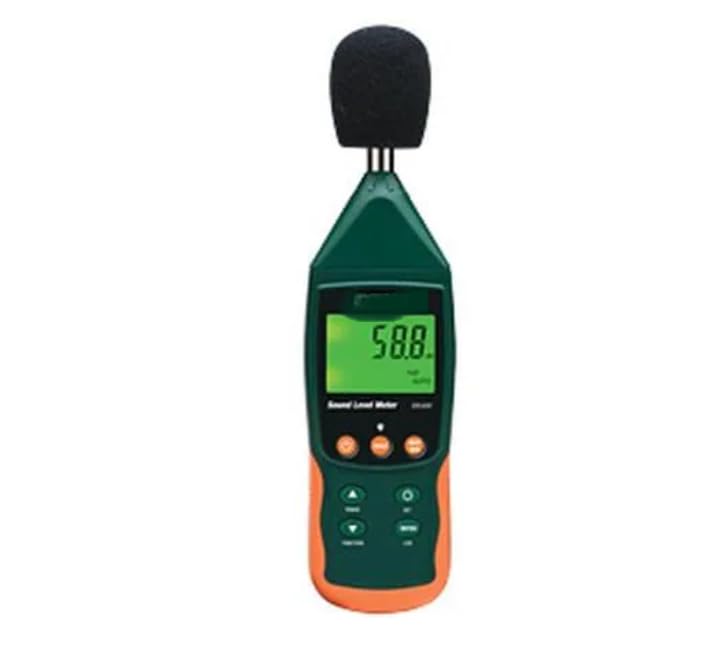
Figura 1: Davanti view of the EXTECH SDL600 Sound Meter. The device features a digital display, control buttons, and a microphone with a windscreen.
The SDL600 is designed for accurate sound level measurements. Key components include the microphone (with windscreen), LCD display, and control buttons for various functions such as power, data hold, min/max, and logging.
Impostare
1. Installazione della batteria
- Individuare il coperchio del vano batteria sul retro del dispositivo.
- Open the cover and insert the 6 AA batteries, ensuring correct polarity.
- Riposizionare saldamente il coperchio del vano batteria.
2. Inserimento della scheda SD
- Locate the SD card slot, typically on the side or bottom of the device.
- Insert the provided SD card into the slot until it clicks into place.
- Ensure the card is inserted correctly to prevent damage.
3. Windscreen Attachment
Gently slide the foam windscreen over the microphone at the top of the device. The windscreen helps to minimize wind noise during outdoor measurements.
Istruzioni per l'uso
1. Accensione/Spegnimento
Premere e tenere premuto il tasto ENERGIA pulsante per accendere o spegnere il dispositivo.
2. Modalità di misurazione
The SDL600 supports both Auto Ranging E Regolazione manuale. Refer to the on-screen indicators and specific buttons (if available) to switch between these modes for optimal measurement range.
3. Data Hold and Min/Max/Peak Hold
- Premere il tasto PRESA pulsante per congelare la lettura corrente sul display. Premere di nuovo per rilasciare.
- Utilizzare il MINIMO MASSIMO button to display the minimum and maximum sound levels recorded during a measurement session.
- IL TENUTA DI PICCO function captures and displays the highest instantaneous sound pressure level.
4. Data Logging to SD Card
The SDL600 can log data directly to the inserted SD card in Excel format. This allows for easy transfer to a PC for analysis.
- Imposta Samptasso di ling: Le sampling rate is user-programmable from 1 to 3600 seconds. Access the menu settings (refer to device interface) to configure your desired interval.
- Inizia la registrazione: Premere il tasto dedicato TRONCO D'ALBERO button to begin recording data. The device will record readings with a date and time stamp.
- Stop Logging: Premere il tasto TRONCO D'ALBERO nuovamente il pulsante per interrompere la registrazione.
- Dati di trasferimento: Remove the SD card and insert it into a computer to access the logged data files.
5. Internal Memory Storage
The device's internal memory can store up to 99 readings manually. Consult the device's interface for instructions on how to save and recall these readings.
6. Spegnimento automatico
The SDL600 features an Auto Power Off function to conserve battery life. This feature can be disabled through the device's settings menu if continuous operation is required.
Manutenzione
1. Pulizia
Wipe the device with a soft, dry cloth. Do not use abrasive cleaners or solvents. Ensure the microphone and display are kept clean for accurate readings.
2. Conservazione
When not in use for extended periods, remove the batteries to prevent leakage. Store the device in its hard carrying case in a cool, dry place, away from direct sunlight and extreme temperatures.
3. Calibrazione
Regular calibration is recommended to maintain measurement accuracy. Refer to professional calibration services or the manufacturer's guidelines for calibration procedures.
Risoluzione dei problemi
| Problema | Possibile causa | Soluzione |
|---|---|---|
| Il dispositivo non si accende. | Batterie scariche o installate in modo errato. | Sostituire le batterie con batterie nuove, assicurandosi che la polarità sia corretta. |
| Letture imprecise. | Microphone obstructed, device needs calibration, or incorrect measurement mode. | Ensure microphone is clear. Perform calibration. Check if Auto/Manual ranging is set appropriately. |
| SD card logging not working. | SD card not inserted correctly, card full, or card error. | Reinsert SD card. Check available space. Try a different SD card. Ensure logging function is activated. |
| Lo schermo è vuoto o bloccato. | Low battery or system error. | Replace batteries. If problem persists, remove batteries for a few minutes and reinsert to reset the device. |
Specifiche
- Modello: SDL600
- Precisione: ±1.4 dB
- Standard: Meets ANSI and IEC 61672-2013 Class 2
- Gamma: Auto o Manuale
- Registrazione dei dati: External SD card (Excel format), User programmable sampling rate (da 1 a 3600 secondi)
- Memoria interna: Stores 99 readings manually
- Funzioni: Min/Max, Peak Hold, Data Hold
- Energia: 6 AA batteries (included), Optional AC Adaptor UA100-240
- Spegnimento automatico: Yes, with disable capability
- Peso: Circa 11.99 libbre (5.44 kg)
- Produttore: EXTECH
Garanzia e supporto
For warranty information and technical support, please refer to the official EXTECH webo contattare il distributore locale. Conservare la ricevuta d'acquisto come prova d'acquisto per eventuali reclami in garanzia.
Produttore: EXTECH
ASIN: B0DVYXV4CS


