1. Introduzione
This manual provides detailed instructions for the setup, operation, and maintenance of your Itari M102 Label Maker Machine. Please read this manual thoroughly before using the device to ensure proper function and longevity.
2. Contenuto della confezione
Verifica che tutti gli articoli siano presenti nel tuo pacco:
- Itari M102 Label Maker Machine
- 3 Rolls of Thermal Labels (1.57" x 1.18" / 40mm x 30mm)
- Cavo di ricarica USB di tipo C.
- Manuale dell'utente (questo documento)

Image 2.1: The Itari M102 Label Maker Machine shown with the included label rolls.
3. Prodotto finitoview
Familiarize yourself with the components of your label maker.
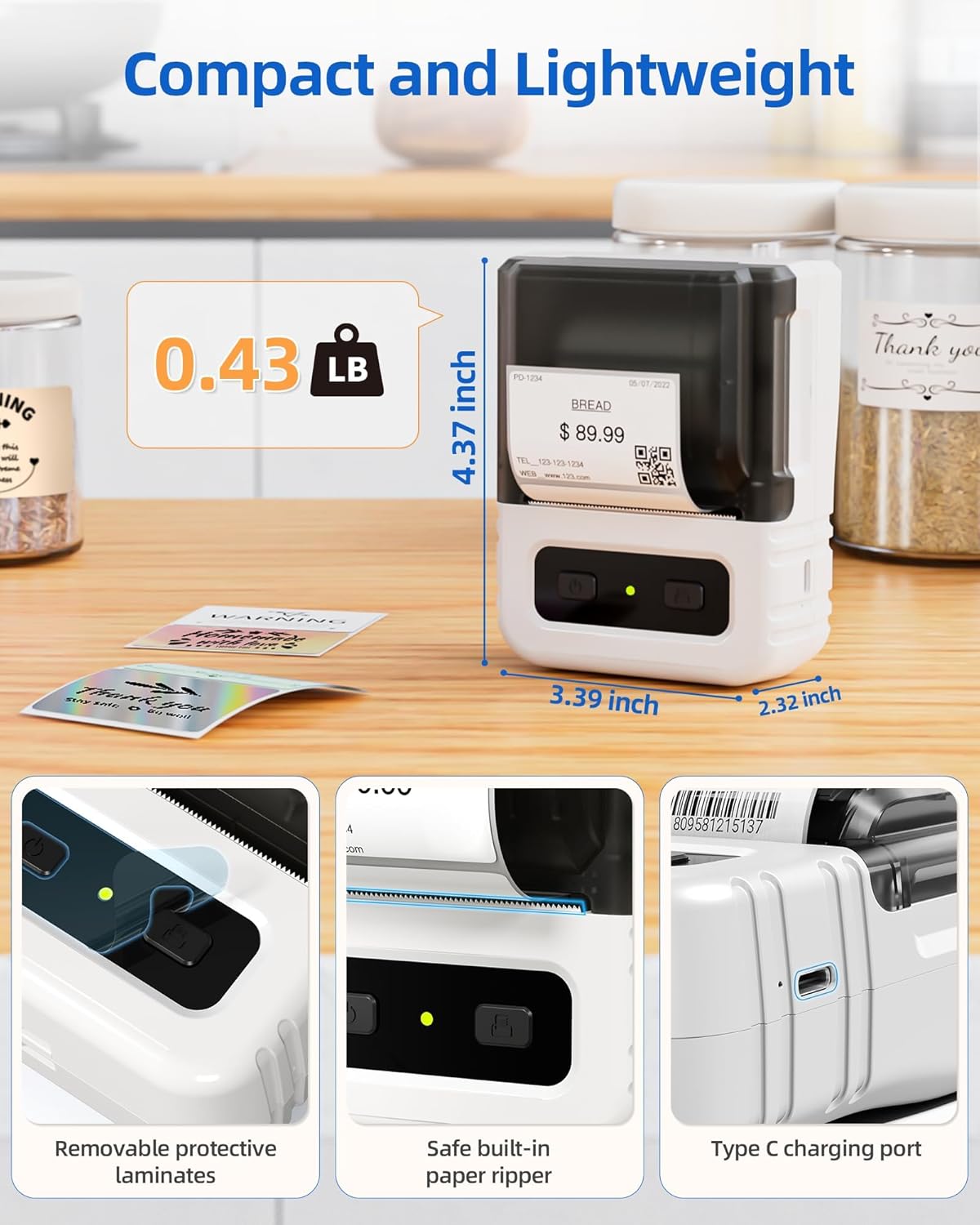
Immagine 3.1: Dettagliata view highlighting the dimensions, safe built-in paper ripper, removable protective laminates, and Type-C charging port.
Caratteristiche principali:
- Pulsante di accensione: Utilizzato per accendere/spegnere il dispositivo.
- Label Compartment: Holds the label roll.
- Adjustable Guide: Ensures proper alignment for various label widths (supports 20-50mm wide labels).
- Fessura di uscita della carta: Dove emergono le etichette stampate.
- Built-in Paper Ripper: Per staccare in modo pulito le etichette stampate.
- Porta di ricarica di tipo C: Per ricaricare la batteria interna.
4. Impostazione
4.1. Carica del dispositivo
Before first use, fully charge the label maker. Connect the provided USB Type-C cable to the charging port on the device and a compatible USB power adapter (not included). A full charge takes approximately 2 hours and provides up to 1 month of typical usage.
4.2. Caricamento delle etichette
- Aprire il coperchio dello scomparto delle etichette.
- Insert a roll of thermal labels into the compartment, ensuring the labels feed from the bottom and the printing side faces upwards.
- Adjust the label guides to fit the width of your label roll snugly. The device supports labels from 20mm to 50mm wide.
- Pull a small portion of the label paper out through the paper exit slot.
- Chiudere bene il coperchio del vano etichette.

Image 4.1: The label compartment open, illustrating how to insert a label roll and adjust the width guides.
4.3. Installazione e connettività dell'app
The Itari M102 Label Maker connects wirelessly via Bluetooth to your smartphone or tablet, and via USB to computers. Download the dedicated label editing application from your device's app store (e.g., Apple App Store for iOS, Google Play Store for Android).
- Per la connessione Bluetooth:
- Turn on the label maker.
- Abilita il Bluetooth sul tuo dispositivo mobile.
- Open the Itari label app and follow the in-app instructions to search for and pair with your M102 device. Pairing typically takes less than 2 seconds.
- Per la connessione USB:
- Connect the label maker to your computer using the USB Type-C cable.
- Install the necessary drivers or software for your operating system (Windows, macOS, Chrome OS, Linux) as prompted or available on the Itari support websito.

Image 4.2: Illustrates wireless Bluetooth connectivity for iOS and Android, and USB connectivity for Chrome OS, Windows, Mac OS, and Linux.
5. Istruzioni per l'uso
5.1. Creating and Customizing Labels
The Itari label app provides extensive customization options:
- Modelli: Access over 300 free label templates for various uses (address, price, food, clothing, cable, jewelry, folder labels, etc.).
- Fonts & Symbols: Choose from over 100 fonts and 1000 symbols to personalize your labels.
- Immagini: Embed images into your label designs.
- Revisione del testo: Adjust text size, style, alignment, and add multiple lines.
- Codici a barre e codici QR: Genera e stampa vari tipi di codici a barre e codici QR.
5.2. Stampa di etichette
- Ensure the label maker is powered on and connected to your device (Bluetooth or USB).
- Open the Itari label app and create or select your desired label design.
- Confirm the label size in the app matches the loaded label roll.
- Tap the 'Print' button in the app.
- The label maker will print the label. Use the built-in paper ripper to cleanly detach the label from the roll.
6. Manutenzione
6.1. Pulizia
To maintain print quality and device longevity:
- Turn off the label maker before cleaning.
- Gently wipe the print head with a soft, lint-free cloth moistened with isopropyl alcohol. Allow it to dry completely before use.
- Clean the exterior of the device with a soft, dry cloth. Do not use harsh chemicals or abrasive cleaners.
6.2. Label Storage
Conservare le etichette termiche in un luogo fresco e asciutto, lontano dalla luce solare diretta e dal calore, per evitare che il rivestimento termico sbiadisca prematuramente o si danneggi.
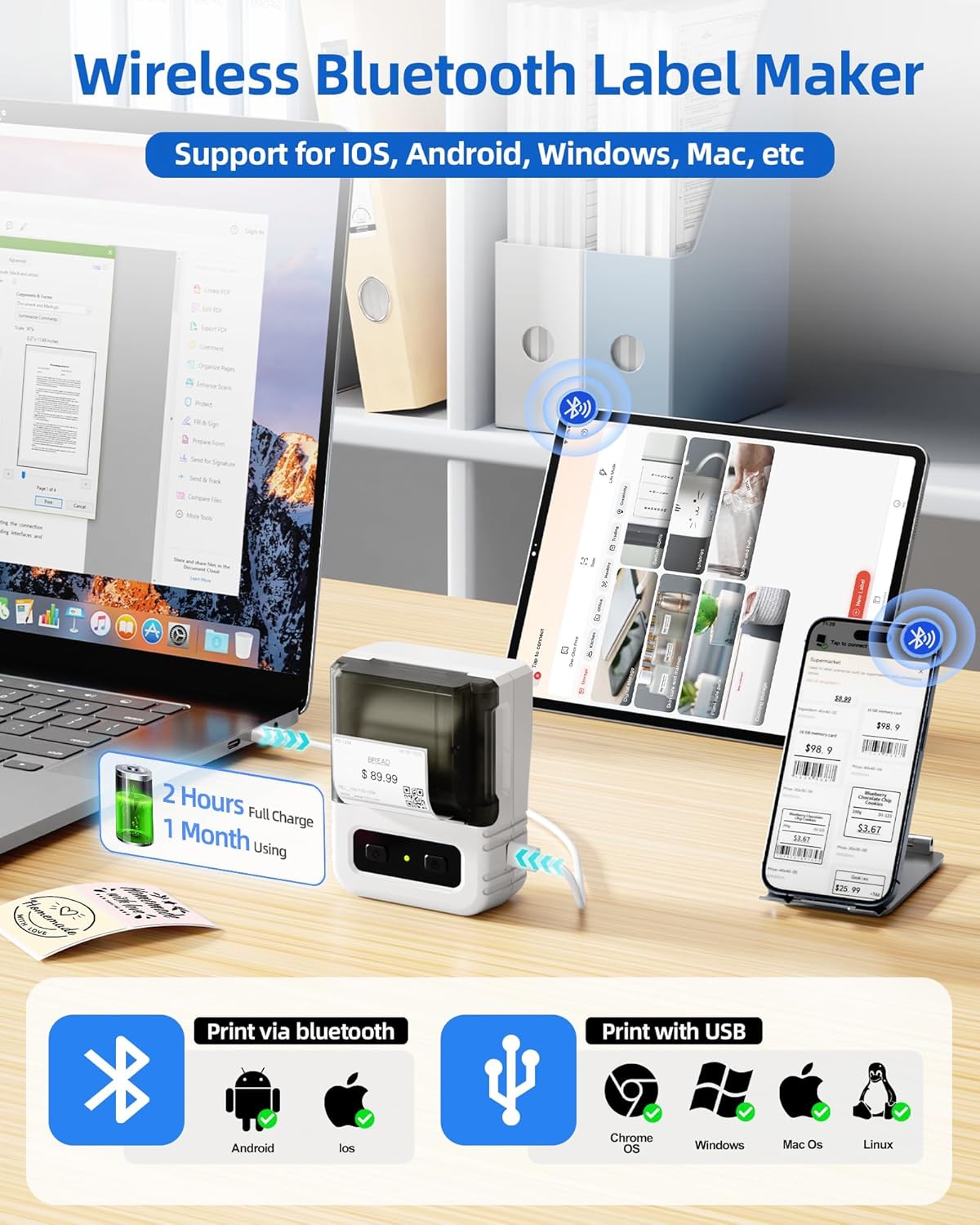
Image 6.1: Itari thermal label rolls, highlighting the 1.57" x 1.18" (40mm x 30mm) size, 230 sheets per roll, and high-quality thermal paper.
7. Risoluzione Dei Problemi
If you encounter issues with your Itari M102 Label Maker, refer to the following common problems and solutions:
| Problema | Possibile causa | Soluzione |
|---|---|---|
| Il dispositivo non si accende | Batteria scarica | Caricare il dispositivo utilizzando il cavo USB Type-C in dotazione. |
| Nessuna stampa o stampa sbiadita |
|
|
| Errore di connessione Bluetooth |
|
|
| Labels jam |
|
|
8. Specifiche
- Modello: Numero di modello: M102
- Tecnologia di stampa: Termica (senza inchiostro)
- Supported Label Width: 20 mm - 50 mm
- Included Label Size: 1.57" x 1.18" (40 mm x 30 mm)
- Connettività: Bluetooth, USB tipo C
- Durata della batteria: Up to 1 month of typical use (2 hours full charge)
- Dimensioni: Approximately 4.37" (H) x 3.39" (W) x 2.32" (D)
- Peso: Circa 0.43 libbre (0.195 kg)
9. Garanzia e supporto
For warranty information and technical support, please refer to the contact details provided with your purchase or visit the official Itari websito. Conservare la ricevuta d'acquisto come prova d'acquisto per eventuali reclami in garanzia.


