1. Introduzione
This manual provides detailed instructions for the installation, operation, and maintenance of your Acouto 7-Inch TFT LCD VGA Monitor. Please read this manual thoroughly before using the product to ensure proper function and to prevent damage. Keep this manual for future reference.
2. Informazioni sulla sicurezza
- Assicurarsi che l'alimentazione soddisfi il volume specificatotage (12V) and current (greater than 1A) requirements.
- If using a car power supply, a regulator must be added to prevent interference and voltage fluttuazioni.
- Evitare di esporre il monitor a temperature estreme, umidità o luce solare diretta.
- Non tentare di smontare o riparare l'unità da soli. Per qualsiasi intervento di assistenza, rivolgersi a personale qualificato.
- Keep the monitor away from water or other liquids to prevent electric shock.
3. Contenuto della confezione
Verifica che tutti gli articoli elencati di seguito siano inclusi nel tuo pacchetto:
- 1 x 7-Inch LCD Display Screen (1024x600)
- 1 x Driver Board (Control Kit)
- 1 x Flat Cable (for connecting LCD to driver board)
- 1 cavo di alimentazione USB
- 1 x telecomando

Image 3.1: Complete package contents including the LCD screen, driver board, various cables, and a remote control.
4. Prodotto finitoview
The Acouto 7-Inch TFT LCD VGA Monitor is a versatile display solution featuring a 1024x600 resolution. It is designed for various applications, including use with Raspberry Pi 3/2 or as a general computer display. The monitor supports multiple input types and offers image adjustment capabilities.
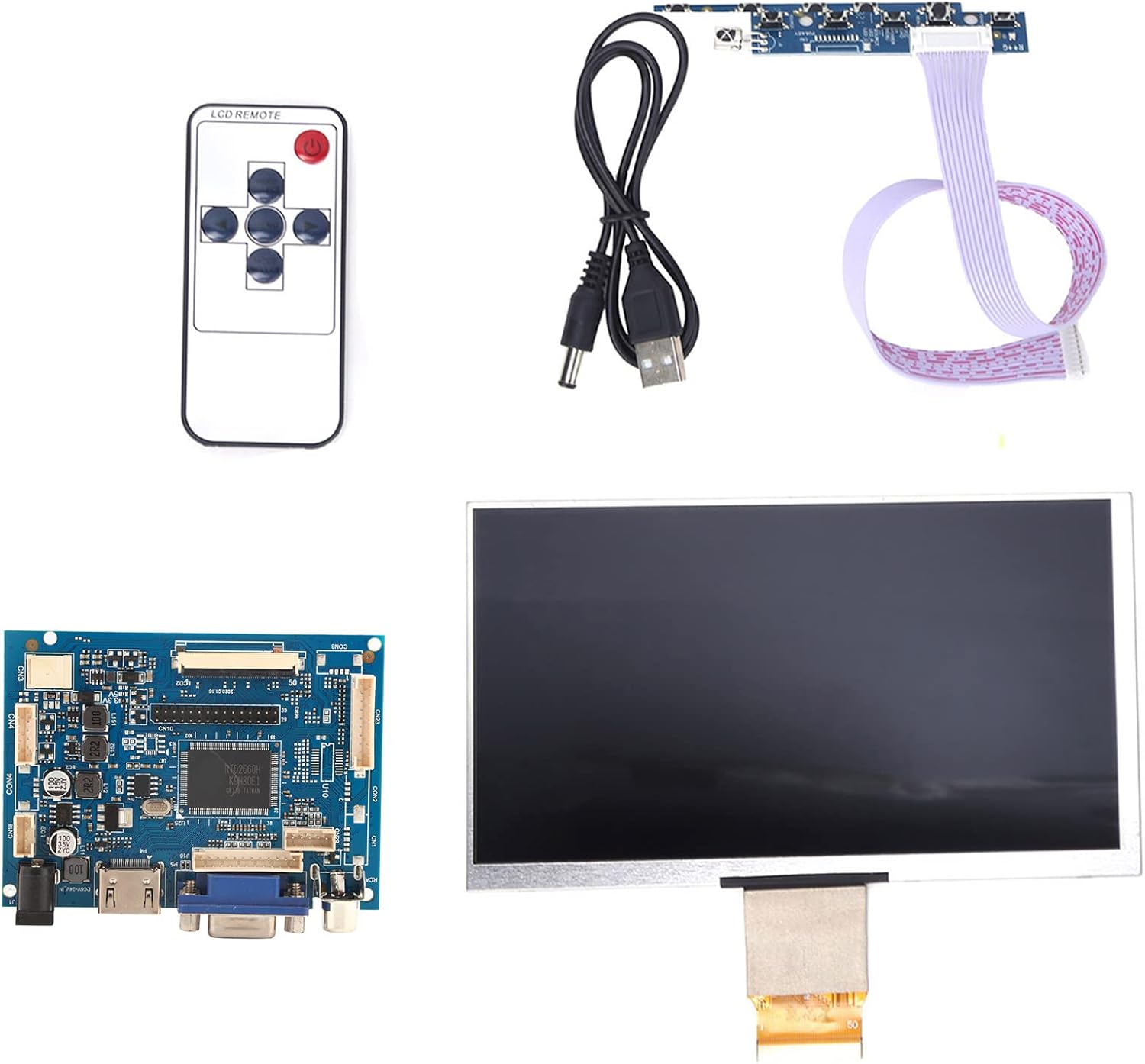
Immagine 4.1: Passoview of the Acouto 7-inch TFT LCD VGA Monitor kit components.
4.1. Display LCD
The 7-inch TFT LCD panel provides a clear display with a physical resolution of 1024x600 pixels. It supports various resolutions from 640x480 to 1600x1200 through arbitrary adjustment.

Image 4.2: The 7-inch TFT LCD display screen.
4.2. Driver Board
The driver board serves as the control unit for the LCD, featuring multiple input interfaces including 2 x AV channels, VGA, and 1 x HD input (version 1.2). It also includes buttons for menu navigation and settings adjustment.

Image 4.3: The driver control board with input ports.
4.3. Controllo remoto
A remote control is included for convenient adjustment of settings and input selection.

Image 4.4: The included remote control.
5. Impostazione
Follow these steps to set up your Acouto 7-Inch TFT LCD VGA Monitor:
- Connect the LCD to the Driver Board: Carefully connect the flat cable from the LCD display to the corresponding connector on the driver board. Ensure the connection is secure and correctly oriented.
- Collegare l'ingresso video: Choose your desired video input (VGA, HD, AV1, or AV2) and connect the appropriate cable from your source device (e.g., Raspberry Pi, computer, DVD player) to the driver board.
- Connetti alimentazione: Connect the USB power cord to the driver board's power input, and then connect it to a 12V power source (greater than 1A). If using a car power supply, ensure a regulator is in place.
- Accensione: Once all connections are secure, power on the monitor and your source device.

Image 5.1: LCD screen connected to the driver board.
6. Istruzioni per l'uso
6.1. Accensione/spegnimento
Press the power button on the driver board or the remote control to turn the monitor on or off.
6.2. Selezione ingresso
Use the 'Input' button on the driver board or remote control to cycle through available video inputs (AV1, AV2, VGA, HD).
6.3. Navigazione nel menu
Access the On-Screen Display (OSD) menu by pressing the 'Menu' button. Use the arrow buttons to navigate and the 'OK' or 'Enter' button to select options. Adjust settings such as brightness, contrast, color, and aspect ratio.
6.4. Image Flip and Convert
The monitor supports image flipping (up/down, left/right) and display format conversion (4:3 / 16:9). These functions can be accessed through the OSD menu or dedicated buttons on the remote control, providing a customizable viewesperienza di acquisizione.
Note: AV2 video input is designed for automatic camera screen display, typically used in automotive applications for reverse cameras.
7. Manutenzione
Per garantire la longevità e le prestazioni ottimali del monitor, seguire queste linee guida per la manutenzione:
- Pulizia dello schermo: Pulire delicatamente lo schermo con un panno morbido e privo di lanugine. Per macchie ostinate, strofinare leggermenteampImmergere il panno in acqua o in un detergente per schermi non abrasivo. Non spruzzare il liquido direttamente sullo schermo.
- Pulizia del Casing: Utilizzare un panno morbido e asciutto per pulire il monitor.asing. Evitare l'uso di detergenti o solventi aggressivi.
- Magazzinaggio: When not in use for extended periods, store the monitor in a cool, dry place, away from direct sunlight and dust.
8. Risoluzione Dei Problemi
If you encounter any issues with your monitor, refer to the following troubleshooting guide:
| Problema | Possibile causa | Soluzione |
|---|---|---|
| Nessuna visualizzazione / Schermo nero |
|
|
| Image distorted / Poor quality |
|
|
| Il telecomando non funziona |
|
|
9. Specifiche
Detailed technical specifications for the Acouto 7-Inch TFT LCD VGA Monitor:
| Caratteristica | Specificazione |
|---|---|
| Marca | Acuto |
| Nome del modello | Acouto536ocyn8e0 |
| Dimensioni dello schermo | 7 pollici |
| Tipo di visualizzazione | Schermo LCD |
| Risoluzione fisica | 1024x600 |
| Risoluzioni supportate | Da 640x480 a 1600x1200 |
| Proporzioni | 4:3 (convertible to 16:9) |
| Interfaccia Hardware | VGA, HD (version 1.2), 2 x AV channels |
| Input dell'interfaccia umana | Pulsanti, telecomando |
| Volume di eserciziotage | 12V (Power supply > 1A required) |
| Potenza nominale | 6-7 Watt |
| Dimensioni del prodotto | Dimensioni: 30 x 19 x 4 cm |
| Peso del prodotto | 323 grammi |
10. Garanzia e supporto
Per informazioni sulla garanzia e assistenza tecnica, consultare la documentazione fornita al momento dell'acquisto o contattare il rivenditore. Conservare la ricevuta d'acquisto come prova d'acquisto per eventuali reclami in garanzia.
