1. Introduzione
Grazie per l'acquistoasing the llano Wireless HDMI Transmitter and Receiver Set. This device allows you to wirelessly transmit video and audio from your source device to a display, supporting Full HD 1080P resolution at 60Hz with ultra-low latency. It features two versatile connection modes and Type-C charging compatibility, making it ideal for various applications from home entertainment to professional presentations.
This manual provides detailed instructions for setup, operation, and troubleshooting to ensure optimal performance and a seamless user experience.
2. Contenuto della confezione
Si prega di controllare il contenuto della confezione per assicurarsi che siano presenti tutti gli articoli:
- 1 x llano Wireless HDMI Receiver (RX)
- 1 x llano Wireless HDMI Transmitter (TX)
- 1 cavo di prolunga HDMI
- 1 x USB Power Cable (Type-A to Type-C)
- 1 x Manuale utente
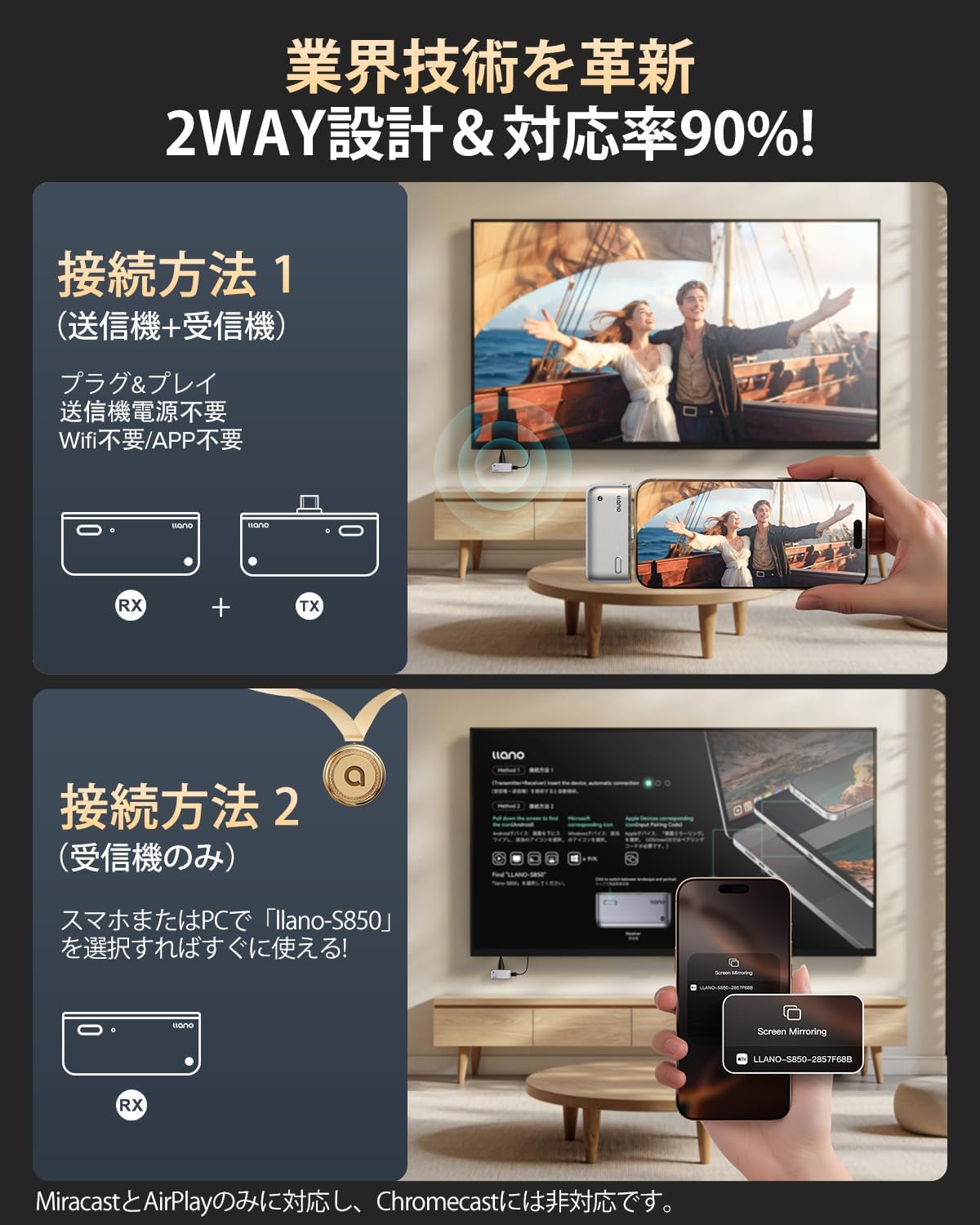
Image: Components of the llano Wireless HDMI Transmitter and Receiver Set, including the receiver, transmitter, HDMI extension cable, and USB power cable.
3. Informazioni sulla sicurezza
- Non esporre il dispositivo all'acqua o a umidità eccessiva.
- Evitare di far cadere o sottoporre il dispositivo a forti impatti.
- Utilizzare solo i cavi e gli accessori forniti.
- Tenere il dispositivo lontano da fonti di calore e dalla luce solare diretta.
- Non tentare di smontare o riparare da soli il dispositivo. Contatta l'assistenza clienti per assistenza.
4. Istruzioni per l'installazione
4.1. Connection Method 1: Using both Transmitter (TX) and Receiver (RX)
This method is recommended for most devices, offering a plug-and-play experience without requiring Wi-Fi or complex settings.
- Collegare il ricevitore (RX): Plug the HDMI end of the receiver into an HDMI port on your display (TV, monitor, projector). Connect the USB power cable to the receiver and then to a 5V power adapter or a USB port on your display for power.
- Collegare il trasmettitore (TX): Plug the Type-C end of the transmitter into the Type-C port of your source device (smartphone, tablet, laptop).
- Associazione automatica: The devices will automatically pair within approximately 5-10 seconds. The LED indicator on the transmitter will blink during preparation and become solid when connected.
- Switch Display Input: On your display, switch the input source to the corresponding HDMI port where the receiver is connected.
Video: Demonstrates connecting the receiver to a TV's HDMI and power, then connecting the transmitter to a tablet. The tablet screen is then mirrored to the TV.

Image: Visual guide showing the four steps to connect the transmitter and receiver: 1. Connect receiver power, 2. Connect receiver HDMI, 3. Connect transmitter to source, 4. Screen sharing begins.
4.2. Connection Method 2: Using Receiver (RX) Only for Wireless Mirroring
This method allows direct wireless mirroring from compatible devices (e.g., iPhone, Android, Mac, Windows) to the receiver without needing the separate transmitter unit.
- Collegare il ricevitore (RX): Plug the HDMI end of the receiver into an HDMI port on your display. Connect the USB power cable to the receiver and then to a 5V power adapter or a USB port on your display for power.
- Switch Display Input: On your display, switch the input source to the corresponding HDMI port where the receiver is connected. The mirroring initial screen will appear.
- Initiate Mirroring from Source Device:
- iPhone/iPad/Mac: Select "Screen Mirroring" from your device's control center. Choose the device name "LLANO-S850-[Product Number]" from the list. If prompted, enter the PIN code displayed on your TV screen. Screen sharing will begin automatically.
- Smartphone Android: Go to "Wireless Display," "Wireless Share," or "Multi-screen" settings. Select the device name "LLANO-S850-[Product Number]". Screen sharing will begin.
- Finestre 10/11: Press "Windows Key + K". Find and select the device name "LLANO-S850-[Product Number]". Screen sharing will begin.
Video: Demonstrates connecting the receiver to a TV's HDMI and power, then wirelessly mirroring an Android phone and an iPhone to the TV.

Image: Visual guide showing the three steps to connect the receiver only: 1. Connect receiver power, 2. Connect receiver HDMI, 3. Initiate screen mirroring from your device.

Image: Detailed steps for iPhone screen mirroring: 1. Select Screen Mirroring, 2. Choose LLANO-S850 product number, 3. Enter PIN code displayed on screen.
5. Istruzioni per l'uso
5.1. Mirror Mode vs. Extended Mode
The llano Wireless HDMI set supports two display modes:
- Modalità specchio: Duplicates the content of your source device's screen onto the larger display. Ideal for presentations, watching videos, or sharing photos.
- Modalità estesa: Extends your desktop, allowing you to have different content on your source device and the larger display. This enhances multitasking and work efficiency.

Image: Illustration of Mirror Mode (displaying identical content on laptop and external monitor) and Extended Mode (displaying different content on laptop and external monitor).
5.2. Switching Screen Orientation
When using the transmitter with a smartphone or tablet, you can switch between portrait and landscape orientations by tapping the button on the transmitter. This allows for flexible viewsul display.
5.3. Charging While in Use
The transmitter features a Type-C charging port, allowing you to charge your smartphone or laptop while simultaneously mirroring its screen. This ensures uninterrupted usage during long sessions.

Image: A smartphone connected to the transmitter, which is then connected to a power adapter via a Type-C cable, demonstrating simultaneous charging and mirroring.
6. Manutenzione
- Pulire il dispositivo con un panno morbido e asciutto. Non utilizzare detergenti liquidi.
- Conservare il dispositivo in un luogo fresco e asciutto quando non viene utilizzato.
- Ensure connectors are free from dust and debris before connecting.
7. Risoluzione Dei Problemi
| Problema | Possibile causa | Soluzione |
|---|---|---|
| Nessun segnale sul display | Incorrect HDMI input selected; Loose cable connections; Insufficient power; Devices not paired. | Ensure the correct HDMI input is selected on your display. Check all cable connections. Ensure the receiver is powered correctly. Re-pair the devices if using Method 1. |
| Unstable connection or flickering screen | Interference from other wireless devices; Obstacles between transmitter and receiver; Devices too far apart. | Minimize interference by moving other wireless devices away. Ensure a clear line of sight between the transmitter and receiver. Reduce the distance between the devices. |
| Nessun audio | Audio settings on source device or display; Volume too low. | Check audio output settings on your source device and display. Increase volume on both devices. |
| Transmitter not charging source device | Charging cable not connected; Power adapter insufficient. | Ensure a Type-C charging cable is connected to the transmitter and a power source. Use a compatible power adapter with sufficient wattage. |
8. Specifiche
| Caratteristica | Dettaglio |
|---|---|
| Numero di modello | T1 |
| Marca | piano |
| Colore | Grigio |
| Dimensioni del prodotto | Dimensioni: 5 x 5 x 2 cm |
| Peso del prodotto | 0.14 kg (141.8 g) |
| Distanza massima di trasmissione wireless | Fino a 50 m (linea di vista) |
| Supporto alla risoluzione | 480P, 576P, 720P, 1080P a 60 Hz |
| Latenza | ca. 0.06 secondi |
| Frequenza senza fili | 5.8G (doppio canale) |
| Porta di ricarica | Type-C (for simultaneous charging) |
| Certificazione | Japanese Technical Conformity Certification (Tech-Kite Number: 220-JP8967) |
9. Garanzia e supporto
llano offers a 90-day unconditional return or exchange policy if you encounter any connection issues with the product.
For further assistance, technical support, or warranty claims, please contact llano customer service through the retailer where you purchased the product.


