1. Introduzione
Thank you for choosing the BLUETTI AORA 100 Portable Power Station. This manual provides essential information for the safe and efficient use of your device. The AORA 100 is designed for versatility, offering a reliable power source for various applications, from emergency backup to outdoor adventures. It features a 1152Wh capacity, 1800W AC output, ultra-fast UPS functionality, and multiple charging options.
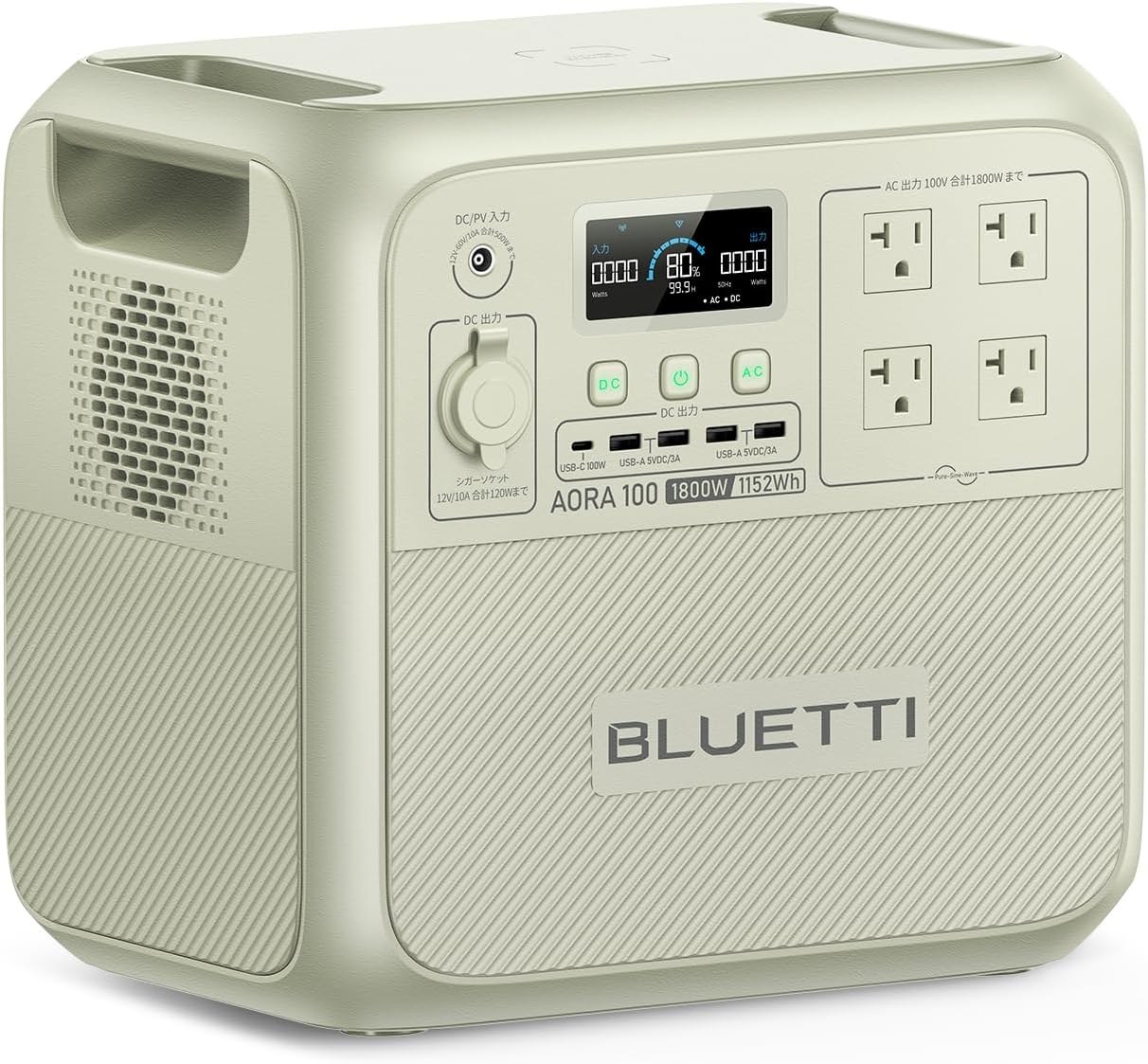
Image 1.1: The BLUETTI AORA 100 Portable Power Station, showcasingrazie al suo design compatto e alle molteplici porte di uscita.
2. Istruzioni di sicurezza
Please read and understand all safety instructions before operating the BLUETTI AORA 100. Failure to follow these instructions may result in electric shock, fire, or serious injury.
- Non smontare, riparare o modificare l'unità.
- Tenere l'unità lontana da fonti di calore, dalla luce solare diretta e da materiali infiammabili.
- Non esporre l'unità all'acqua o ad altri liquidi.
- Assicurare una ventilazione adeguata durante l'uso e la ricarica. Non ostruire le aperture di ventilazione.
- Utilizzare solo accessori e cavi di ricarica approvati da BLUETTI.
- Conservare l'unità in un luogo fresco e asciutto quando non viene utilizzata.
- Il casing is made from UL94V-0 certified flame-retardant material for enhanced safety.
- The BLUETOPUS BMS (Battery Management System) monitors for overcharge and overheating in real-time.
3. Contenuto della confezione
Verifica che tutti gli articoli siano inclusi nel tuo pacco:
- BLUETTI AORA 100 Portable Power Station Unit
- Cavo di ricarica CA.
- MC4 Solar Charging Cable / Car Charging Cable
- Manuale dell'utente (questo documento)
4. Prodotto finitoview
Familiarize yourself with the ports and controls of your AORA 100 unit.

Image 4.1: Front panel of the BLUETTI AORA 100, highlighting the 11 output ports and wireless charging pad.
4.1. Porte e controlli
- Tappetino di ricarica wireless Qi da 15 W: Situato sulla superficie superiore per i dispositivi compatibili.
- Porte di uscita CA: 4 x 100V AC outlets (1800W total, 2700W Power Lift mode).
- Porte USB-A: 4 x USB-A ports (18W each).
- Porta USB-C: 1 x USB-C port (PD3.0/100W).
- Presa accendisigari: 1 x 12V/10A (150W) cigarette lighter socket.
- Ingresso CC/FV: For charging via AC adapter, solar panels, or car charger.
- Schermo LCD: Displays power consumption, battery status, and other operational information.
5. Impostazione
Before first use, fully charge your BLUETTI AORA 100.
5.1. Ricarica iniziale
- Connect the AC charging cable to the DC/PV input port on the AORA 100.
- Collegare l'altra estremità del cavo di ricarica CA a una presa a muro standard.
- The LCD screen will indicate charging status. The unit can charge to 80% in approximately 45 minutes using TurboBoost 1440W AC charging.
- Una volta caricata completamente, scollegare il cavo.

Image 5.1: The BLUETTI AORA 100 connected to a wall outlet for rapid AC charging.
6. Istruzioni per l'uso
6.1. Accensione/Spegnimento
Tenere premuto il pulsante di accensione principale per accendere o spegnere l'unità. Lo schermo LCD si illuminerà all'accensione.
6.2. Charging the AORA 100
The AORA 100 supports 7 charging methods:
- Presa a muro CA: Use the provided AC charging cable. Supports TurboBoost 1440W for 80% charge in 45 minutes.
- Pannelli solari: Connect compatible solar panels (up to 500W input) using the MC4 solar charging cable. MPPT technology ensures up to 97% charging efficiency even on cloudy days. Full charge in approximately 3.4 hours with 500W solar input.
- Ricarica auto: Connect to your vehicle's cigarette lighter socket using the car charging cable. A full charge can be achieved in 2.5 hours with BLUETTI Charger1 car charging (500W).
- Other methods may include generator, lead-acid battery, etc. Refer to the full manual for details.

Image 6.1: The BLUETTI AORA 100 being charged via a car's cigarette lighter socket, ideal for travel.
6.3. Scarica (dispositivi di alimentazione)
Collega i tuoi dispositivi alle porte di uscita appropriate:
- Uscita CA: For household appliances (e.g., refrigerators, microwave ovens, rice cookers).
- USB-A/USB-C Output: For smartphones, tablets, laptops, and other USB-powered devices.
- Presa accendisigari: For 12V DC devices (e.g., car refrigerators).
- Ricarica wireless: Place Qi-compatible devices on the charging pad.

Image 6.2: The BLUETTI AORA 100 powering a kettle and a refrigerator, demonstrating its high output capability.
6.4. Funzionalità UPS
The AORA 100 features an ultra-fast Uninterruptible Power Supply (UPS) function. In the event of a power outage, it detects the interruption in 0.02 seconds and automatically switches to battery power, protecting sensitive electronics like computers from data loss or damage.
6.5. Power Lift Mode (2700W)
The 1800W high output can be boosted to 2700W in Power Lift mode for resistive load appliances with heating elements that exceed 1800W. This allows for simultaneous use of multiple high-power devices, such as a toaster (1000W) and a hairdryer (1200W).
6.6. Ricarica pass-through
The AORA 100 supports pass-through charging, allowing you to power devices while the unit itself is being charged. This is particularly useful during extended power outages or at job sites.
6.7. Controllo app
Download the BLUETTI app to remotely control your AORA 100. The app allows you to:
- Turn output ports on/off.
- Monitor power consumption and usage data.
- Perform wireless firmware updates (OTA).
7. Manutenzione
Proper maintenance ensures the longevity and optimal performance of your AORA 100.
- Pulizia: Per pulire l'unità, utilizzare un panno asciutto e morbido. Non utilizzare detergenti abrasivi o solventi.
- Magazzinaggio: If storing for an extended period, charge the unit to 50-80% every 3-6 months to maintain battery health. Store in a cool, dry environment.
- Durata della batteria: The AORA 100 uses LiFePO4 batteries, offering over 3500 charge/discharge cycles and a 10-year lifespan.

Image 7.1: Internal structure of the BLUETTI AORA 100, highlighting the LiFePO4 battery cells and the advanced Battery Management System (BMS).
8. Risoluzione Dei Problemi
If you encounter issues with your AORA 100, refer to the following common problems and solutions:
| Problema | Possibile causa | Soluzione |
|---|---|---|
| L'unità non si accende | La batteria è scarica; il pulsante di accensione non è premuto correttamente | Caricare l'unità; tenere premuto il pulsante di accensione per 3 secondi. |
| L'uscita CA non funziona | AC output is off; Overload protection activated | Ensure AC output is enabled; Reduce connected load; Restart unit. |
| Ricarica lenta | Bassa potenza in ingresso; Alta temperatura ambiente | Ensure charger is fully connected; Use higher wattage input (e.g., TurboBoost AC); Move to a cooler environment. |
| Problemi di connessione dell'app | Bluetooth/Wi-Fi disattivati; App non aggiornata | Ensure Bluetooth/Wi-Fi is enabled on your device and AORA 100; Update the app to the latest version. |
Se il problema persiste, contattare l'assistenza clienti BLUETTI.
9. Specifiche
| Caratteristica | Specificazione |
|---|---|
| Modello | BLUETTI AORA 100 |
| Capacità della batteria | 1152 Wh |
| Potenza di uscita CA | 1800W (Rated), 2700W (Power Lift Mode) |
| Tipo di batteria | LiFePO4 (fosfato di ferro e litio) |
| Durata | Over 3500 cycles to 80% capacity, 10-year lifespan |
| Orario di commutazione dell'UPS | 0.02 seconds (20ms) |
| Potenza di ingresso CA | Up to 1440W (TurboBoost) |
| Potenza in ingresso solare | Fino a 500W |
| Ricarica wireless | Qi da 15 W |
| Peso | 16.4 kg |
| Voltage | 100 Volt (CA) |
| Tipi di connettori | USB Type A, USB Type C, AC, Cigarette Lighter |
| Caratteristiche di sicurezza | UL94V-0 flame-retardant casing, BLUETOPUS BMS (overcharge, overheat protection) |
| Usi consigliati | Camping, Household, Outdoor work, Commercial, Emergency |
10. Garanzia e supporto
BLUETTI offers an industry-leading Servizio di garanzia di 5 anno for the AORA 100 Portable Power Station, demonstrating confidence in its quality and durability. This warranty covers manufacturing defects and ensures comprehensive after-sales support.
10.1. Assistenza clienti
For technical assistance, warranty claims, or any inquiries, please contact BLUETTI customer support through the official website or your purchase platform. Please have your product model and purchase date available when contacting support.
Per maggiori informazioni, visita il sito ufficiale Negozio BLUETTI su Amazon.


