1. Introduzione
This manual provides detailed instructions for the safe and efficient operation of the TOA Electronics BG-2060 5-Input Mixer Amplifier. The BG-2060 is designed for background music and general announcement applications, suitable for various commercial environments such as bars, retail stores, and banquet rooms. It features multiple inputs, flexible output options, and robust controls for optimal audio management.
2. Informazioni sulla sicurezza
Leggere attentamente le presenti istruzioni di sicurezza prima di utilizzare l'unità. Conservare il manuale per riferimento futuro.
- Fonte di energia: Connect the unit only to the specified power supply (120 V AC, 60 Hz).
- Ventilazione: Assicurare una ventilazione adeguata. Non ostruire le aperture di ventilazione.
- Umidità: Non esporre l'unità alla pioggia o all'umidità per evitare incendi o scosse elettriche.
- Manutenzione: Per qualsiasi intervento di manutenzione, rivolgersi a personale qualificato. Non tentare di riparare questo prodotto da soli.
- Posizionamento: Posizionare l'unità su una superficie stabile e piana. Evitare di posizionarla vicino a fonti di calore o alla luce diretta del sole.
- Messa a terra: Garantire un'adeguata messa a terra per evitare scosse elettriche.
3. Contenuto della confezione
Verificare che tutti gli articoli elencati di seguito siano inclusi nella confezione:
- TOA Electronics BG-2060 Mixer Amppiù vivace
- 5x Volume control cover YA-920
- 4x Removable terminal plug (2 pins)
- 2x Removable terminal plug (3 pins)
- 1x Removable terminal plug (4 pins)
- 1x Removable terminal plug (5 pins)
- Manuale dell'utente (questo documento)
4. Prodotto finitoview
4.1 Pannello frontale

Figura 4.1: Controlli del pannello frontale
This image displays the front panel of the TOA BG-2060 Mixer Amplifier. Key features visible include five input volume knobs (Mic, Line 1/Tel, Line 2, Line 3, Module), Bass and Treble tone controls, Signal, Peak, and Power LED indicators, and the main power switch. The overall design is a sleek black chassis.
- Input Volume Controls (MIC, LINE 1/TEL, LINE 2, LINE 3, MODULE): Adjust the volume level for each corresponding input channel.
- Controllo BASSI: Adjusts the low-frequency response of the audio output.
- Controllo ALTI: Regola la risposta alle alte frequenze dell'uscita audio.
- SEGNALE LED: Si illumina quando è presente un segnale audio.
- LED DI PICCO: Illuminates when the output signal is clipping or nearing distortion.
- LED DI ALIMENTAZIONE: Indicates the power status of the unit (blue when ON).
- Interruttore di ALIMENTAZIONE: Accende o spegne l'unità.
4.2 Pannello posteriore
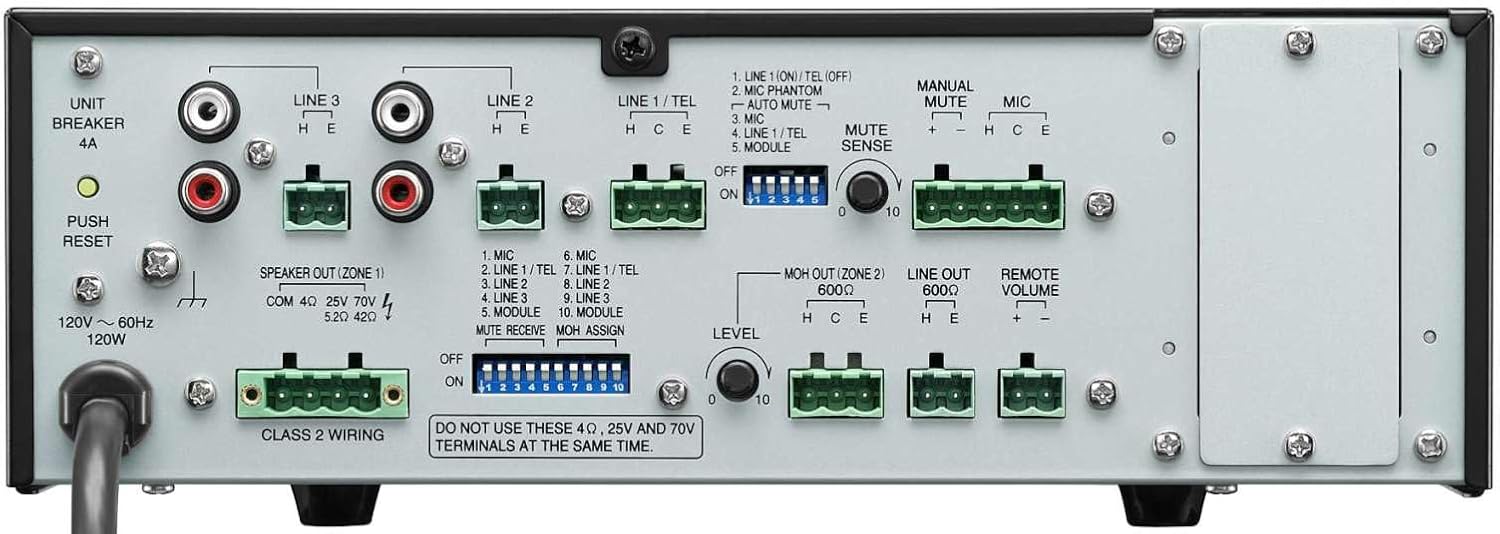
Figura 4.2: Collegamenti del pannello posteriore
This image shows the rear panel of the TOA BG-2060 Mixer Amplifier, detailing its connectivity options. Visible are the power input, speaker outputs (4 Ohms, 25V, 70V), various input terminals (Mic, Line 1/Tel, Line 2, Line 3, Module), MOH output, Line output, Remote Volume control, and DIP switches for configuration.
- Potenza in ingresso: AC power cord connection.
- UNIT BREAKER: Interruttore automatico ripristinabile.
- Speaker Output (ZONE 1): Terminals for connecting speakers (4 Ohms, 25V, or 70V). Note: Do not use 4 Ohms, 25V, and 70V terminals at the same time.
- Terminali di ingresso:
- MICROFONO: Balanced input for microphones, with +24V DC phantom power option.
- LINE 1/TEL: Selectable input for line-level devices or telephone paging.
- LINE 2, LINE 3: Unbalanced inputs for line-level devices (e.g., CD players, media players).
- MODULO: Input for optional modules.
- MOH OUT (ZONE 2): Music On Hold output, also assignable as a second zone output.
- LINEA IN USCITA: Unbalanced line-level output for connecting to external ampdepuratori o dispositivi di registrazione.
- VOLUME REMOTO: Terminals for connecting an optional remote volume control.
- Interruttori DIP: Configure various settings such as phantom power, input sensitivity, muting functions, and MOH assignment.
5. Impostazione
Follow these steps for initial setup of your BG-2060 Mixer Amppiù vivace.
- Spegni: Ensure the unit's power switch is in the OFF position and the power cord is disconnected.
- Collegamento dell'altoparlante: Connect your speakers to the appropriate speaker output terminals (4 Ohms, 25V, or 70V) on the rear panel. Ensure correct polarity. Do not connect speakers to multiple output types simultaneously.
- Collegamento del dispositivo di ingresso: Connect your audio sources (microphones, music players, etc.) to the desired input terminals (MIC, LINE 1/TEL, LINE 2, LINE 3, MODULE) using appropriate cables and terminal plugs.
- Configurazione interruttore DIP: Refer to the rear panel diagram and the detailed instructions in the full manual for setting the DIP switches according to your specific needs (e.g., phantom power for microphones, mute settings).
- Connessioni opzionali: If using, connect to the MOH OUT, LINE OUT, or REMOTE VOLUME terminals.
- Collegamento elettrico: Once all connections are secure, plug the power cord into a suitable AC outlet.
6. Funzionamento
Operating the BG-2060 is straightforward.
- Accensione: Turn the POWER switch on the front panel to the ON position. The POWER LED will illuminate blue.
- Input Volume Adjustment: Slowly turn up the volume knob for the input channel you wish to use (MIC, LINE 1/TEL, etc.).
- Regolazione del volume principale: Adjust the master volume control (if applicable, or use individual input volumes) to achieve the desired overall output level.
- Controllo dei toni: Use the BASS and TREBLE controls to fine-tune the audio's low and high frequencies to your preference.
- Monitoraggio: Observe the SIGNAL and PEAK LEDs. The SIGNAL LED indicates audio presence. If the PEAK LED illuminates frequently or stays lit, reduce the input volume to prevent distortion.
- Funzione di silenziamento: If configured via DIP switches, utilize the manual or automatic mute functions as needed for paging or announcements.
7. Manutenzione
Proper maintenance ensures the longevity and optimal performance of your mixer amppiù vivace.
- Pulizia: Pulire l'unità con un panno morbido e asciutto. Non utilizzare detergenti abrasivi, cere o solventi.
- Ventilazione: Controllare periodicamente che le aperture di ventilazione siano libere da polvere e detriti.
- Connessioni: Assicurarsi che tutti i collegamenti dei cavi siano saldi e privi di corrosione.
- Magazzinaggio: Se si conserva l'unità per un periodo prolungato, scollegarla dall'alimentazione e conservarla in un luogo fresco e asciutto.
8. Risoluzione Dei Problemi
Per i problemi più comuni e le relative soluzioni, fare riferimento alla tabella sottostante.
| Problema | Possibile causa | Soluzione |
|---|---|---|
| Nessun potere | Power cord disconnected; Unit breaker tripped; Power outlet issue. | Check power cord connection; Press UNIT BREAKER button on rear panel; Test power outlet with another device. |
| Nessuna uscita audio | Input volume too low; Speaker connections incorrect; Mute function active; Incorrect input selected. | Increase input and master volumes; Verify speaker wiring and impedance; Check DIP switch settings for mute; Ensure correct input source is active. |
| Suono distorto | Input signal too high (PEAK LED on); Incorrect impedance matching; Faulty cable. | Reduce input volume; Ensure speaker impedance matches amplifier output; Replace cables. |
| Rumore di ronzio o ronzio | Loop di terra; Collegamenti allentati; Interferenze da altri dispositivi elettronici. | Ensure proper grounding; Check all cable connections; Move unit away from other electronic devices. |
9. Specifiche
| Caratteristica | Dettaglio |
|---|---|
| Fonte di alimentazione | 120 V CA, 60 Hz |
| Potenza nominale | 60W |
| Ingressi | Mic: -60 dB, 600 Ohms, balanced; Line 1/TEL: -10 dB/-20 dB, 10 kOhms, balanced; Line 2, 3: -10 dB, 10 kOhms, unbalanced; Modules |
| Risultati | Speaker: 4 Ohms, 25 V (10 Ohms), 70 V (83 Ohms), balanced; MOH: 0 dB, 600 Ohms, balanced; Line: 0 dB, 600 Ohms, unbalanced |
| Regolamento di uscita | 2 dB or less, no load to full load (1 kHz) |
| Potenza fantasma | On/Off switch for Mic, +24 V DC |
| Controllo del tono | Bass: +/- 10 dB at 100 Hz; Treble: +/- 10 dB at 10 kHz |
| Muting | Manual mute/Automatic mute |
| Indicatori | LED di alimentazione, LED del livello del segnale, LED di picco |
| Dimensioni (LxAxP) | 10.39 x 3.71 x 10.52 pollici |
| Peso | 11.68 libbre |
10. Garanzia e supporto
For warranty information and technical support, please refer to the documentation provided with your purchase or visit the official TOA Electronics websito.


