1. Prodotto finitoview
The ATOMSTACK R8 Laser Rotary Chuck Engraver is a versatile accessory designed to expand the engraving capabilities of compatible laser engravers, particularly for irregular and cylindrical objects. It provides precise rotation and stability, enabling high-quality engraving on a variety of shapes that standard flatbed engravers cannot accommodate.

Figure 1.1: ATOMSTACK R8 Laser Rotary Chuck Engraver and included components.
Caratteristiche principali:
- Ideal for Irregular Cylinder Engraving: Designed for objects like balls, rings, spherical items, and cups with handles, offering up to 180° angle adjustment and 360° rotation.
- Precision & High-Speed: Features a high-torque motor for speeds up to 10000mm/Min and 0.1mm accuracy. The high-hardness brass claw ensures durability and stability.
- No Installation Required & Easy to Operate: Upgraded high-strength aluminum alloy structure allows for immediate use. Tool-free adjustment of roller distance.
- Compatibilità: Suitable for ATOMSTACK P1 K2 Laser Engraver and compatible with popular software such as LaserGRBL and LightBurn.
- Accessori inclusi: Comes with four 100mm raised footpads for use with compatible engravers like the ATOMSTACK P1 K2.
2. Guida all'installazione
This section outlines the steps to set up your ATOMSTACK R8 Laser Rotary Chuck Engraver with a compatible laser engraving machine.
2.1 Disimballaggio e ispezione iniziale
Carefully remove all components from the packaging. Verify that all parts listed in the product manual are present and undamaged. If any parts are missing or damaged, contact customer support immediately.
2.2 Connecting the R8 to Your Engraver
- Posizionamento: Position the R8 rotary chuck on a stable, level surface.
- Engraver Height Adjustment: If using with an ATOMSTACK P1 K2 Engraver, utilize the four included 100mm raised footpads to elevate the engraving machine. This ensures proper clearance and alignment with the R8 rotary chuck.
- Y-axis Terminal Connection: Connect the R8 rotary chuck to your engraving machine by replacing the Y-axis terminal. This allows the engraver to control the rotation of the R8.
- Connessione USB: Connect the R8 to your computer via USB. Upon connection, the system should automatically enter roller processing mode.

Figure 2.1: USB connection and software interface for roller processing mode.
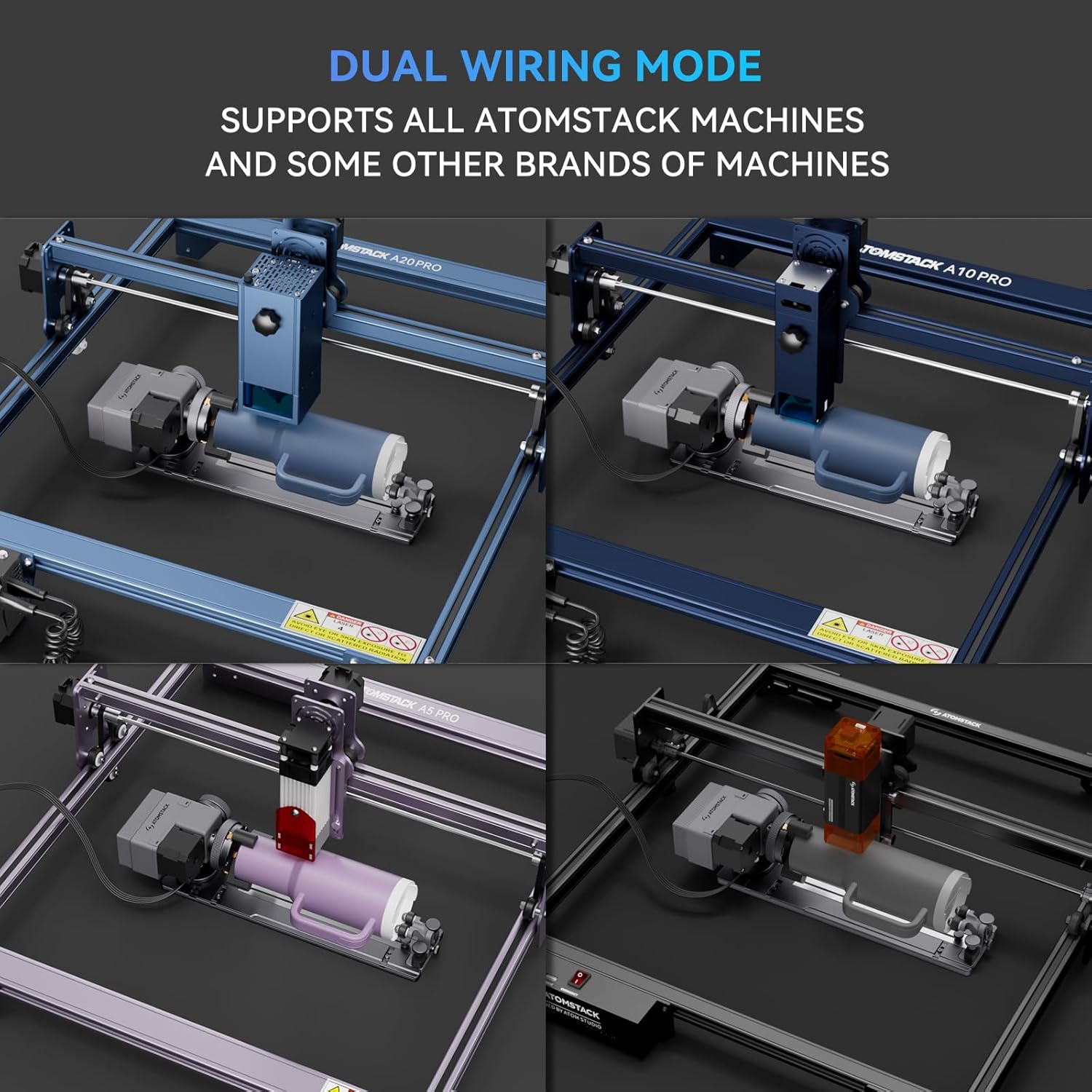
Figure 2.2: The R8 supports dual wiring modes and is compatible with various ATOMSTACK machines and some other brands.
3. Istruzioni per l'uso
This section provides guidance on operating the ATOMSTACK R8 for various engraving tasks.
3.1 Configurazione software
Before using the rotary roller, it is essential to modify the configuration parameters within your laser engraving software (e.g., LaserGRBL, LightBurn). Refer to your software's documentation for specific instructions on setting up rotary axis engraving.

Figura 3.1: Esample of software interface for managing engraving projects and settings.
3.2 Engraving Regular Cylindrical Objects
For objects like tumblers, cans, or pens, place them securely on the R8's rollers. Adjust the roller distance as needed to ensure the object is stable and rotates smoothly. No tools are required for this adjustment.

Figure 3.2: Engraving a regular cylindrical object using the R8 rotary chuck.
3.3 Incisione di oggetti irregolari e sferici
The R8 is designed to handle a wide range of irregular cylindrical objects, including those with handles, and spherical items. It offers up to 180° angle adjustment and 360° rotation. Utilize the included fixtures to secure uniquely shaped items.

Figura 3.3: Esamples of irregular cylindrical objects being engraved.

Figure 3.4: The R8 is equipped with three sets of fixtures to adapt to multiple special-shaped materials, including objects with handles and spherical items.
3.4 Applications and Examples
The R8 expands your engraving possibilities to include various household items and personalized gifts.

Figura 3.5: Esamples of items that can be engraved, such as mugs, tumblers, goblets, rings, and flowerpots.
4. Manutenzione
Proper maintenance ensures the longevity and optimal performance of your ATOMSTACK R8 Laser Rotary Chuck Engraver.
4.1 Pulizia
- Regularly clean the rollers and chuck jaws to remove dust, debris, and engraving residue. Use a soft, dry cloth.
- Per i residui ostinati, una leggera damp È possibile utilizzare un panno, assicurandosi che il dispositivo sia scollegato e completamente asciutto prima del successivo utilizzo.
- Avoid using abrasive cleaners or solvents that could damage the surface or internal components.
4.2 Ispezione
- Periodically inspect the chuck jaws and rollers for any signs of wear or damage.
- Ensure all screws and fasteners are secure. Tighten if necessary.
- Check the connection cables for fraying or damage. Replace if any issues are found.
5. Risoluzione Dei Problemi
This section addresses common issues you might encounter with the ATOMSTACK R8 and provides solutions.
| Problema | Possibile causa | Soluzione |
|---|---|---|
| R8 does not rotate or respond. | Incorrect Y-axis terminal connection; USB not connected; software not configured. | Ensure the R8 is correctly connected to the engraver's Y-axis terminal. Verify USB connection to the computer. Check software settings for rotary mode. |
| Engraving is distorted or inconsistent. | Object not securely held; incorrect software parameters (e.g., steps per rotation); object slipping. | Ensure the object is firmly secured by the chuck jaws or rollers. Adjust roller distance for optimal grip. Verify and calibrate rotary parameters in your engraving software. Clean rollers if slipping occurs. |
| R8 cannot be used with ATOMSTACK P1/K2 engraver. | Engraver height is insufficient; missing or incorrect risers. | Ensure the four 100mm raised footpads are correctly installed under the ATOMSTACK P1/K2 engraver to provide necessary clearance for the R8. |
| Chuck jaws are stiff or not gripping properly. | Accumulated debris; lack of lubrication. | Clean the chuck jaws thoroughly. Apply a small amount of appropriate lubricant if recommended by the manufacturer (refer to the full product manual for specific lubrication guidelines). |
If you encounter issues not covered here, please refer to the comprehensive online resources or contact ATOMSTACK customer support.
6. Specifiche
| Caratteristica | Dettaglio |
|---|---|
| Numero di modello | R8 |
| Dimensioni del prodotto | 15.75 x 6.3 x 5.51 pollici |
| Peso dell'articolo | 3.12 libbre |
| Produttore | COMBINATORE DI ATOMETRO |
| Paese di origine | Cina |
| Precisione dell'incisione | 0.1mm (as per feature bullets) |
| Max. Velocità di rotazione | 10000mm/Min (as per feature bullets) |
| Regolazione dell'angolo | Up to 180° (as per feature bullets) |
| Capacità di rotazione | 360° (as per feature bullets) |
7. Garanzia e supporto
ATOMSTACK is committed to providing excellent customer service and support for its products.
- Garanzia: The ATOMSTACK R8 comes with a 1-year warranty.
- Parti di ricambio: Sono disponibili parti di ricambio.
- Supporto tecnico: Lifetime technical support is provided. Professional technical and support teams are available 24/7 to answer any questions or concerns.
For assistance, please contact ATOMSTACK customer service through their official channels or visit their websito per FAQ e risorse di supporto.


