1. Introduzione
Thank you for choosing the ASD 12 Inch Smart RGBW Flush Mount Ceiling Light. This fixture combines a stylish minimalist design with efficient, versatile lighting solutions. Featuring multicolor RGBW capabilities, smart app control, and remote operation, it offers a wide range of lighting effects for your space. This manual provides essential information for safe installation, effective operation, and proper maintenance of your new lighting fixture.

Figure 1.1: ASD 12 Inch Smart RGBW Flush Mount Ceiling Light with accessories.
3. Contenuto della confezione
Verificare che tutti i componenti siano presenti prima di iniziare l'installazione:
- ASD 12 Inch Smart RGBW Flush Mount Ceiling Light Fixture (4 units)
- Telecomando
- Hardware di montaggio (viti, dadi per cavi)
- Manuale di istruzioni
4. Specifiche
| Caratteristica | Dettaglio |
|---|
| Marca | Disturbo dello spettro autistico |
| Nome del modello | SOFFITTA |
| Numero di parte | A-LFM12D20SRGBW-N-4p |
| Colore | 12" | Nickel | RGBW |
| Materiale | Acciaio legato, acrilico |
| Stile | Moderno |
| Dimensioni del prodotto | 11.3 cm L x 11.3 cm P x 3.4 cm A |
| Usi specifici | Solo per uso interno |
| Fonte di alimentazione | Cablato |
| Tipo di sorgente luminosa | GUIDATO |
| Tipo di finitura | Dipinto |
| Materiale dell'ombra | Plastica |
| Voltage | 120 Volt |
| Cosatage | 20 watt |
| Tipo di montaggio | montaggio a filo |
| Vita media | 50,000 ore |
| Caratteristiche speciali | 1064/1220LM, Remote Control, RGBW, Smart App, CCT Adjustable 2700-6500K |

Figura 4.1: Dimensioni del prodotto e caratteristiche principali.
5. Installazione
Follow these steps to install your ASD Smart RGBW Flush Mount Ceiling Light:
- Prepararsi per l'installazione: Turn off power at the circuit breaker before starting. Ensure the mounting surface is clean and stable.
- Remove the Lens: Gently remove the lens from the fixture by rotating it clockwise. This will expose the mounting holes and wiring connections.
- Montare l'apparecchio: Attach the fixture's base to the electrical outlet box using the provided screws. Ensure it is securely fastened.
- Connessioni dei cavi: Connect the wires: Black to Black (Live), White to White (Neutral), and Ground to Ground. Secure all connections with wire nuts. Carefully tuck all wires back into the outlet box.
- Fissare l'obiettivo: Once wiring is complete and secure, attach the lens by aligning it with the fixture and rotating it counter-clockwise until it locks into place.
- Ripristina alimentazione: Riattivare la corrente tramite l'interruttore automatico.
- Download ASD SMART App: For smart control features, download the "ASD SMART" application from your smartphone's app store. Scan the QR codes below or click the links to download.
Negozio Google Play (Android)
App Store di Apple (iOS) - Add Fixture to App: Follow the in-app instructions to add your new ceiling light to the ASD SMART app. This typically involves putting the light into pairing mode and connecting it to your Wi-Fi network.

Figure 5.1: Initial installation steps: removing the lens and wiring.
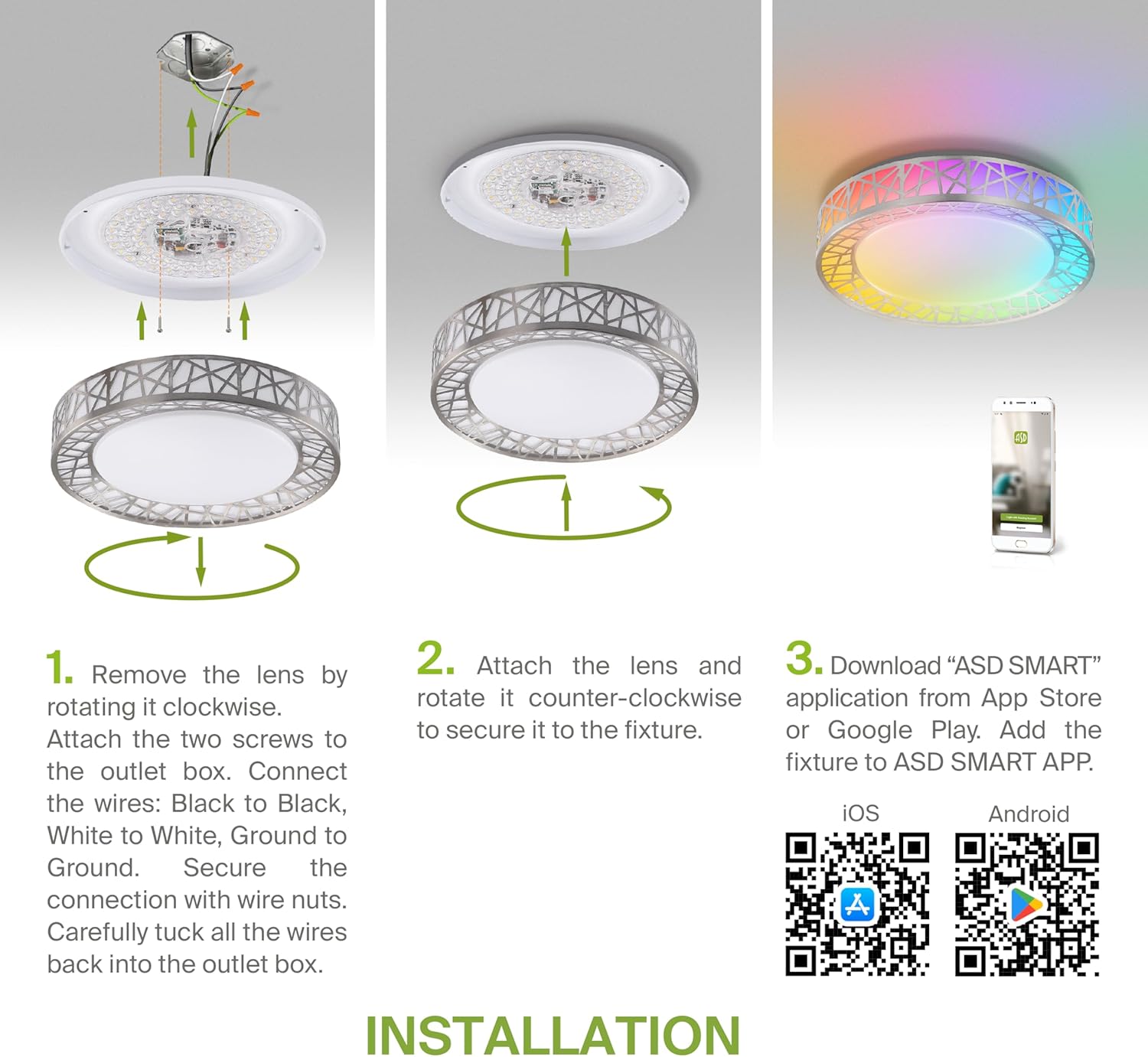
Figure 5.2: Complete installation overview including app download.
6. Istruzioni per l'uso
Your ASD Smart RGBW Flush Mount Ceiling Light offers multiple control methods:
6.1 telecomando
Il telecomando incluso consente le funzioni di base:
- Acceso/Spento: Accendere o spegnere la luce.
- dimming: Adjust brightness levels smoothly.
- Adeguamento CCT: Change color temperature (e.g., from warm white to cool white).
- Selezione del colore RGB: Cycle through or select specific RGB colors.
6.2 ASD SMART App Control
The ASD SMART app provides full control and advanced features:
- 16.7 milioni di colori: Choose any color from the full RGBW spectrum.
- Smooth Dimming & CCT: Precisely adjust brightness and color temperature (2700K-6500K).
- Modelli di illuminazione: Select pre-set or custom lighting scenes and effects.
- Raggruppamento: Control multiple fixtures simultaneously.
- Pianificazione: Set timers for lights to turn on/off or change settings automatically.

Figure 6.1: RGBW color capabilities.

Figure 6.2: Control via remote and smart app.

Figure 6.3: Seamless dimming functionality.
6.3 Controllo vocale (Alexa e Google Assistant)
The fixture is compatible with Amazon Alexa and Google Assistant for convenient voice commands:
- Ensure your ASD SMART app is linked to your Alexa or Google Home account.
- Use commands such as "Alexa, turn on the living room light" or "Hey Google, set the bedroom light to blue."

Figure 6.4: Compatibility with Alexa and Google Assistant.
7. Manutenzione
To ensure the longevity and optimal performance of your ceiling light:
- Pulizia: Scollegare l'alimentazione prima di pulire. Pulire l'apparecchio con un panno morbido e asciutto. Non utilizzare detergenti abrasivi o solventi.
- Sostituzione della lampadina: Questo apparecchio utilizza la tecnologia LED integrata e non richiede la sostituzione della lampadina.
8. Risoluzione Dei Problemi
Se riscontri problemi con la tua plafoniera, fai riferimento ai seguenti problemi comuni e alle relative soluzioni:
| Problema | Possibile causa | Soluzione |
|---|
| La luce non si accende | Nessuna alimentazione, cablaggio allentato, interruttore difettoso | Controllare l'interruttore automatico. Assicurarsi che tutti i collegamenti dei cavi siano ben saldi. Testare l'interruttore a parete. |
| Il telecomando non funziona | Dead battery, out of range, interference | Replace remote battery. Ensure you are within range. Remove any obstructions. |
| App cannot connect to light | Incorrect Wi-Fi password, light not in pairing mode, 5GHz Wi-Fi network | Verify Wi-Fi password. Reset light to pairing mode (refer to app instructions). Ensure you are on a 2.4GHz Wi-Fi network. |
| Il controllo vocale non risponde | App not linked to voice assistant, incorrect device name | Check linking in ASD SMART app and voice assistant app. Verify device name in voice assistant app. |
9. Garanzia e supporto
L'ASD fornisce un Garanzia limitata di 5 anno for this product, guaranteeing top quality and safety. The fixture is ETL certified, ensuring compliance with North American safety standards.
For technical support, warranty claims, or any questions not covered in this manual, please contact ASD customer service. Refer to the product packaging or the official ASD websito per le informazioni di contatto.


