1. Introduzione
Thank you for choosing the GRIFEMA GA2006 Digital Luggage Scale. This portable and accurate scale is designed to help you measure the weight of your luggage, preventing unexpected excess baggage fees. Please read this manual carefully before use to ensure proper operation and to maximize the lifespan of your device.
2. Informazioni sulla sicurezza
- Non immergere la bilancia in acqua o altri liquidi.
- Evitare di far cadere la bilancia o di sottoporla a forti urti.
- Tenere fuori dalla portata dei bambini.
- Non tentare di smontare o riparare la bilancia da soli. In caso di problemi, contattare l'assistenza clienti.
- Ensure the battery compartment is securely closed after battery installation.
3. Contenuto della confezione
The GRIFEMA GA2006 Digital Luggage Scale package includes:
- 1 x GRIFEMA GA2006 Digital Luggage Scale
- 1 batteria CR2032 (preinstallata o inclusa separatamente)
4. Prodotto finitoview
Familiarize yourself with the components of your digital luggage scale:

Immagine: Frontale view of the GRIFEMA GA2006 Digital Luggage Scale, highlighting the LCD screen, power/tare button, and unit selection button.
- Schermo LCD: Mostra le letture del peso e gli indicatori delle unità.
- Power/Tare Button (⏸/T/A): Press to power on/off, or to activate the tare function.
- Unit Button (U/SET/▼): Press to switch between measurement units (kg/lb).
- Strap and Hook: For attaching luggage to be weighed.
5. Impostazione
5.1 Installazione della batteria
The scale uses one CR2032 lithium battery. If the battery is not pre-installed or needs replacement, follow these steps:
- Individuare il vano batterie sul retro della bilancia.
- Utilizzare un piccolo cacciavite per aprire il coperchio della batteria.
- Inserire la batteria CR2032 con il lato positivo (+) rivolto verso l'alto.
- Riposizionare il coperchio della batteria e fissarlo con la vite.
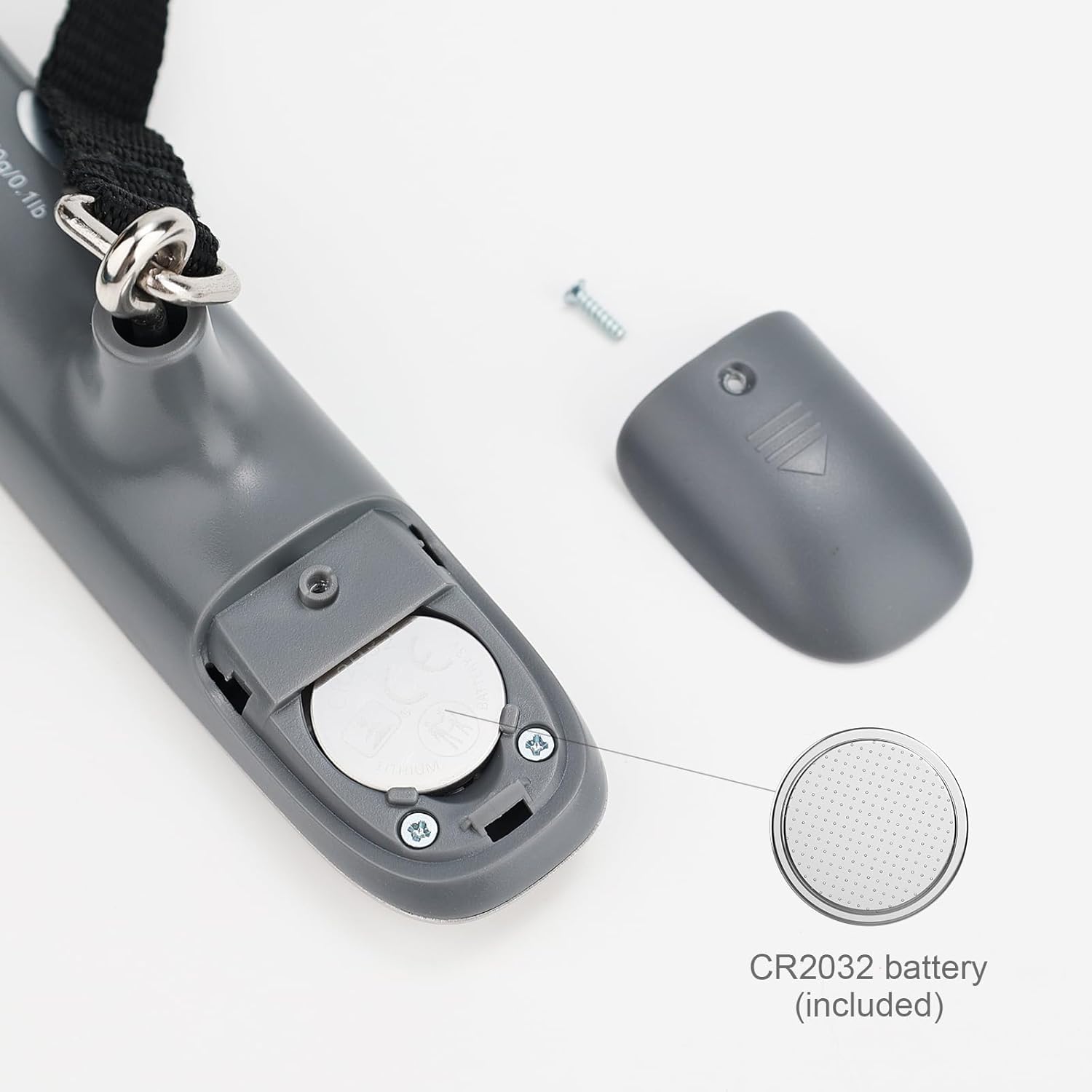
Immagine: dettagliata view of the battery compartment, showing the CR2032 battery and how to open the cover.
6. Istruzioni per l'uso
6.1 Accensione/spegnimento
- To power on, press the Power/Tare button (⏸/T/A). The display will show "8888" then "0.00 kg" or "0.0 lb".
- To power off, press and hold the Power/Tare button (⏸/T/A) for 3 seconds. The scale will also automatically shut off after 60 seconds of inactivity to conserve battery.
6.2 Unit Conversion (kg/lb)
While the scale is powered on and displaying "0.00", press the Unit button (U/SET/▼) to switch between kilograms (kg) and pounds (lb). The selected unit will be displayed on the LCD screen.
6.3 Pesatura dei bagagli
- Ensure the scale is powered on and displaying "0.00".
- Attach the luggage strap to the handle of your luggage.
- Lift the scale by its body, holding it steady, so the luggage hangs freely from the strap and hook.
- Wait for the display to stabilize. The weight will flash three times and then lock, indicating the final measurement.
- Lower the luggage. The display will show the locked weight for a few seconds before returning to "0.00" or powering off automatically.

Image: A person demonstrating how to weigh a suitcase using the digital luggage scale, showing the scale held above the luggage.
6.4 Funzione di tara
The tare function allows you to subtract the weight of a container or additional items to get the net weight of the contents.
- With the scale powered on and displaying "0.00", attach the empty container or item you wish to tare.
- Once the weight stabilizes, press the Power/Tare button (⏸/T/A). The display will reset to "0.00" and show a "T" indicator, meaning the tare weight has been subtracted.
- Now, add the items you want to weigh into the container. The display will show only the weight of the added items.
7. Manutenzione
7.1 Pulizia
Pulire la bilancia con un panno morbido, damp panno. Non utilizzare detergenti abrasivi né immergere la bilancia in acqua.
7.2 Conservazione
Store the scale in a cool, dry place. If not used for an extended period, it is recommended to remove the battery to prevent leakage.
7.3 Sostituzione della batteria
When the display shows a "Lo" indicator, it's time to replace the battery. Refer to section 5.1 for battery installation instructions.
8. Risoluzione Dei Problemi
| Problema | Possibile causa | Soluzione |
|---|---|---|
| La bilancia non si accende. | Batteria scarica o installata in modo errato. | Check battery installation or replace the CR2032 battery. |
| Il display mostra "Lo". | Batteria scarica. | Sostituire la batteria CR2032. |
| Il display visualizza "Err" o "O-Ld". | Overload. The weight exceeds the maximum capacity. | Remove some weight. The maximum capacity is 50 kg (110 lb). |
| Letture imprecise. | Scale not held steadily, or external interference. | Ensure the scale is held steady and the luggage hangs freely. Avoid strong air currents or vibrations during weighing. |
9. Specifiche
Detailed specifications for the GRIFEMA GA2006 Digital Luggage Scale:

Image: Technical drawing illustrating the dimensions of the GRIFEMA GA2006 Digital Luggage Scale.
- Modello: GA2006
- Capacità di peso massima: 50 kg / 110 libbre
- Precisione di misurazione: 50 g / 0.1 lb (+/- 0.5%)
- Unità: Chilogrammi (kg), libbre (lb)
- Display: LCD retroilluminato
- Materiale: Acciaio inossidabile, plastica
- Tipo di batteria: 1 x CR2032 Alkaline (included)
- Spegnimento automatico: 60 secondi di inattività
- Dimensioni: 14.5 cm x 3.2 cm x 3.5 cm (approximate, main body)
- Peso netto: 85 grammi
10. Informazioni sulla garanzia
GRIFEMA products are manufactured to high-quality standards. This product is covered by a standard warranty against manufacturing defects. Please retain your proof of purchase for any warranty claims. For specific warranty terms and conditions, refer to the documentation provided at the time of purchase or contact customer support.
Additionally, a 30-day free return policy may apply, as per retailer terms.
11. Assistenza clienti
If you have any questions, concerns, or require assistance with your GRIFEMA GA2006 Digital Luggage Scale, please contact your retailer or the manufacturer's customer service. Please have your product model number (GA2006) and purchase details ready when contacting support.


