1. Introduzione
Thank you for choosing the Infiniity DM56 Sport Smartwatch. This device is designed to enhance your active lifestyle with advanced fitness tracking, health monitoring, and smart connectivity features. Equipped with a vibrant 1.43-inch AMOLED display, built-in GPS, and comprehensive health sensors, the DM56 is your reliable companion for both daily wear and intense workouts.
This manual provides detailed instructions on how to set up, operate, maintain, and troubleshoot your smartwatch to ensure optimal performance and longevity.

Immagine 1.1: anteriore view of the Infiniity DM56 Sport Smartwatch, showcasinil suo display AMOLED rotondo e il design robusto.
2. Cosa c'è nella scatola
Upon opening your Infiniity DM56 Sport Smartwatch package, please ensure all the following items are present:
- Infiniity DM56 Sport Smartwatch
- Cavo di ricarica
- Manuale dell'utente (questo documento)
3. Impostazione
3.1 Ricarica dello smartwatch
Before first use, fully charge your DM56 smartwatch. A full charge typically takes approximately 2 hours.
- Collega il cavo di ricarica magnetico ai contatti di ricarica sul retro dello smartwatch. Assicurati che i pin siano allineati correttamente.
- Collegare l'estremità USB del cavo di ricarica a un adattatore di alimentazione USB standard (consigliato 5 V/1 A) o alla porta USB di un computer.
- The watch display will show a charging indicator. Once fully charged, the indicator will change or disappear.
3.2 Associazione con lo smartphone
To unlock the full potential of your DM56 smartwatch, you need to pair it with your smartphone via Bluetooth using the dedicated companion application. The DM56 is compatible with Android 5.0+ and iOS 11 and above.
- Scarica l'App: Cercare the official Infiniity companion app (refer to the packaging or quick start guide for the exact app name) on the Google Play Store (for Android) or Apple App Store (for iOS) and install it.
- Abilita Bluetooth: Assicurati che il Bluetooth sia abilitato sul tuo smartphone.
- Apri l'app: Launch the companion app on your smartphone and follow the on-screen instructions to create an account or log in.
- Aggiungi dispositivo: Within the app, navigate to the 'Add Device' or 'Pair Device' section. The app will search for available smartwatches.
- Select DM56: Select 'DM56' from the list of found devices. A pairing request may appear on both your phone and the watch. Confirm the pairing on both devices.
- Configurazione completa: Once paired, the app will guide you through initial settings, such as profile information, notification permissions, and data synchronization.
4. Utilizzo dello smartwatch
4.1 Navigazione di base
The DM56 features a responsive touchscreen and physical buttons for intuitive control.
- Schermo tattile: Scorri verso l'alto, verso il basso, verso sinistra o verso destra per navigare tra i menu e le notifiche. Tocca per selezionare gli elementi.
- Pulsanti fisici: The watch has multiple buttons, typically labeled 'SPORT', 'SEL', 'BACK', and a dedicated 'GPS' button. Their functions may vary depending on the current screen or mode.
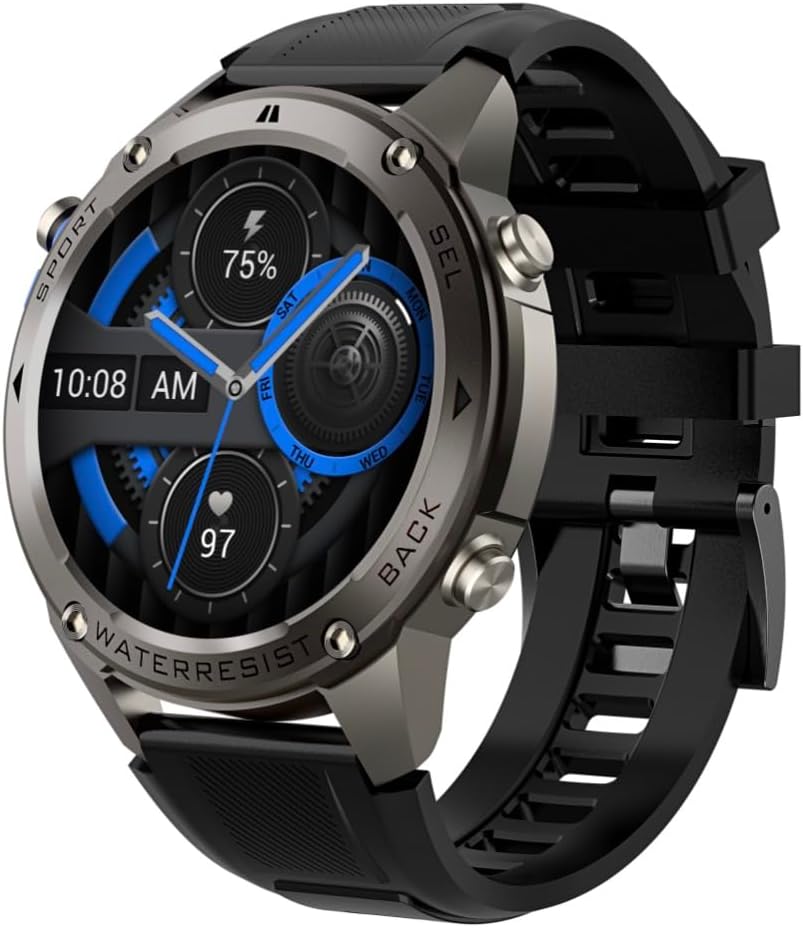
Immagine 4.1: Lato view of the Infiniity DM56 Sport Smartwatch, highlighting the physical control buttons.
4.2 Funzionalità di visualizzazione
The 1.43-inch AMOLED display offers vibrant colors and deep blacks with a resolution of 466x466 pixels.
- Display sempre attivo: The DM56 supports Always-On Display functionality, allowing you to see the time and essential information at a glance without needing to raise your wrist or press a button. This feature can be configured in the watch settings.

Image 4.2: The Infiniity DM56 Sport Smartwatch display, showcasing a typical watch face with various data points.
4.3 Built-in GPS & Compass
The DM56 features dual-frequency GPS (L1+L5) and supports multiple satellite systems (GPS, GLONASS, BDS, Galileo, NAVIC, QZSS) for precise outdoor tracking. A built-in compass further aids navigation.
- Tracciamento GPS: When starting an outdoor activity (e.g., running, cycling), the watch will automatically attempt to acquire a GPS signal. Ensure you are in an open area for faster signal acquisition. Your route, distance, and pace will be recorded.
- Bussola: Access the compass feature from the watch's menu to get real-time directional information.

Image 4.3: The Infiniity DM56 Sport Smartwatch from an angle, highlighting the dedicated GPS button on the side.

Immagine 4.4: Un primo piano view of the GPS button on the Infiniity DM56 Sport Smartwatch, indicating its function.
4.4 Monitoraggio della salute per tutto il giorno
The DM56 is equipped with the VC30F sensor for continuous health monitoring.
- Monitoraggio della frequenza cardiaca: Track your heart rate in real-time throughout the day. View your current heart rate on the watch face or in the dedicated heart rate app.
- Monitoraggio dell'ossigeno nel sangue (SpO2): Misura i livelli di saturazione dell'ossigeno nel sangue.
- Monitoraggio del sonno: The watch automatically monitors your sleep patterns, including deep sleep, light sleep, and awake times. View analisi dettagliata del sonno nell'app complementare.
- Monitoraggio dello stress: Tieni sotto controllo i tuoi livelli di stress durante il giorno.
- Pedometro: Counts your daily steps, distance, and estimated calories burned.
Note: The Infiniity DM56 Smartwatch is NOT A MEDICAL DEVICE. All health monitoring data is for reference only and should not be used for medical diagnosis or treatment.
4.5 modalità sportive
The DM56 offers over 170 customizable sports modes, with 14 built-in modes such as outdoor running, cycling, and swimming. You can add up to 10 additional modes manually via the companion app.
- Avvio di un'attività: Navigate to the 'Workout' or 'Sports' menu on the watch, select your desired activity, and tap to start.
- Durante l'attività: The watch will display real-time metrics such as duration, distance, heart rate, and calories burned.
- Ending Activity: Swipe or press the designated button to pause or end the activity. Your workout data will be saved and synchronized with the app.
4.6 Smart Notifications & Calls
Once paired with your smartphone, the DM56 can receive notifications and handle calls directly on your wrist.
- Notifiche: Receive alerts for incoming calls, SMS messages, and app notifications (e.g., social media, email). Configure which app notifications you want to receive in the companion app.
- Make/Answer Call: The DM56 allows you to make and answer calls directly from the watch, utilizing its built-in microphone and speaker. Ensure the watch is connected to your phone via Bluetooth.
5. Manutenzione
5.1 Valutazione di impermeabilità
The DM56 has a 5ATM waterproof rating, meaning it can withstand water pressures equivalent to a depth of 50 meters. This makes it suitable for swimming, showering, and other water-based activities. However, it is not recommended for diving or high-pressure water activities.
- Avoid exposing the watch to hot water, steam, or strong detergents.
- Dopo l'esposizione all'acqua salata, sciacquare l'orologio con acqua dolce e asciugarlo accuratamente.
5.2 Pulizia e cura
Per mantenere l'aspetto e la funzionalità del tuo smartwatch:
- Pulire regolarmente il corpo dell'orologio e il cinturino con un panno morbido eamp stoffa.
- Prima di procedere alla ricarica, assicurarsi che i contatti di ricarica sul retro dell'orologio siano puliti e asciutti.
- Evitare l'uso di detergenti o solventi abrasivi.
5.3 Ottimizzazione della durata della batteria
The DM56 is powered by a 500mAh high-voltage battery, offering extended usage. To maximize battery life:
- Regolare la luminosità dello schermo a un livello più basso.
- Limitare l'uso della funzione Always-On Display se non è essenziale.
- Disattiva le notifiche non necessarie.
- Disattivare il monitoraggio continuo della frequenza cardiaca se non necessario 24 ore su 24, 7 giorni su 7.
6. Risoluzione Dei Problemi
If you encounter issues with your Infiniity DM56 smartwatch, try the following common solutions:
- L'orologio non si accende: Assicurati che l'orologio sia completamente carico. Collegalo al caricabatterie e attendi qualche minuto prima di provare ad accenderlo di nuovo.
- Impossibile associare il telefono:
- Assicurati che il Bluetooth sia abilitato sul telefono e sull'orologio.
- Assicurati che l'orologio si trovi nel raggio di azione del Bluetooth del tuo telefono.
- Riavvia sia l'orologio che il telefono.
- Svuota la cache Bluetooth sul tuo telefono (Android) oppure elimina il dispositivo e riesegui l'associazione.
- Assicurati che l'app complementare sia aggiornata all'ultima versione.
- Dati sanitari inesatti:
- Assicurati che l'orologio sia indossato comodamente al polso, né troppo stretto né troppo largo.
- Pulisci il sensore sul retro dell'orologio.
- Note that environmental factors and individual physiology can affect readings. Remember, it is not a medical device.
- Notifiche non ricevute:
- Controlla le impostazioni di notifica nell'app complementare.
- Assicurati che l'app disponga delle autorizzazioni necessarie sul tuo telefono (ad esempio, accesso alle notifiche).
- Verify that the watch is connected to your phone.
- Breve durata della batteria: Per suggerimenti sull'ottimizzazione della batteria, fare riferimento alla Sezione 5.3.
Se il problema persiste dopo aver provato questi passaggi, contatta l'assistenza clienti per ulteriore assistenza.
7. Specifiche
| Caratteristica | Specificazione |
|---|---|
| Numero di modello | 56 marchi |
| Display | 1.43-inch AMOLED, 466x466 pixels |
| Sensori | Heart Rate (VC30F), Accelerometer (STK8321), Magnetometer (Compass), Barometer+Altitude (SPL07-03) |
| Connettività | Bluetooth 5.3 |
| Capacità della batteria | 500mAh |
| Livello di impermeabilità | 5 ATM |
| Compatibilità | Android 5.0+ and iOS 11 and above |
| Peso dell'articolo | 3 once |
| Dimensioni del pacco | 4.25 x 4.25 x 2.8 pollici |
| Sistema operativo | Android Wear 2.7 (Note: This refers to the underlying OS, not necessarily full Android Wear functionality) |
| GPS | Built-in GPS (L1+L5 dual-frequency) |
| Forma | Girare |
| Tipo di batteria | Nonstandard Battery, Lithium Ion |
8. Garanzia e supporto
The Infiniity DM56 Sport Smartwatch comes with a standard manufacturer's warranty. Please refer to the warranty card included in your product packaging for specific terms and conditions, including warranty duration and coverage details.
For technical support, troubleshooting assistance beyond what is covered in this manual, or warranty claims, please contact Infiniity customer service through the contact information provided on the product packaging or the official Infiniity websito.
Si prega di conservare la prova d'acquisto ai fini della garanzia.


