1. Introduzione
The Arylic A100 is a 100W×2 high-power stereo amplifier designed for home audio systems. It integrates wireless streaming capabilities including WiFi, Bluetooth, and AirPlay, along with support for various online music services and FM radio. The device features dual microphone input jacks for karaoke and multiroom audio functionality, allowing synchronized or independent playback across multiple rooms.
This manual provides detailed instructions for the setup, operation, and maintenance of your Arylic A100 amplifier. Please read it thoroughly before use to ensure proper functionality and to maximize your listening experience.

This image highlights the comprehensive features of the Arylic A100, including its support for WiFi, AirPlay, Bluetooth, FM Radio, KTV, and multiroom audio, making it a versatile audio solution.
2. Informazioni importanti sulla sicurezza
- Fonte di energia: Collegare l'unità solo a una presa di corrente CA con la tensione specificatatage. Assicurarsi che il cavo di alimentazione sia collegato saldamente.
- Ventilazione: Non ostruire le aperture di ventilazione. Garantire un adeguato flusso d'aria attorno all'unità per evitare il surriscaldamento.
- Acqua e umidità: Non esporre l'unità a pioggia, umidità o liquidi che gocciolano/spruzzano. Non posizionare oggetti contenenti liquidi, come vasi, sull'apparecchio.
- Calore: Tenere l'unità lontana da fonti di calore quali radiatori, bocchette di riscaldamento, stufe o altri apparecchi (inclusi amplificatori) che producono calore.
- Pulizia: Pulire solo con un panno asciutto.
- Manutenzione: Non tentare di riparare questo prodotto da soli. Affidare tutte le operazioni di manutenzione a personale di assistenza qualificato.
- antenne: Ensure all antennas (WiFi, Bluetooth, FM) are properly connected for optimal performance.
3. Contenuto della confezione
Verifica che tutti gli articoli elencati di seguito siano inclusi nel tuo pacchetto:
- Arylic A100 AmpUnità lificatore
- Cavo di alimentazione
- Telecomando
- Antenna WiFi
- Antenna Bluetooth
- FM Antenna (wire type)
- Manuale dell'utente (questo documento)
4. Prodotto finitoview
4.1 Pannello frontale

This image displays the front panel of the Arylic A100 amplifier, featuring the power button, display screen, volume knob, mode button, preset buttons (1-6), playback controls, and dual microphone inputs with a USB port.
4.2 Pannello posteriore

This image illustrates the rear panel of the Arylic A100 amplifier, detailing all connection ports including antennas, audio inputs/outputs, speaker terminals, LAN port, and power input.

Questo diagramma fornisce una descrizione dettagliata view of both the front and rear panels of the Arylic A100, with all buttons, ports, and terminals clearly labeled for easy identification.
5. Impostazione
5.1 Connessioni fisiche
- Collegare le antenne: Screw the provided WiFi, Bluetooth, and FM antennas into their respective ports on the rear panel.
- Collegare gli altoparlanti: Connect your passive speakers to the R (Right) and L (Left) speaker terminals on the rear panel. Ensure correct polarity (+ to + and - to -).
- Connect Audio Sources (Optional):
- For analog devices (e.g., CD player), use the Line In Porte RCA.
- For turntables, use the Ingresso fono RCA ports and connect the turntable's ground wire to the Terra terminale.
- For digital audio sources (e.g., TV, game console), use the OPT In (ottico) o Ingresso coassiale porti.
- Connetti alimentazione: Plug the power cable into the AC Power Input on the rear panel, then plug the other end into a wall outlet.

This image shows the Arylic A100 amplifier connected to a pair of speakers and a CD player, demonstrating the use of Line In and Line Out connections for analog audio equipment.

This image illustrates the Arylic A100 amplifier connected to a turntable, highlighting its dedicated Phono In input for vinyl playback.

This image shows the Arylic A100 amplifier connected to a television, demonstrating its capability to play high-quality digital sound from a TV source.
5.2 Network Setup (WiFi / LAN)
The Arylic A100 supports both wired (LAN) and wireless (WiFi) network connections for streaming services and multiroom functionality.
- Wired Connection (Recommended for Stability):
- Collegare un cavo Ethernet dal router al Porta LAN on the rear panel of the A100. The device will automatically connect to the network.

This image demonstrates connecting an Ethernet cable to the LAN port on the Arylic A100 for a stable wired network connection.
- Connessione wireless (WiFi):
- Assicurarsi che l'antenna WiFi sia collegata.
- Download the "Go Control" or "4Stream" app from your mobile device's app store.
- Follow the in-app instructions to connect the A100 to your home WiFi network. This typically involves selecting the A100 from a list of devices and entering your WiFi password.
6. Istruzioni per l'uso
6.1 Funzionamento di base
- Accensione/spegnimento: Premere il tasto Pulsante di accensione sul pannello frontale.
- Regolazione del volume: Ruotare il Manopola del volume to increase or decrease the audio output.
- Selezione input: Premere il tasto Manopola del volume to cycle through available input sources (WiFi, Bluetooth, Line In, Phono In, Optical, Coaxial, FM, USB).
- Selezione preimpostata: Utilizzare il Pulsanti preimpostati (1-6) to quickly access saved radio stations or streaming playlists.
6.2 Wireless Audio Streaming
The A100 supports various wireless streaming technologies:
- Bluetooth:
- Seleziona Bluetooth come sorgente di ingresso.
- On your mobile device, search for "Arylic A100" in the Bluetooth settings and pair.
- WiFi Streaming (AirPlay, Spotify Connect, DLNA, UPnP):
- Ensure the A100 is connected to your WiFi network (see Section 5.2).
- Use compatible apps (e.g., Spotify, Apple Music) on your mobile device to stream audio to the A100 via AirPlay or Spotify Connect.
- The A100 is compatible with a wide range of online streaming music platforms and protocols, including Spotify, Amazon Music, TuneIn, iHeartRadio, QQ Music, TIDAL, Napster, and more.

This image displays the logos of several popular music services and platforms that are compatible with the Arylic A100 amplifier, highlighting its broad streaming capabilities.
6.3 Radio FM
The A100 features a built-in FM radio tuner.
- Assicurarsi che l'antenna FM sia collegata.
- Select FM as the input source.
- The unit supports automatic scanning of local FM channels.
- You can preset multiple favorite channels using the preset buttons for quick access.

This close-up image of the Arylic A100's display panel shows the FM radio interface, indicating a tuned frequency and station information.
6.4 Microphone Input (KTV Function)
The A100 includes dual microphone input jacks for karaoke or public address applications.
- Collegare fino a due microfoni al microfono 1 E microfono 2 input jacks on the front panel.
- Adjust microphone volume as needed.

This image shows a person using a microphone connected to the Arylic A100 amplifier, demonstrating its karaoke (KTV) functionality.
6.5 Funzionalità multiroom
By setting up multiple Arylic devices in different rooms, you can create a multiroom audio system.
- Riproduzione sincronizzata: Play the same song in all connected rooms simultaneously.
- Riproduzione indipendente: Play different songs in different rooms at the same time.
- Control multiroom settings using the "Go Control" or "4Stream" app.
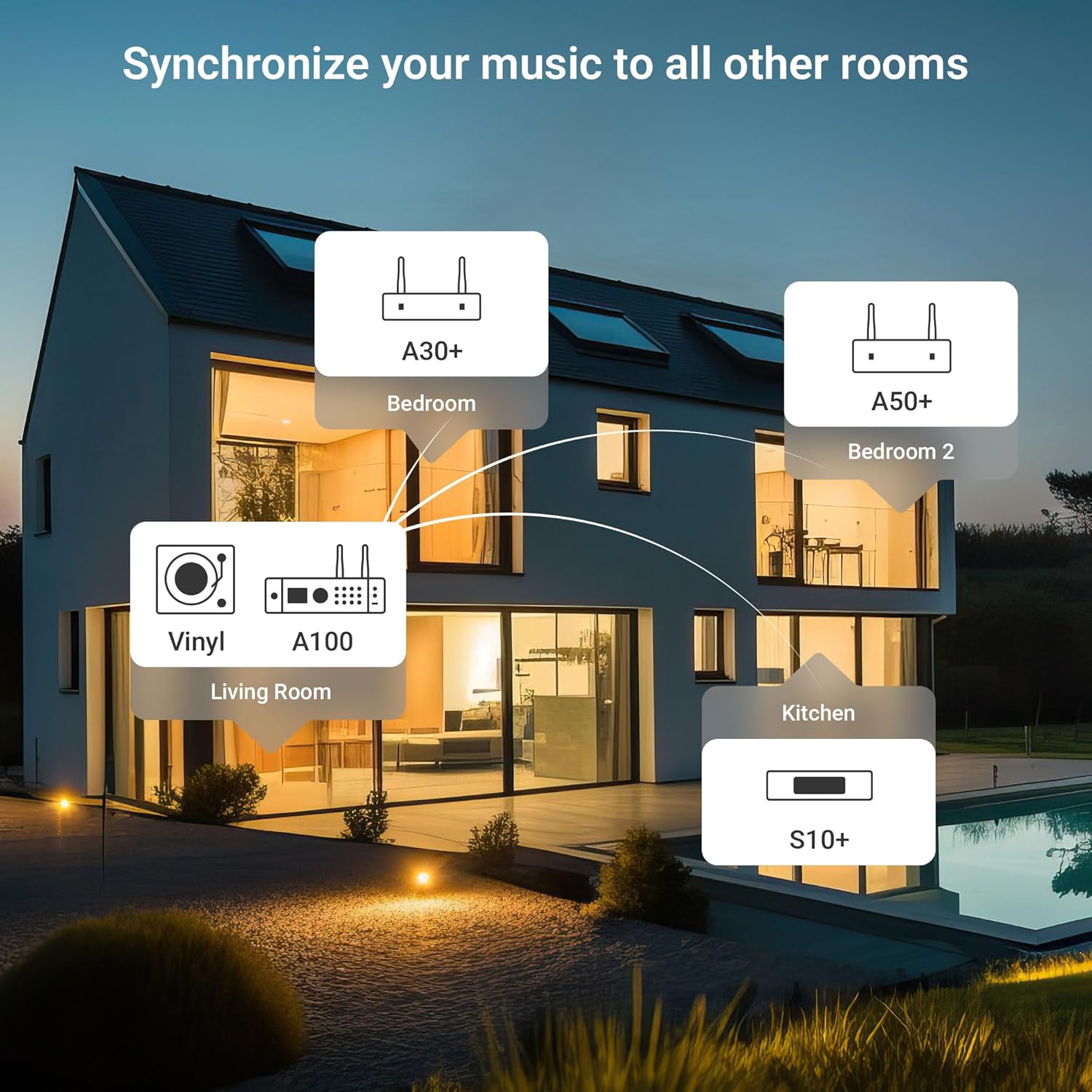
This diagram illustrates a multiroom audio setup, showing how various Arylic devices, including the A100, can be distributed throughout a home to play synchronized or independent music.
6.6 App Control (Go Control / 4Stream)
The "Go Control" and "4Stream" apps provide comprehensive control over the A100 amppiù vivace.
- Scaricamento: Obtain the apps from your mobile device's app store.
- Funzioni: Adjust volume, switch input sources, manage multiroom zones, and apply equalizer (EQ) settings.

This image displays multiple screenshots of the "Go Control" mobile application, showcasing its interface for managing audio settings, input sources, and multiroom configurations.
6.7 Riproduzione USB
The A100 supports audio playback from USB storage devices.
- Inserisci un'unità USB contenente audio files into either the front or rear USB port.
- Select USB as the input source.
- Playback can be controlled via the front panel buttons or the mobile app.

This image illustrates a USB drive connected to the Arylic A100 amplifier, with a smartphone screen displaying a music playlist, indicating USB playback functionality.
7. Manutenzione
- Pulizia: Utilizzare un panno morbido e asciutto per pulire l'esterno dell'unità. Non utilizzare detergenti liquidi o spray.
- Ventilazione: Controllare periodicamente che le aperture di ventilazione siano libere da polvere e detriti.
- Magazzinaggio: Se si conserva l'unità per un periodo prolungato, scollegarla dall'alimentazione e conservarla in un luogo fresco e asciutto.
8. Risoluzione Dei Problemi
| Problema | Possibile causa | Soluzione |
|---|---|---|
| Nessun potere | Cavo di alimentazione non collegato; presa di corrente non attiva. | Assicurarsi che il cavo di alimentazione sia collegato saldamente. Testare la presa con un altro dispositivo. |
| Nessuna uscita audio | Incorrect input source selected; Speaker cables loose; Volume too low; Mute activated. | Select the correct input source. Check speaker connections. Increase volume. Deactivate mute. |
| Impossibile connettersi al WiFi | Incorrect WiFi password; Router too far; WiFi antenna not connected. | Verify WiFi password. Move unit closer to router or use wired LAN. Ensure WiFi antenna is connected. Re-run app setup. |
| L'associazione Bluetooth non riesce | Bluetooth not selected as input; Device already paired to another unit; Bluetooth antenna not connected. | Select Bluetooth input. Disconnect from other devices. Ensure Bluetooth antenna is connected. Try pairing again. |
| Scarsa ricezione della radio FM | FM antenna not properly positioned or connected. | Adjust the position of the FM wire antenna. Ensure it is fully extended and connected. Consider an external FM antenna for improved reception. |
| Il microfono non funziona | Microfono non collegato correttamente; volume del microfono troppo basso. | Ensure microphones are securely plugged into Mic 1/2 jacks. Adjust microphone volume. |
9. Specifiche
| Caratteristica | Dettaglio |
|---|---|
| Modello | A100 |
| Potenza di uscita | 100W x 2 (into 4 Ohms) |
| Connettività wireless | WiFi, Bluetooth, AirPlay, Spotify Connect, DLNA, UPnP |
| Ingressi audio | Line In (RCA), Phono In (RCA), Optical In, Coaxial In, USB (front & rear), Dual Microphone (front) |
| Uscite audio | Speaker Terminals (R/L), Line Out (RCA) |
| Caratteristiche speciali | FM Radio, Multiroom Audio, App Control (Go Control/4Stream), Built-in Power Supply with Toroidal Transformer, TPA3255 Amplifier Chip, ESS 9023P DAC |
| Dimensioni del pacco | 14 x 10.8 x 4.4 pollici |
| Peso dell'articolo | 3 libbre |
| Produttore | Rakoit Technology (Shenzhen) Co., Ltd. |
10. Garanzia e supporto
For warranty information and technical support, please refer to the official Arylic webo contattare il rivenditore locale. Conservare la ricevuta d'acquisto per eventuali reclami in garanzia.
Produttore: Rakoit Technology (Shenzhen) Co., Ltd.
Per ulteriore assistenza, visitare il Arylic Store on Amazon.


