Introduzione
Grazie per l'acquistoasing the Levoit Smart Stand Fan. This fan is designed to provide powerful yet quiet air circulation for large rooms, featuring smart control options via app and voice assistants, multiple modes, and adjustable oscillation. Please read this manual thoroughly before use and keep it for future reference.

Image: The Levoit Smart Stand Fan, showcasing its sleek design, accompanying remote control, and a smartphone displaying the VeSync app interface for smart control.
Informazioni sulla sicurezza
Per ridurre il rischio di incendi, scosse elettriche o lesioni, osservare le seguenti precauzioni di sicurezza:
- Scollegare sempre il ventilatore prima di pulirlo o di effettuare qualsiasi intervento di manutenzione.
- Non inserire dita o oggetti estranei nella griglia della ventola.
- Keep the fan away from water and moisture. Do not use in wet environments.
- Assicurarsi che il ventilatore sia posizionato su una superficie stabile e piana per evitare che si ribalti.
- Non ostruire le aperture dell'aria.
- The fan housing may become warm during use; this is normal and within safe temperature standards.
Contenuto della confezione
- Levoit Smart Stand Fan
- Telecomando
- Cavo di alimentazione
- Manuale dell'utente (questo documento)
Impostare
The Levoit Smart Stand Fan is designed for easy assembly. Follow these steps to set up your fan:
- Rimuovere con attenzione tutti i componenti dalla confezione.
- Attach the fan head to the stand, ensuring it clicks securely into place.
- Collegare il cavo di alimentazione al ventilatore e poi collegarlo a una presa elettrica standard.
- Posizionare il ventilatore su una superficie solida e piana.
For optimal performance, ensure the fan is positioned where airflow is not obstructed.
Istruzioni per l'uso
Metodi di controllo
The Levoit Smart Stand Fan offers versatile control options:
- Visualizzazione sul dispositivo: Use the buttons on the fan's main body to adjust settings.
- Telecomando: The included remote allows convenient control from a distance. The remote is magnetic and can be stored on the back of the fan.
- VeSync App: Download the VeSync app from the App Store or Google Play to control your fan from your smartphone. This enables advanced features and scheduling.
- Controllo vocale (Alexa): Integrazione con Amazon Alexa per un utilizzo a mani libere.

Image: A woman relaxing in bed, demonstrating voice control of the Levoit Smart Stand Fan via an Amazon Alexa device.
Modalità ventola
Choose from four distinct modes to suit your comfort needs:
- Modalità normale: Standard continuous airflow.
- Modalità Turbo: Provides maximum airflow for rapid cooling.
- Modalità ecologica: Energy-efficient mode that adjusts fan speed based on ambient temperature.
- Modalità risparmio: Operates at a very low noise level (as low as 20 dB) for undisturbed sleep. The display can be turned off in this mode.

Image: A smartphone screen displaying the VeSync app with "Sleep Mode" activated, illustrating the fan's quiet operation at 20 dB for a peaceful night's sleep.
Impostazioni di velocità
The fan features 12 adjustable speed levels, offering precise control over airflow intensity. Airflow can reach up to 7.5 m/s.

Image: A woman smiling, enjoying the powerful and fast airflow (7.5 m/s) from the Levoit Smart Stand Fan, illustrating its effectiveness in providing quick relief from heat.
Oscillazione
Distribute cool air throughout your entire room with adjustable oscillation:
- Oscillazione verticale: Fino a 120°
- Oscillazione orizzontale: Fino a 90°
Control oscillation angles via the display, remote, or VeSync app. The fan can circulate air up to 30 meters, ensuring comfort even in large spaces.
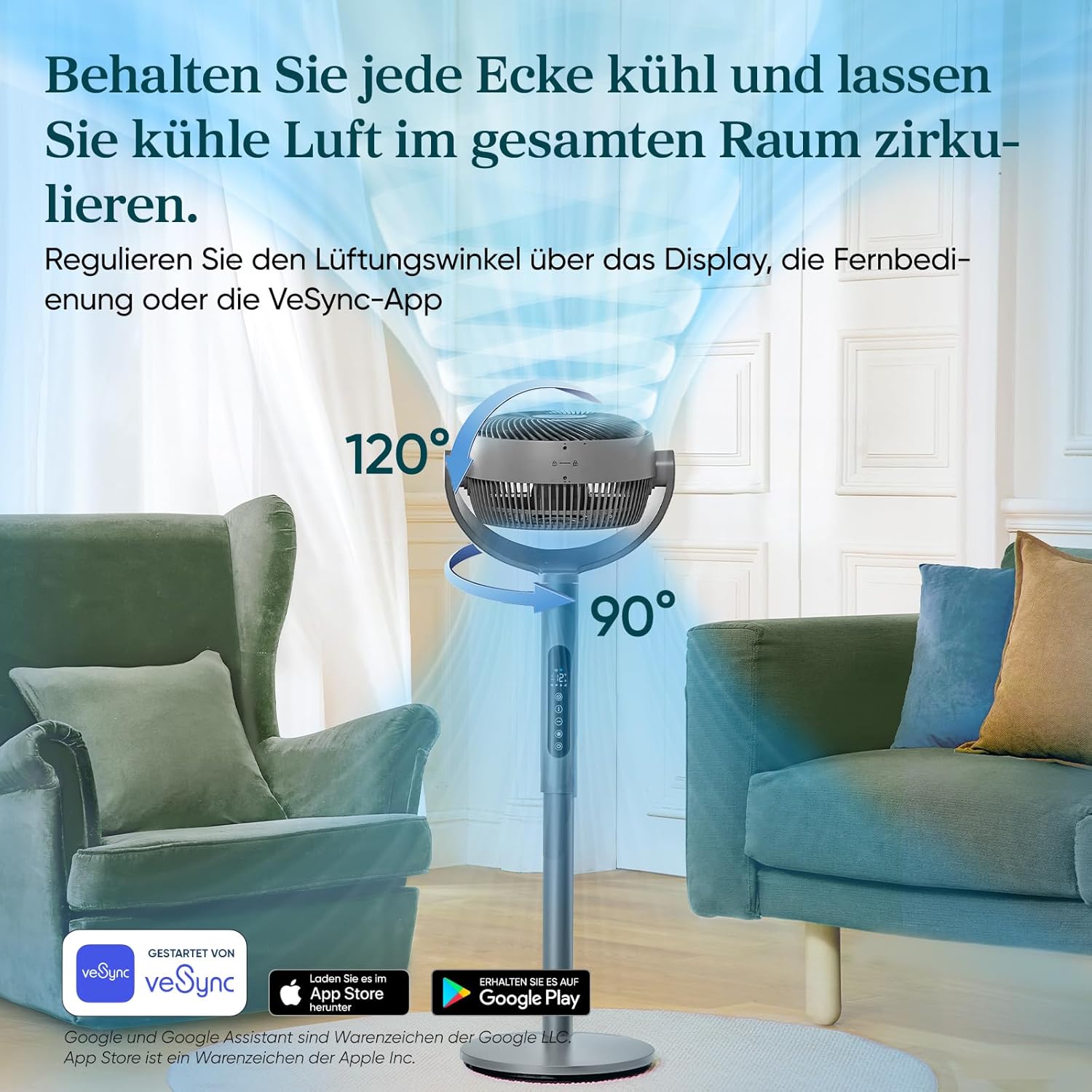
Image: A visual representation of the Levoit Smart Stand Fan's adjustable oscillation, showing its ability to move air vertically up to 120 degrees and horizontally up to 90 degrees, ensuring comprehensive room coverage.

Image: The Levoit Smart Stand Fan effectively circulating cool air across a large living space, demonstrating its impressive 30-meter air throw capability to keep distant areas comfortable.
Funzione timer
Set a timer for up to 12 hours for automatic fan shut-off, ideal for energy saving or nighttime use.
Efficienza energetica
The Levoit Smart Stand Fan is highly energy-efficient, consuming a maximum of 30 Watts.

Image: A visual representation of the fan's low power consumption, showing a lightbulb plugged into an outlet with "30 Watt, Max." indicating its energy efficiency.
Manutenzione
Una manutenzione regolare garantisce prestazioni ottimali e longevità del ventilatore.
- Pulizia:
- Prima di pulire il ventilatore, staccare sempre la spina.
- Pulire le superfici esterne con un panno morbido, damp stoffa.
- To clean the fan blades, carefully remove the front grille (refer to assembly instructions for reverse steps if needed). Use a soft brush or cloth to remove dust. Ensure all parts are dry before reassembling and operating.
- Magazzinaggio: Quando non viene utilizzato per lunghi periodi, conservare il ventilatore in un luogo fresco e asciutto, preferibilmente nella confezione originale.
Risoluzione dei problemi
If you encounter issues with your Levoit Smart Stand Fan, please refer to the following common problems and solutions:
| Problema | Possibile causa | Soluzione |
|---|---|---|
| La ventola non si accende. | Not plugged in; Power outlet malfunction; Remote control battery low. | Ensure the power cord is securely plugged into a working outlet. Check remote control batteries and replace if necessary. |
| Flusso d'aria debole. | Fan speed too low; Obstruction in front/back of fan; Dirty blades. | Aumentare la velocità della ventola. Rimuovere eventuali ostruzioni. Pulire le pale e la griglia della ventola. |
| La ventola è rumorosa. | Ventilatore non posizionato su una superficie piana; Parti allentate; Ostruzione. | Place fan on a stable, level surface. Check for any loose components and secure them. Ensure no foreign objects are in the fan. Note: Oscillation motors may produce a slight sound, which is normal. |
| Telecomando non funzionante. | Batterie scariche o inserite in modo errato; ostruzione tra il telecomando e la ventola. | Replace batteries, ensuring correct polarity. Ensure a clear line of sight between the remote and the fan's receiver. |
| Problemi di connettività dell'app. | Wi-Fi signal weak; Incorrect network settings; App outdated. | Ensure your Wi-Fi network is stable. Restart your router and the fan. Update the VeSync app to the latest version. Re-pair the device if necessary. |
Specifiche
| Caratteristica | Dettaglio |
|---|---|
| Marca | Levitazione |
| Numero di modello | LPF-R432S-WEU |
| Colore | Grigio |
| Dimensioni (prodotto) | 32P x 36.6L x 110A cm |
| Peso | 7.4 chilogrammi |
| Energia | 30 Watt (massimo) |
| Voltage | 120V |
| Livello di rumore | 20 dB (minimo) |
| Distanza di lancio in aria | Fino a 30 metri |
| Velocità dell'aria | Fino a 7.5 m/s |
| Oscillazione | 120° Verticale, 90° Orizzontale |
| Modalità | Turbo, Normal, Eco, Sleep |
| Livelli di velocità | 12 |
| Timer | Fino a 12 ore |
Garanzia e supporto
The Levoit Smart Stand Fan comes with a Garanzia di 2 anno. For warranty claims, technical support, or any questions regarding your product, please contact Levoit customer service. You can find contact information on the official Levoit websito o tramite l'app VeSync.
For the latest updates and support resources, visit the official Levoit websito: www.levoit.com


