Introduzione
The SONRU B110 is a versatile 2-in-1 Bluetooth 5.3 audio adapter designed to transform your audio experience. It functions as both a Bluetooth transmitter (TX mode) and a Bluetooth receiver (RX mode), allowing you to wirelessly stream audio to and from various devices. Enjoy high-fidelity sound, low latency, and extended battery life for home entertainment, travel, and on-the-go use.
Contenuto della confezione
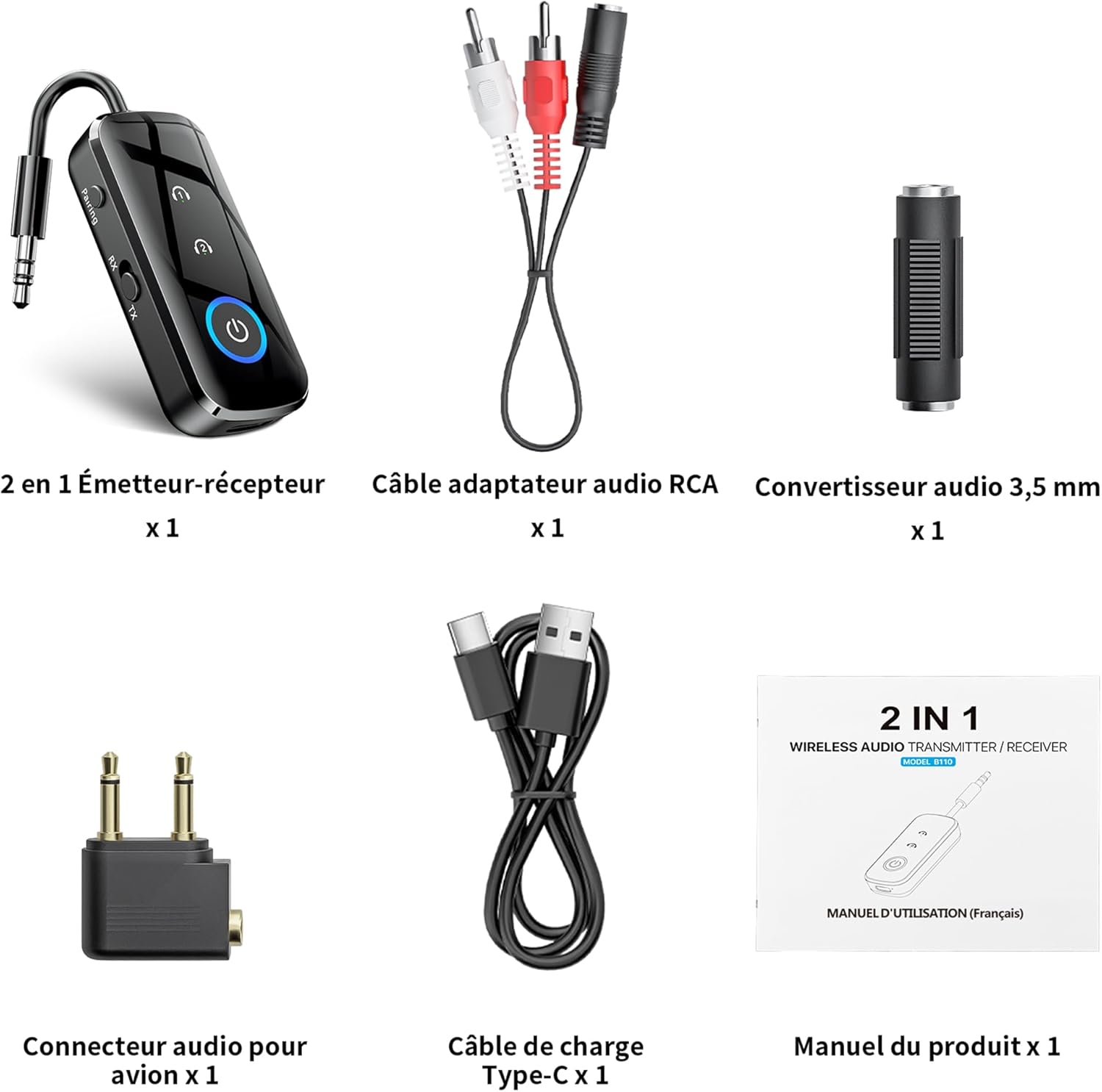
Figura 1: Contenuto della confezione
- 1 x SONRU B110 2-in-1 Bluetooth Transmitter/Receiver
- 1 x RCA Audio Adapter Cable
- 1 convertitore audio da 3.5 mm
- 1 x Airplane Audio Connector
- 1 x Cavo di ricarica tipo-C USB
- 1 x Manuale utente
Prodotto finitoview

Figure 2: Device Features and Controls
The SONRU B110 features a compact design with essential controls for easy operation. It includes a 3.5mm audio jack, a mode switch (RX/TX), power button, and volume/track control buttons. The device also has a USB-C charging port.
Specifiche
| Caratteristica | Dettaglio |
|---|---|
| Modello | B110 |
| Versione Bluetooth | 5.3 |
| Protocolli Bluetooth | A2DP/AVRCP (Reception), A2DP (Emission) |
| Campo di funzionamento | >10 meters (open space) |
| Interfaccia audio | Universal 3.5 mm audio input/output |
| Capacità della batteria | 250 mAh |
| Tempo di ricarica | Circa 1.5 ore (USB-C) |
| Durata della batteria (modalità TX) | Fino a 15 ore |
| Durata della batteria (modalità RX) | Fino a 12 ore |
| Dimensioni | Dimensioni: 13.9 x 11.6 x 2 cm |
| Peso | 110 grammi |
| Caratteristiche speciali | Automatic connection memory, Dual connection, Fast Charging, Hands-Free Calls, Low Latency |
Impostare
1. Carica del dispositivo
Before first use, fully charge your SONRU B110.
- Collegare il cavo di ricarica USB Type-C in dotazione alla porta di ricarica del dispositivo.
- Collegare l'altra estremità del cavo a un adattatore di alimentazione USB (non incluso) o alla porta USB di un computer.
- La spia di carica indicherà lo stato di carica. Una carica completa richiede circa 1.5 ore.
- Once fully charged, the device offers up to 15 hours of use in Transmitter (TX) mode and 12 hours in Receiver (RX) mode.

Figura 3: Ricarica e durata della batteria
2. Abbinamento in modalità trasmettitore (TX)
TX mode allows you to transmit audio from non-Bluetooth devices (e.g., TV, PC, airplane entertainment system) to Bluetooth headphones or speakers.
- Switch the device to TX mode.
- Connect the SONRU B110 to your audio source (e.g., TV, PC, MP3 player) using the 3.5mm audio cable. For airplane entertainment systems, use the provided airplane audio connector.
- Accendi le cuffie o l'altoparlante Bluetooth e impostali in modalità di associazione.
- The SONRU B110 will automatically search for and connect to nearby Bluetooth devices. The indicator light will confirm a successful connection.
- Doppia connessione: The device supports connecting to two Bluetooth headphones/speakers simultaneously. After connecting the first device, put the second device into pairing mode. The B110 will automatically connect to it.

Figure 4: TX Mode in an Airplane

Figura 5: Doppia connessione in modalità TX
3. Accoppiamento in modalità ricevitore (RX)
RX mode allows you to receive audio from your Bluetooth-enabled smartphone, tablet, or computer and play it through non-Bluetooth devices like car stereos, wired headphones, or home speaker systems.
- Switch the device to RX mode.
- Connect the SONRU B110 to your non-Bluetooth audio device (e.g., car stereo, wired speaker) using the 3.5mm audio cable.
- Enable Bluetooth on your smartphone, tablet, or computer and search for "SONRU B110" in the list of available devices.
- Select "SONRU B110" to pair. The indicator light will confirm a successful connection.
- Riconnessione automatica: The device has an automatic connection memory function. After a successful connection, re-enabling Bluetooth on your phone will automatically connect to the B110.

Figure 6: RX Mode in a Car

Figure 7: TX and RX Mode Compatibility
Istruzioni per l'uso
Accensione/spegnimento
- Accensione: Premere e tenere premuto il pulsante di accensione finché la spia non si accende.
- Spegni: Premere e tenere premuto il pulsante di accensione finché la spia non si spegne.
Cambio di modalità
- Use the TX/RX switch on the side of the device to select the desired mode (Transmitter or Receiver).
Controllo musicale (modalità RX)
- Riproduci/Pausa: Premi una volta il pulsante di accensione.
- Traccia successiva: Premere e tenere premuto il pulsante "+".
- Traccia precedente: Premere e tenere premuto il pulsante "-".
- Aumenta volume: Premere brevemente il pulsante "+".
- Volume basso: Premere brevemente il pulsante "-".
Call Management (RX Mode)
The SONRU B110 features a built-in microphone for hands-free calls when in RX mode.
- Rispondi/Termina chiamata: Premi una volta il pulsante di accensione.
- Rifiuta chiamata: Premere e tenere premuto il pulsante di accensione.
- Ricomponi l'ultimo numero: Premere due volte il pulsante di accensione.
Manutenzione
- Mantenere il dispositivo asciutto. Evitare l'esposizione a umidità o liquidi.
- Non tentare di smontare o modificare il dispositivo.
- Pulisci il dispositivo con un panno morbido e asciutto. Non utilizzare prodotti chimici aggressivi o detergenti abrasivi.
- Conservare il dispositivo in un luogo fresco e asciutto quando non viene utilizzato.
- Evitare temperature estreme.
Risoluzione dei problemi
- Il dispositivo non si accende:
- Ensure the device is fully charged. Connect it to a power source using the USB-C cable and try again.
- Impossibile effettuare l'associazione con un dispositivo Bluetooth:
- Make sure the SONRU B110 is in the correct mode (TX for transmitting, RX for receiving).
- Ensure your target Bluetooth device (headphones, speaker, phone) is in pairing mode.
- Place the devices close to each other.
- Cancellare i precedenti record di associazione su entrambi i dispositivi e riprovare ad associarli.
- Nessun suono o scarsa qualità audio:
- Check if the 3.5mm audio cable is securely connected to both the SONRU B110 and the audio source/receiver.
- Ensure the volume on both the SONRU B110 and the connected audio device is turned up.
- Verify that the correct input/output source is selected on your audio system (e.g., AUX input on car stereo).
- Reduce the distance between the B110 and the paired Bluetooth device, and remove any obstacles.
- Assicurarsi che non vi siano interferenze da parte di altri dispositivi wireless.
- Dual connection not working:
- Ensure both target Bluetooth devices are in pairing mode when attempting to connect the second device.
- Device not compatible with musical instruments or hearing aids:
- As stated in the product features, this device is not designed for use with musical instruments or hearing aids.
Garanzia e supporto
SONRU products are designed for reliability and performance. For warranty information or technical support, please refer to the contact details provided on the product packaging or visit the official SONRU websito. Conservare la prova d'acquisto per eventuali reclami in garanzia.


