1. Introduzione
Thank you for choosing the Ewent EW3295 Backlit Wireless Keyboard. This full-size keyboard offers versatile connectivity options, including Bluetooth 5.0 and 2.4GHz wireless, allowing you to connect up to three devices simultaneously. Its slim design, silent keys, and adjustable backlight provide a comfortable and efficient typing experience. This manual provides detailed instructions for setup, operation, and maintenance to ensure optimal performance of your keyboard.

Figure 1.1: Slim and sturdy design of the EW3295 keyboard.
2. Caratteristiche principali
- Wireless Multi-Device Connection: Connect up to 3 devices simultaneously via Bluetooth 5.0 (x2) or wireless 2.4 GHz. Easily switch between devices with just one button.
- Retroilluminazione regolabile: The keyboard's backlight is dimmable and can be turned off completely, ideal for various lighting conditions.
- Flat & Quiet Design: Flat, silent keys ensure a comfortable and low-noise typing experience, suitable for quiet environments.
- 12 tasti multimediali: Quick access to functions like volume control, email, and other operations.
- Batteria ricaricabile a lunga durata: Equipped with a 300mAh lithium battery and intelligent energy-saving function for extended use.
- Ampia compatibilità: Compatible with Windows (XP, 7, 8.1, 10, 11) and Android, suitable for PCs, laptops, and tablets.
- Design robusto e durevole: Made of high-density polycarbonate, lightweight yet durable, with a compact design.
- Layout italiano: Features an Italian QWERTY keyboard layout.
3. Contenuto della confezione
Si prega di controllare il contenuto della confezione dopo averla disimballata:
- Ewent EW3295 Backlit Wireless Keyboard
- USB-A 2.4GHz Wireless Receiver
- Cavo di ricarica da USB-C a USB-A
- Manuale dell'utente (questo documento)
4. Guida all'installazione
4.1 Ricarica della tastiera
The EW3295 keyboard is equipped with a built-in rechargeable 300mAh lithium battery. Before first use, it is recommended to fully charge the keyboard.
- Locate the USB Type-C charging port on the rear panel of the keyboard.
- Connect one end of the provided USB-C charging cable to the keyboard's USB-C port.
- Connect the other end of the USB-A cable to a USB power source (e.g., computer USB port, USB wall adapter).
- The charging indicator light (if present) will illuminate during charging and turn off when fully charged. A full charge takes less than 1 hour and provides over 1 month of use.

Figure 4.1: Rear panel of the keyboard with charging port and receiver compartment.
4.2 Collegamento della tastiera
The EW3295 keyboard supports three connection modes: 2.4GHz wireless and two Bluetooth 5.0 channels (BT1, BT2). You can connect up to three devices and switch between them.
4.2.1 Connessione wireless a 2.4 GHz
- Locate the USB-A wireless receiver, typically stored in a compartment on the rear panel of the keyboard.
- Collega il ricevitore USB-A a una porta USB disponibile sul tuo computer o dispositivo.
- Premere il tasto Fn + 1 keys on the keyboard to switch to 2.4GHz mode. The indicator light for channel 1 will illuminate.
- La tastiera dovrebbe connettersi automaticamente al tuo dispositivo.

Figure 4.2: Ewent EW3295 keyboard and its USB wireless receiver.
4.2.2 Connessione Bluetooth (BT1 / BT2)
- Premere il tasto Fn + 2 keys to select Bluetooth channel 1 (BT1) or Fn + 3 keys to select Bluetooth channel 2 (BT2). The corresponding indicator light will flash, indicating pairing mode.
- Sul tuo dispositivo (PC, laptop, tablet), attiva il Bluetooth e cerca nuovi dispositivi.
- Select "EW3295" or a similar name from the list of available Bluetooth devices.
- Follow any on-screen prompts to complete the pairing process. Once connected, the indicator light will stop flashing and remain solid.
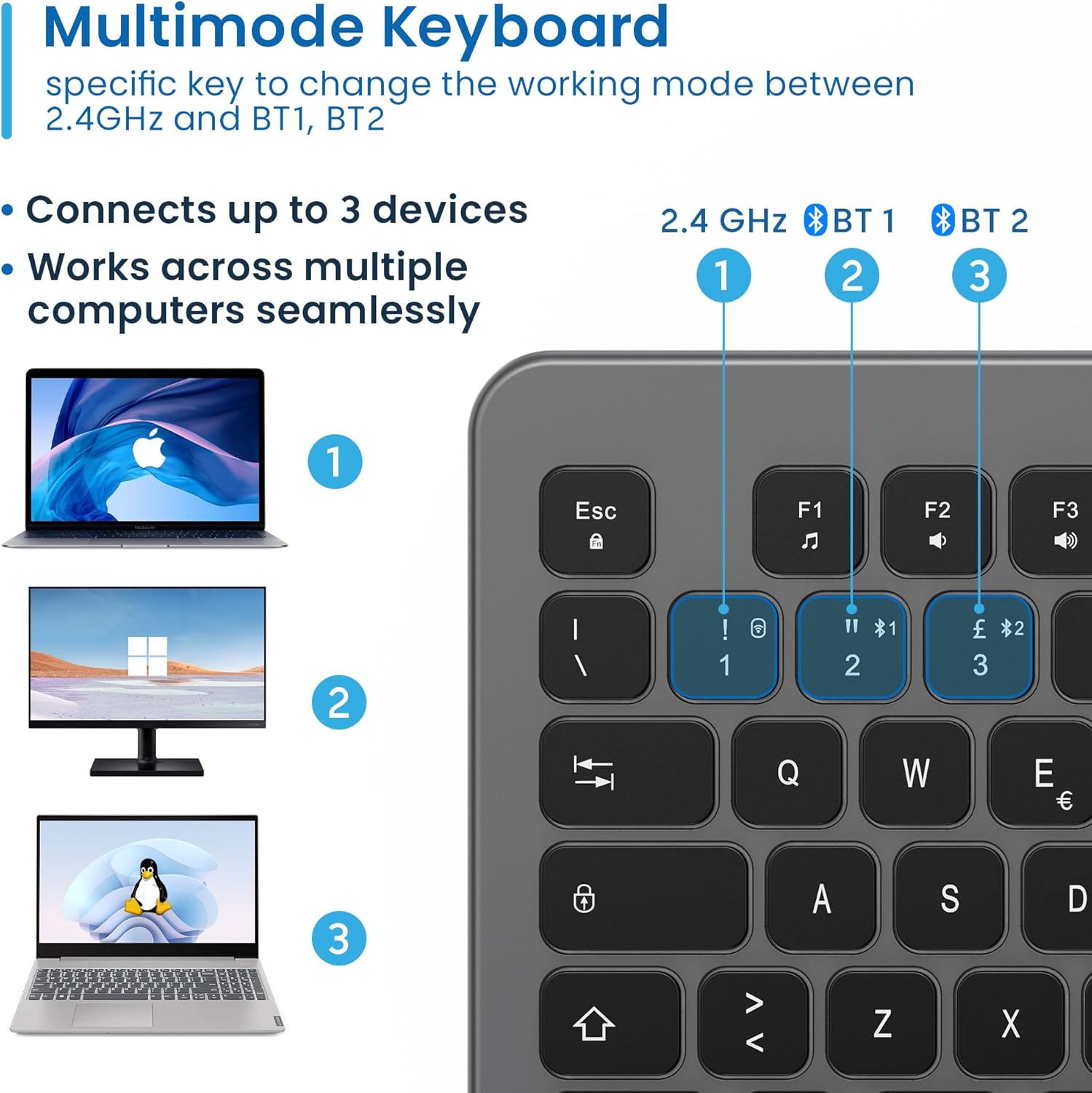
Figure 4.3: Multi-device connectivity options for the EW3295 keyboard.
4.2.3 Passaggio tra dispositivi connessi
Once multiple devices are paired, you can easily switch between them:
- Premere Fn + 1 to switch to the 2.4GHz connected device.
- Premere Fn + 2 per passare al dispositivo Bluetooth 1 connesso.
- Premere Fn + 3 per passare al dispositivo Bluetooth 2 connesso.
5. Istruzioni per l'uso
5.1 Digitazione di base
The EW3295 features a full-size Italian QWERTY layout. Its flat and silent keys provide a comfortable and precise typing experience, reducing noise in quiet environments.

Figure 5.1: Illuminated Italian QWERTY Keyboard Layout.

Figure 5.2: Silent keys for reduced noise.
5.2 Controllo della retroilluminazione
The keyboard features an adjustable backlight for improved visibility in low-light conditions.
- Retroilluminazione ON/OFF: Premere il tasto Blocco Scorr key (often labeled with a lightbulb icon) to toggle the backlight on or off.
- Backlight Brightness Up: Premere Fn + Pag ↑ per aumentare la luminosità della retroilluminazione.
- Backlight Brightness Down: Premere Fn + Pag ↓ per diminuire la luminosità della retroilluminazione.
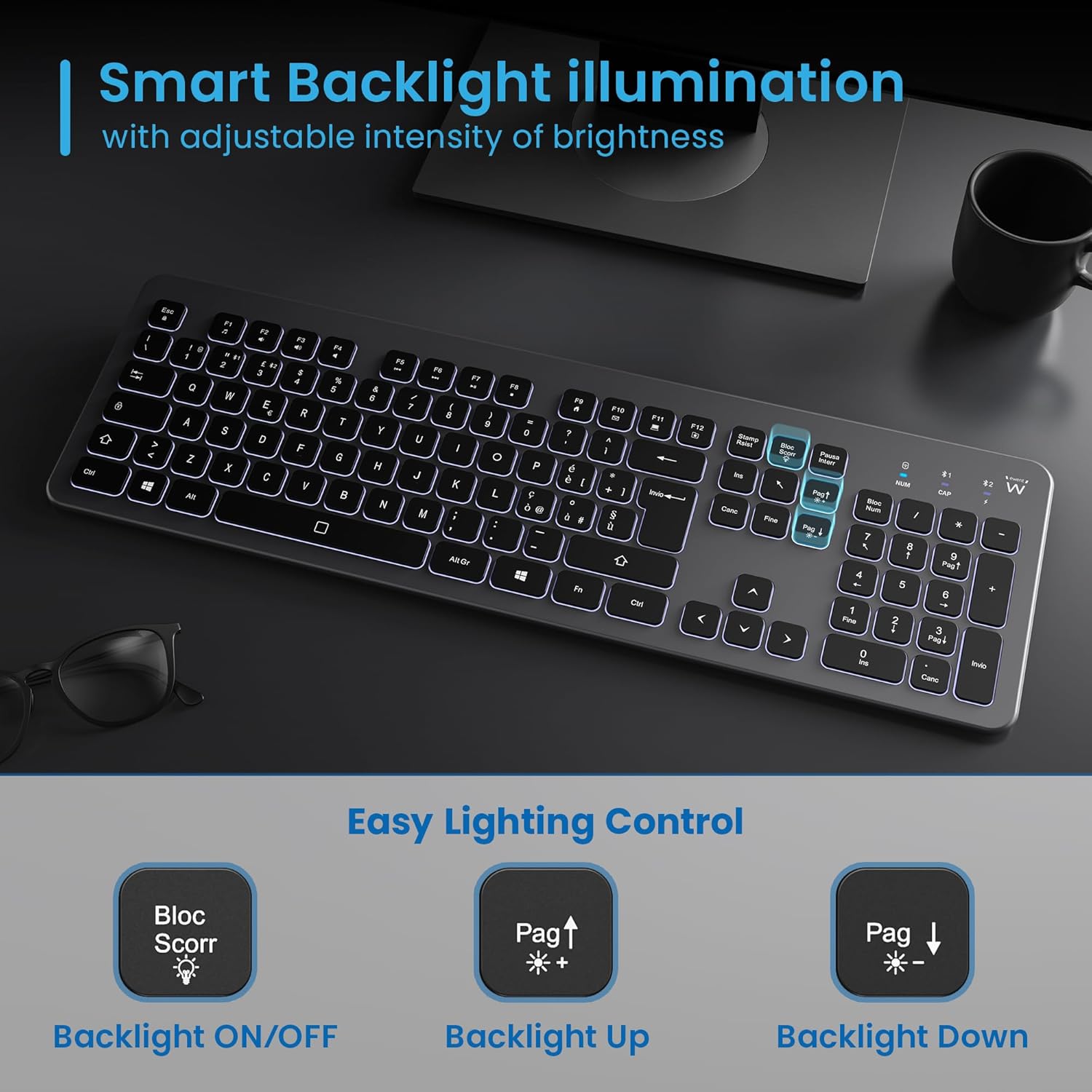
Figure 5.3: Backlight control keys.
5.3 tasti multimediali
The keyboard includes 12 dedicated multimedia keys (F1-F12) that provide quick access to various functions. To use these functions, press the Fn tasto contemporaneamente al tasto F desiderato.
| Combinazione di tasti | Funzione |
|---|---|
| Tasto F1 | Lettore multimediale |
| Tasto F2 | Abbassa il volume |
| Tasto F3 | Alza il volume |
| Tasto F4 | Muto |
| Tasto F5 | Traccia precedente |
| Tasto F6 | Traccia successiva |
| Tasto F7 | Riproduci/Pausa |
| Tasto F8 | Fermare |
| Tasto F9 | Pagina iniziale |
| Tasto F10 | |
| Tasto F11 | Il mio computer |
| Tasto F12 | Calcolatrice |
6. Manutenzione e cura
Una corretta manutenzione garantisce la longevità e le prestazioni ottimali della tastiera.
- Pulizia: Utilizzare un panno morbido, asciutto e privo di lanugine per pulire la superficie della tastiera. Per lo sporco ostinato, leggermente dampPulire il panno con acqua o con un detergente delicato e non abrasivo. Evitare l'eccessiva umidità.
- Evitare i liquidi: Do not spill liquids on the keyboard. In case of accidental spills, immediately disconnect the keyboard and allow it to dry completely before re-using.
- Magazzinaggio: Quando non viene utilizzata per lunghi periodi, conservare la tastiera in un luogo fresco e asciutto, lontano dalla luce solare diretta e da temperature estreme.
- Cura della batteria: To prolong battery life, avoid fully discharging the battery frequently. Charge the keyboard when the low battery indicator appears.
- Memoria del ricevitore: When transporting the keyboard, store the USB wireless receiver in its dedicated compartment on the rear panel to prevent loss.
7. Risoluzione Dei Problemi
If you encounter issues with your EW3295 keyboard, please refer to the following common solutions:
| Problema | Possibile causa | Soluzione |
|---|---|---|
| La tastiera non risponde (2.4 GHz) | Low battery; Receiver not plugged in; Incorrect channel selected. | Charge the keyboard; Ensure USB receiver is securely plugged in; Press Fn + 1 to select 2.4GHz mode. |
| La tastiera non risponde (Bluetooth) | Low battery; Bluetooth not enabled on device; Not paired; Incorrect channel selected. | Charge the keyboard; Enable Bluetooth on your device; Re-pair the keyboard (see Section 4.2.2); Press Fn + 2 or Fn + 3 per selezionare il canale Bluetooth corretto. |
| Retroilluminazione non funzionante | Retroilluminazione disattivata; batteria scarica. | Premere Blocco Scorr to turn on/off; Increase brightness with Fn + Pag ↑; Charge the keyboard. |
| I tasti sono bloccati o non rispondono | Dirt or debris under keys; Physical damage. | Clean the keyboard (see Section 6); If physical damage, contact support. |
| Durata breve della batteria | Uso frequente della retroilluminazione; degrado della batteria nel tempo. | Reduce backlight brightness or turn it off when not needed; Ensure full charge cycles. |
8. Specifiche
| Caratteristica | Dettaglio |
|---|---|
| Nome del modello | Tastiera Wireless Retroilluminata EW3295 |
| Numero modello articolo | EW3295 |
| Marca | Ewent |
| Tecnologia di connettività | Bluetooth 5.0 (x2), 2.4GHz Wireless |
| Descrizione della tastiera | Multimedia, Full-size, Italian Layout |
| Dispositivi compatibili | PC (Windows XP, 7, 8.1, 10, 11), Android |
| Tipo di batteria | Batteria al litio ricaricabile da 300 mAh |
| Retroilluminazione | Intensità regolabile |
| Dimensioni (L x P x A) | Circa. 432mm x 122mm x 22mm |
| Peso | Circa 390 g |
| Materiale | High-density Polycarbonate |

Figure 8.1: Keyboard dimensions and weight.
9. Informazioni sulla garanzia
Ewent products are designed and manufactured to the highest quality standards. This product is covered by a limited warranty from the date of purchase. Please refer to the warranty card included with your product or visit the official Ewent website for detailed warranty terms and conditions specific to your region. The warranty typically covers defects in materials and workmanship under normal use.
10. Assistenza clienti
For technical support, troubleshooting assistance, or any questions regarding your Ewent EW3295 keyboard, please contact Ewent customer support. You can typically find contact information (phone, email, support portal) on the official Ewent websito o nella confezione del prodotto.
Please have your product model number (EW3295) and purchase details ready when contacting support.