Introduzione
Grazie per aver scelto il neroview W50PRO Smartwatch. This manual provides essential information for setting up, operating, and maintaining your device. Please read it carefully to ensure optimal performance and a safe user experience. Keep this manual for future reference.
Contenuto della confezione
Verifica che tutti gli articoli siano presenti nel tuo pacco:
- Neroview W50PRO Smartwatch
- Cinturino in silicone
- Replacement Nylon Braided Strap
- Cavo di ricarica magnetico
- Manuale dell'utente (questo documento)

Immagine: Contenuto della confezione e dimensioni del prodotto.
Prodotto finitoview
Il Neroview W50PRO Smartwatch features a 1.45-inch HD touchscreen display, function buttons, a powerful flashlight, and a comfortable silicone strap. Its robust design is suitable for various activities.

Immagine: Neroview W50PRO Smartwatch with its key features labeled.
Impostare
1. Carica del dispositivo
Prima del primo utilizzo, carica completamente lo smartwatch. Collega il cavo di ricarica magnetico ai punti di ricarica sul retro dell'orologio e collega l'estremità USB a un adattatore di alimentazione (non incluso) o alla porta USB di un computer. L'orologio visualizzerà un indicatore di carica.
- Una carica completa richiede in genere circa 3 ore.
- The 960mAh battery provides up to 30 days of typical use and 100 days of standby time.

Image: Battery capacity and charging information.
2. Installazione dell'app
Scarica e installa il "Da Fit" application on your smartphone. You can find it in the App Store (iOS) or Google Play Store (Android).
3. Device Pairing and Bluetooth Calls
To connect your smartwatch and enable Bluetooth calling:
- Download the Da Fit app from your phone's app store.
- Abilita il Bluetooth sul tuo smartphone.
- Open the Da Fit app and add your device.
- Confirm the pairing request on your phone and watch.
- Grant necessary notification permissions within the Da Fit app for calls and messages.
- Una volta effettuato l'abbinamento, potrai effettuare e ricevere chiamate direttamente dal tuo orologio.

Image: Connection and calling setup guide.
Istruzioni per l'uso
1. Navigazione di base
- Schermo tattile: Scorri verso sinistra/destra, verso l'alto/verso il basso per navigare nei menu e accedere alle funzioni. Tocca per selezionare.
- Pulsanti funzione: Use the physical buttons on the side of the watch for quick access to specific functions or to return to the home screen.
2. Flashlight and Compass
The W50PRO includes a built-in flashlight and compass for outdoor activities.
- Torcia elettrica: Activate the flashlight feature from the watch's menu. It offers fixed and intermittent modes for various situations.
- Bussola: Access the compass feature from the watch's menu for accurate directional guidance.
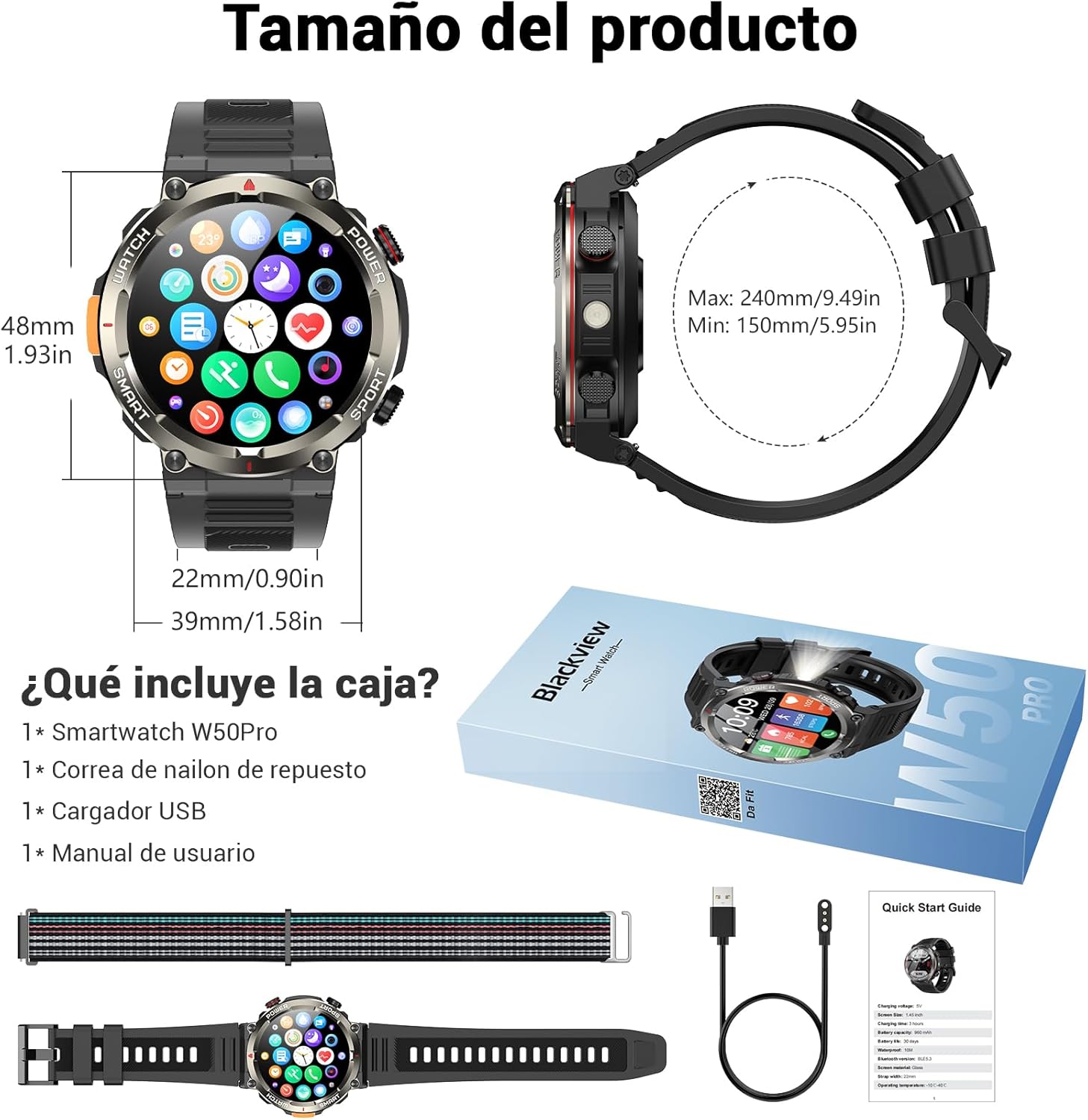
Image: Compass feature for outdoor navigation.

Image: Powerful LED flashlight in action.
3. Chiamate e notifiche Bluetooth
Once paired with your smartphone, the W50PRO allows you to manage calls and notifications directly from your wrist.
- Effettua/Ricevi chiamate: Use the integrated speaker and microphone to make or answer calls.
- Notifiche: Receive real-time alerts for text messages, emails, and social media apps.
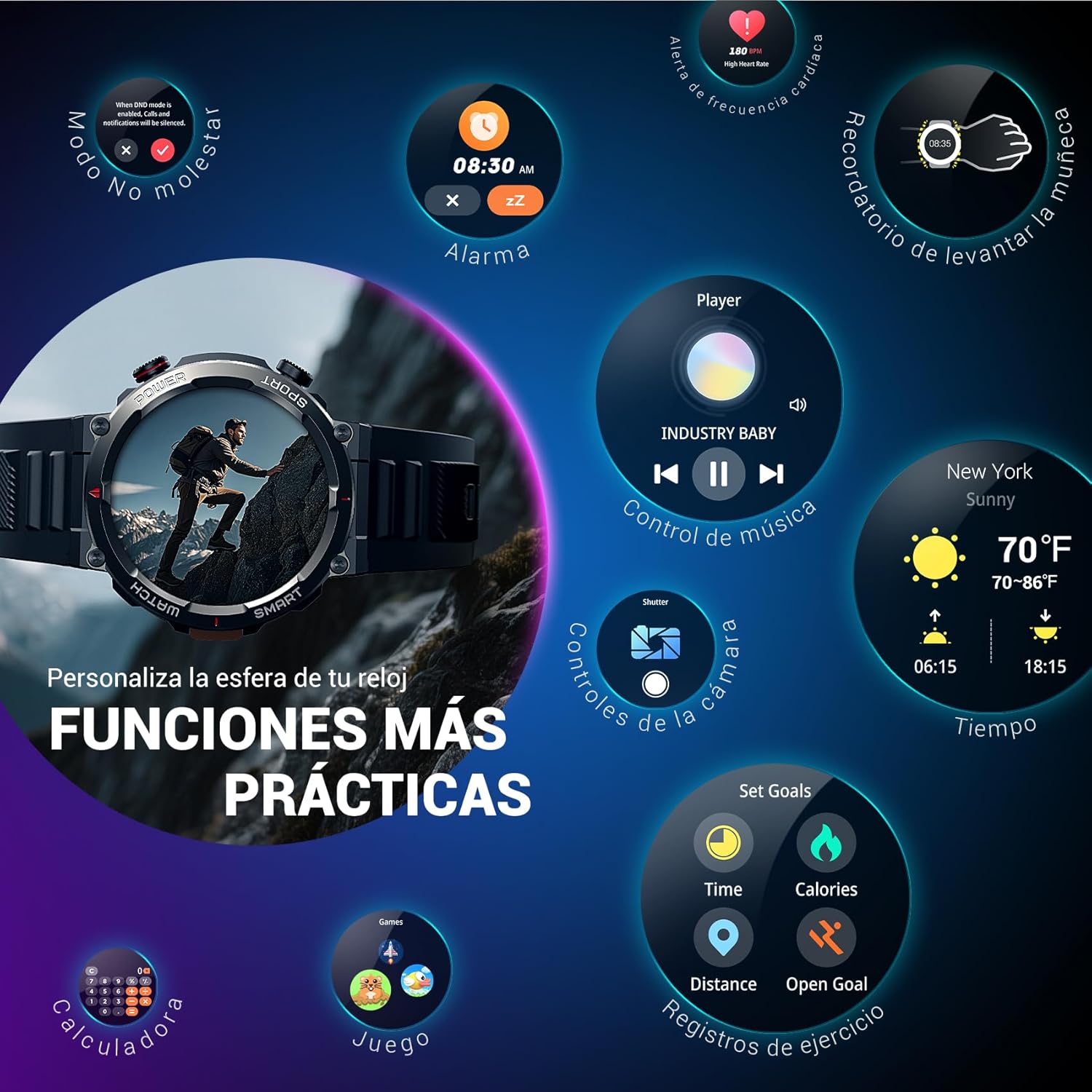
Image: Bluetooth calling and notification features.
4. Monitoraggio della salute
The smartwatch is equipped with high-precision sensors to monitor various health indicators:
- Frequenza cardiaca: Monitoraggio della frequenza cardiaca in tempo reale.
- Ossigeno nel sangue (SpO2): Monitora i livelli di ossigeno nel sangue.
- Monitoraggio del sonno: Tiene traccia della qualità e dei modelli del sonno.
- Livelli di stress: Fornisce informazioni sui tuoi livelli di stress.
All health data synchronizes with the Da Fit app for detailed analysis and trend tracking.

Image: Real-time health monitoring features.
5. Modalità sportive
The W50PRO offers over 100 integrated sports modes, including running, cycling, climbing, rope skipping, football, and basketball. It accurately records exercise time, distance, steps, calorie consumption, and heart rate changes, providing clear and intuitive performance data. Detailed data can be viewed nell'app Da Fit.

Immagine: Oltreview di oltre 100 modalità sportive.
6. Personalizzazione dei quadranti dell'orologio
The Da Fit app provides a wide selection of watch faces to suit various styles. You can also upload personal photos as wallpaper and adjust text color and widget layout to create a unique watch interface.

Immagine: quadranti personalizzabili.
7. Altre funzioni pratiche
Il Neroview W50PRO includes additional features for daily convenience:
- Previsioni del tempo
- Controllo della musica
- Controllo remoto della fotocamera
- Allarmi
- Promemoria sedentario
- Promemoria per bere acqua
- Cronometro
- Timer per il conto alla rovescia
- Trova Telefono
- Calcolatrice
- Giochi
- Regolazione della luminosità

Image: Multiple smart functions available on the smartwatch.
Manutenzione
1. Pulizia
Pulisci regolarmente lo smartwatch e il cinturino per prevenire irritazioni cutanee e mantenere la funzionalità del dispositivo. Usa un panno morbido eamp panno per pulire lo schermo e casing. For the strap, follow the manufacturer's cleaning recommendations based on the material (silicone or nylon).
2. Resistenza all'acqua
Il Neroview W50PRO Smartwatch features an IP68 water resistance rating. This means it is protected against dust ingress and can withstand immersion in water up to 1.5 meters for up to 30 minutes. It is suitable for daily use, such as hand washing or light rain. Avoid using it in hot water, saunas, or during diving, as steam and high pressure can compromise the seals.

Immagine: Caratteristiche di resistenza, tra cui la resistenza all'acqua IP68.
3. Cura della batteria
Per prolungare la durata della batteria:
- Evitare temperature estreme.
- Non lasciare che la batteria si scarichi completamente frequentemente.
- Charge the device using the provided magnetic charging cable.
Risoluzione dei problemi
Se riscontri problemi con il tuo Blackview W50PRO Smartwatch, try the following:
- Il dispositivo non si accende: Assicurarsi che l'orologio sia completamente carico.
- Impossibile associare il telefono: Check if Bluetooth is enabled on both devices. Restart both the watch and phone. Ensure the Da Fit app has necessary permissions.
- Dati sanitari inesatti: Assicurati che l'orologio sia ben aderente al polso. Pulisci regolarmente i sensori.
- Notifiche non ricevute: Verify that notification permissions are granted in the Da Fit app and your phone's settings. Ensure the app is running in the background.
- Breve durata della batteria: Reduce screen brightness, disable unnecessary features, and limit frequent heart rate monitoring.
For persistent issues, refer to the Da Fit app's help section or contact customer support.
Specifiche
| Caratteristica | Specificazione |
|---|---|
| Marca | Neroview |
| Modello | W50PRO |
| Dimensioni dello schermo | 1.45 pollici |
| Tipo di visualizzazione | LCD |
| Risoluzione | 360 x 360 pixel |
| Capacità della batteria | 960 mAh |
| Durata tipica della batteria | Fino a 30 giorni |
| Tempo di standby | Fino a 100 giorni |
| Tempo di ricarica | Circa 3 ore |
| Connettività | Bluetooth |
| Input dell'interfaccia umana | Buttons, Microphone |
| Resistenza all'acqua | Grado di protezione IP68 |
| Modelli di telefono compatibili | iOS e Android |
| Dimensioni del prodotto | Dimensioni: 8.8 x 2.2 x 18.1 cm |
| Peso del prodotto | 136 grammi |
Garanzia e supporto
For warranty information and technical support, please refer to the documentation included with your purchase or visit the official Blackview websito. Conservare la prova d'acquisto per eventuali reclami in garanzia.


