Prodotto finitoview
The BOYA BOYALINK 3 is an advanced wireless lavalier microphone system designed for high-quality audio recording across multiple devices. Featuring AI-powered noise cancellation, studio-grade sound, and multi-device compatibility, it is ideal for vlogging, interviews, live streaming, and online teaching.

Image: The BOYA BOYALINK 3 system, showing the charging case, receiver, transmitters, and various adapters.
Cosa è incluso
Verifica che tutti i componenti elencati di seguito siano presenti nel tuo pacchetto:
- 1 x Ricevitore
- 2 x trasmettitori
- 1 x Custodia di ricarica
- 1 adattatore USB-C
- 1 x adattatore Lightning
- 1 x TRS to TRS Audio Cable
- 2 x Magnetic Mounts
- 2 x Magnetic Back Clips
- 2 x parabrezza pelosi
- 1 cavo di ricarica da USB-C a USB-A
- 1 x custodia per il trasporto

Image: All components included in the BOYALINK 3-01 package.
Guida all'installazione
Ricarica del sistema
Before first use, fully charge the transmitters, receiver, and charging case. Place the transmitters and receiver into the charging case. Connect the charging case to a power source using the provided USB-C to USB-A charging cable.
Connessione al tuo dispositivo
The BOYALINK 3 offers universal compatibility with various devices:
- Per dispositivi iPhone/iOS: Attach the Lightning adapter to the receiver and plug it into your iPhone's Lightning port.
- For Android/USB-C Devices: Attach the USB-C adapter to the receiver and plug it into your Android device's USB-C port.
- For Cameras/Laptops/PCs (with 3.5mm input): Use the provided 3.5mm TRS to TRS audio cable to connect the receiver's 3.5mm output to your camera's or computer's audio input.
The system will automatically pair the transmitters with the receiver upon power-on. Ensure the blue indicator light on the receiver is solid, indicating a successful connection.
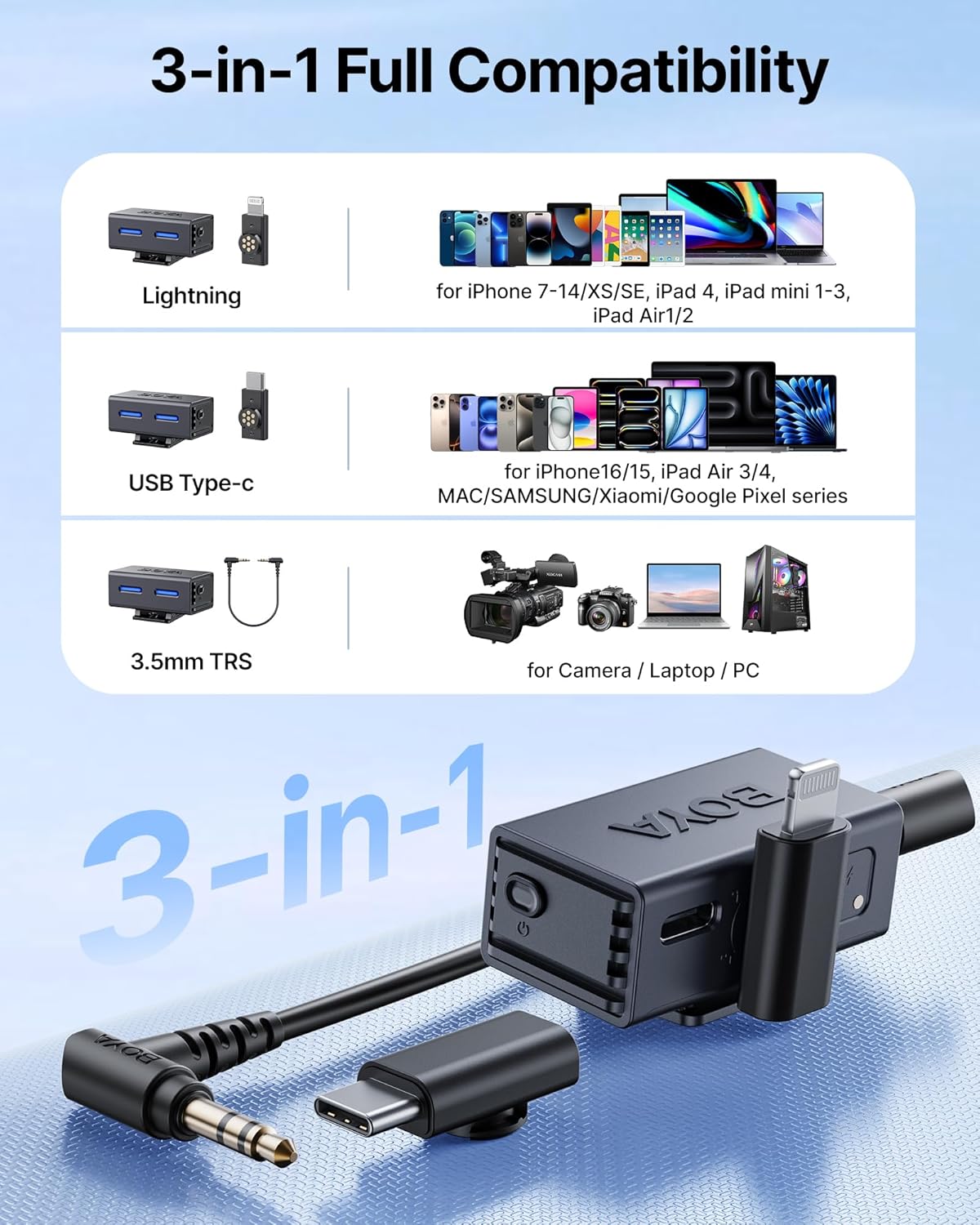
Image: The receiver with its interchangeable Lightning, USB-C, and 3.5mm TRS adapters for broad compatibility.
Istruzioni per l'uso
Indossare il trasmettitore
Attach the transmitter to your clothing using the magnetic back clip or magnetic mount. For optimal audio quality, position the microphone approximately 6-8 inches (15-20 cm) from your mouth.

Image: The compact and lightweight design of the mini button microphone.
Cancellazione del rumore AI
The BOYALINK 3 features AI-powered noise reduction. To cycle through Low, Medium, and High noise cancellation modes, double-press the RX button on the receiver. You can also control this feature via the BOYA Central app.

Image: Visual representation of the AI noise cancellation technology, showing its effectiveness against various noise types.
Using the BOYA Central App
Download the "BOYA Central" app from your device's app store for advanced control. The app allows you to:
- Adjust 4-level AI noise reduction.
- Customize EQ modes (Podcast, Music, Live).
- Sync multiple BOYALINK 3 devices.
- Eseguire gli aggiornamenti del firmware.
- Monitor audio with zero-latency.

Image: The BOYA Central app interface, demonstrating various audio adjustment options.
Monitoraggio in tempo reale
Connect headphones to the receiver's 3.5mm output for real-time audio monitoring. This allows you to hear crystal-clear, uncompressed audio with less than 10ms delay, ensuring optimal recording quality.
Multi-Device Support (2TX-4RX)
The system supports one transmitter pairing with up to four receivers simultaneously. This feature is beneficial for multi-angle filming, live broadcasts, or collaborative projects, allowing real-time audio synchronization across various recording devices. Additional receivers are sold separately.

Image: Illustration of the multi-source sync recording system, showing one transmitter broadcasting to multiple receivers.
Extended Range and Battery Life
The BOYALINK 3 provides an ultra-stable transmission range of up to 984 feet (300 meters). Each microphone offers approximately 6 hours of runtime, extended to over 30 hours with the fully charged charging case. The microphones can be fast-charged in about 1.5 hours.

Image: Visual representation of the microphone's stable wireless range up to 984 feet.

Image: Illustration of the extended battery life, showing 6 hours of microphone use and over 30 hours with the charging case.
Professional-Grade Recording
Experience crystal-clear audio with 48kHz/24-bit resolution, a frequency response of 20Hz-20kHz, and a signal-to-noise ratio of 85 dB. The system incorporates Smart AGC (Automatic Gain Control) and distortion-limiting features to ensure studio-quality recordings with minimal post-editing required.

Immagine: dettagliata view of the microphone's internal structure, highlighting its 6mm Hi-Fi mic and low distortion.
Manutenzione
To ensure the longevity and optimal performance of your BOYA BOYALINK 3 system, follow these maintenance guidelines:
- Pulizia: Use a soft, dry cloth to wipe the transmitters, receiver, and charging case. Avoid using liquid cleaners or solvents.
- Magazzinaggio: Store the system in its carrying pouch when not in use to protect it from dust and physical damage. Keep it in a cool, dry place away from direct sunlight and extreme temperatures.
- Cura della batteria: For long-term storage, ensure the batteries are charged to approximately 50%. Recharge them every three months to prevent deep discharge, which can reduce battery life.
- Parabrezza pelosi: Clean the furry windshields gently with a soft brush if they accumulate dust or debris. Replace them if they become worn or damaged to maintain effective wind noise reduction.
Risoluzione dei problemi
If you encounter issues with your BOYA BOYALINK 3, refer to the following common problems and solutions:
| Problema | Possibile causa | Soluzione |
|---|---|---|
| Nessuna uscita audio | Receiver not connected properly; low battery; incorrect device input selected. | Ensure receiver is securely plugged into your device. Check battery levels of transmitters and receiver. Verify correct audio input is selected on your recording device. |
| Scarsa qualità audio/disturbo statico | Interference; transmitter too far from receiver; microphone placement issues; high ambient noise. | Move closer to the receiver. Avoid strong electromagnetic interference sources. Adjust microphone placement. Activate AI noise cancellation via the RX button or BOYA Central app. |
| Transmitter not pairing | Out of range; pairing issue; low battery. | Ensure transmitter and receiver are within range. Power cycle both units. Check battery levels. If issues persist, refer to the app for re-pairing instructions. |
| L'app non si connette al dispositivo | Bluetooth/connection issue; outdated app firmware. | Ensure Bluetooth is enabled on your device. Restart the app and the microphone system. Check for app updates and firmware updates within the app. |
Specifiche tecniche
| Caratteristica | Dettaglio |
|---|---|
| Nome del modello | BOYALINK 3-01 |
| Fattore di forma del microfono | Lavalier |
| Tecnologia di connettività | Senza fili (2.4 GHz) |
| Tipo di connettore | Lightning, USB Type-C, 3.5 mm Jack |
| Modello polare | Omnidirezionale |
| Risposta in frequenza | 20 Hz - 20 kHz |
| Signal-to-Noise Ratio | 85 dB |
| Risoluzione audio | 48kHz / 24 bit |
| Gamma di trasmissione | Fino a 984 piedi (300 m) |
| Durata della batteria del trasmettitore | Circa 6 ore |
| Durata totale della batteria (con custodia) | ca. 30+ ore |
| Charging Time (mics) | Circa 1.5 ore |
| Peso dell'articolo (trasmettitore) | 9 grammi (0.317 once) |
| Dimensioni (L x P x A) | 0.04 x 0.04 x 0.04 pollici (Prodotto) |
| Materiale | Acrilonitrile-butadiene-stirene |
| Dispositivi compatibili | Camera, Smartphone, Tablet, Laptop, PC |
Garanzia e supporto
Per informazioni sulla garanzia e supporto tecnico, fare riferimento al sito ufficiale BOYA website or contact BOYA customer service directly. Keep your purchase receipt as proof of purchase for warranty claims.
BOYA Official Websito: www.boya-mic.com


