1. Introduzione
This manual provides essential information for setting up, operating, and maintaining your DOOGEE Tab A9 Pro Android 15 Tablet. Please read it thoroughly to ensure proper usage and to maximize your device's capabilities.
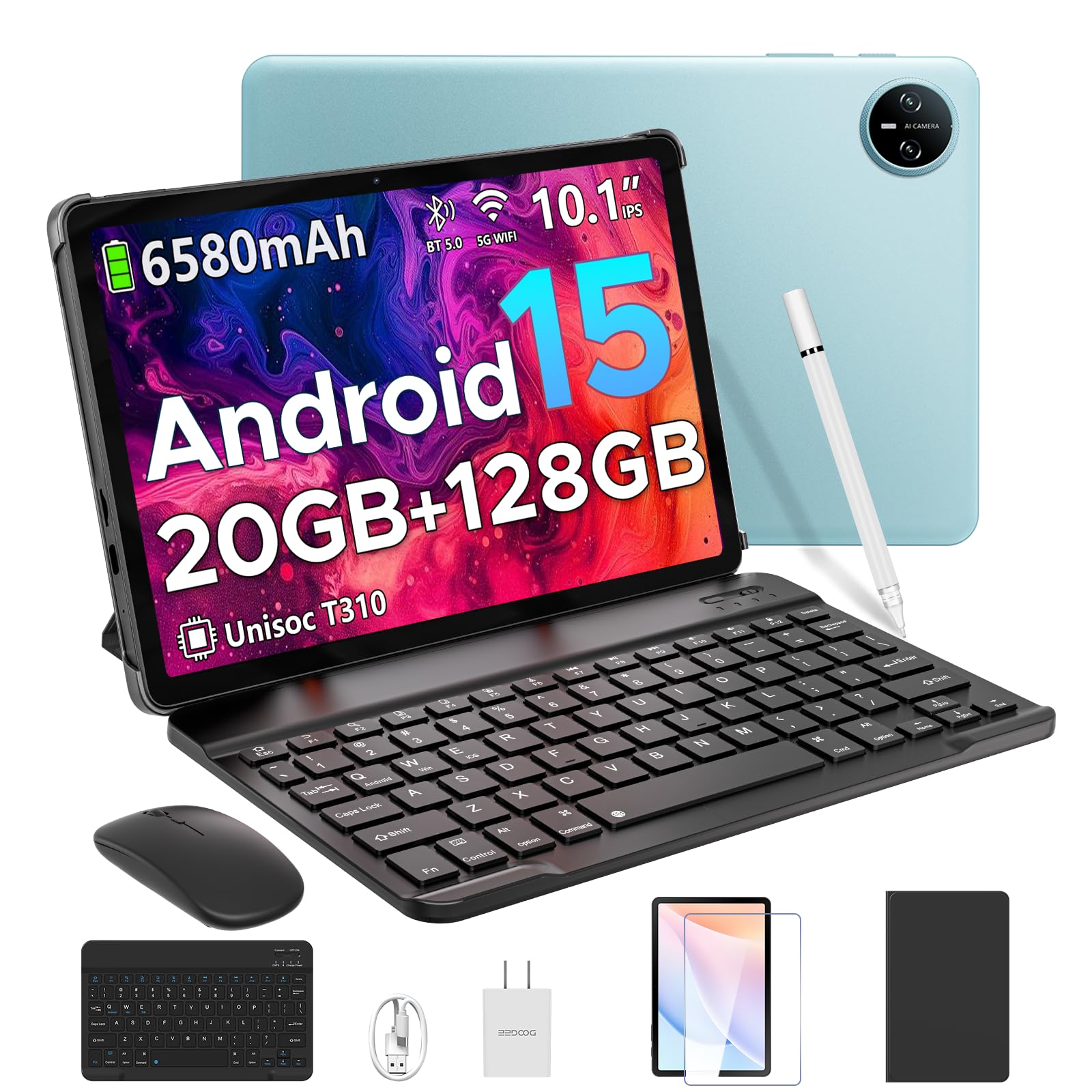
Image 1.1: The DOOGEE Tab A9 Pro Tablet.
2. Cosa c'è nella scatola
Your DOOGEE Tab A9 Pro package includes the following items:
- DOOGEE Tab A9 Pro Tablet (x1)
- Cavo USB di tipo C (x1)
- Caricabatterie (x1)
- Manuale (x1)
- Scheda di garanzia (x1)
- Tastiera Bluetooth (edizione VIP)
- Mouse Bluetooth (edizione VIP)
- Stilo (edizione VIP)
- Custodia protettiva in pelle (edizione VIP)
- Pellicola temperata (edizione VIP)

Image 2.1: All items included in the DOOGEE Tab A9 Pro package.
3. Prodotto finitoview
The DOOGEE Tab A9 Pro features a sleek design with essential components for user interaction and connectivity.
3.1 Caratteristiche fisiche
- Display: 10.1-inch IPS HD Ultra-Clear Display.
- Telecamere: Fotocamera principale da 8 MP (posteriore) e fotocamera frontale da 5 MP.
- Audio: High-Quality Dual Speakers and a 3.5mm Audio Jack.
- Porte: Type-C USB port for charging and data transfer.
- Pulsanti: Power button and volume controls located on the side.

Immagine 3.1: posteriore view of the DOOGEE Tab A9 Pro, highlighting the camera module.

Immagine 3.2: Lato view of the tablet, illustrating the power button, volume controls, and ports.
Video 3.1: Un breve video mostraasing the ultra-thin body and design of the DOOGEE Tab A9 Pro.
4. Impostazione
4.1 Carica iniziale
Before first use, fully charge your tablet using the provided Type-C USB cable and charger. The battery indicator on the screen will show charging progress.
4.2 Accensione/spegnimento
- Per accendere: Tenere premuto il pulsante di accensione finché non appare il logo DOOGEE.
- Per spegnere: Tenere premuto il pulsante di accensione, quindi selezionare "Spegni" tra le opzioni visualizzate sullo schermo.
4.3 Procedura guidata di configurazione iniziale
Upon first power-on, follow the on-screen instructions to complete the initial setup, including language selection, Wi-Fi connection, and Google account login.
5. Sistema operativo (Android 15)
The DOOGEE Tab A9 Pro runs on the Android 15 operating system, offering a smart, fluid, and secure user experience with enhanced privacy features.

Image 5.1: Visual representation of the Android 15 system interface.
Video 5.1: Un overview of the DOOGEE Tab A9 Pro running Android 15.
6. Prestazioni e archiviazione
The tablet is designed for smooth operation and ampla capacità di archiviazione.
6.1 Processore
Powered by the energy-efficient Unisoc T310 octa-core processor, the tablet ensures seamless performance for various tasks.

Image 6.1: Diagram illustrating the Unisoc T310 Quad-Core Processor.
6.2 RAM e archiviazione
The tablet features 20GB of RAM (4GB physical + 16GB virtual) and 128GB of internal storage. Storage can be expanded up to 2TB using a microSD card (sold separately).

Image 6.2: Visual representation of the tablet's RAM and ROM configuration.
7. Schermo e audio
Experience vibrant visuals and clear sound with your tablet.
7.1 Visualizzazione
The 10.1-inch IPS HD display offers wide viewing angles and a resolution of 1280x800 for an immersive visual experience.

Image 7.1: The 10.1-inch IPS HD display with key specifications.
7.2 Audio
Built-in dual speakers deliver clear and dynamic sound for movies, music, and video calls.

Image 7.2: Illustration of the tablet's dual speaker system.
8. Telecamere
Capture moments and conduct video calls with the integrated cameras.
8.1 Fotocamera principale
The 8MP main camera allows you to take sharp photos.

Image 8.1: Close-up of the 8MP main camera on the tablet's rear.
Videocamera frontale 8.2
La fotocamera frontale da 5 MP è adatta per selfie e videochiamate.

Image 8.2: The 5MP front camera in use for a video call.
9. Connettività
Stay connected with various wireless options.
9.1 Wi-Fi
Supports 2.4G/5G dual-band Wi-Fi for smooth, high-speed internet access.

Image 9.1: Features of WiFi 5 connectivity on the tablet.
9.2 Bluetooth
Equipped with Bluetooth 5.0 for connecting wireless accessories.
9.3 GPS
Built-in GPS provides accurate navigation for travel and outdoor activities.
10. Accessori
The DOOGEE Tab A9 Pro comes with a suite of accessories to enhance its functionality.
10.1 Tastiera Bluetooth
Connect the Bluetooth keyboard for a desktop-like typing experience, ideal for productivity tasks.

Image 10.1: The tablet connected to its Bluetooth keyboard for efficient typing.
10.2 Mouse and Stylus
The included mouse and stylus further enhance navigation and interaction, especially for note-taking and creative tasks.

Image 10.2: The tablet shown with its accompanying keyboard and mouse.

Image 10.3: The tablet being used with the stylus for precise input.
Custodia protettiva 10.3
The protective case shields your tablet from drops and scratches and can also function as a stand.

Image 10.4: The tablet securely placed within its protective case.
11. Gestione della batteria
The tablet is equipped with a high-capacity battery for extended use.
11.1 Capacità della batteria
Features a long-lasting 6580mAh battery, providing hours of power for various activities without frequent recharging.

Image 11.1: Diagram showing the 6580mAh battery inside the tablet.
Video 11.1: A video highlighting the large battery capacity of the DOOGEE Tab A9 Pro.
12. Funzionalità di sicurezza
Protect your device and data with built-in security options.
12.1 Sblocco col sorriso
Effortlessly unlock your tablet using facial recognition technology.

Image 12.1: Illustration of the facial recognition unlock feature.
12.2 Fortified Privacy Shield
Android 15 provides enhanced privacy controls, robust data encryption, timely security patches, and proactive app screening for unbreakable security.

Immagine 12.2: Passoview of Android 15's privacy features.
13. Multitasking & Productivity
Optimize your workflow and entertainment with these features.
13.1 Multitasking a schermo diviso
Run two applications simultaneously side-by-side for enhanced productivity.

Image 13.1: The tablet displaying two apps in split-screen mode.
13.2 WPS Office integrato
The tablet comes with WPS Office pre-installed, providing PC-level productivity for documents, spreadsheets, and presentations (Note: WPS Office feature may be unavailable in certain regions).

Immagine 13.2: Il tablet mostraasing WPS Office applications.
Video 13.1: A video demonstrating the DOOGEE Tab A9 Pro's capabilities for learning and work.
14. Manutenzione
14.1 Pulizia
Utilizzare un panno morbido e privo di lanugine per pulire lo schermo e il corpo del tablet. Evitare l'uso di prodotti chimici aggressivi o materiali abrasivi.
14.2 Aggiornamenti software
Controlla e installa regolarmente gli aggiornamenti di sistema per garantire prestazioni ottimali, sicurezza e accesso alle nuove funzionalità. Vai a Impostazioni > Sistema > Aggiornamento di sistema per verificare la presenza di aggiornamenti.
15. Risoluzione Dei Problemi
Questa sezione affronta i problemi più comuni che potresti riscontrare con il tuo tablet.
15.1 Il tablet non si accende
- Assicurarsi che il tablet sia sufficientemente carico. Collegarlo al caricabatterie per almeno 30 minuti.
- Per eseguire un riavvio forzato, tenere premuto il pulsante di accensione per 10-15 secondi.
15.2 Prestazioni lente
- Chiudere le applicazioni in background non necessarie.
- Cancella i dati della cache per le app utilizzate di frequente.
- Ensure sufficient storage space is available. Delete old fileoppure trasferirli su un archivio esterno.
- Riavviare il tablet.
15.3 Problemi di connettività Wi-Fi
- Riavvia il router Wi-Fi e il tablet.
- Dimentica la rete Wi-Fi e riconnettiti.
- Assicurati di trovarti nel raggio d'azione del segnale Wi-Fi.
15.4 Accessori non collegati
- Assicurarsi che il Bluetooth sia abilitato sul tablet e sull'accessorio.
- Check if the accessory is charged and in pairing mode.
- Refer to the accessory's individual manual for specific pairing instructions.
16. Specifiche
| Caratteristica | Specificazione |
|---|---|
| Marca | DOOGEE |
| Nome del modello | TABA9PRO |
| Numero modello articolo | Scheda A9 Pro |
| Sistema operativo | Androide 15 |
| Dimensioni di visualizzazione dello schermo in piedi | 10.1 pollici |
| Risoluzione dello schermo | Risoluzione 1280*800 |
| Risoluzione massima dello schermo | 1280*800 pixel |
| Marca del processore | Unisoc |
| Coprocessore grafico | Mali-G52 1-Core-2EE |
| Capacità di archiviazione della memoria | 128 GB (espandibile fino a 2 TB tramite microSD) |
| Memoria RAM | 20 GB (4 GB fisici + 16 GB virtuali) |
| Tipo senza fili | 802.11ac, 802.11n (2.4G/5G Dual-band WiFi) |
| Bluetooth | 5.0 |
| Capacità della batteria | Polimeri di litio da 6580 mAh (inclusi) |
| Durata media della batteria | Up to 2 years (estimated lifespan) |
| Peso dell'articolo | 1.05 libbre |
| Dimensioni del prodotto | 9.55 x 6.33 x 0.31 pollici |
| Colore | Blue (other colors available) |
| Data prima disponibilità | 23 aprile 2025 |
17. Garanzia e supporto
17.1 Informazioni sulla garanzia
Your DOOGEE Tab A9 Pro comes with a 2-Year Limited Warranty. Please refer to the included Warranty Card for detailed terms and conditions.
17.2 Assistenza clienti
For any questions or technical assistance, please contact our support team. We aim to respond within 24 hours.
- Supporto online: Disponibile 24 ore su 24, 7 giorni su 7.
- Resi: Garanzia di rimborso entro 30 giorni e resi gratuiti.


