Introduzione
Grazie per l'acquistoasing the WISCENT WTB-733 Retro Cassette Player Recorder. This device combines classic audio playback with modern features, including AM/FM/SW radio, Bluetooth connectivity, USB/Micro SD playback, and voice recording. Please read this manual thoroughly before use to ensure proper operation and to maximize your listening experience.
Informazioni sulla sicurezza
- Non esporre l'unità alla pioggia o all'umidità per evitare incendi o scosse elettriche.
- Evitare di posizionare l'unità vicino a fonti di calore quali termosifoni, bocchette di ventilazione, stufe o altri apparecchi che producono calore.
- Utilizzare solo gli accessori specificati dal produttore.
- Scollegare l'unità durante i temporali o quando non viene utilizzata per lunghi periodi.
- Non aprire il casing. Affidare tutti gli interventi di assistenza a personale qualificato.
- Tenere fuori dalla portata dei bambini.
Prodotto finitoview
The WISCENT WTB-733 is a versatile audio system designed for both retro and modern listening. Key features include:
- Lettore/Registratore di cassette: Play and record audio cassettes.
- AM/FM/SW Radio: Multi-band radio tuner for various broadcasts.
- Connettività Bluetooth: Streaming audio wireless da dispositivi compatibili.
- USB/Micro SD (TF) Playback: Riproduci MP3/WMA files da un archivio esterno.
- Microfono incorporato: Per la registrazione vocale.
- Luci colorate RGB: Dynamic lighting effects on speakers.
- Jack per cuffie: Per l'ascolto privato.
- Opzioni doppia alimentazione: AC or battery powered.

Figura 1: Fronte view of the WISCENT WTB-733 with key features highlighted.
Impostare
Accensione del dispositivo
The WTB-733 can be powered by AC electricity or batteries.
- Alimentazione CA: Connect the included AC power cord to the AC IN port on the back of the unit and then to a standard 120V AC, 60Hz wall outlet. The AC cord is typically stored in the battery compartment.
- Potenza della batteria: For portable use, insert 6 UM-1 type batteries (not included) into the battery compartment located on the back of the unit. Ensure correct polarity. Alternatively, 2 rechargeable batteries (not included) can be used.
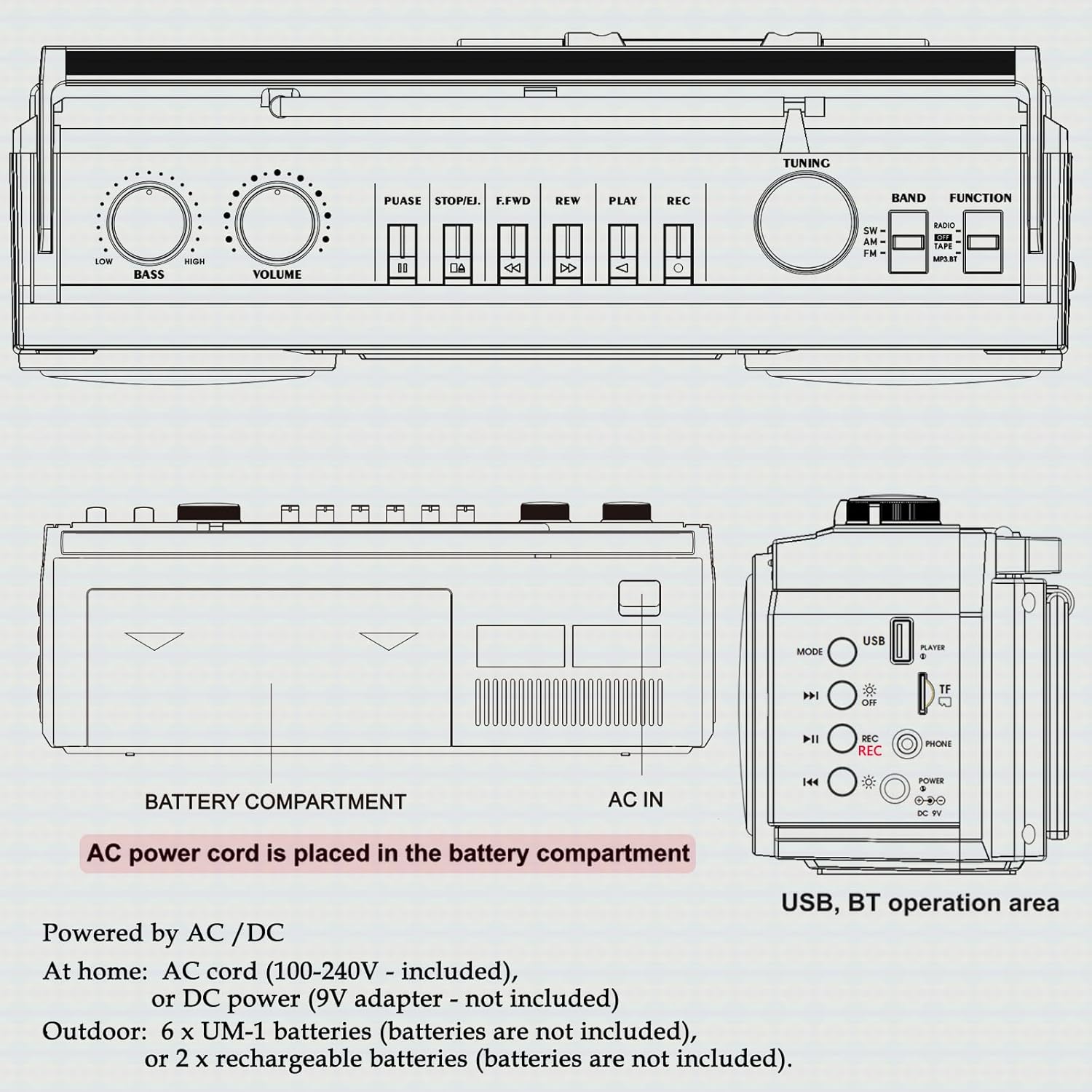
Figura 2: Posteriore view showing battery compartment and AC IN port.
Configurazione dell'antenna
For optimal radio reception, extend the telescopic antenna fully. Adjust its position and angle to improve signal clarity.
Istruzioni per l'uso
Controlli generali

Figura 3: Controlli del pannello superiore.
- Interruttore di ALIMENTAZIONE: Accende/Spegne l'unità.
- Manopola VOLUME: Regola il livello sonoro complessivo.
- Manopola BASSO: Regola il livello dei bassi.
- Selettore FUNZIONE: Switches between RADIO, TAPE, USB/TF, and BT (Bluetooth) modes.
- Selettore BAND: In Radio mode, selects between FM, AM, and SW bands.
- Manopola di accordatura: Tunes to desired radio stations.
Funzionamento radio (AM/FM/SW)
- Imposta il FUNZIONE selettore per RADIO.
- Select the desired band (FM, AM, or SW) using the BANDA selettore.
- Per una migliore ricezione, estendere l'antenna telescopica.
- Ruotare il ACCORDATURA knob to find your desired station.
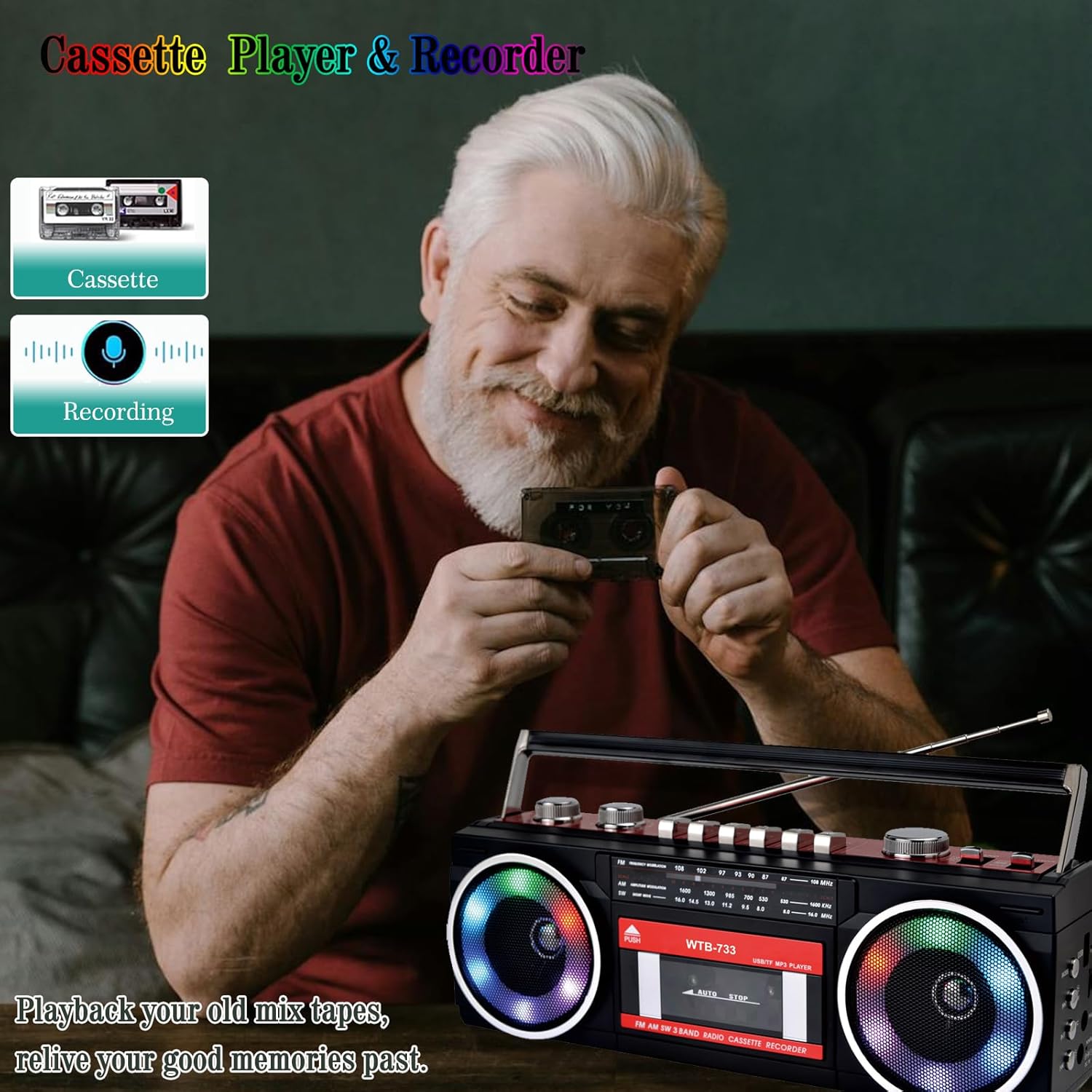
Figure 4: Radio tuning dial.
Lettore e registratore di cassette

Figure 5: Cassette player controls.
- Imposta il FUNZIONE selettore per NASTRO.
- Premere il tasto PUSH/EJECT pulsante per aprire lo sportello della cassetta.
- Insert a cassette tape with the open edge facing upwards. Close the cassette door.
- Riproduzione: Premere il tasto GIOCARE pulsante per avviare la riproduzione.
- Registrazione: Premere il tasto RICORDA button to begin recording. Ensure a blank tape is inserted. The built-in microphone will record ambient sound.
- Avanti veloce/Riavvolgimento: Utilizzare il FWD E RIVISTA pulsanti.
- Pausa: Premere il tasto PAUSA button to temporarily stop playback/recording. Press again to resume.
- Arresto/Espulsione: Premere il tasto STOP/ESPULSIONE button to stop playback/recording and eject the tape.
Connettività Bluetooth
- Imposta il FUNZIONE selettore per BT. The unit will enter pairing mode, indicated by a flashing light or audio prompt.
- Sul tuo dispositivo abilitato Bluetooth (ad esempio, smartphone, tablet), attiva il Bluetooth e cerca i dispositivi disponibili.
- Select "WTB-733" from the list of devices to pair.
- Una volta effettuata l'associazione, puoi riprodurre in streaming l'audio dal tuo dispositivo al boombox.
- Nota: This unit supports Bluetooth reception only and does not transmit Bluetooth signals to headphones or other speakers.

Figure 6: Bluetooth streaming from a mobile device.
USB/Micro SD (TF) Playback
- Imposta il FUNZIONE selettore per USB/TF.
- Insert a USB drive or Micro SD (TF) card into the corresponding slot on the side of the unit.
- The unit will automatically detect and begin playing MP3/WMA files dal dispositivo di archiviazione.
- Use the playback control buttons (Play/Pause, Next, Previous) to navigate tracks.
Luci colorate RGB
The speakers are equipped with RGB LED lighting that creates a dynamic visual effect.
- The lights are automatically turned off in Radio mode.
- In other modes (BT, Tape, USB/TF), the lights are on by default.
- To manually control the lights, press the 'OFF' button (often labeled with a lightbulb icon) twice continuously to toggle them on or off.

Figure 7: RGB colorful lights in operation.
Presa per cuffie
Connect standard 3.5mm headphones (not included) to the headphone jack on the side of the unit for private listening. Audio will be muted from the main speakers when headphones are connected.
Manutenzione
- Pulizia: Utilizzare un panno morbido e asciutto per pulire l'esterno dell'unità. Non utilizzare detergenti abrasivi o solventi.
- Cura del registratore a cassette: Pulire periodicamente le testine del nastro e i rulli di pressione con un batuffolo di cotone leggermente damptrattato con alcol isopropilico per garantire una qualità audio ottimale e prevenire danni al nastro.
- Magazzinaggio: Quando non si utilizza l'unità per lunghi periodi, rimuovere le batterie e conservarla in un luogo fresco e asciutto, lontano dalla luce solare diretta.
Risoluzione dei problemi
| Problema | Possibile causa | Soluzione |
|---|---|---|
| Nessun potere | Cavo CA non collegato; batterie scariche o inserite in modo errato. | Check AC connection; Replace or correctly insert batteries. |
| Nessun suono | Volume troppo basso; Cuffie collegate; Modalità di funzionamento non corretta. | Increase volume; Disconnect headphones; Select correct function mode. |
| Scarsa ricezione radio | Antenna non estesa; segnale debole. | Estendere e regolare l'antenna; provare a spostare l'unità in una posizione diversa. |
| La cassetta non riproduce/registra | Tape damaged; Incorrect buttons pressed; Tape heads dirty. | Check tape condition; Ensure correct play/record buttons are pressed; Clean tape heads. |
| Il Bluetooth non si connette | Unit not in BT mode; Device not in pairing mode; "WTB-733" not selected. | Switch to BT mode; Ensure device Bluetooth is on and searching; Select "WTB-733" to pair. |
| Le luci RGB non funzionano | In Radio mode; Lights turned off manually. | Lights are off in Radio mode by design; Press the 'OFF' button twice to toggle them on in other modes. |
Specifiche
- Numero modello: WTB-733
- Dimensioni del prodotto: 13 x 4.92 x 3.93 pollici
- Peso dell'articolo: 3.63 libbre
- Bande radiofoniche: AM/FM/SW
- Connettività: Bluetooth, USB, Micro SD (TF)
- Tipo di altoparlante: Stereo
- Alimentazione elettrica: AC 120V, 60Hz or 6 x UM-1 batteries (not included)
- USB/TF Support: Fino a 64 GB (formato FAT32)
Garanzia e supporto
WISCENT products are designed for reliability and performance. For warranty information or technical support, please refer to the documentation included with your purchase or contact WISCENT customer service through their official channels. Keep your purchase receipt as proof of purchase for warranty claims.


