1. Introduzione
The Dekala Sunrise Alarm Clock is an innovative device designed to enhance your wake-up and sleep experience. It combines a natural sunrise simulation light, FM radio, dual alarms, a variety of white noise and natural sounds, and a customizable 7-color night light. This manual provides detailed instructions for setting up, operating, and maintaining your alarm clock to ensure optimal performance.
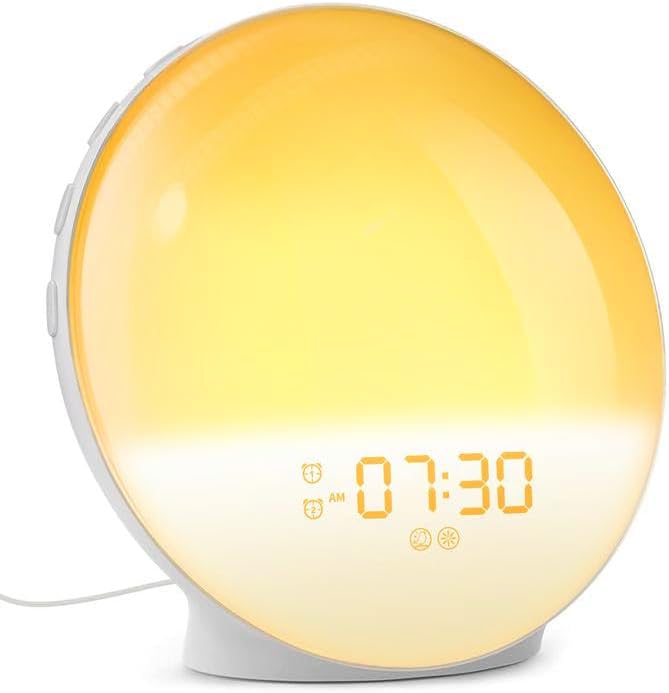
Image: The Dekala Sunrise Alarm Clock with its light panel illuminated in a warm yellow, showing the time 07:30 AM, indicating its primary function as a sunrise simulator.
2. Informazioni sulla sicurezza
- Leggere attentamente tutte le istruzioni prima dell'uso.
- Non esporre il dispositivo all'acqua o a umidità eccessiva.
- Utilizzare solo l'adattatore di alimentazione fornito o un equivalente certificato.
- Tenere fuori dalla portata dei bambini.
- Non tentare di smontare o riparare da soli il dispositivo. Contatta l'assistenza clienti per assistenza.
- Place the device on a stable, flat surface to prevent falling.
3. Contenuto della confezione
Si prega di controllare la confezione per verificare la presenza dei seguenti elementi:
- Dekala Sunrise Alarm Clock (Classic Version)
- USB Power Adapter
- Cavo USB
- Manuale d'uso
4. Prodotto finitoview e componenti
Familiarize yourself with the various parts and controls of your Dekala Sunrise Alarm Clock:
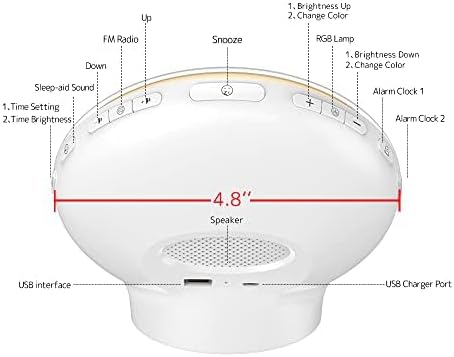
Image: A detailed diagram illustrating the back and top controls of the Dekala Sunrise Alarm Clock, highlighting the location and function of each button and port, including the USB charger port and speaker.
Pulsanti di controllo e porte:
- Pulsante Ripeti: Located on top, for temporary alarm pause.
- Pulsante radio FM: Activates/deactivates FM radio.
- Pulsanti su/giù: Adjusts time, brightness, volume, and navigates menus.
- Sleep-aid Sound Button: Selects and activates sleep-aid sounds.
- Pulsante di impostazione dell'ora: Entra nella modalità di impostazione dell'ora.
- rgb lamp Pulsante: Controlla la luce notturna a 7 colori.
- Pulsante allarme 1: Imposta e attiva la Sveglia 1.
- Pulsante allarme 2: Imposta e attiva la Sveglia 2.
- Oratore: Audio output for alarms, radio, and sounds.
- Interfaccia USB: For additional connectivity (if applicable).
- Porta caricatore USB: Per alimentazione in ingresso.
5. Impostazione
- Collegamento elettrico: Connect the USB cable to the USB Charger Port on the back of the alarm clock and plug the other end into the provided USB power adapter. Plug the adapter into a standard wall outlet. The display will light up.
- Impostazione dell'ora iniziale:
- Premere e tenere premuto il tasto Impostazione dell'ora button. The hour digits will start blinking.
- Utilizzare il Up E Giù pulsanti per regolare l'ora.
- Premere il tasto Impostazione dell'ora nuovamente il pulsante per confermare l'ora e passare all'impostazione dei minuti.
- Utilizzare il Up E Giù pulsanti per regolare i minuti.
- Premere il tasto Impostazione dell'ora ancora una volta per confermare e uscire dalla modalità di impostazione dell'ora.
- Posizionamento: Place the alarm clock on a stable, flat surface such as a bedside table, ensuring the light panel faces towards you for optimal sunrise simulation.
6. Istruzioni per l'uso
6.1. Impostazione degli allarmi (allarme 1 e allarme 2)
Your Dekala alarm clock features two independent alarms.
- Premere il tasto Allarme 1 or Allarme 2 button. The alarm time digits will blink.
- Utilizzare il Up E Giù buttons to set the desired alarm hour, then press the respective Allarme nuovamente il pulsante per confermare.
- Utilizzare il Up E Giù buttons to set the desired alarm minute, then press the respective Allarme nuovamente il pulsante per confermare.
- Wake-up Sound Selection: Utilizzare il Up E Giù buttons to cycle through available wake-up sounds (e.g., bird chirping, ocean waves, FM radio, traditional beep). Press the Allarme pulsante per confermare la selezione.

Image: This image illustrates the variety of 7 built-in sound effects available on the Dekala Sunrise Alarm Clock, including natural sounds like bird chirping and ocean waves, as well as FM radio and a traditional beep.
- Light Intensity Setting: Utilizzare il Up E Giù buttons to set the desired light intensity for the sunrise simulation. Press the Allarme pulsante per confermare.
- The alarm icon will appear on the display, indicating the alarm is active.
6.2. Simulazione dell'alba
The sunrise simulation feature gradually brightens the light panel before your set alarm time, mimicking a natural sunrise to gently wake you up. The light intensity will increase from a dim red to a bright white over a period of time (typically 10-60 minutes, depending on settings).
6.3. Funzione snooze
Quando suona la sveglia, premere il tasto grande Posticipare button on top of the clock to temporarily pause the alarm. The alarm will sound again after 9 minutes. This function can typically be used up to 5 times.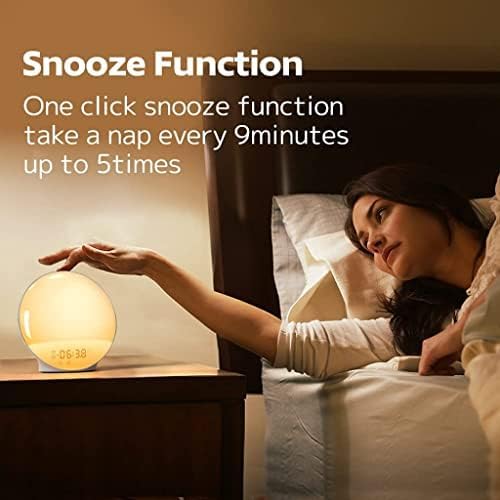
Image: This image demonstrates the snooze function, showing a hand pressing the top of the alarm clock, with text explaining that a single click activates a 9-minute snooze, repeatable up to 5 times.
6.4. Radio FM
- Premere il tasto Radio FM button to turn the radio on/off.
- Per cercare le stazioni, tenere premuto il tasto Radio FM button. The clock will automatically scan and save available stations.
- Utilizzare il Up E Giù pulsanti per passare da una stazione FM salvata all'altra.
- Regolare il volume utilizzando il Up E Giù buttons when the radio is playing.
6.5. White Noise / Sleep Aid Sounds
The clock offers various soothing sounds to help you fall asleep.
- Premere il tasto Sleep-aid Sound button to activate the sleep aid function.
- Utilizzare il Up E Giù buttons to cycle through the available sleep sounds (e.g., white noise, rain, stream, bird).

Image: This image highlights the sleep aid function, depicting a couple asleep with the alarm clock nearby, and showcasing four optional sleeping sounds: Bird, Steam, White Noise, and Rain, designed to promote relaxation.
- Premere il tasto Sleep-aid Sound button again to set a timer for the sound to play (e.g., 15, 30, 60 minutes).
- To turn off the sleep aid sound, press the Sleep-aid Sound button until the function is deactivated.
6.6. Night Light / RGB Lamp
The clock can function as a night light with customizable colors and brightness.
- Premere il tasto rgb lamp pulsante per accendere la luce notturna.
- Premere il tasto rgb lamp ripetutamente il pulsante per scorrere i 7 colori disponibili.
- Utilizzare il Aumento luminosità E Luminosità ridotta buttons to adjust the light intensity (20 levels of brightness).
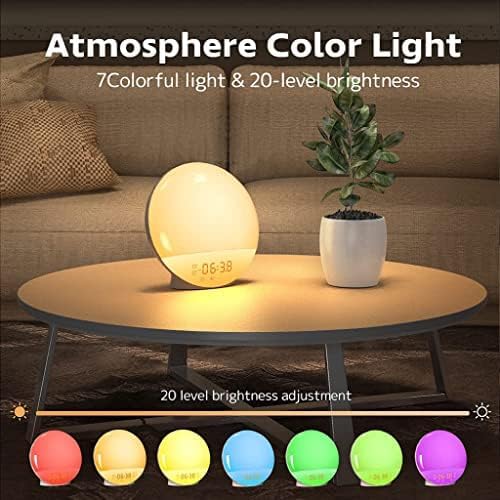
Image: This image showcases the 'Atmosphere Color Light' feature, displaying the alarm clock emitting a warm glow, with an illustration of 7 distinct color options and the capability for 20 levels of brightness adjustment.
- Premere e tenere premuto il tasto rgb lamp pulsante per spegnere la luce notturna.
7. Manutenzione
- Pulizia: Wipe the device with a soft, dry cloth. Do not use abrasive cleaners, waxes, or solvents.
- Magazzinaggio: Se non si utilizza il dispositivo per un periodo prolungato, scollegarlo e conservarlo in un luogo fresco e asciutto.
- Evitare i liquidi: Do not immerse the device in water or expose it to dripping or splashing.
8. Risoluzione Dei Problemi
| Problema | Possibile causa | Soluzione |
|---|---|---|
| Il dispositivo non si accende. | Adattatore di alimentazione non collegato o difettoso. | Ensure the power adapter is securely plugged into the clock and the wall outlet. Try a different outlet. |
| L'allarme non suona. | Sveglia non attivata, volume troppo basso o ora impostata in modo errato. | Check if the alarm icon is displayed. Verify alarm time and ensure volume is set to an audible level. |
| FM Radio static or poor reception. | Segnale debole o interferenza. | Extend the FM antenna fully. Reposition the clock to a location with better signal. Perform an auto-scan for stations again. |
| La luce è troppo fioca/luminosa. | L'impostazione della luminosità necessita di regolazione. | Use the Brightness Up/Down buttons to adjust the light intensity. |
9. Specifiche
- Marca: Dekala
- Modello: ACA-002-B (Classic Version)
- Dimensioni del prodotto: 3 x 1.5 x 7 pollici
- Peso dell'articolo: 1.17 libbre (0.53 chilogrammi)
- Fonte di energia: USB Powered (AC Adapter included)
- Utilizzo interno/esterno: Al chiuso
- Tipo di montaggio: Da tavolo
- Caratteristiche: Sunrise Simulation, Dual Alarms, FM Radio, White Noise Sounds, 7 Colors Night Light, Snooze Function.
10. Garanzia e supporto
Dekala products are manufactured with high-quality standards. For any questions, technical support, or warranty claims, please contact Dekala customer service. Please refer to your purchase documentation for specific warranty terms and contact information.
You can typically find support contact details on the official Dekala websito o tramite il rivenditore presso cui hai acquistato il prodotto.


