1. Introduzione
This manual provides essential information for the safe and efficient use of your LG 43-Inch QNED80 4K Smart TV. Please read this manual thoroughly before operating your TV and retain it for future reference. The LG QNED80 4K Smart TV offers a vibrant visual experience with advanced AI processing and smart features.
2. Caratteristiche principali
- Dynamic QNED Colour with 100% Color Volume: LG's wide color gamut technology delivers colorful images for a vivid immersive experience.
- Processore AI α7 Gen8: Enhanced brightness, improved sound, and refined picture detail with 4K upscaling and Dynamic Tone Mapping Pro.
- HDR10 Pro: Delivers a dramatic visual experience and elevated picture quality by enhancing each color on your screen.
- Modalità Filmmaker: Watch films as directors intended with automatic preservation of original colors, settings, and frame rates.
- WebOS Smart TV Platform: A smarter, more personalized experience with access to streaming apps and LG Channels. Includes Re:New Program for software updates.
- Telecomando magico AI: Features a dedicated AI button for AI Chatbot, AI Concierge, AI Search, AI Picture Wizard, and AI Sound Wizard.
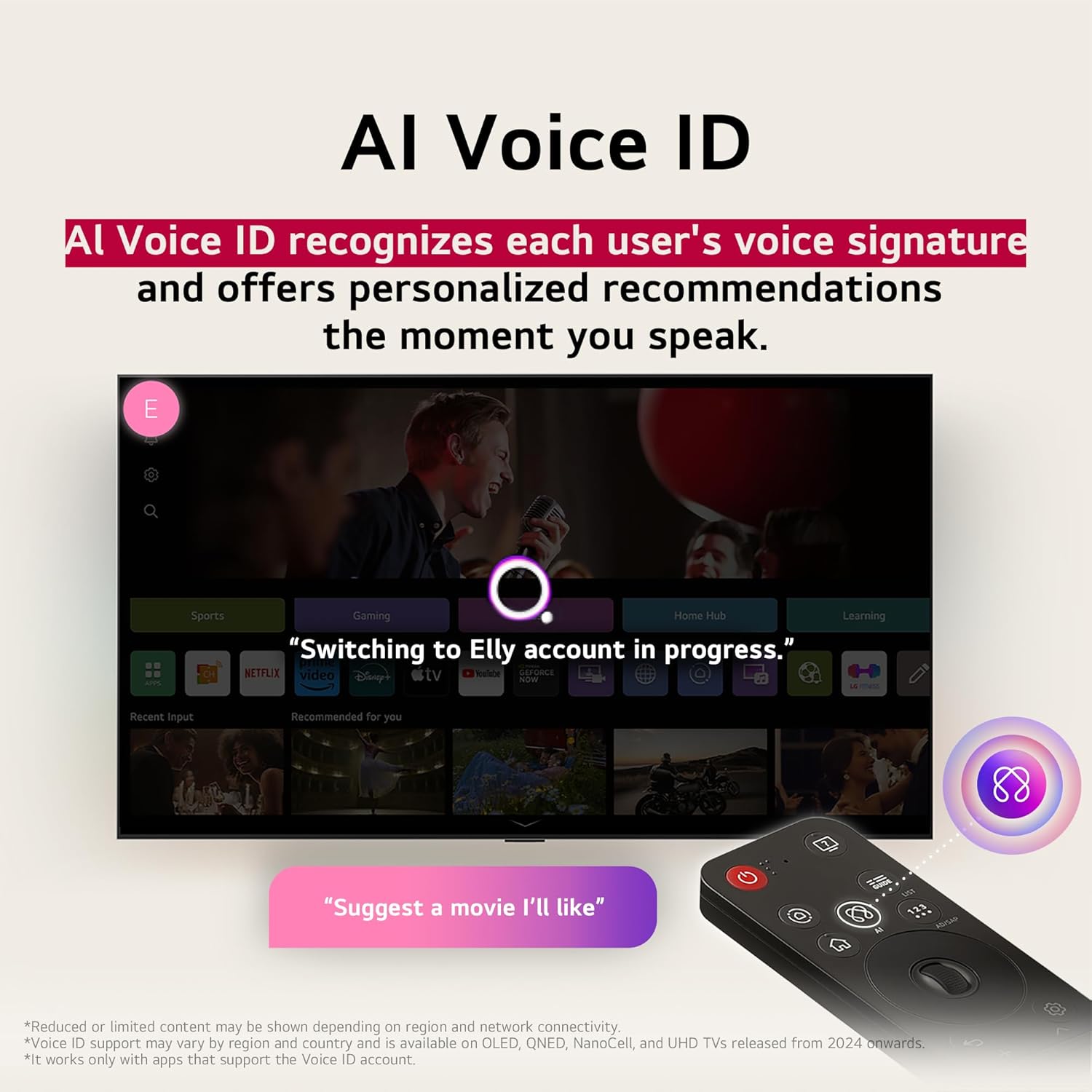
- ID vocale AI: Recognizes user's voice signature for personalized recommendations.
3. Impostazione
3.1 Disimballaggio e ispezione iniziale
Carefully remove the TV and all accessories from the packaging. Ensure all components listed in the 'What's in the Box' section are present and undamaged. Keep packaging for potential future transport or returns.
3.2 Montaggio su supporto o a parete
If using the included stand, follow the instructions provided in the separate quick setup guide to securely attach the stand to the TV. If wall-mounting, ensure you use a compatible VESA mount and follow the mount manufacturer's instructions, paying attention to weight limits and wall type. Always ensure the TV is securely fastened to prevent accidental falls.
3.3 Collegamento delle periferiche
Connect your external devices (e.g., cable box, Blu-ray player, gaming console) to the appropriate HDMI ports. For internet connectivity, use an Ethernet cable for a stable wired connection or connect via Wi-Fi during the initial setup process. Ensure the power cable is securely connected to the TV and a power outlet.
3.4 Accensione iniziale e procedura guidata di configurazione
Press the power button on the TV or the Magic Remote. The TV will guide you through the initial setup wizard, including language selection, network connection, channel scanning, and smart TV account setup. Follow the on-screen prompts to complete the process.
4. Istruzioni per l'uso
4.1 Utilizzo del telecomando magico
The Magic Remote allows for intuitive control of your TV. Point and click, use the scroll wheel, or utilize voice commands. Dedicated buttons provide quick access to popular streaming services and AI features.
4.2 Navigazione WebOS
IL WebOS platform provides a user-friendly interface for accessing apps, live TV, and connected devices. Use the Magic Remote's pointer to select icons on the home screen launcher bar. Customize the launcher bar to prioritize your favorite apps.
4.3 Funzionalità AI
- ID vocale AI: Set up your voice profile to receive personalized content recommendations and settings adjustments.
- Ricerca AI: Use voice commands to search for content, information, or additional solutions.
- Concierge AI: Provides customized keywords and recommendations based on your viewstoria.
- Chatbot AI: Understands your intent and provides immediate solutions for configuration settings or troubleshooting.
5. Integrazione dei media
5.1 Immagini del prodotto
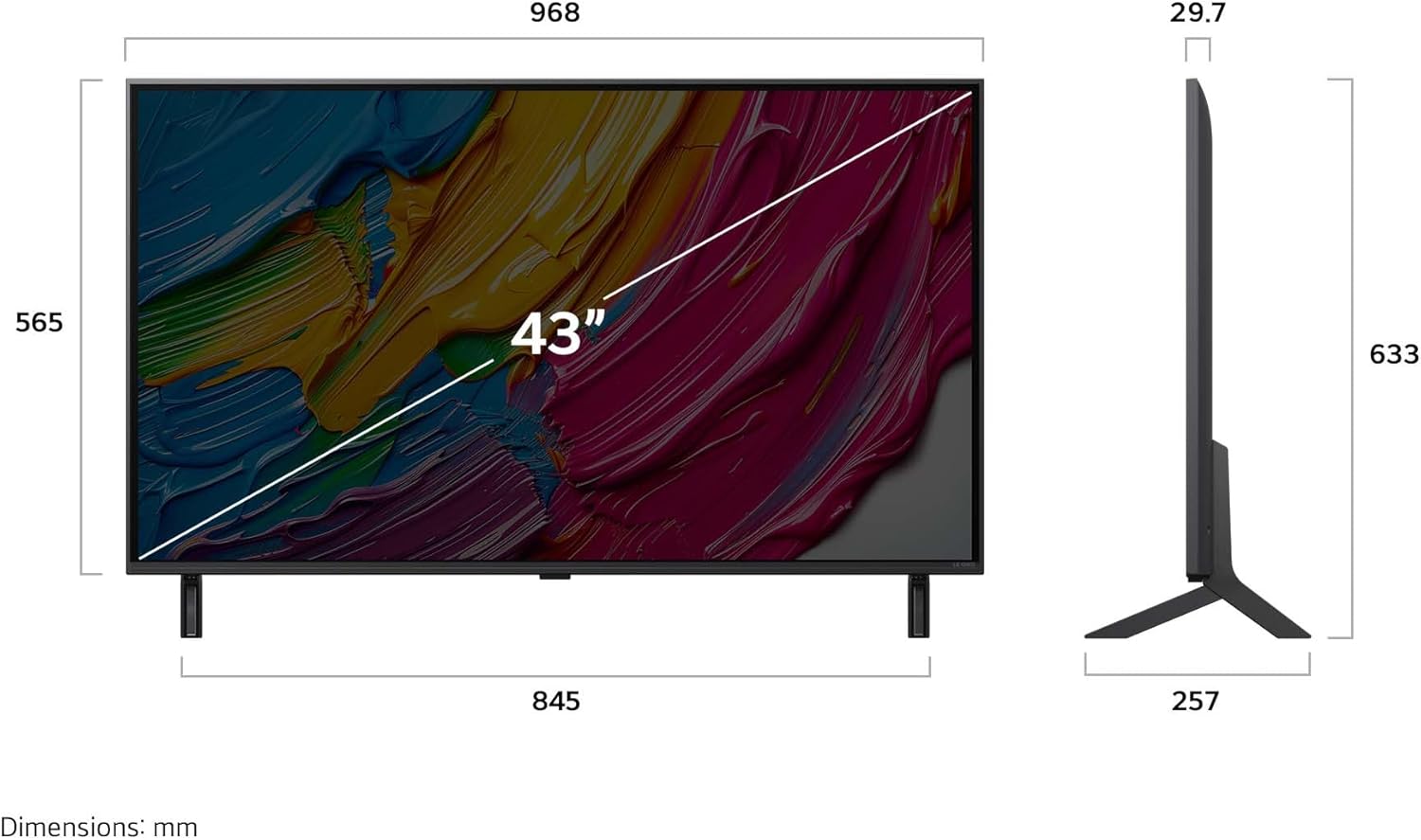
Davanti view of the LG 43-Inch QNED80 4K Smart TV.

Lato profile of the LG 43-Inch QNED80 4K Smart TV, showcasinil suo design sottile.

Posteriore view of the LG 43-Inch QNED80 4K Smart TV, highlighting connectivity ports.

Illustration of Dynamic QNED Colour with 100% Color Volume for vibrant visuals.

The α7 AI Processor Gen8, responsible for upscaling 4K visuals with stunning color and brightness.

Visual comparison demonstrating Precision Dimming Technology for sharper pictures and finer details.

Demonstration of 4K Super Upscaling, boosting resolution for enhanced clarity, brightness, and detail.
Experience your favorite films, sports, and games on the LG Ultra Big TV with high resolution.

The AI Magic Remote, completing your AI experience with dedicated AI buttons for various functions.

AI Voice ID recognizing a user's voice signature to offer personalized recommendations.

AI Search providing personalized recommendations and additional solutions based on user requests.
5.2 Video ufficiali del prodotto
In base ai criteri forniti, non erano disponibili video ufficiali del prodotto del venditore da incorporare.
6. Manutenzione
6.1 Pulizia del televisore
Always unplug the TV before cleaning. Use a soft, dry cloth to wipe the screen and exterior surfaces. For stubborn marks, lightly dampen the cloth with water or a specialized screen cleaner. Avoid using harsh chemicals, abrasive materials, or spraying liquids directly onto the TV.
6.2 Aggiornamenti software
Your LG Smart TV will periodically receive software updates to improve performance and add new features. Ensure your TV is connected to the internet. Software updates will automatically download, or you may receive a notification to accept or deny the update. It is recommended to keep your TV's software up to date for optimal performance and security.
7. Risoluzione Dei Problemi
If you encounter issues with your LG QNED80 4K Smart TV, refer to the following common troubleshooting steps:
- Nessun potere: Controlla che il cavo di alimentazione sia collegato saldamente sia al televisore che alla presa a muro. Prova una presa diversa.
- Nessuna immagine/suono: Ensure the correct input source is selected. Check all cable connections (HDMI, antenna, etc.) for looseness.
- Il telecomando non funziona: Replace the batteries in the Magic Remote. Ensure there are no obstructions between the remote and the TV. Re-pair the remote if necessary (refer to the on-screen guide for pairing instructions).
- Scarsa qualità dell'immagine: Regola le impostazioni dell'immagine (luminosità, contrasto, nitidezza) nel menu TV. Assicurati che la sorgente di ingresso fornisca un segnale di alta qualità.
- Problemi di connettività Internet: Check your Wi-Fi router and modem. Restart them if needed. Reconnect the TV to the Wi-Fi network or try a wired Ethernet connection.
- Le app della Smart TV non funzionano: Ensure your TV's software is up to date. Try clearing the app's cache or reinstalling the app.
For more detailed troubleshooting, consult the on-screen user guide available through the WebInterfaccia del sistema operativo o visita il supporto LG websito.
8. Specifiche
| Caratteristica | Dettaglio |
|---|---|
| Marca | LG |
| Numero di modello | 43QNED80AUA |
| Dimensioni dello schermo | 43 pollici |
| Tecnologia di visualizzazione | 4KQNED |
| Risoluzione | Risoluzione 4K (3840 x 2160) |
| Frequenza di aggiornamento | Frequenza 60 Hz |
| Processore | Processore AI α7 4K Gen 8 |
| Caratteristiche speciali | HDR10 Pro, AI webOS, LG Channels, webOS Re:New, Magic Remote |
| Tecnologia di connettività | Bluetooth, Ethernet, HDMI, USB, Wi-Fi |
| Porte HDMI | 3 |
| Porte USB | 2 |
| Proporzioni | 16:9 |
| Peso dell'articolo | 26.4 libbre |
| Dimensioni del prodotto (P x L x A) | 10.12 x 38.11 x 24.92 pollici |
| Nome del colore | Nero |
| Componenti inclusi | Power Cable, Magic Remote, Stand, Remote Control Batteries |
9. Garanzia e supporto
9.1 Garanzia del prodotto
Your LG 43-Inch QNED80 4K Smart TV comes with a standard manufacturer's warranty. Please refer to the warranty card included in your product packaging for specific terms, conditions, and duration. Keep your proof of purchase for warranty claims.
9.2 Piani di protezione estesa
Extended protection plans are available for purchase to provide additional coverage beyond the manufacturer's warranty. Options include a 4-Year Protection Plan and a Complete Protect plan. For details on these plans, please refer to the product listing or contact your retailer.
9.3 Assistenza clienti
For technical assistance, service requests, or further information, please visit the official LG support website or contact LG customer service directly. You can find contact information and online resources in your product documentation or on the LG websito.