1. Introduzione e oltreview
This manual provides detailed instructions for the safe and proper installation, operation, and maintenance of your Brookstone Tilt Wall Mount, Model BKS-720-909. This wall mount is designed to securely hold most flat and curved televisions ranging from 36 to 70 inches, with a maximum weight capacity of 77 lbs (35 kg).
The mount features a low-profile design, positioning your TV approximately 0.81 inches from the wall, and offers a tilt adjustment range of 0° to -8° to optimize viewangoli di visione e ridurre l'abbagliamento.

Figura 1: Fronte view of the Brookstone Tilt Wall Mount, showing the main wall plate and two vertical TV brackets.

Figure 2: Lifestyle image illustrating the low-profile design of the Brookstone Tilt Wall Mount, showing the TV positioned 0.81 inches from the wall.
2. Informazioni sulla sicurezza
WARNING: Read all instructions before installation. If you do not understand these instructions or have doubts about the safety of the installation, consult a qualified installer.
- Non superare la capacità di peso massima di 35 kg (77 libbre). Il superamento di questo limite può causare gravi lesioni o danni materiali.
- Ensure the mounting surface (wall) can safely support the combined weight of the mount and the television.
- Questo prodotto è destinato esclusivamente all'uso in ambienti interni.
- Utilizzare solo l'hardware fornito o specificato dal produttore.
- Always have at least two people assist with the installation of large or heavy televisions.
- Verify that there are no hidden electrical wires, water pipes, or gas lines in the wall where you intend to drill.
- Stringere saldamente tutte le viti, ma non eccessivamente. Un serraggio eccessivo può danneggiare le viti o la superficie di montaggio.
3. Contenuto della confezione
Carefully unpack the box and ensure all components are present and undamaged. If any parts are missing or defective, contact customer support.
- Gruppo piastra a parete (x1)
- Staffe TV (x2)
- Kit ferramenta (viti varie, rondelle, distanziali, tasselli a muro)
- Livella a bolla (x1)
- Manuale di istruzioni (x1)
4. Configurazione e installazione
4.1 Controlli pre-installazione
- Compatibilità TV: Verify your TV's weight is within 77 lbs (35 kg) and its VESA mounting pattern (distance between screw holes on the back of the TV) is between 200x200mm and 400x400mm.
- Tipo di parete: This mount is suitable for solid concrete walls, brick walls, or wood stud walls. Do NOT install on drywall alone.
- Strumenti necessari (non inclusi): Pencil, stud finder, drill, drill bits (wood/concrete), Phillips head screwdriver, socket wrench, measuring tape.
4.2 Fissaggio delle staffe TV al televisore
- Appoggia il televisore a faccia in giù su una superficie morbida e pulita per evitare graffi.
- Identifica i fori di montaggio VESA sul retro del televisore.
- Select the appropriate screws (M4, M6, or M8) and spacers from the hardware kit that fit your TV's mounting holes.
- Attach the two TV brackets to the back of your TV using the selected screws and spacers. Ensure the brackets are centered and the hooks face upwards.
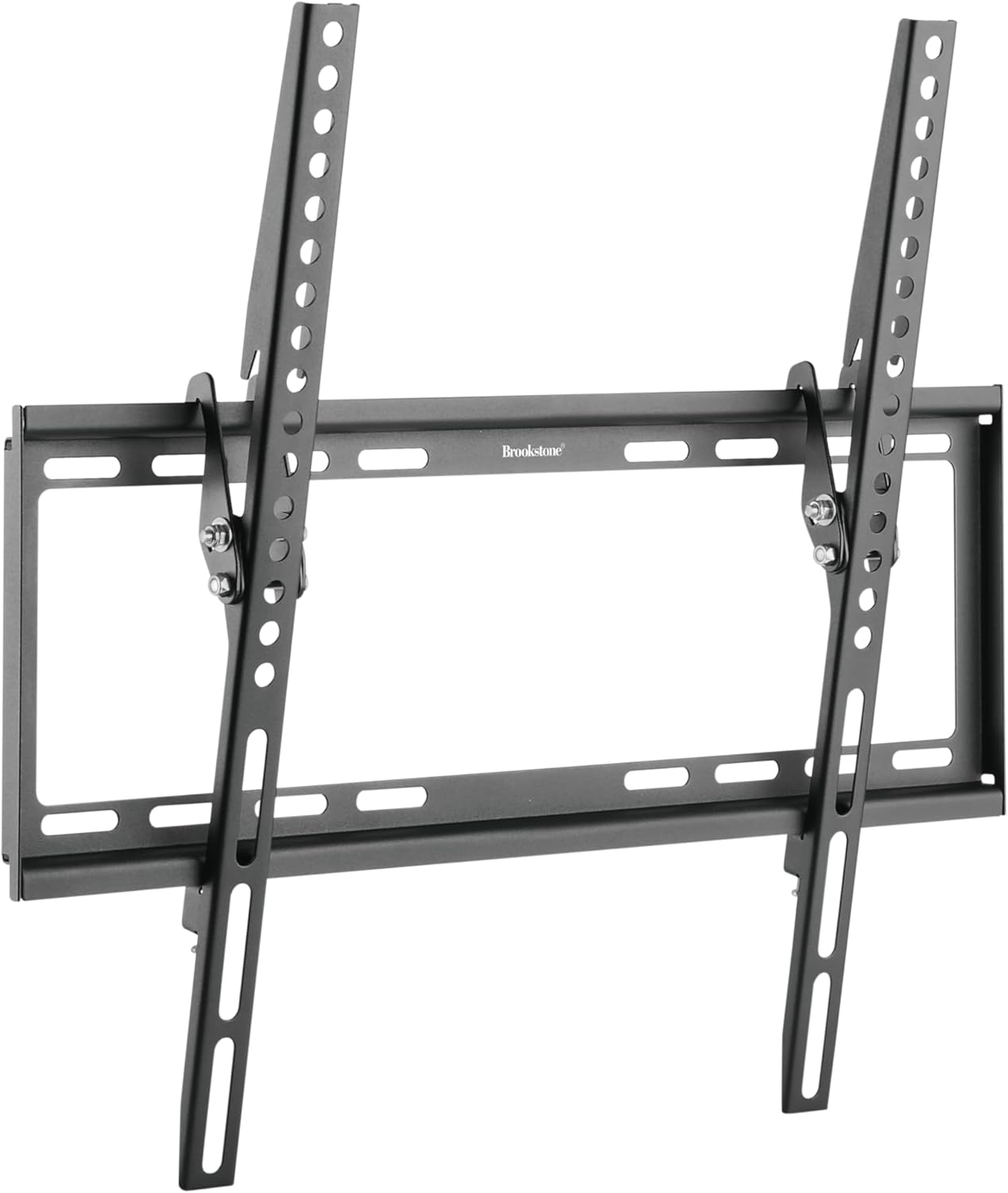
Figura 3: Angolato view of the mount, demonstrating the tilt mechanism on the TV brackets.
4.3 Mounting the Wall Plate to the Wall
- Determinare la posizione di montaggio: Decide on the desired height for your TV. Use a pencil to mark the center of the desired TV position.
- Individuare i montanti (per pareti con montanti in legno): Use a stud finder to locate the center of two adjacent wood studs. Mark their centers. The wall plate must be mounted to at least two studs.
- Posizione piastra a muro: Hold the wall plate against the wall at the desired height, ensuring it is level using the provided bubble level. Mark the drilling points through the holes on the wall plate.
- Praticare i fori pilota:
- For Wood Studs: Drill pilot holes using a 7/32 inch (5.5mm) drill bit to a depth of 2.2 inches (55mm).
- For Concrete/Brick Walls: Drill pilot holes using a 3/8 inch (10mm) drill bit to a depth of 2.4 inches (60mm). Insert concrete anchors into the holes until they are flush with the wall.
- Piastra di sicurezza a muro: Attach the wall plate to the wall using the lag bolts and washers. Tighten all bolts firmly with a socket wrench.

Figure 4: The Brookstone Tilt Wall Mount installed on a wall, ready for a TV.
4.4 Appendere la TV
- Con l'aiuto di qualcuno, sollevare con cautela il televisore utilizzando le staffe in dotazione.
- Agganciare le staffe per la TV al bordo superiore della piastra a muro.
- Gently lower the TV until the brackets are fully seated on the wall plate.
- Individuare le viti di sicurezza o i meccanismi di bloccaggio nella parte inferiore delle staffe del televisore. Serrarli per fissare il televisore alla piastra a muro ed evitare che si sposti accidentalmente.
5. Istruzioni per l'uso
5.1 Regolazione dell'inclinazione
The Brookstone Tilt Wall Mount allows for a tilt adjustment from 0° to -8° to achieve optimal viewangoli di visione e ridurre l'abbagliamento.
- To adjust the tilt, gently push or pull the bottom of the TV to the desired angle. The friction-based mechanism will hold the TV in place.
- Dopo la regolazione, assicurarsi che il televisore sia stabile.

Figure 5: Lifestyle image showing a TV mounted with the Brookstone Tilt Wall Mount, demonstrating the 0° to -8° tilt adjustment for glare reduction.
6. Manutenzione
- Pulizia: Use a soft, dry cloth to clean the mount. Avoid abrasive cleaners or solvents.
- Controlli periodici: Periodically check all screws and bolts to ensure they remain tight and secure. Do not overtighten.
- Ispezione dei danni: Inspect the mount for any signs of damage or wear. If damage is observed, discontinue use and contact customer support.
7. Risoluzione Dei Problemi
- La TV non è in piano: Ensure the wall plate was installed level. If not, remove the TV, loosen the wall plate bolts slightly, adjust with a level, and re-tighten.
- TV does not tilt smoothly: Check for any obstructions behind the TV. Ensure the tilt mechanism is free of debris.
- Il monte sembra instabile: Immediately remove the TV. Re-check all mounting bolts on the wall plate and TV brackets for proper tightness. Ensure the wall type is appropriate and anchors (if used) are correctly installed. Do not re-hang the TV until stability is confirmed.
- Parti mancanti: Refer to the Package Contents section. If parts are missing, contact Brookstone customer support.
8. Specifiche
| Caratteristica | Specificazione |
|---|---|
| Marca | Pietra di ruscello |
| Numero di modello | BKS-720-909 |
| Dimensioni TV compatibili | 36″ – 70″ |
| Capacità di peso | 77 libbre (35 kg) |
| Compatibilità VESA | da 200x200mm a 400x400mm |
| Angolo di inclinazione | Da 0° a -8° |
| Professionistafile dal Muro | 0.81″ (20.5 mm) |
| Materiale | Acciaio inossidabile |
| Colore | Nero |
| Peso dell'articolo | 4 libbre |
| Dimensioni del prodotto | 12 x 9 x 2 pollici |
| Codice UPC | 850060744686 |
9. Garanzia e supporto
Brookstone products are designed for quality and reliability. For warranty information, technical support, or to inquire about replacement parts, please refer to the warranty card included with your purchase or visit the official Brookstone website. Please have your model number (BKS-720-909) and proof of purchase ready when contacting support.


