Introduzione
This manual provides essential instructions for the safe and efficient operation, installation, and maintenance of your Durastar Through-the-Wall Air Conditioner with Supplemental Heating. This unit offers 14,000 BTU cooling and 10,600 BTU supplemental heating, designed for areas up to 700 sq. ft. Please read all instructions carefully before use and retain this manual for future reference.
Informazioni sulla sicurezza
Seguire sempre le precauzioni di sicurezza di base per ridurre il rischio di incendi, scosse elettriche o lesioni.
- Assicurarsi che l'unità sia adeguatamente messa a terra.
- Non utilizzare l'unità con un cavo di alimentazione o una spina danneggiati.
- Non inserire dita o oggetti nell'ingresso/uscita dell'aria.
- Scollegare l'alimentazione prima della pulizia o della manutenzione.
- Tenere i materiali infiammabili lontani dall'unità.
- Questo apparecchio non è destinato all'uso da parte di persone (bambini compresi) con ridotte capacità fisiche, sensoriali o mentali, o prive di esperienza e conoscenza, a meno che non siano supervisionate o abbiano ricevuto istruzioni riguardanti l'uso dell'apparecchio da una persona responsabile della loro sicurezza.
Prodotto finitoview
The Durastar DRTHC142XNA1SLV is a versatile through-the-wall unit providing both cooling and supplemental heating. It features a digital display, remote control, and multiple fan speeds for customized comfort.
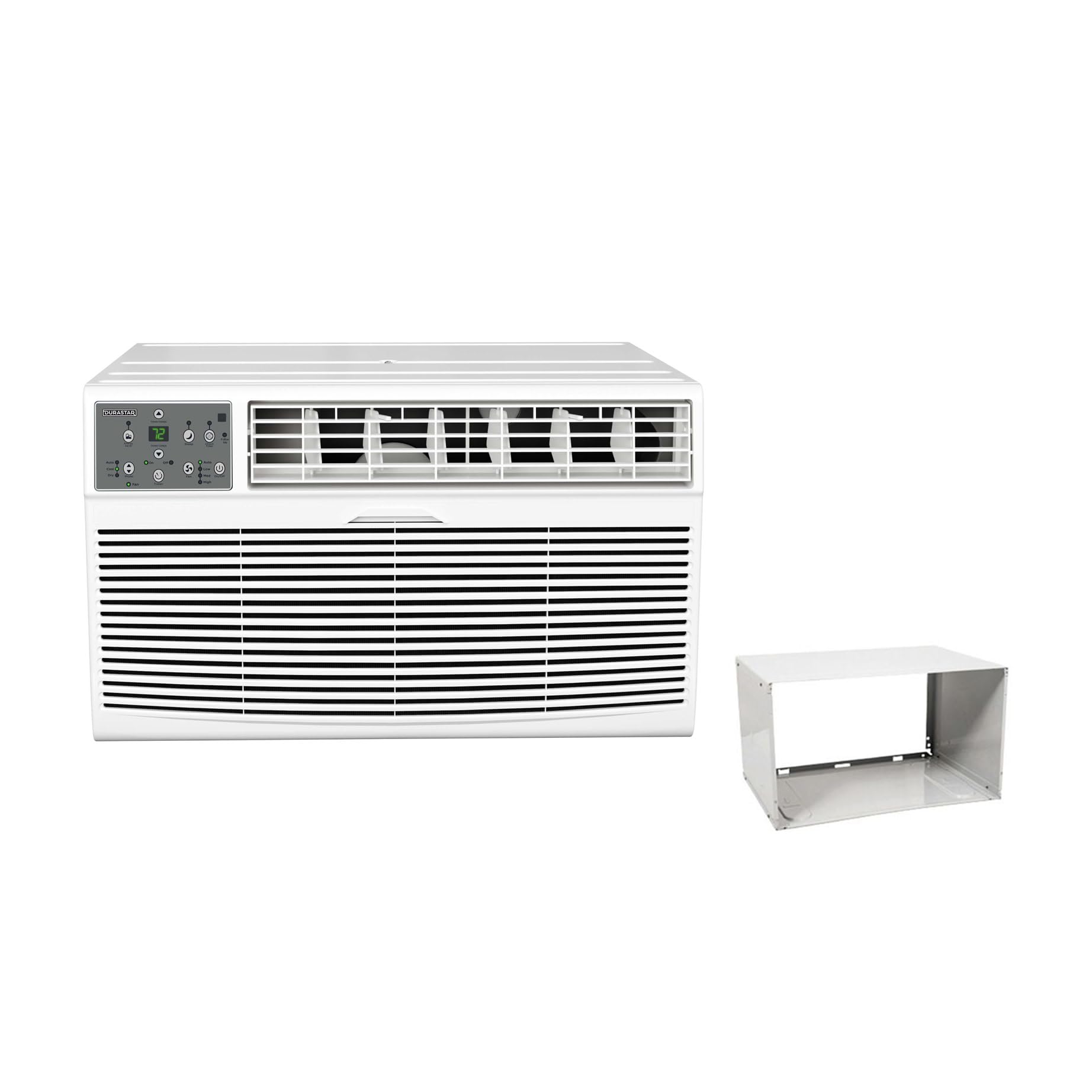
Image: The main Durastar through-the-wall air conditioner unit, showing its front grille and control panel.
Caratteristiche principali:
- Capacità di raffreddamento di 14,000 BTU
- 10,600 BTU Supplemental Heating Capacity
- Covers areas up to 700 sq. ft.
- Tre velocità della ventola
- Built-in Dehumidifier (Dry Mode)
- 24-hour Timer
- Funzionamento del telecomando
Pannello di controllo

Immagine: Un dettaglio view of the unit's control panel, featuring a digital temperature display, mode selection buttons (Auto, Cool, Dry, Fan), fan speed controls (Low, Med, High), timer, and power button.
The control panel allows direct access to all unit functions. The digital display shows the set temperature or timer settings. Indicator lights confirm the active mode and fan speed.
Telecomando

Image: The remote control for the air conditioner, featuring an LCD screen and buttons for temperature adjustment, mode selection, fan speed, and timer functions.
The included remote control provides convenient operation from a distance. It mirrors most functions available on the main control panel.
Installazione
This unit is designed for through-the-wall installation and includes a wall sleeve. Proper installation is crucial for optimal performance and safety. Professional installation is recommended.
Requisiti del sito:
- Elettrica: The unit requires a 230V electrical supply. Ensure your electrical circuit can support the unit's wattage (1817 watts). The required plug type is NEMA 6-20P.
- Apertura nel muro: A suitable wall opening is required for the wall sleeve. Refer to the dimensions in the specifications section.
- Liquidazione: Maintain adequate clearance around the unit for proper airflow and maintenance.

Image: A visual representation of the NEMA 6-20P plug type, which is necessary for the unit's electrical connection.

Image: The air conditioner unit shown installed within a wall sleeve, with its power cord plugged into a wall outlet, illustrating a typical installation scenario.
Room Size and BTU Requirements:
Select the appropriate BTU capacity based on your room size for efficient cooling and heating.

Image: A table detailing recommended cooling and heating BTU capacities for various room sizes (in square feet), along with a formula for calculating room area (Length x Width = Area).
| Room Size (Sq Ft) | Cooling BTUs | Heating BTUs (optional) |
|---|---|---|
| 300-350 | 8,000 | 4,200 |
| 400-450 | 10,000 | 10,600 |
| 450-550 | 12,000 | 10,600 |
| 550-700 | 14,000 | 10,600 |
Istruzioni per l'uso
Per un utilizzo ottimale, familiarizzare con il pannello di controllo e le funzioni del telecomando.
Accensione/spegnimento
- Premere il tasto Energia pulsante sul pannello di controllo o sul telecomando per accendere o spegnere l'unità.
Selezione della modalità
Premere il tasto Modalità pulsante per scorrere le modalità operative disponibili:
- Freddo: For cooling the room. Adjust temperature using Temperatura su/giù pulsanti.
- Calore: For supplemental heating. Adjust temperature using Temperatura su/giù pulsanti.
- Asciutto: Dehumidifies the air without significant cooling.
- Fan: Fa circolare l'aria senza raffreddamento o riscaldamento.
- Auto: Automatically selects cooling or heating based on the set temperature and room temperature.
Regolazione della velocità della ventola
In Cool, Heat, or Fan mode, press the Velocità della ventola pulsante per selezionare la velocità della ventola Bassa, Media o Alta.
Funzione timer
The 24-hour timer allows you to set a specific time for the unit to turn on or off.
- To Set Auto-On: Con l'unità spenta, premere il Timer pulsante, quindi utilizzare Temperatura su/giù to set the desired delay time (1-24 hours).
- To Set Auto-Off: Con l'unità accesa, premere il tasto Timer pulsante, quindi utilizzare Temperatura su/giù to set the desired delay time (1-24 hours).
Manutenzione
Una manutenzione regolare garantisce prestazioni ottimali e prolunga la durata del condizionatore. Scollegare sempre l'alimentazione prima di eseguire qualsiasi intervento di manutenzione.
Pulizia del filtro dell'aria
- Il filtro dell'aria deve essere pulito ogni due settimane o più frequentemente, a seconda dell'utilizzo.
- Remove the front panel and slide out the air filter.
- Lavare il filtro con acqua tiepida e sapone. Risciacquare abbondantemente e lasciarlo asciugare completamente all'aria prima di reinstallarlo.
- Non utilizzare l'unità senza il filtro dell'aria.
Pulizia dell'unità
- Pulire l'esterno dell'unità con un panno morbido, damp stoffa.
- Non utilizzare prodotti chimici aggressivi, abrasivi o solventi.
- Assicurarsi che non penetri acqua nei componenti elettrici.
Risoluzione dei problemi
Prima di contattare l'assistenza clienti, consultare la seguente tabella per problemi comuni e relative soluzioni.
| Problema | Possibile causa | Soluzione |
|---|---|---|
| L'unità non si accende | Nessuna alimentazione; Cavo di alimentazione non completamente collegato; Interruttore automatico scattato. | Check power connection; Reset circuit breaker; Ensure proper voltage (230 V). |
| Raffreddamento/riscaldamento insufficiente | Dirty air filter; Room size too large for unit capacity; Doors/windows open; Temperature setting too high/low. | Clean air filter; Close doors/windows; Adjust temperature setting; Ensure unit capacity matches room size. |
| L'unità è rumorosa | Parti allentate; Unità non in piano; Ostruzione nella ventola. | Check for loose components; Ensure unit is level; Remove any obstructions. |
| Fuori gocciola acqua | Funzionamento normale (condensa). | This is normal during cooling mode as condensation drains. |
| Il telecomando non funziona | Batterie scariche; ostruzione tra il telecomando e l'unità. | Replace batteries; Remove obstructions; Ensure remote is pointed at the unit. |
Specifiche
| Caratteristica | Dettaglio |
|---|---|
| Numero di modello | DRTHC142XNA1SLV |
| Capacità di raffreddamento | Potenza nominale: 14,000 BTU |
| Capacità di riscaldamento | 10,600 BTU (Supplemental) |
| Voltage | 230 Volt |
| Cosatage | 1817 watt |
| Area di raffreddamento | Fino a 700 mq. piedi |
| Dimensioni del prodotto (P x L x A) | 20.25 x 24.25 x 14.5 pollici |
| Peso dell'articolo | 0.16 ounces (Unit weight is approximately 96.03 lbs) |
| Livello sonoro | 69.9 decibel |
| Metodo di installazione | Attraverso il muro |
| Componenti inclusi | Product Only (Wall Sleeve Included with this variant) |
Informazioni sulla garanzia
This Durastar air conditioner comes with a Garanzia del produttore di 2 anno. Please retain your proof of purchase for warranty claims. For specific terms and conditions, refer to the warranty documentation included with your product or contact Durastar customer support.
Assistenza clienti
If you have any questions, require technical assistance, or need to report an issue that cannot be resolved using the troubleshooting guide, please contact Durastar customer support. Refer to the contact information provided in your product packaging or on the official Durastar websito.


