1. Introduzione
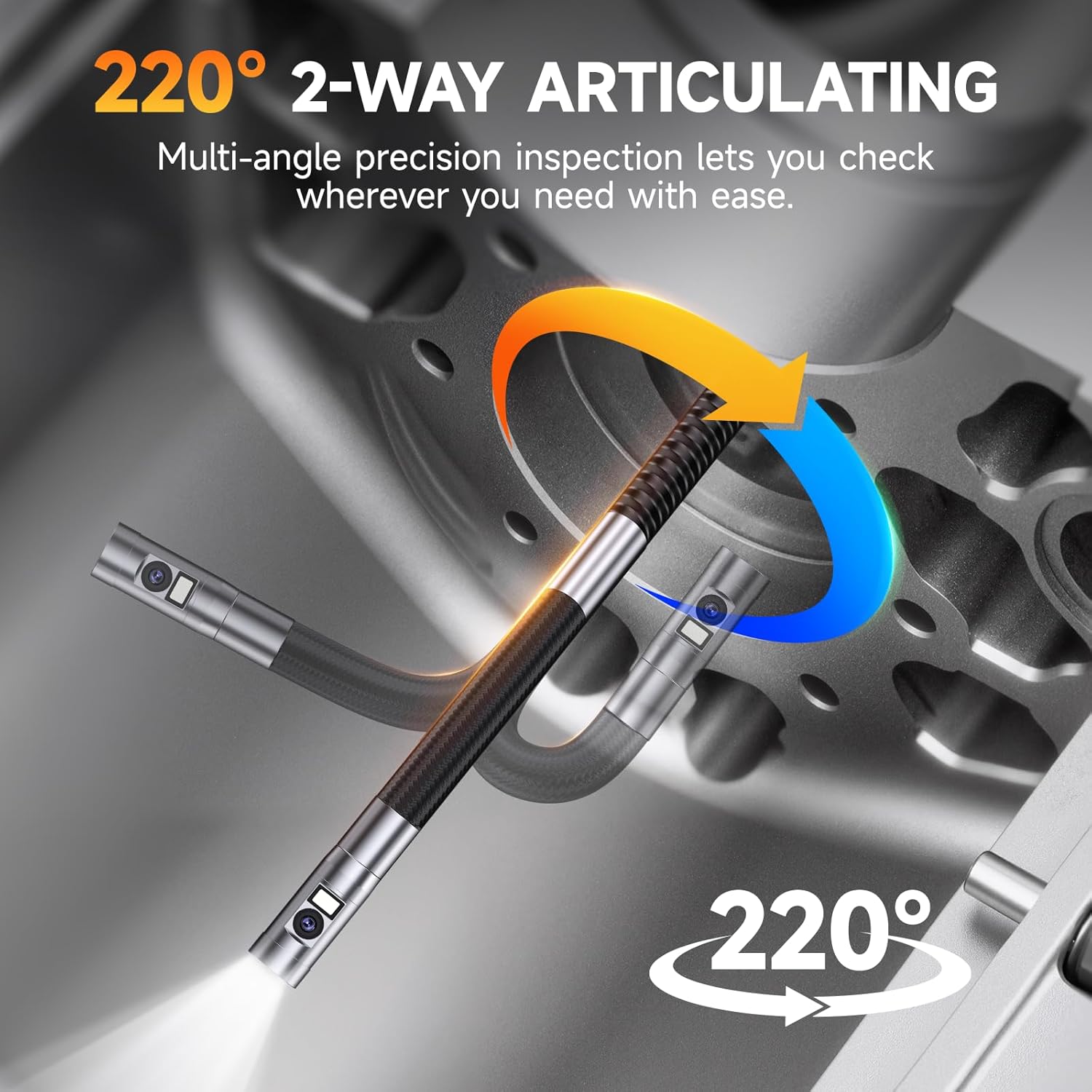
The FOXWELL FY406D is an advanced industrial endoscope designed for precise inspections in confined or hard-to-access areas. This device features dual lenses and a 2-way 220° articulating camera, providing multi-angle visibility with exceptional clarity. It is suitable for professionals in automotive, HVAC, plumbing, and general home inspection applications. This manual provides essential information for the safe and effective operation of your FY406D borescope.
2. Cosa c'è nella scatola
Carefully unpack your FOXWELL FY406D borescope and verify that all items listed below are present:
- 1x Articulating Borescope (Main Unit)
- 1x 2-in-1 Charging and Data Transfer Cable (USB-C)
- 1x Carrying Case Bag
- 1x User’s Manual (This Document)
- 2x Small Tips (Accessories for probe)
3. Prodotto finitoview e Caratteristiche
The FOXWELL FY406D is engineered for high-performance inspection. Familiarize yourself with its key components and capabilities.
3.1. Dual Lens System for Enhanced Visibility

The borescope features a dual-lens system, allowing users to switch between a front view, un lato view, o uno schermo diviso doppio view for comprehensive inspection without changing probes.
3.2. 2-Way 220° Articulation Control

The probe offers 2-way 220° articulation, enabling precise navigation around corners and obstacles in tight spaces. This feature is crucial for detailed inspections of engine components or wall cavities.
3.3. Ultra-Slim 6.5mm Probe
The 6.5mm (0.25 inch) diameter probe allows for easier entry into very tight spaces, such as spark plug holes or small pipe openings, compared to larger standard probes.
3.4. 4.3" IPS HD True Color Display

The device features a 4.3-inch IPS screen that provides clear, high-definition images with accurate color reproduction. It also displays real-time temperature readings.
3.5. Adjustable LED Illumination and IP67 Waterproof Probe

Equipped with 6 front LEDs (5000 lux) and 1 side LED (8000 lux), all with 3 adjustable brightness levels, the probe ensures optimal visibility in dark or damp environments. The IP67 waterproof rating protects the probe from water ingress, and overheat protection automatically shuts off the device if temperatures exceed 70°C.
3.6. Multi-Zoom Functionality

The borescope supports 2x and 4x digital zoom, allowing users to magnify details for closer examination of defects or features.
3.7. Registrazione e archiviazione
The device includes 32GB of onboard memory, capable of storing over 50 videos or 10,000 photos. It supports video recording with audio and high-resolution image capture. Files can be transferred via the USB-C cable.
4. Impostazione
4.1. Carica del dispositivo
- Connect the provided 2-in-1 USB-C cable to the charging port on the borescope.
- Collegare l'altra estremità del cavo USB-C a un adattatore di alimentazione USB compatibile (non incluso) o alla porta USB di un computer.
- The charging indicator on the device will illuminate. A full charge typically takes approximately 4 hours, providing up to 4 hours of continuous operation.
4.2. Attaching Small Tips (Optional)
The borescope comes with two small tips (e.g., hook, magnet). These can be screwed onto the end of the probe for retrieving lost items or manipulating objects in tight spaces. Ensure the device is powered off before attaching or detaching tips.
5. Istruzioni per l'uso
5.1. Accensione/Spegnimento
- Per accendere: tenere premuto il pulsante di accensione finché lo schermo non si illumina.
- To power off: Press and hold the power button until the screen shuts down.
5.2. Navigazione nell'interfaccia
The device features intuitive buttons for navigation and control:
- Pulsante OK: Confirms selections or takes photos/starts video recording.
- Pulsante Menu: Accesses settings and playback modes.
- Frecce su/giù: Navigate menus, adjust zoom, or control articulation.
- Joystick di articolazione: Controls the bending of the probe tip.
5.3. Regolazione della luminosità dei LED
Press the dedicated LED button to cycle through the three brightness levels (Low, Medium, High) or to turn the lights off. This helps optimize visibility and reduce glare in various inspection environments.
5.4. Cambio di telecamera Views
Premere la fotocamera view button to toggle between front camera view, telecamera laterale viewo uno schermo diviso view displaying both simultaneously.
5.5. Catturare foto e video
- Per scattare una foto: In diretta view, press the OK button once.
- Per registrare un video: In diretta view, press and hold the OK button to start recording. Press and hold again to stop.
- I contenuti multimediali acquisiti vengono salvati nella memoria interna da 32 GB.
5.6. Zoom and Image Rotation
- Use the designated zoom buttons (or arrow keys in some modes) to apply 2x or 4x digital zoom.
- The device supports 360° image rotation, accessible via the menu, to adjust the orientation of the live feed or captured images.
5.7. File Trasferire
Connect the borescope to a computer using the provided USB-C cable. The device will appear as a removable storage device, allowing you to access and transfer photos and videos.
6. Manutenzione
6.1. Cleaning the Probe and Lenses
- After each use, especially in dirty or oily environments, gently wipe the probe and camera lenses with a soft, damp stoffa.
- For stubborn grime, use a small amount of isopropyl alcohol on a cotton swab. Ensure no liquid enters the main unit.
- Non utilizzare detergenti abrasivi o solventi.
6.2. Cura della batteria
- Per preservare la salute della batteria, ricaricarla regolarmente, anche se il dispositivo non viene utilizzato frequentemente.
- Evitare di scaricare completamente la batteria per periodi prolungati.
- Conservare il dispositivo in un luogo fresco e asciutto, lontano dalla luce solare diretta.
6.3. Conservazione
When not in use, store the borescope and its accessories in the provided carrying case to protect it from dust, impacts, and environmental damage.
7. Risoluzione Dei Problemi
If you encounter issues with your FOXWELL FY406D, refer to the following common problems and solutions:
| Problema | Possibile causa | Soluzione |
|---|---|---|
| Il dispositivo non si accende | Batteria scarica; pulsante di accensione difettoso | Caricare completamente il dispositivo. Se il problema persiste, contattare l'assistenza. |
| Scarsa qualità dell'immagine / Immagine scura | Dirty lens; Insufficient lighting | Clean the camera lens. Increase LED brightness. |
| Probe articulation not working | Mechanical obstruction; Internal issue | Ensure no physical obstruction. Do not force articulation. Contact support if damaged. |
| Impossibile trasferire files al computer | Incorrect cable; Driver issue; Corrupted memory | Use the provided USB-C cable. Try a different USB port or computer. |
| Il dispositivo si surriscalda | Utilizzo prolungato ad alte temperature | The device has overheat protection and will shut down automatically. Allow it to cool before resuming use. |
8. Specifiche
| Caratteristica | Dettaglio |
|---|---|
| Modello | Anno fiscale 406D |
| Diametro della sonda | 6.5 mm (0.25 pollici) |
| Articolazione | 2-Way, 220° |
| Schermo di visualizzazione | 4.3 pollici IPS HD |
| Risoluzione di acquisizione video | Formato: 720p |
| Zoom ottico | 4x (Digital) |
| Illuminazione a LED | 6 Front LEDs (5000 lux), 1 Side LED (8000 lux), 3 adjustable levels |
| Livello di resistenza all'acqua | IP67 (Sonda) |
| Tipo di batteria | Ioni di litio (2600 mAh) |
| Durata media della batteria | Fino a 4 ore |
| Memoria interna | 32 GB |
| Interfaccia Hardware | USB tipo C |
| Peso dell'articolo | 1.04 kg |
| Dimensioni del prodotto | Dimensioni: 21.89 x 12.78 x 5.03 cm |
| Registrazione audio | SÌ |
9. Informazioni sulla sicurezza
- This device is for industrial and home inspection use only. It is NON intended for medical or human body use.
- Non tentare di smontare o modificare il dispositivo. Ciò invaliderà la garanzia e potrebbe causare danni o lesioni.
- Keep the device away from extreme temperatures, open flames, and corrosive substances.
- Ensure the probe is clean and free of debris before insertion into any cavity.
- Always handle the probe and articulation mechanism gently to prevent damage.
10. Garanzia e supporto
FOXWELL products are designed for reliability and performance. For warranty information, technical support, or service inquiries, please refer to the warranty card included with your product or visit the official FOXWELL website. Please have your product model (FY406D) and purchase details ready when contacting support.


