1. Introduzione
This manual provides detailed instructions for the safe and effective operation of your Dracast Palette Series II LED4000 RGBW Soft Panel. The DRPA4000RGB2 is a high-output, full-spectrum RGBW LED panel designed for professional production environments, offering precise color control and versatile lighting effects.
Si prega di leggere attentamente il presente manuale prima di utilizzare il prodotto e di conservarlo per riferimento futuro.
2. Informazioni sulla sicurezza
Per garantire un funzionamento sicuro ed evitare danni al prodotto o lesioni a se stessi e ad altri, osservare le seguenti precauzioni di sicurezza:
- Do not operate the unit with wet hands or in wet conditions.
- Garantire l'alimentazione voltage corrisponde ai requisiti specificati sull'unità.
- Always disconnect the power cable before cleaning or performing maintenance.
- Non ostruire le aperture di ventilazione. Il surriscaldamento può causare danni.
- Avoid direct eye exposure to the light source. The light output is very bright.
- Use only Dracast-approved accessories and replacement parts.
- Tenere l'unità lontana da materiali infiammabili.
- If the unit is damaged, do not attempt to repair it yourself. Contact qualified service personnel.
3. Contenuto della confezione
Verifica che tutti gli articoli elencati di seguito siano inclusi nel tuo pacchetto:
- Dracast Palette Series II LED4000 RGBW Soft Panel (DRPA4000RGB2)
- Soft Padded Carry Case (Model CC-38)
- Cavo di alimentazione
- U-bracket Yoke
- Barn Doors (pre-attached or separate)
4. Prodotto finitoview
Familiarize yourself with the components and controls of the LED4000 RGBW Soft Panel.
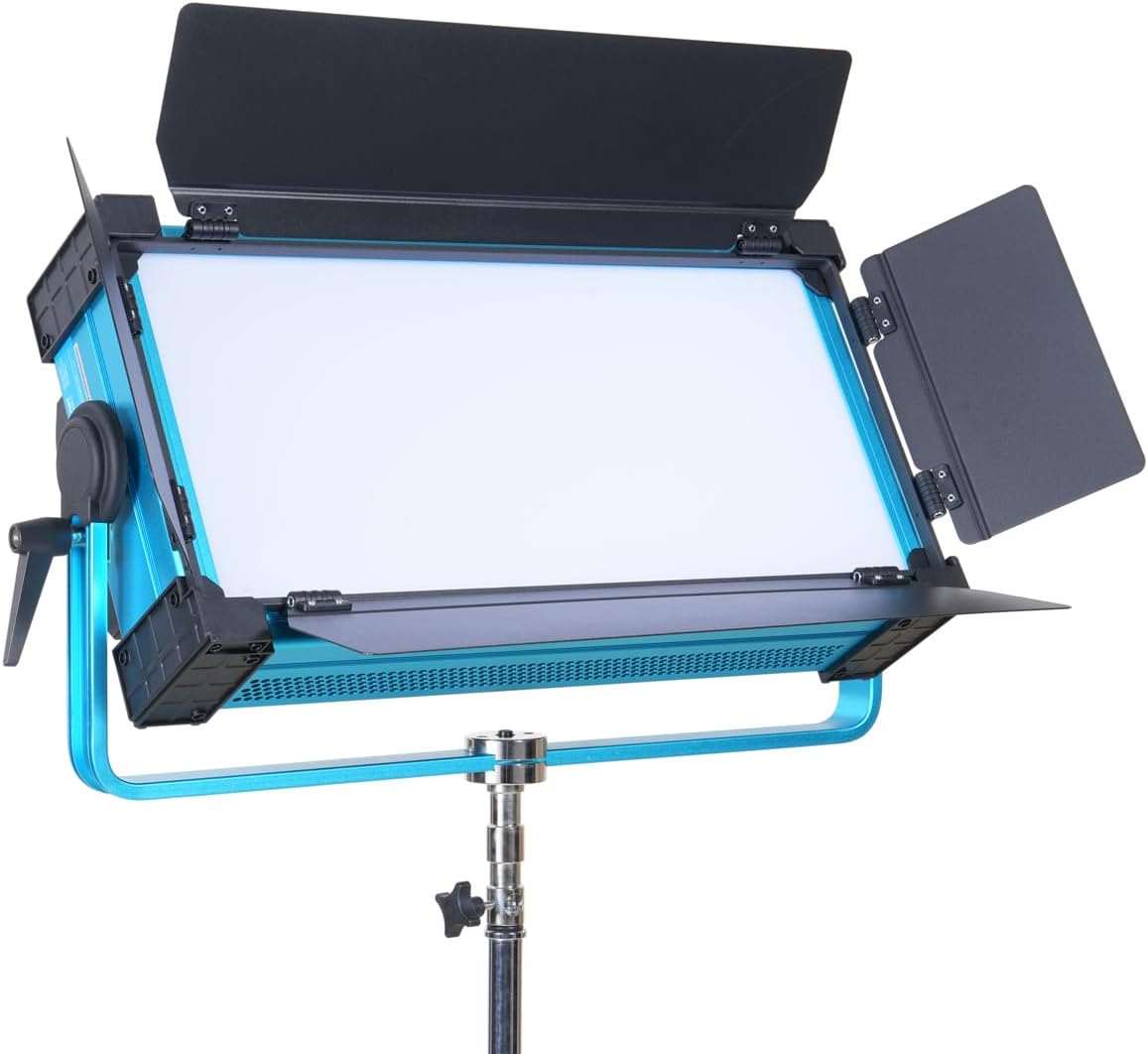
Figura 4.1: Davanti view of the Dracast Palette Series II LED4000 RGBW Soft Panel with its barn doors fully open, showcasing the light-emitting surface and the sturdy U-bracket yoke.

Figura 4.2: Davanti view of the LED4000 panel with its barn doors closed, illustrating the compact form factor when not in use or for focused light control.

Figura 4.3: Fronte angolato view of the LED4000 panel without barn doors, providing a clear look at the soft light diffusion surface.
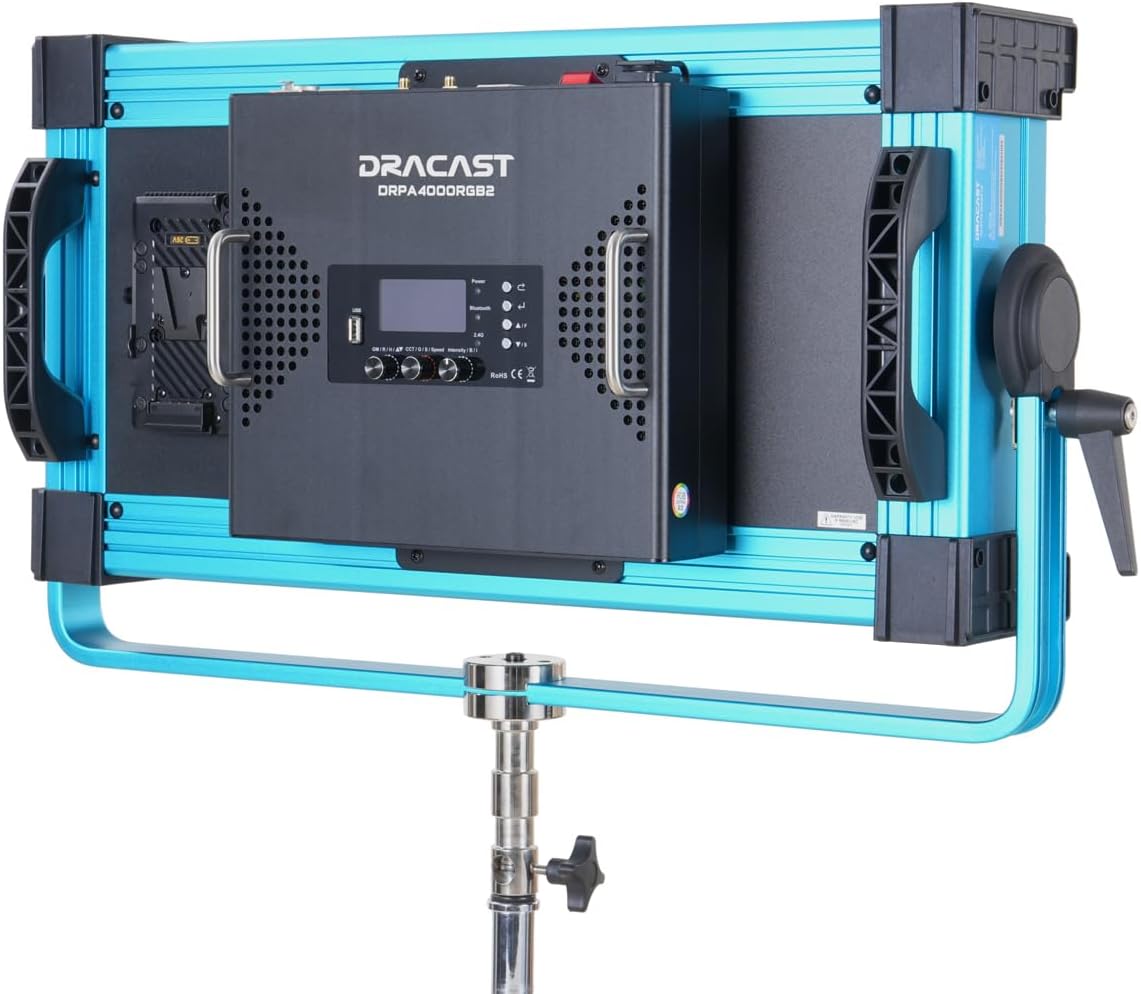
Figura 4.4: Posteriore view of the LED4000 panel, highlighting the integrated control panel with LCD display, adjustment knobs, and the V-mount battery plate for portable power solutions.

Figura 4.5: Lato view of the LED4000 panel, illustrating the robust U-bracket yoke and the locking handle for precise angle adjustment and secure mounting.
4.6. Layout del pannello di controllo
The rear control panel features an LCD display, navigation buttons, and rotary knobs for adjusting various settings. Specific functions include:
- Schermo LCD: Shows current settings, modes, and values.
- Pulsante Modalità: Cycles through CCT, HSI, RGB, Gel, and FX modes.
- Manopola dell'intensità: Regola la luminosità (0-100%).
- Manopole dei parametri: Adjust specific parameters depending on the selected mode (e.g., CCT, Hue, Saturation).
- Porte DMX: 5-pin DMX In/Out for wired DMX control.
- Potenza in ingresso: Per collegare l'adattatore di alimentazione CA.
- V-Mount Plate: For attaching compatible V-mount batteries (sold separately).
5. Impostazione
5.1. Montaggio del pannello
- Attach the U-bracket yoke to a compatible light stand or mounting hardware using the standard 5/8" receiver.
- Securely tighten the locking knob on the light stand to prevent accidental movement.
- Adjust the angle of the LED panel using the locking handles on the U-bracket, then tighten to secure the desired position.
5.2. Alimentazione dell'unità
The LED4000 can be powered via AC adapter or V-mount battery.
- Alimentazione CA: Connect the provided power cable to the power input port on the rear of the panel, then plug the other end into a suitable AC outlet.
- Potenza della batteria: Attach a fully charged V-mount battery (not included) to the V-mount plate on the rear of the panel. Ensure it clicks securely into place.
Press the power button to turn the unit on. The LCD display will illuminate.
6. Istruzioni per l'uso
The Dracast Palette Series II LED4000 offers multiple operating modes and control options.
6.1. Onboard Control
Use the Mode button to cycle through the available lighting modes, and the Intensity/Parameter knobs to adjust settings.
- Modalità CCT (temperatura colore correlata): Adjusts white light from 2500K to 9999K. Use the dedicated knob for CCT and another for Green/Magenta shift.
- Modalità HSI (Tonalità, Saturazione, Intensità): Provides full control over color.
- Hue: Adjusts the color tone (0-360°).
- Saturazione: Adjusts the purity or intensity of the color (0-100%).
- Intensità: Adjusts the overall brightness (0-100%).
- Modalità RGB: Allows direct adjustment of Red, Green, and Blue LED levels.
- Modalità Gel: Emulates various ROSCO and LEE lighting gels. Select from a library of pre-programmed gels.
- FX Mode (Lighting Effects): Access 21 preloaded cinematic lighting effects such as Lightning, Police Car, Screen Flicker, RGB Loop, and more. Use the parameter knob to select and adjust effect speed or intensity.
6.2. Controllo dell'app Bluetooth
The Dracast Palette V2 App (available for iOS and Android) allows wireless control of the LED4000 panel.
- Download and install the "Dracast Palette V2" app from your device's app store.
- Assicurati che il Bluetooth sia abilitato sul tuo dispositivo mobile.
- Power on the LED4000 panel.
- Open the Dracast Palette V2 app and follow the on-screen instructions to connect to your light.
- Once connected, you can control brightness, color modes, FX, and gel selections remotely.
6.3. DMX Control (Wired and Wireless)
The LED4000 supports 5-pin DMX512 for integration into professional lighting setups.
- Wired DMX: Connect a DMX controller to the DMX IN port using a 5-pin DMX cable. Use the DMX OUT port to daisy-chain multiple units. Refer to the DMX chart in the appendix (if available, otherwise consult Dracast support) for channel assignments.
- DMX wireless: The unit features built-in wireless DMX capabilities. Consult the Dracast documentation or support for pairing instructions with compatible wireless DMX transmitters.
7. Manutenzione
Proper maintenance ensures the longevity and optimal performance of your LED panel.
- Pulizia: Utilizzare un panno morbido e asciutto per pulire l'esterno dell'unità. Per lo sporco ostinato, un panno leggermenteamp cloth with mild detergent can be used, ensuring no liquid enters the unit. Do not use harsh chemicals or abrasive cleaners.
- Magazzinaggio: When not in use, store the LED panel in its provided soft padded carry case (CC-38) in a cool, dry place, away from direct sunlight and extreme temperatures.
- Ventilazione: Ensure the ventilation holes are free from dust and obstructions to prevent overheating.
8. Risoluzione Dei Problemi
If you encounter issues with your LED4000 panel, refer to the following common problems and solutions:
| Problema | Possibile causa | Soluzione |
|---|---|---|
| L'unità non si accende. | No power supply; faulty cable; battery depleted. | Check power cable connection and outlet. Ensure battery is charged and properly seated. |
| L'emissione luminosa è incoerente o tremolante. | Loose connection; DMX signal issue; internal fault. | Check all cable connections. If using DMX, verify signal integrity. Restart the unit. |
| Impossibile connettersi tramite l'app Bluetooth. | Bluetooth not enabled; app issue; unit not discoverable. | Ensure Bluetooth is on your device. Restart the app and the LED panel. Check app permissions. |
| I comandi non rispondono. | Temporary software glitch; DMX override. | Power cycle the unit. If using DMX, ensure DMX signal is not overriding local controls. |
If the problem persists after attempting these solutions, please contact Dracast customer support for assistance.
9. Specifiche
| Modello | DRPA4000RGB2 |
| Tipo di luce | RGBW Soft Panel |
| Assorbimento di potenza | 400W |
| Conteggio LED | 1120 LEDs (560 RGB, 560 White) |
| Gamma CCT | Temperatura di colore: da 2500K a 9999K |
| Oscuramento | 16 bit |
| Modalità di controllo | CCT, HSI, RGB, Gel, FX |
| Opzioni di controllo | Onboard, Bluetooth (Dracast Palette V2 App), 5-pin DMX512 (Wired/Wireless) |
| Effetti di luce | 21 preloaded effects |
| Costruzione | Alloggiamento interamente in metallo |
| Dimensioni del prodotto | 22.6"L x 3.2"W x 19.8"H (57.4 cm x 8.1 cm x 50.3 cm) |
| Peso | (Weight not specified in input) |
| Codice UPC | 659675247267 |
10. Garanzia e supporto
For warranty information, please refer to the warranty card included with your product or visit the official Dracast website. For technical support, service, or inquiries, please contact Dracast customer service:
- Websito: www.dracast.com
- E-mail: support@dracast.com
- Telefono: (Contact information not provided, please refer to product packaging or websito)
When contacting support, please have your product model (DRPA4000RGB2) and serial number ready.


