1. Introduzione
This manual provides essential information for the setup, operation, maintenance, and troubleshooting of your KOOSMILE N150 8-inch 2-in-1 Mini Laptop. Please read this manual thoroughly before using the device to ensure proper functionality and to prevent damage.
2. Contenuto della confezione
Verificare che tutti gli articoli siano presenti nel pacco:
- KOOSMILE N150 8-inch 2-in-1 Mini Laptop x1
- Adattatore PD x1
- Stilo attivo x1
- Cavo HDMI x1
- HUB x1
- Manuale utente x1
- Data Cables x2
3. Prodotto finitoview
Familiarize yourself with the components and ports of your mini laptop.
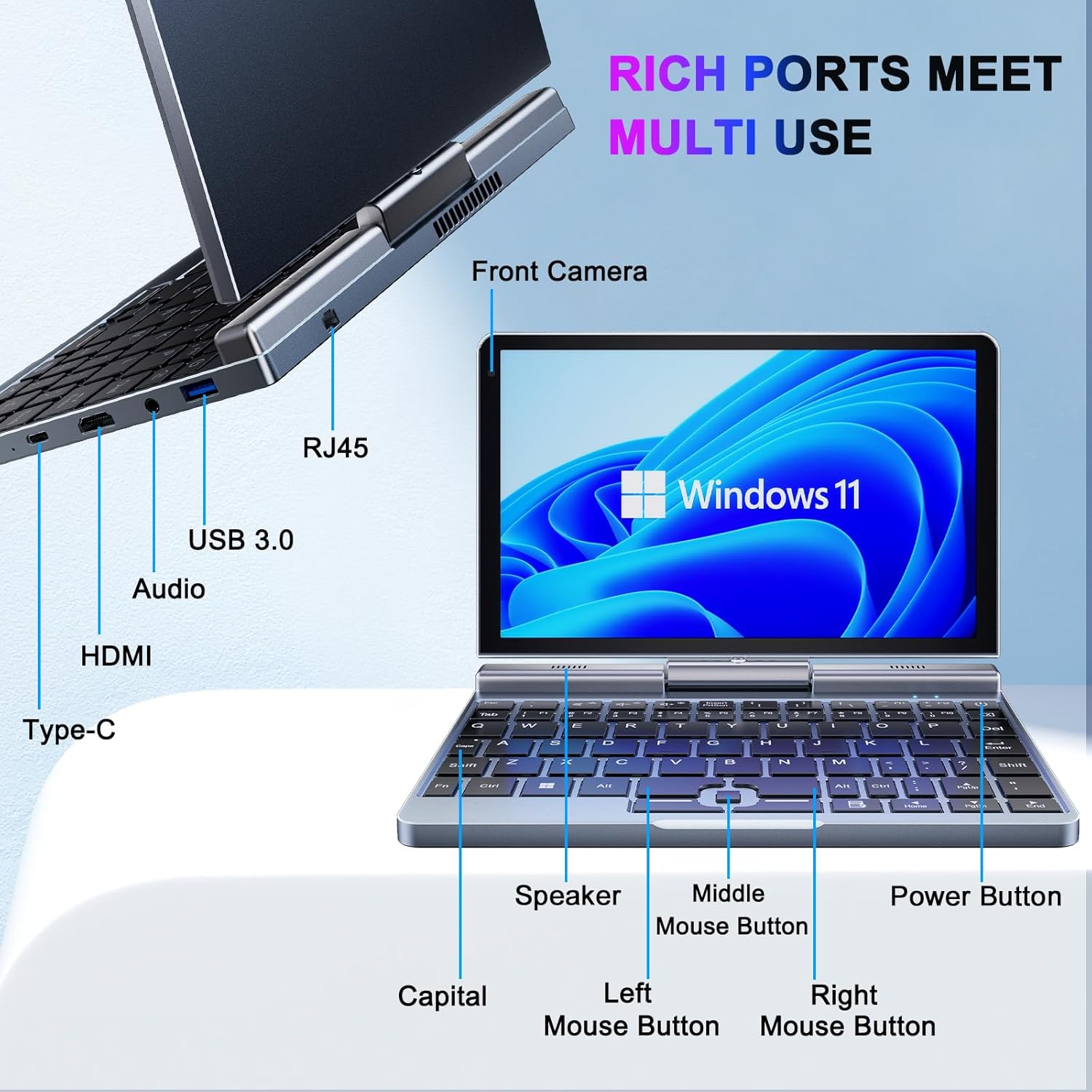
Immagine 3.1: KOOSMILE N150 Mini Laptop with labeled ports and buttons. Key components include the Front Camera, RJ45 port, USB 3.0 port, Audio jack, HDMI port, Type-C port, Speaker, Middle Mouse Button, Left Mouse Button, Right Mouse Button, Capital indicator, and Power Button.
3.1 Caratteristiche principali
- Processore: Intel N150 (4 cores/4 threads, up to 3.6GHz)
- Sistema operativo: Windows 11 Pro
- Display: Schermo touch HD da 8 pollici (1280x800 pixel)
- Memoria: 12 GB di RAM LPDDR5 (4800 MHz)
- Magazzinaggio: 512GB or 1TB M.2 SSD (expandable up to 2TB)
- Connettività: Wi-Fi 6 (802.11ax), Bluetooth 5.2, Gigabit Ethernet (via RJ45)
- Porte: USB 3.0, USB Type-C, HDMI, Headphone Jack
- Telecamera: Fotocamera frontale da 2 MP
- Progetto: 180° Rotating Screen, 2-in-1 Convertible (Laptop/Tablet mode), CNC-machined full-metal body
- Peso: Circa 0.78 kg (1.72 libbre)
4. Impostazione
4.1 Carica iniziale
- Connect the provided PD Adapter to the USB Type-C port on the laptop.
- Collegare l'adattatore a una presa di corrente.
- Allow the device to charge fully before first use. A full charge is indicated by the charging LED changing color or turning off.
- Nota: Use only the provided PD adapter or a compatible Type-C charger with sufficient voltage (e.g., a laptop or Steamdeck charger) to ensure proper charging. Standard phone USB blocks may not provide enough power.
4.2 Primo avvio e configurazione di Windows
- Press and hold the Power Button (refer to Image 3.1) until the screen illuminates.
- Follow the on-screen instructions to complete the Windows 11 Pro setup process. This typically includes selecting your region, language, connecting to a Wi-Fi network, and creating a user account.
5. Istruzioni per l'uso
5.1 Accensione/spegnimento e modalità di sospensione
- Accensione: Premere il pulsante di accensione.
- Modalità risparmio: Premere brevemente il pulsante di accensione mentre il dispositivo è acceso. Premere di nuovo per riattivarlo.
- Fermare: Click the Windows Start button, then Power, and select "Shut down."
- Ricomincia: Click the Windows Start button, then Power, and select "Restart."
5.2 Utilizzo della funzionalità 2 in 1
The laptop features a 180° rotating screen, allowing it to transform into various modes.
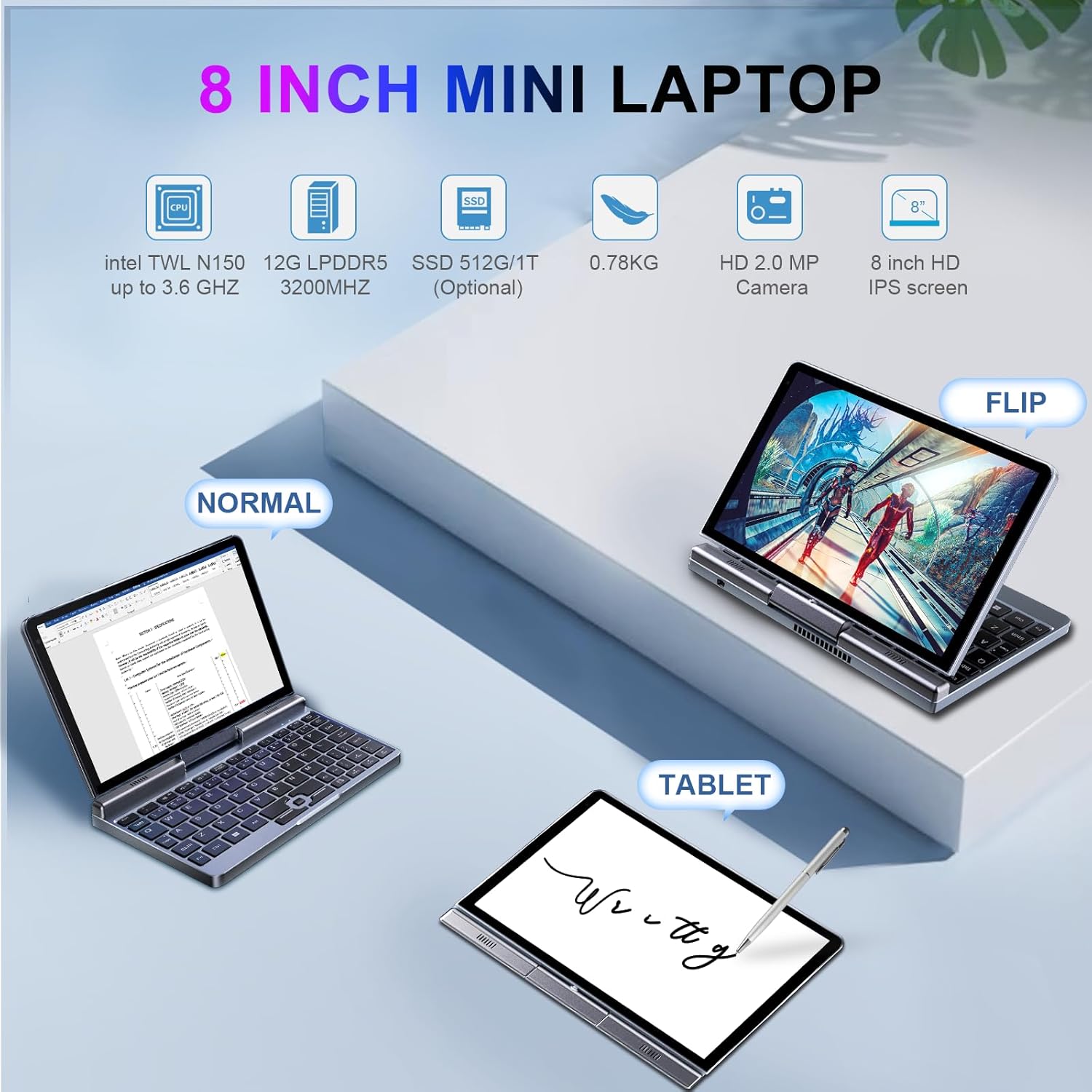
Immagine 5.1: Demonstrates the KOOSMILE N150 Mini Laptop in its three primary modes: Normal (traditional laptop), Flip (tent mode), and Tablet (screen folded back). This highlights the device's versatility for different usage scenarios.
- Modalità portatile: Standard configuration for typing with the physical keyboard.
- Tent Mode (Flip): Rotate the screen 180 degrees and stand the device in a tent shape for media consumption or presentations.
- Modalità Tablet: Fold the screen completely back against the base for a full touchscreen experience. The physical keyboard will automatically disable in this mode.
5.3 Touch Screen and Stylus Usage
- The 8-inch HD screen supports multi-touch gestures.
- Use the included Active Stylus for precise input, drawing, or note-taking, especially in Tablet mode.
5.4 Collegamento di display esterni
The laptop supports external displays via HDMI and USB Type-C (DisplayPort out).

Immagine 5.2: The KOOSMILE N150 Mini Laptop connected to an external monitor, demonstrating its capability for multi-screen display and enhanced productivity. The image shows the laptop displaying a document while the external monitor shows a larger view of the same document.

Immagine 5.3: The KOOSMILE N150 Mini Laptop configured as a micro desktop, connected to two external monitors, a keyboard, and a mouse. This setup illustrates its potential for multi-tasking and extended workspace.
- Connect an HDMI cable from the laptop's HDMI port to your external display.
- Alternatively, use a USB Type-C to DisplayPort cable or adapter for compatible monitors.
- Premere Tasto Windows + P to open the Project menu and select your desired display mode (e.g., Duplicate, Extend, Second screen only).
5.5 Connettività di rete
- Wifi: Access Wi-Fi settings via the Windows taskbar icon to connect to available wireless networks.
- Bluetooth: Enable Bluetooth in Windows settings to pair with Bluetooth devices like headphones or keyboards.
- Collegamento Ethernet: Per una connessione di rete cablata, collegare un cavo Ethernet alla porta RJ45.
6. Manutenzione
6.1 Pulizia
- Per pulire lo schermo e la parte esterna, utilizzare un panno morbido e privo di lanugine.
- Per segni ostinati, leggermente dampImmergere il panno in acqua o in una soluzione detergente per schermi. Evitare prodotti chimici aggressivi.
- Assicurarsi che il dispositivo sia spento e scollegato prima della pulizia.
6.2 Cura della batteria
- Per prolungare la durata della batteria, evitare temperature estreme.
- Non lasciare che la batteria si scarichi completamente frequentemente.
- If storing the device for an extended period, charge it to approximately 50-70%.
6.3 Aggiornamenti software
- Controlla e installa regolarmente gli aggiornamenti di Windows per garantire prestazioni e sicurezza ottimali. Vai a Impostazioni > Windows Update.
7. Risoluzione Dei Problemi
| Problema | Possibile soluzione |
|---|---|
| Il dispositivo non si accende. |
|
| Batteria non in carica. |
|
| Problemi di connessione Wi-Fi. |
|
| Touchscreen or stylus not responding. |
|
| Device runs hot during use. |
|
8. Specifiche
| Caratteristica | Dettaglio |
|---|---|
| Modello | P8 (N150) |
| Processore | Intel N150 (4 cores/4 threads, up to 3.6GHz) |
| Grafica | Grafica Intel UHD (integrata) |
| Sistema operativo | Windows 11 Pro |
| Display | 8-inch HD Touch Screen, 1280 x 800 pixels |
| Memoria RAM | LPDDR12 da 5 GB (4800 MHz) |
| Magazzinaggio | 512GB or 1TB M.2 SSD (Expandable up to 2TB) |
| Connettività wireless | Wi-Fi 6 (802.11ax), Bluetooth 5.2 |
| Porti | 1x USB 3.0, 1x USB Type-C (DisplayPort out), 1x HDMI, 1x Headphone Jack, 1x RJ45 (Ethernet) |
| Telecamera | Fotocamera frontale da 2 MP |
| Batteria | 36.5 WH Lithium Polymer |
| Dimensioni (LxWxH) | 7.87 x 5.51 x 0.79 pollici |
| Peso | 1.72 libbre (0.78 kg) |
| Colore | Grigio |
9. Garanzia e supporto
KOOSMILE provides a 1-year warranty for this product. For technical support, warranty claims, or any inquiries, please contact KOOSMILE customer support. Contact details can typically be found on the KOOSMILE official websito o tramite la tua piattaforma di acquisto.
Risorse online e FAQ potrebbero essere disponibili anche su KOOSMILE Store.


