1. Prodotto finitoview
The CUBOT GT 3 Smartwatch is a robust and feature-rich device designed for active lifestyles. It integrates advanced GPS positioning, comprehensive health monitoring, and a wide array of sports modes, all housed within a durable, water-resistant design.
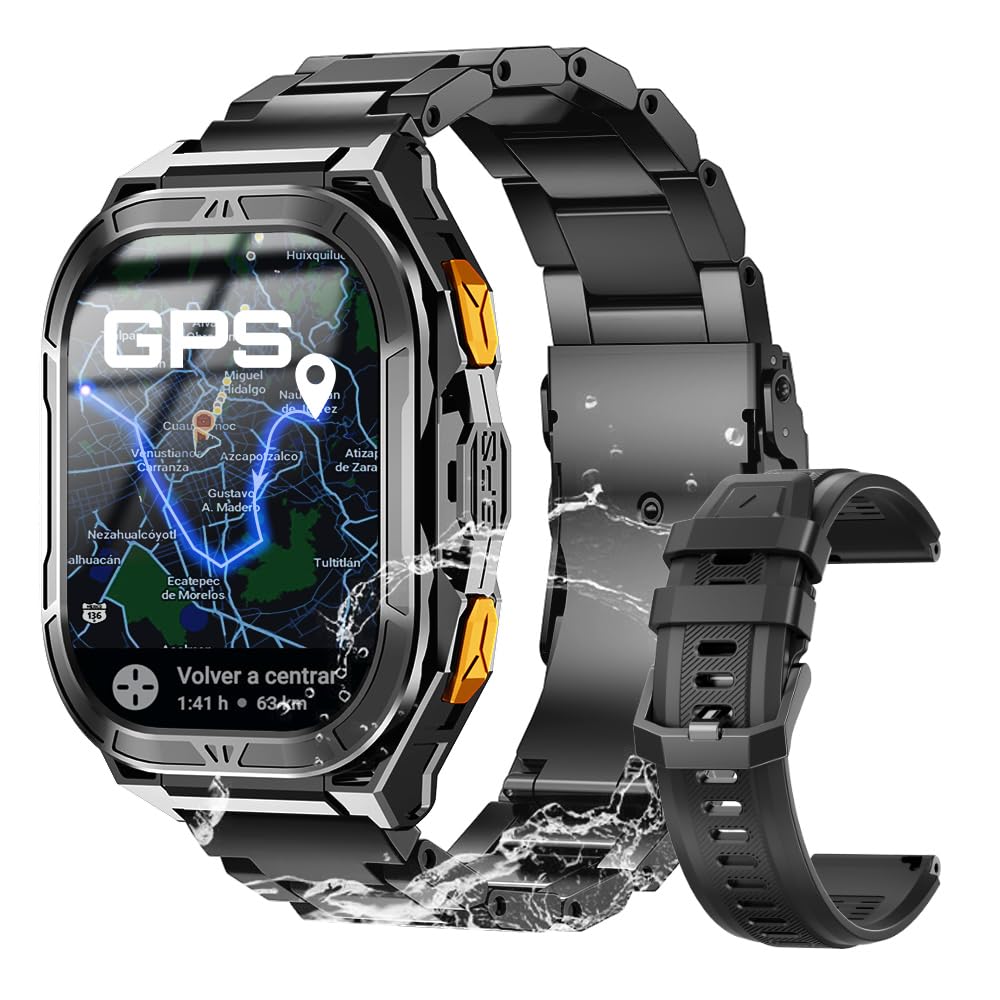
Figura 1: Principale view of the CUBOT GT 3 Smartwatch.
2. Configurazione e utilizzo iniziale
2.1 Unboxing e componenti
Dopo aver aperto la confezione, assicurarsi che siano presenti tutti i componenti:
- CUBOT GT 3 Smartwatch
- Cavo di ricarica
- Manuale d'uso
- Additional strap (if included)
Video 1: Unboxing e inizialiview of a similar smartwatch model.
2.2 Ricarica dello smartwatch
Prima del primo utilizzo, caricare completamente lo smartwatch. Collegare il cavo di ricarica magnetico ai punti di ricarica sul retro dell'orologio e collegare l'estremità USB a un adattatore di alimentazione (non incluso) o alla porta USB di un computer. Una ricarica completa richiede in genere circa 2 ore.

Figure 2: The smartwatch displaying battery information and charging status.
2.3 Installazione e associazione dell'app
To unlock the full potential of your CUBOT GT 3, download and install the companion app on your smartphone. Scan the QR code displayed on the watch or in the manual to find the correct app (e.g., GloryFitPro or FitCloudPro, depending on the specific version). Follow the on-screen instructions to create an account and pair your smartwatch via Bluetooth.
Video 2: Tutorial on connecting a smartwatch via Bluetooth on iOS.
Video 3: Demonstrates Bluetooth connection steps for a smartwatch.
2.4 Regolazione della cinghia
The smartwatch comes with interchangeable straps. To adjust or change the strap, use the provided tool to remove the pins holding the strap in place. Insert the new strap and secure it with the pins. Ensure the strap is comfortably snug on your wrist for accurate health monitoring.
Video 4: Shows unboxing, strap adjustment, and app connection for a smartwatch.
3. Utilizzo dello smartwatch
3.1 Navigazione di base
The CUBOT GT 3 features a 1.96" HD AMOLED touchscreen display. Swipe left/right, up/down to navigate through menus and functions. Use the physical buttons for quick access to specific features or to return to the home screen.

Figure 3: The smartwatch display showing resolution and AMOLED screen type, along with button functions.
3.2 Effettuare e ricevere chiamate
Once connected to your phone via Bluetooth, you can make and receive calls directly from your smartwatch. Access the call function from the main menu, dial numbers, or select contacts. The watch also supports SOS calls by pressing a designated button in emergencies, provided emergency contacts are set up in the companion app.

Figure 4: The smartwatch demonstrating Bluetooth call functionality and SOS feature.
Video 5: Shows Bluetooth calling features on a smartwatch.
3.3 Notifiche
Receive notifications for calls, messages, and various apps directly on your watch. Ensure notification permissions are enabled in the companion app settings on your smartphone.
3.4 Personalizzazione dei quadranti dell'orologio
Personalize your smartwatch with a variety of pre-installed watch faces or download more from the companion app. You can also set custom wallpapers using your own photos.

Figure 5: The smartwatch showing various customizable watch faces and themes.
3.5 Strumenti intelligenti
The CUBOT GT 3 includes several smart tools for daily convenience:
- Allarme: Imposta le sveglie direttamente dall'orologio.
- Controllo della musica: Controlla la riproduzione della musica sul tuo smartphone.
- Controllo della telecamera: Attiva da remoto la fotocamera del tuo telefono.
- Previsioni del tempo: Ricevi aggiornamenti meteo in tempo reale.
- Torcia elettrica: Utilizzare lo schermo dell'orologio come torcia.
- Calcolatrice: Eseguire calcoli di base.
- Trova telefono: Individua lo smartphone associato.
- Assistente vocale: Interagisci con l'assistente vocale del tuo telefono.

Figura 6: Oltreview of various smart tools available on the smartwatch.
4. Monitoraggio della salute
The CUBOT GT 3 provides 24-hour health monitoring using bio-optical sensors.

Figure 7: The smartwatch displaying various health metrics including heart rate, blood oxygen, and stress levels.
4.1 Monitoraggio della frequenza cardiaca
Monitora costantemente la frequenza cardiaca durante il giorno. View real-time data and historical trends in the companion app.
4.2 Monitoraggio dell'ossigeno nel sangue (SpO2)
Measures your blood oxygen saturation levels. This feature helps you understand your body's oxygen absorption capacity.
4.3 Monitoraggio del sonno
Automatically tracks your sleep patterns, including deep sleep, light sleep, and REM cycles. Provides insights into your sleep quality and helps set sleep goals.

Figure 8: The smartwatch illustrating automatic sleep monitoring and sleep stage analisi.
4.4 Stress Test and Breathing Training
The watch offers stress level assessments and guided breathing exercises to help manage stress and promote relaxation.
Video 6: Demonstrates health monitoring features including heart rate, SpO2, and blood pressure on a smartwatch.
5. Modalità Sport e GPS
The CUBOT GT 3 supports over 100 sports modes and features advanced GPS capabilities.

Figure 9: The smartwatch displaying various sports modes and activity tracking.
5.1 Posizionamento GPS
Equipped with dual-band L1 and L5 GPS for precise and rapid positioning. Features include real-time route tracking, return planning, and automatic return reminders, ideal for outdoor sports.

Figura 10: Lo smartwatch mostraasing its dual-band GPS positioning system for accurate outdoor tracking.
Video 7: Highlights GPS tracking and route monitoring for outdoor activities.
5.2 Monitoraggio ambientale
Features a built-in compass for real-time navigation, and measures altitude and atmospheric pressure. This provides crucial environmental data for outdoor enthusiasts.

Figure 11: The smartwatch displaying environmental data such as compass, altitude, and barometer readings.
5.3 Resistenza all'acqua
With IP68 and 5ATM water resistance, the watch can be used for swimming and diving up to 50 meters. It includes a drainage function to remove water from the microphone and speaker after water exposure.

Figure 12: The smartwatch highlighting its 5ATM water resistance and swimming features.
6. Durata della batteria
The CUBOT GT 3 is equipped with a 480 mAh battery, offering up to 30 days of standby time and 15 days of daily use, depending on usage patterns and feature activation.

Figure 13: The smartwatch emphasizing its 480 mAh battery capacity and extended usage times.
7. Specifiche
| Caratteristica | Specificazione |
|---|---|
| Marca | CUBOTTO |
| Nome del modello | GT3-XNUMX-XNUMX |
| Dimensioni dello schermo | 1.96 pollici |
| Tipo di visualizzazione | AMOLED |
| GPS | Integrated GPS (Dual-band L1+L5) |
| Resistenza all'acqua | IP68, 5ATM (fino a 50 metri) |
| Capacità della batteria | 480 mAh |
| Durata media della batteria | 15 giorni (uso quotidiano), 30 giorni (standby) |
| Connettività | Bluetooth |
| Caratteristiche speciali | SOS Button, GPS, Weather Forecast, Compass, Altimeter, Barometer, Health Monitoring (HR, SpO2, Sleep, Stress), 100+ Sports Modes |
| Capacità di archiviazione della memoria | 256 MB |
8. Manutenzione
To ensure the longevity and optimal performance of your CUBOT GT 3 Smartwatch, follow these maintenance guidelines:
- Pulizia: Pulire regolarmente l'orologio e il cinturino con un panno morbido e asciutto.amp cloth. For water-resistant models, ensure the drainage function is used after exposure to water.
- Ricarica: Utilizzare solo il cavo di ricarica fornito. Evitare di esporre i contatti di ricarica ad acqua o liquidi corrosivi.
- Magazzinaggio: Conservare l'orologio in un luogo fresco e asciutto, lontano dalla luce solare diretta e da temperature estreme.
- Evitare i prodotti chimici: Non esporre l'orologio a sostanze chimiche aggressive, detergenti o solventi, poiché potrebbero danneggiarne i materiali.
- Impatto: Sebbene sia durevole, evitare cadute o urti inutili per evitare danni allo schermo o ai componenti interni.
9. Risoluzione Dei Problemi
If you encounter issues with your CUBOT GT 3 Smartwatch, try the following steps:
- L'orologio non si accende: Assicurati che l'orologio sia completamente carico. Collegalo al caricabatterie per almeno 30 minuti.
- Impossibile associare il telefono: Make sure Bluetooth is enabled on your phone and the watch. Ensure the watch is within range and not paired with another device. Restart both the watch and phone.
- Dati sanitari inesatti: Assicurati che l'orologio sia ben aderente al polso, né troppo stretto né troppo largo. Pulisci il sensore sul retro dell'orologio.
- Notifiche non ricevute: Check app permissions on your phone to ensure the companion app has access to notifications. Verify that notifications are enabled within the companion app settings.
- Il GPS non si connette: Assicurati di trovarti in un'area esterna aperta e con una vista libera view of the sky. Wait a few minutes for the watch to acquire a GPS signal.
If the issue persists, consult the detailed troubleshooting section in the full user manual or contact customer support.
10. Garanzia e supporto
Your CUBOT GT 3 Smartwatch comes with a standard manufacturer's warranty. Please refer to the warranty card included in your product packaging for specific terms and conditions. For technical support, product inquiries, or warranty claims, please visit the official CUBOT websito o contattare i canali autorizzati del servizio clienti.


