Introduzione
Thank you for choosing the GOBOULT Soniq Over Ear Bluetooth Headphones. These headphones are designed to provide a superior audio experience with features like 70 hours of playtime, 40mm bass drivers, Zen™ ENC microphone, Type-C fast charging, and dual device pairing. This manual will guide you through the setup, operation, and maintenance of your new headphones to ensure optimal performance.
Cosa c'è nella scatola
Si prega di controllare il contenuto della confezione per assicurarsi che siano presenti tutti gli articoli:
- Soniq Headphone
- Cavo di ricarica di tipo C.
- Manuale d'uso
- Cuscinetti auricolari (preinstallati)
- Scheda di garanzia
Caratteristiche del prodotto Fineview
The GOBOULT Soniq headphones come equipped with several advanced features:
- Tempo di riproduzione esteso: Fino a 70 ore di riproduzione audio con una singola carica.
- Modalità EQ personalizzabili: Regola il suono profiles for bass boost, balanced audio, or vocal clarity.
- Cancellazione del rumore ambientale (ENC): Migliora la chiarezza delle chiamate riducendo il rumore di fondo.
- Abbinamento di due dispositivi: Seamlessly connect and switch between two devices simultaneously.
- Powerful Audio Drivers: 40mm bass-boosted drivers for rich sound.
- Tecnologia Bluetooth più recente: Bluetooth 5.4 for faster pairing and stable connections.
- Design confortevole: Lightweight build with cushioned earcups for prolonged wear.
- Resistenza all'acqua: IPX5 rating for splash, rain, and sweat protection.
- Comandi tattili: Easy-to-use physical buttons for volume, playback, and mode switching.
- AI Voice Assistant Support: Compatible with Google Assistant and Siri.

Immagine: Oltreview of key features including 70H battery, EQ modes, ENC, dual pairing, 40mm drivers, and Bluetooth 5.4.

Image: Close-up of the GOBOULT Soniq headphone earcup highlighting the 40mm power-packed bass neodymium drivers with BoomX™ Technology and Memory Foam.
Guida all'installazione
1. Carica delle cuffie
Before first use, fully charge your GOBOULT Soniq headphones. Use the provided Type-C charging cable to connect the headphones to a compatible USB power source.
- Una carica completa garantisce fino a 70 ore di riproduzione.
- Fast charging feature: 10 minutes of charge provides approximately 8 hours of playtime.
- L'indicatore LED mostrerà lo stato di carica e si spegnerà o cambierà colore quando la carica sarà completa.

Image: GOBOULT Soniq headphones connected via Type-C cable, illustrating 70 hours playtime and fast charging capability.
2. Accensione/Spegnimento
To power on, press and hold the Power button for approximately 3 seconds until the LED indicator lights up. To power off, press and hold the Power button again for 3 seconds until the LED indicator turns off.
3. Accoppiamento Bluetooth
Per associare le cuffie a un dispositivo abilitato Bluetooth, segui questi passaggi:
- Assicurarsi che le cuffie siano completamente cariche e spente.
- Tenere premuto il pulsante di accensione per 5-7 secondi finché l'indicatore LED non lampeggia alternativamente in rosso e blu, indicando la modalità di associazione.
- Sul tuo dispositivo (smartphone, tablet, laptop), attiva il Bluetooth e cerca i dispositivi disponibili.
- Select "GOBOULT Soniq" from the list of found devices.
- Una volta connesso, l'indicatore LED lampeggerà lentamente in blu o rimarrà fisso in blu.

Image: GOBOULT Soniq headphones highlighting Bluetooth 5.4 for fast and stable connection.
Istruzioni per l'uso
1. Controlli di base
The headphones feature tactile buttons for easy control:
- Pulsante di accensione: Tenere premuto per accendere/spegnere. Premere brevemente per riprodurre/mettere in pausa.
- Volume su (+): Premere brevemente per aumentare il volume. Premere a lungo per passare alla traccia successiva.
- Volume basso (-): Premere brevemente per diminuire il volume. Premere a lungo per tornare alla traccia precedente.
- Multi-function Button (often combined with Power or a dedicated button): Answer/End calls, activate voice assistant.

Image: Close-up of the right earcup showing tactile button controls for volume and play/pause.
2. Modalità EQ
Customize your audio experience with multiple EQ modes. Press the dedicated EQ button (or a specific combination, refer to quick start guide if available) to cycle through modes:
- Modalità Bass Boost: Migliora le basse frequenze per ottenere bassi più profondi.
- Modalità bilanciata: Fornisce un suono neutrofile adatto a vari generi.
- Modalità vocale: Ottimizza le frequenze medie per ottenere voci più nitide.
- Modalità di gioco: Reduces latency for a more synchronized gaming audio experience (60ms ultra-low latency).
- Modalità Musica: Audio professionale standardfile per l'ascolto musicale in generale.
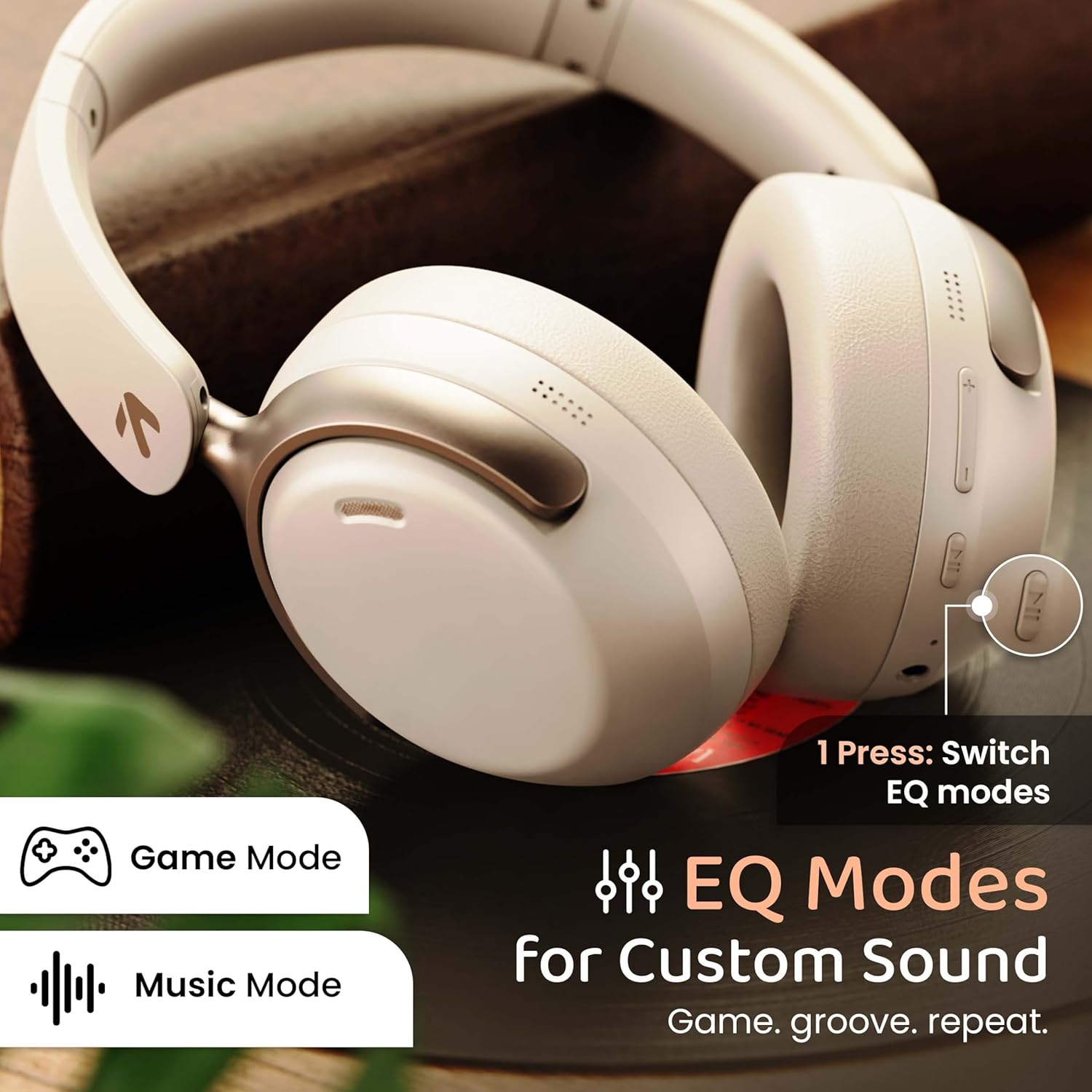
Image: GOBOULT Soniq headphones illustrating the EQ modes for custom sound, including Game Mode and Music Mode.

Image: GOBOULT Soniq headphones highlighting Combat™ Gaming Mode with 60ms ultra-low latency, tailored for mobile gaming and real-time sound accuracy.
3. Accoppiamento di due dispositivi
The headphones support dual device pairing, allowing you to connect to two devices simultaneously and switch between them seamlessly.
- Associare le cuffie al primo dispositivo come descritto nella sezione "Associazione Bluetooth".
- Disattivare il Bluetooth sul primo dispositivo.
- Associa le cuffie al secondo dispositivo.
- Riattiva il Bluetooth sul primo dispositivo. Le cuffie dovrebbero connettersi automaticamente a entrambi i dispositivi.
- Audio will play from the device currently active. To switch, pause audio on the first device and start playing on the second.

Image: GOBOULT Soniq headphones demonstrating dual device connectivity with a laptop and a smartphone.
4. Modalità cablata (AUX)
For a wired connection, use a standard 3.5mm AUX cable (not included) to connect the headphones to your audio source. In wired mode, the headphones operate passively, and the built-in microphone will not function.

Image: GOBOULT Soniq headphones showing the option for wireless mode and an optional wired mode via AUX cable, noting that the mic is off in wired mode.
5. Cancellazione del rumore ambientale (ENC) per le chiamate
The Zen™ ENC microphone technology helps reduce ambient noise during calls, ensuring clearer conversations. This feature is automatically active during phone calls.

Image: Close-up of the GOBOULT Soniq headphone earcup highlighting the Zen™ ENC Mic for processed calling, ambient noise isolation, enhanced call experience, and sharper voice clarity.
6. Assistente vocale
Activate your device's voice assistant (Google Assistant or Siri) by pressing the multi-function button (or specific button, refer to quick start guide) for approximately 2 seconds.

Image: GOBOULT Soniq headphones with icons for Google Assistant and Siri, indicating personalized AI assistant support.
Manutenzione e cura
- Pulizia: Pulisci le cuffie con un panno morbido e asciutto. Non utilizzare detergenti abrasivi o solventi.
- Resistenza all'acqua: The headphones are IPX5 water resistant, meaning they are protected against splashes, rain, and sweat. Do not submerge them in water or expose them to strong jets of water.
- Magazzinaggio: Quando non vengono utilizzate, conservare le cuffie in un luogo fresco e asciutto, lontano dalla luce solare diretta e da temperature estreme. Il design pieghevole consente di riporle in modo compatto.
- Cura della batteria: Per prolungare la durata della batteria, evitare di scaricare completamente le cuffie frequentemente. Caricarle regolarmente, anche se non vengono utilizzate costantemente.
Image: GOBOULT Soniq headphones illustrating IPX5 water resistance, indicating protection against splash, rain, and sweat.

Image: GOBOULT Soniq headphones showcasing their adjustable headband, foldable design, and movable earcups for maximum comfort and portability.
Risoluzione dei problemi
| Problema | Possibile soluzione |
|---|---|
| Le cuffie non si accendono. | Assicurati che le cuffie siano cariche. Collegale a una fonte di alimentazione tramite il cavo Type-C. |
| Impossibile associare il dispositivo. |
|
| Nessun suono o volume basso. |
|
| Il microfono non funziona in modalità cablata. | The built-in microphone is not active when using the AUX wired connection. This is normal operation. |
| Connessione intermittente. |
|
Specifiche
| Caratteristica | Dettaglio |
|---|---|
| Nome del modello | AirBass |
| Tecnologia di connettività | Bluetooth, cablato, wireless |
| Tecnologia di comunicazione wireless | Bluetooth 5.4 |
| Portata Bluetooth | 10 metri |
| Dimensioni del driver audio | 40 millimetri |
| Tipo di driver audio | Driver dinamico |
| Durata della batteria | 40 ore |
| Porta di ricarica | Type-C Fast Charging Jack |
| Controllo del rumore | Cancellazione del rumore ambientale (ENC) |
| Livello di resistenza all'acqua | IPX5 (Splash, Rain, Sweat Proof) |
| Latenza audio | 60 millisecondi (modalità gioco) |
| Forma dell'auricolare | Sopra l'orecchio |
| Materiale | Memory Foam (Ear Cushions) |
| Peso dell'articolo | 227 grammi |
| Dimensioni del prodotto (LxWxH) | 17 x 5.5 x 19 centimetri |
| Tipo di controllore | Button, Google Assistant |
| Impedenza | 32 Ohm |
| Sensibilità | 118 dB |
Garanzia e supporto
Your GOBOULT Soniq Over Ear Bluetooth Headphones come with a Garanzia del produttore di 1 anno from the date of purchase. This warranty covers manufacturing defects and ensures the reliability of your product.
For warranty claims, technical support, or any inquiries, please refer to the contact information provided on the warranty card included in your package or visit the official GOBOULT support websito.
Conservare la ricevuta d'acquisto come prova d'acquisto per la convalida della garanzia.