1. Introduzione
This user manual provides comprehensive instructions for the setup, operation, maintenance, and troubleshooting of your AM Infinity Gaming Mouse and the accompanying Silk Glass Mouse Pad. Designed for professional gaming, this mouse offers precision, versatility, and ergonomic comfort, while the mouse pad provides an optimal surface for smooth and accurate tracking.
2. Contenuto della confezione
Si prega di verificare che tutti gli articoli elencati di seguito siano presenti nella confezione del prodotto:
- AM Infinity Gaming Mouse
- AM Infinity Silk Glass Mouse Pad
- USB-C Charging Dock / 2.4GHz Wireless Receiver
- Cavo da USB-C a USB-A
- Manuale dell'utente (questo documento)

Image: The AM Infinity Gaming Mouse positioned on the Silk Glass Mouse Pad, showcasing entrambi i prodotti insieme.
3. Prodotto finitoview
3.1 AM Infinity Gaming Mouse
The AM Infinity Gaming Mouse is engineered for high-performance gaming, featuring an adjustable 30000 DPI optical sensor for pixel-perfect accuracy. It supports multiple connectivity modes: ultra-fast 2.4GHz wireless, Bluetooth 5.0, and a wired connection. The ergonomic design with anti-sweat coating ensures comfort during extended use, and its 7 programmable buttons with customizable RGB lighting offer extensive personalization.

Immagine: dall'alto verso il basso view of the AM Infinity Gaming Mouse, highlighting its ergonomic shape and button layout.

Immagine: Lato inferiore view of the AM Infinity Gaming Mouse, showing the sensor and structural elements.

Image: The AM Infinity Gaming Mouse alongside its detachable components, possibly showing alternative feet or customization options.
3.2 AM Infinity Silk Glass Mouse Pad
The Silk Glass Mouse Pad provides a smooth, consistent surface for precise mouse movements. Its unique material composition ensures durability and optimal tracking for high-DPI sensors. The pad features an intricate bandana-style pattern, adding a distinctive aesthetic to your gaming setup.

Image: A full overhead view of the AM Infinity Silk Glass Mouse Pad, displaying its detailed pattern.

Image: A close-up shot of the corner of the Silk Glass Mouse Pad, highlighting the texture and pattern detail.
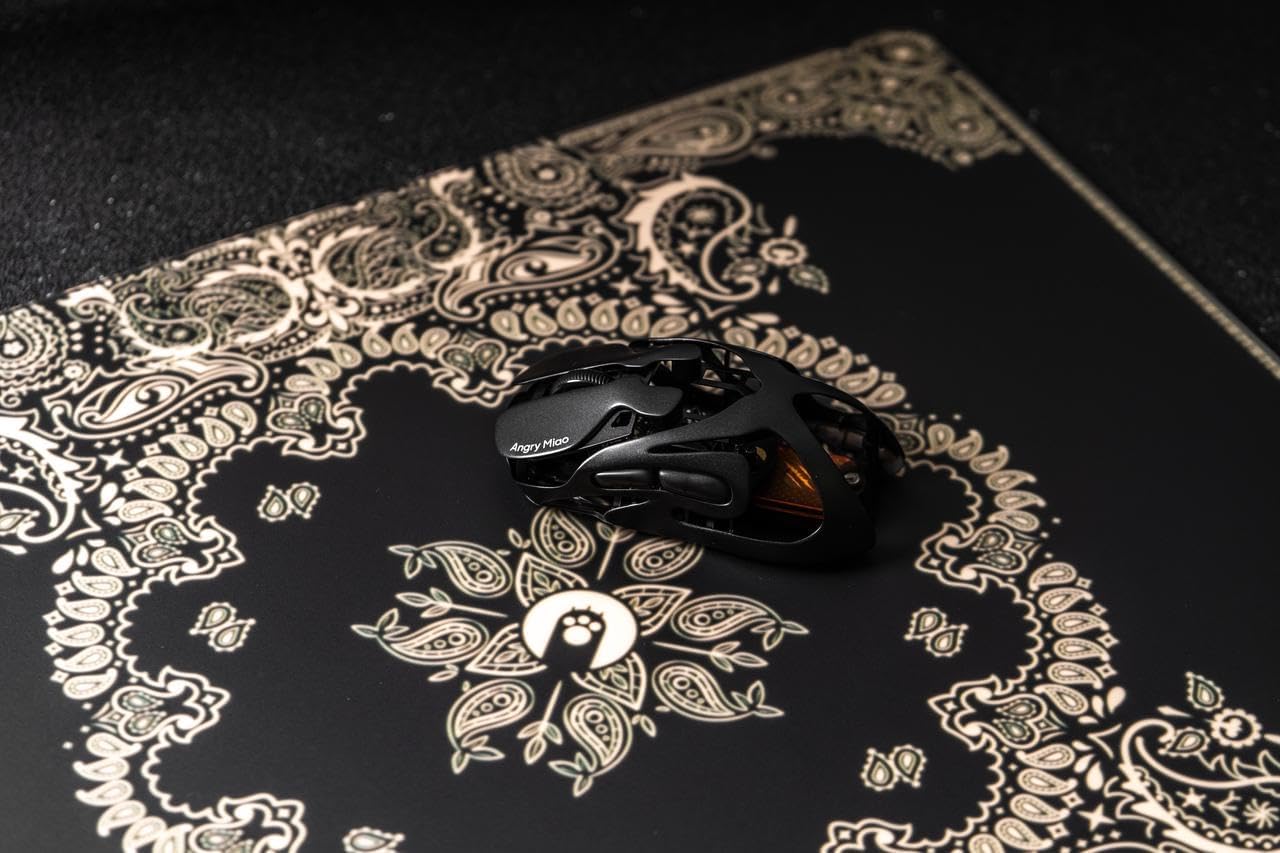
Image: The AM Infinity Gaming Mouse positioned on the Silk Glass Mouse Pad, demonstrating its use.
4. Impostazione
4.1 Ricarica del mouse
Before first use, it is recommended to fully charge the AM Infinity Gaming Mouse. Connect the USB-C end of the provided cable to the charging dock and the USB-A end to an available USB port on your computer or a USB power adapter. Place the mouse onto the charging dock. The mouse will indicate charging status via its RGB lighting.

Image: The AM Infinity Gaming Mouse resting on its USB-C charging dock, which also functions as the wireless receiver.
4.2 Collegamento del mouse
The AM Infinity Gaming Mouse offers three connectivity options:
- Wireless a 2.4 GHz (consigliato per il gaming):
Insert the USB-C charging dock (which doubles as the 2.4GHz receiver) into an available USB-A port on your computer. Ensure the mouse is switched to 2.4G mode (refer to the switch on the underside of the mouse). The mouse should automatically connect.
- Bluetooth 5.0 Wireless (Recommended for Office/Mobile Use):
Switch the mouse to Bluetooth mode. On your computer or device, navigate to Bluetooth settings and search for new devices. Select "AM Infinity Mouse" from the list to pair. The mouse supports Bluetooth 5.0 for stable connections.
- Connessione cablata:
Connect the USB-C end of the provided cable directly to the mouse and the USB-A end to your computer. The mouse will function as a wired mouse and charge simultaneously.
4.3 Positioning the Mouse Pad
Place the AM Infinity Silk Glass Mouse Pad on a flat, stable surface. Ensure there are no obstructions that could interfere with mouse movement. The smooth surface is designed to optimize tracking performance for your gaming mouse.
5. Utilizzo del mouse
5.1 Regolazione DPI
The mouse features an adjustable optical sensor up to 30000 DPI. You can cycle through preset DPI levels using the dedicated DPI button, typically located near the scroll wheel. For fine-tuned adjustments, refer to the "Software Configuration" section.
5.2 pulsanti programmabili
The AM Infinity Gaming Mouse is equipped with 7 programmable buttons. These buttons can be customized to perform various functions, macros, or key assignments through the dedicated software. Refer to the "Software Configuration" section for detailed instructions on button remapping.
5.3 Controllo dell'illuminazione RGB
The mouse features customizable RGB lighting with 16 million colors. Lighting effects can be synchronized with your gaming setup and adjusted via the companion software. This allows for personalized aesthetics and immersive gaming experiences.
6. Configurazione software
To unlock the full potential of your AM Infinity Gaming Mouse, download and install the official companion software from the Angry Miao website. This software allows for advanced customization and management of your device.
- Impostazioni DPI: Adjust DPI levels in single-digit increments, set multiple profiles.
- Key Assignments: Remap all 7 programmable buttons, assign macros, media controls, or system functions.
- Tasso di sondaggio: Configure the mouse's polling rate for optimal responsiveness.
- Effetti di illuminazione RGB: Choose from various lighting modes, colors, and brightness levels.
- Impostazioni avanzate: Fine-tune debounce time and sensor height for competitive play.
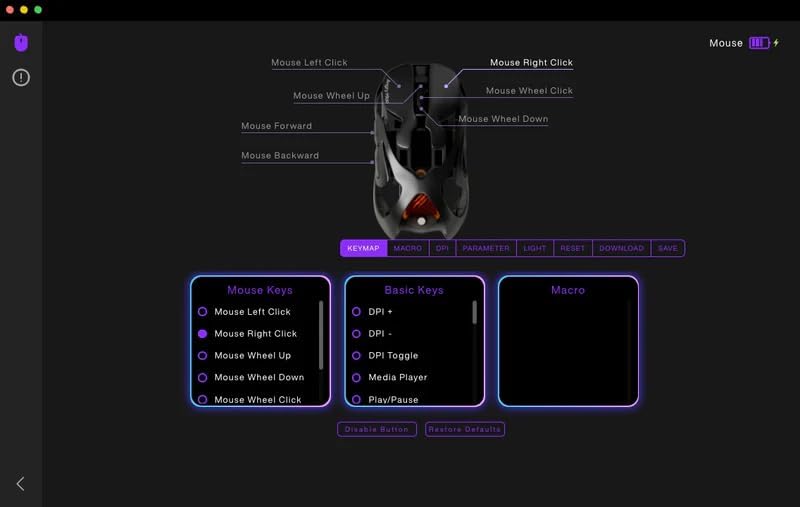
Image: Screenshot of the AM Infinity Gaming Mouse software interface, showing options for key mapping, DPI, and other parameters.
7. Manutenzione
7.1 Pulizia del mouse
To maintain optimal performance and appearance, regularly clean your mouse. Use a soft, lint-free cloth slightly dampened with water or a mild cleaning solution. Avoid harsh chemicals or abrasive materials. Do not allow liquid to enter the mouse's internal components.
7.2 Cleaning the Mouse Pad
The Silk Glass Mouse Pad can be cleaned with a soft, damp cloth. For stubborn stains, a small amount of mild soap can be used, followed by wiping with a clean, damp cloth. Ensure the mouse pad is completely dry before use.
8. Risoluzione Dei Problemi
| Problema | Possibile causa | Soluzione |
|---|---|---|
| Il mouse non risponde (wireless) | Low battery; Receiver not connected; Incorrect mode selected; Interference. | Charge the mouse; Ensure receiver is fully inserted; Switch mouse to 2.4G or Bluetooth mode; Move away from other wireless devices. |
| Il mouse non risponde (cablato) | Cavo non collegato correttamente; porta USB difettosa. | Ensure cable is securely connected to both mouse and computer; Try a different USB port. |
| Tracciamento impreciso | Dirty sensor; Mouse pad surface issues; Incorrect DPI setting. | Clean the mouse sensor; Ensure mouse pad is clean and flat; Adjust DPI settings. |
| L'illuminazione RGB non funziona | Software settings; Low battery. | Check RGB settings in the companion software; Charge the mouse. |
| Pulsanti non programmabili | Software not installed or running; Software glitch. | Install and run the companion software; Restart the software or computer. |
9. Specifiche
- Nome del prodotto: AM Infinity Gaming Mouse
- Numero modello: B0FB8TTJKB (ASIN)
- Sensore: Ottico, fino a 30000 DPI
- Connettività: Wireless a 2.4 GHz, Bluetooth 5.0, cablato (USB-C)
- Pulsanti: 7 pulsanti programmabili
- Illuminazione: RGB (16 milioni di colori)
- Compatibilità: Windows 10/macOS 12.4 and above
- Ricarica: USB-C Charging Dock
- Mouse Pad Material: Silk Glass
10. Garanzia e supporto
Angry Miao products are designed and manufactured to the highest quality standards. This product is covered by a manufacturer's warranty. For detailed warranty terms and conditions, please refer to the warranty card included in your package or visit the official Angry Miao websito.
For technical support, troubleshooting assistance, or inquiries regarding your product, please contact Angry Miao customer service through their official websito o le informazioni di contatto fornite nella documentazione del prodotto.
Ufficiale Websito: www.angrymiao.com


