1. Introduzione
Thank you for choosing BUGANI Buds True Wireless Earbuds. This manual provides detailed instructions on how to set up, operate, and maintain your earbuds to ensure optimal performance and longevity. Please read this manual thoroughly before using the product.
2. Contenuto della confezione
- 1 pair of BUGANI B09 True Wireless Earbuds
- 1 Cavo di ricarica USB-C
- 3 pairs of Eartips (S, M, L)
- 3 pairs of Silicone Ear Hooks (S, M, L)
- 1 Guida per l'utente
3. Prodotto finitoview
Familiarize yourself with the components of your BUGANI Buds.
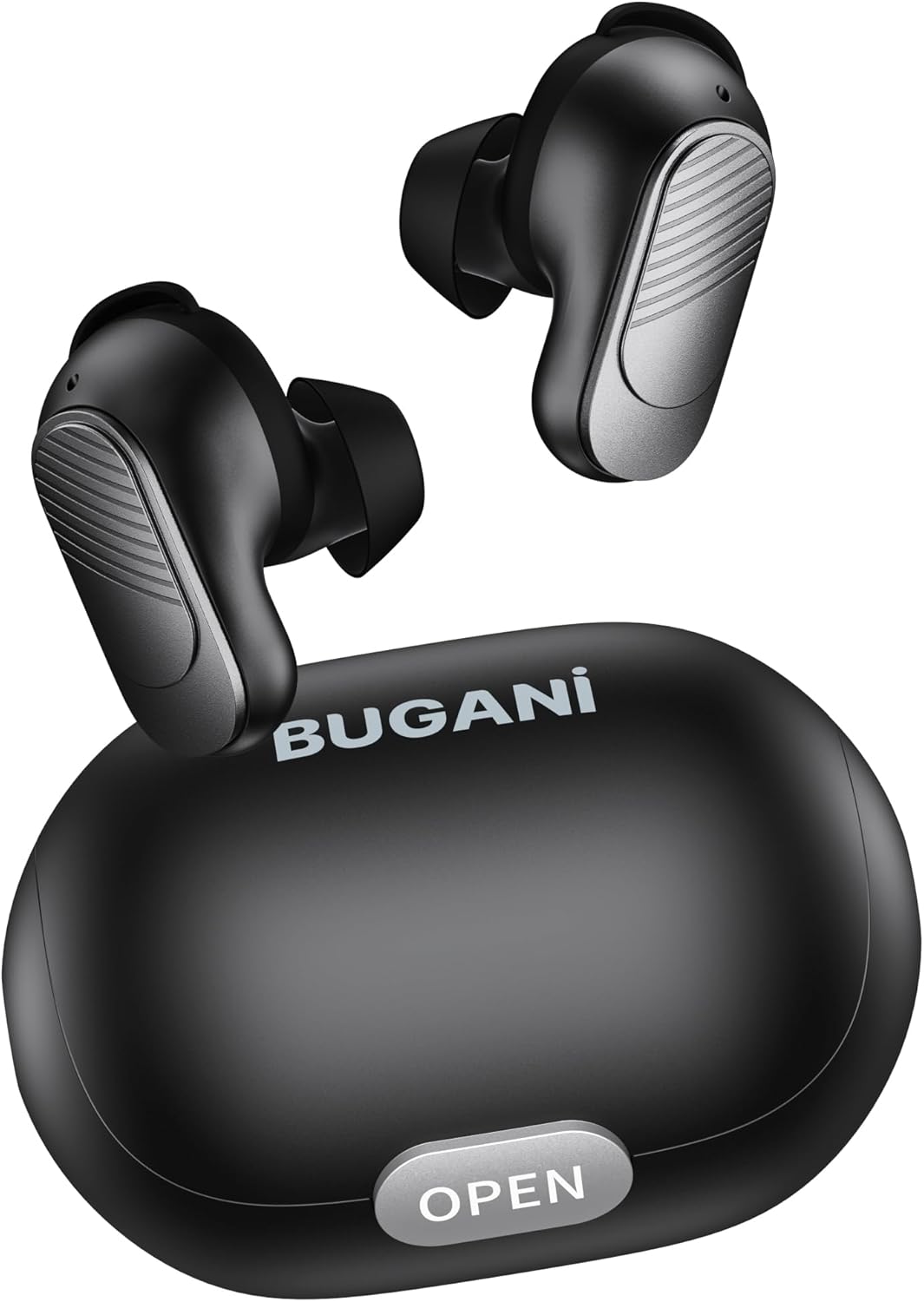
Image: BUGANI Buds True Wireless Earbuds with their charging case. The earbuds are black with silver accents, and the case is a sleek black oval shape with an "OPEN" button.

Image: An exploded diagram showing the internal components of a BUGANI Bud earbud, highlighting the driver and circuit board for enhanced sound quality.

Image: Illustration demonstrating the battery life of BUGANI Buds. It shows 6 hours of playback on a single charge and an additional 24 hours with the charging case, totaling 30 hours.

Image: A woman using BUGANI Buds during a phone call, with an inset showing the earbud and the "MIC" label, indicating the dual microphone for clear calls.

Image: A woman exercising while wearing BUGANI Buds, with an overlay showing the IPX6 water resistance icon, signifying protection against sweat and splashes.

Image: A woman wearing BUGANI Buds, with insets highlighting the lightweight design (3.9g) and the ergonomic fit with proper ear wingtips for comfort.
4. Impostazione
4.1 Carica iniziale
Before first use, fully charge the earbuds and the charging case. Connect the USB-C charging cable to the charging port on the case and a power source. The indicator lights on the case will show charging status.
4.2 Scegliere i gommini auricolari giusti
Select the eartips (S, M, L) and silicone ear hooks that provide the most comfortable and secure fit for your ears. A proper seal is crucial for optimal sound quality and noise isolation.
5. Istruzioni per l'uso
5.1 Accensione/spegnimento
- Accensione: Apri la custodia di ricarica e gli auricolari si accenderanno automaticamente.
- Spegni: Riponi gli auricolari nella custodia di ricarica e chiudi il coperchio. Si spegneranno automaticamente e inizieranno a caricarsi.
5.2 Associazione Bluetooth
- Assicurati che gli auricolari siano nella custodia di ricarica e che il coperchio sia aperto.
- Sul tuo dispositivo (smartphone, tablet, ecc.), attiva il Bluetooth.
- Cercare "BUGANI Buds" in the list of available Bluetooth devices.
- Select "BUGANI Buds" to connect. Once connected, you will hear a confirmation tone.
- Se il Bluetooth è abilitato sul dispositivo, gli auricolari si riconnetteranno automaticamente all'ultimo dispositivo associato quando vengono estratti dalla custodia.
5.3 Comandi touch
The BUGANI Buds feature intuitive touch controls on each earbud:
| Azione | Auricolare sinistro | Auricolare destro |
|---|---|---|
| Riproduci/Pausa | Singolo tocco | Singolo tocco |
| Traccia successiva | Doppio tocco | |
| Traccia precedente | Doppio tocco | |
| Rispondi/Termina chiamata | Singolo tocco | Singolo tocco |
| Rifiuta chiamata | Pressione lunga (2 secondi) | Pressione lunga (2 secondi) |
| Attiva l'Assistente Vocale | Triplo tocco | Triplo tocco |
5.4 Ricarica degli auricolari e della custodia
- Earbuds: Place the earbuds into the charging case. They will automatically charge.
- Custodia di ricarica: Connect the USB-C cable to the charging port on the case and a USB power adapter (not included). The indicator lights will show the charging status.
6. Manutenzione
- Pulisci regolarmente gli auricolari e la custodia di ricarica con un panno morbido e asciutto.
- Non utilizzare detergenti abrasivi o solventi.
- Per garantire una ricarica corretta, mantenere puliti i contatti di ricarica sia sugli auricolari che sulla custodia.
- Conserva gli auricolari nella custodia di ricarica quando non vengono utilizzati per proteggerli e mantenerli carichi.
- Evitare di esporre gli auricolari a temperature estreme, umidità o luce solare diretta.
- While IPX6 water-resistant, do not immerse the earbuds in water.
7. Risoluzione Dei Problemi
| Problema | Possibile soluzione |
|---|---|
| Gli auricolari non si accoppiano |
|
| Un solo auricolare funzionante |
|
| Scarsa qualità del suono |
|
| Gli auricolari non si caricano |
|
8. Specifiche
| Caratteristica | Dettaglio |
|---|---|
| Nome del modello | B09 |
| Marca | BUGANI |
| Tecnologia di connettività | Senza fili (Bluetooth 5.3) |
| Tecnologia di comunicazione wireless | Bluetooth |
| Tipo di controllo | Controllo touch |
| Livello di resistenza all'acqua | IPX6 (impermeabile) |
| Gamma di frequenza | 20 Hz - 20,000 Hz |
| Composizione della batteria | Agli ioni di litio |
| Batteria ricaricabile | SÌ |
| Posizionamento dell'orecchio | In-ear (auricolare) |
| Fattore di forma | In-ear (auricolare) |
| Materiale | Plastica |
| Colore | Nero |
| ASIN | B0FBRKTKTS |
9. Garanzia e supporto
For warranty information and technical support, please refer to the official BUGANI websito o contattare il servizio clienti. Conservare la ricevuta d'acquisto per eventuali reclami in garanzia.
Return Policy: This product typically has a 30-day refund/replacement return policy.
Manufacturer: BUGANI


