1. Introduzione
Benvenuti al Neroview Acebook6 Laptop User Manual. This guide provides essential information for setting up, operating, maintaining, and troubleshooting your new laptop. Please read this manual thoroughly to ensure optimal performance and longevity of your device.
2. Prodotto finitoview
Il Neroview Acebook6 is a versatile laptop designed for business, student, and everyday use. It features a powerful Intel N150 processor, ample memory and storage, and a comfortable display with eye-care technology.
Caratteristiche principali:
- Processore: Intel N150 Quad-Core (up to 3.6GHz) for efficient performance.
- Memoria e archiviazione: 16GB DDR4 RAM and 256GB M.2 SSD, expandable up to 32GB RAM and 2TB SSD.
- Display: 15.6-inch Full HD IPS screen (1920x1080) with TÜV Rheinland Eye Care certification.
- Batteria in carica: 5000mAh (38Whr) battery with 45W Type-C fast charging (supports 100W).
- Connettività: Type-C (PD 3.0), 2x USB 3.2 Gen1, 1x USB 2.0, HDMI 2.0, 3.5mm audio jack, TF card slot, Dual-band Wi-Fi, Bluetooth 5.0.
- Sistema operativo: Windows 11 Home preinstallato.
- Progetto: Sottile 19.5mm profile, 1.7kg lightweight build, 180° lay-flat hinge.

Immagine: Il Neroview Acebook6 laptop displaying the Windows 11 operating system interface.
3. Configurazione iniziale
3.1 Disimballaggio e ispezione
- Estrarre con cautela il computer portatile e tutti gli accessori dalla confezione.
- Verify that all items listed in the "What's in the Box" section are present: Laptop, Type-C charging cable, Adapter, User Manual.
- Inspect the laptop for any signs of physical damage. If damage is found, contact customer support immediately.
3.2 Collegamento dell'adattatore di alimentazione
Before first use, ensure the laptop is fully charged. Connect the Type-C charging cable to the laptop's Type-C port and the adapter to a power outlet.

Immagine: Il Neroview Acebook6 laptop with a Type-C charging cable connected to its port, illustrating the fast charging capability.
3.3 Avvio iniziale e configurazione di Windows
- Per accendere il portatile, premere il pulsante di accensione situato in alto a destra sulla tastiera.
- Segui le istruzioni visualizzate sullo schermo per completare la configurazione iniziale di Windows 11. Questa operazione include la selezione della regione, della lingua, la connessione a una rete Wi-Fi e la creazione di un account utente.
- Si consiglia di connettersi a Internet durante la configurazione per scaricare gli ultimi aggiornamenti.
4. Utilizzo del laptop
4.1 Tastiera e touchpad
The laptop features a full-sized keyboard with an independent numeric keypad for efficient data entry. The touchpad supports multi-touch gestures for navigation.
- Gesti sul touchpad: Per personalizzare i gesti del touchpad (ad esempio, scorrimento con due dita, pizzico per ingrandire), fare riferimento alle impostazioni di Windows 11.
- Tasti funzione: Utilizzare il Fn key in combination with the F1-F12 keys for quick access to functions like screen brightness, volume control, and Wi-Fi toggle.

Immagine: Un dettaglio view of the laptop's keyboard, emphasizing the integrated numeric keypad for enhanced productivity.
4.2 Collegamento di dispositivi esterni
The Acebook6 offers various ports for connecting peripherals:
- Porte USB: Connect USB drives, external keyboards, mice, or other USB devices to the USB 3.2 Gen1 or USB 2.0 ports.
- Porta di tipo C: Use for charging, data transfer, or connecting compatible USB-C accessories.
- Porta HDMI: Connect to an external monitor or TV for extended display or presentations. Supports 4K output.
- Jack audio da 3.5 mm: Collega cuffie o altoparlanti esterni.
- Slot per schede TF: Inserire una scheda TF (microSD) per ulteriore spazio di archiviazione o trasferimento dati.

Immagine: Il lato profile del Neroview Acebook6 laptop, highlighting the arrangement and types of available ports for connectivity.
4.3 Gestione della batteria
The laptop is equipped with a 5000mAh battery. To optimize battery life:
- Regolare la luminosità dello schermo a un livello confortevole.
- Chiudere le applicazioni e le schede del browser non utilizzate.
- Utilize Windows power-saving modes (Power-saving, Balanced, Performance) accessible via the battery icon in the taskbar.
- Evitare temperature estreme.

Image: An illustration detailing the laptop's battery capacity and the three available power modes: Power-saving, Balanced, and Performance.
5. Manutenzione e cura
5.1 Pulizia del portatile
- Prima di procedere alla pulizia, spegnere sempre il computer portatile e scollegare l'adattatore di alimentazione.
- Utilizzare un panno morbido e privo di lanugine leggermente dampPulire il display con acqua o con un detergente per schermi. Evitare prodotti chimici aggressivi.
- Per la tastiera e lo chassis, utilizzare un panno morbido. Una bomboletta di aria compressa può aiutare a rimuovere la polvere tra i tasti e le prese d'aria.
5.2 Conservazione e manipolazione
- Conservare il portatile in un luogo fresco e asciutto, lontano dalla luce solare diretta e da temperature estreme.
- Evitare di appoggiare oggetti pesanti sul portatile.
- Transport the laptop in a protective sleeve or bag to prevent scratches and impacts.
5.3 Aggiornamenti software
Controlla e installa regolarmente gli aggiornamenti di Windows per assicurarti che il tuo sistema disponga delle ultime patch di sicurezza e dei miglioramenti delle prestazioni. Vai a Impostazioni > Windows Update.
6. Risoluzione Dei Problemi
Questa sezione affronta i problemi comuni che potresti riscontrare con il tuo Blackview Acebook6 laptop.
| Problema | Possibile causa | Soluzione |
|---|---|---|
| Il portatile non si accende. | Batteria scarica, problema con l'adattatore di alimentazione. | Connect the power adapter and allow the laptop to charge for at least 30 minutes. Ensure the power outlet is functional. |
| Lo schermo è vuoto o nero. | Modalità sospensione, impostazioni dello schermo, problema hardware. | Press any key or move the mouse to wake the laptop. Check if an external monitor is connected and configured as the primary display. Restart the laptop. |
| Problemi di connessione Wi-Fi. | Wi-Fi adapter off, incorrect password, router issue. | Assicurati che il Wi-Fi sia abilitato nelle impostazioni di Windows. Verifica la password del Wi-Fi. Riavvia il router e il laptop. |
| Prestazioni lente. | Too many applications running, low storage, outdated drivers. | Close unnecessary programs. Free up disk space. Update Windows and device drivers. Consider upgrading RAM or SSD if performance remains an issue (supports up to 32GB RAM + 2TB SSD). |
| Batteria non in carica. | Faulty charger, port issue, battery issue. | Ensure the Type-C cable and adapter are securely connected. Try a different compatible Type-C charger if available. Contact support if the issue persists. |
7. Specifiche tecniche
Di seguito sono riportate le specifiche tecniche dettagliate per il Blackview Acebook6 Laptop:
| Caratteristica | Specificazione |
|---|---|
| Nome del modello | Acebook6 |
| Processore | Intel N150 Quad-Core (up to 3.6GHz, 6MB Cache) |
| Sistema operativo | Windows 11 Casa |
| Memoria RAM | 16GB DDR4 (2666MHz), expandable to 32GB |
| Magazzinaggio | 256GB M.2 SSD, expandable to 2TB |
| Display | 15.6-inch Full HD (1920x1080) IPS, 220 nits, 45% NTSC, TÜV Rheinland Eye Care |
| Grafica | Intel UHD Graphics (supports 4K output via HDMI) |
| Batteria | 5000mAh (38Whr) |
| Ricarica | 45W Type-C Fast Charging (PD 3.0 compliant, supports 100W) |
| Porti | 1x Type-C (PD 3.0), 2x USB 3.2 Gen1, 1x USB 2.0, 1x HDMI 2.0, 1x 3.5mm Audio Jack, 1x TF Card Slot |
| Connettività wireless | Dual-band Wi-Fi, Bluetooth 5.0 |
| Dimensioni (LxWxH) | 14.07 x 9 x 0.66 pollici (35.74 x 22.86 x 1.68 cm) |
| Peso | 3.74 libbre (1.7 kg) |
| Colore | Grigio siderale |
8. Garanzia e supporto
Neroview is committed to providing reliable products and comprehensive customer support.
8.1 Informazioni sulla garanzia
- Il tuo neroview Acebook6 laptop comes with a Garanzia di riparazione di 24 mesi per difetti di fabbricazione.
- Questa garanzia copre i difetti nei materiali e nella lavorazione in condizioni di utilizzo normale.
- For detailed warranty terms and conditions, please refer to the warranty card included with your product or visit the official Blackview websito.
8.2 Supporto tecnico
Neroview offers lifetime technical support for your laptop. If you encounter any issues or have questions:
- Supporto online: Visita il sito ufficiale Blackview supporto websito per FAQ, driver e download di software.
- Supporto via e-mail: Contact our support team via email for assistance. Responses are typically provided within 24 hours (Mon-Sat).
- Offline Stores: Dedicated Blackview service centers are available in various locations, including the U.S., for in-person assistance.
- QR Code: Scan the QR code provided with your laptop for quick access to support resources.
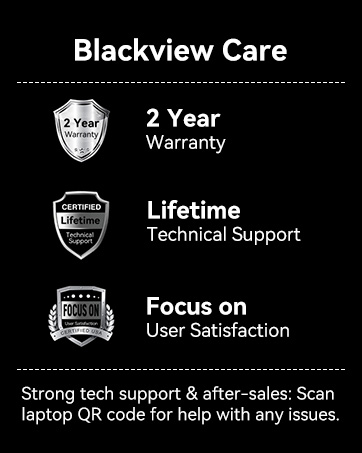
Image: An infographic detailing Blackview's customer care, including a 2-year warranty and lifetime technical support.