1. Introduzione
The KGUSS TOPPING DX5II is a high-performance fully balanced DAC and headphone amplifier combo designed for superior audio reproduction. This manual provides essential information for setting up, operating, and maintaining your device.
Cosa c'è nella scatola
- TOPPING DX5 II x 1
- Telecomando x 1
- Cavo USB x 1
- Cavo CA x 1
- Adattatore da 6.35 mm a 3.5 mm x 1
- Antenna Bluetooth x 1
- Scheda informativa sul prodotto x 1

2. Prodotto finitoview e Caratteristiche principali
The DX5II is a new generation fully balanced DAC and headphone amplifier combo, offering significant upgrades and advanced functionalities for an enhanced audio experience.
Caratteristiche principali:
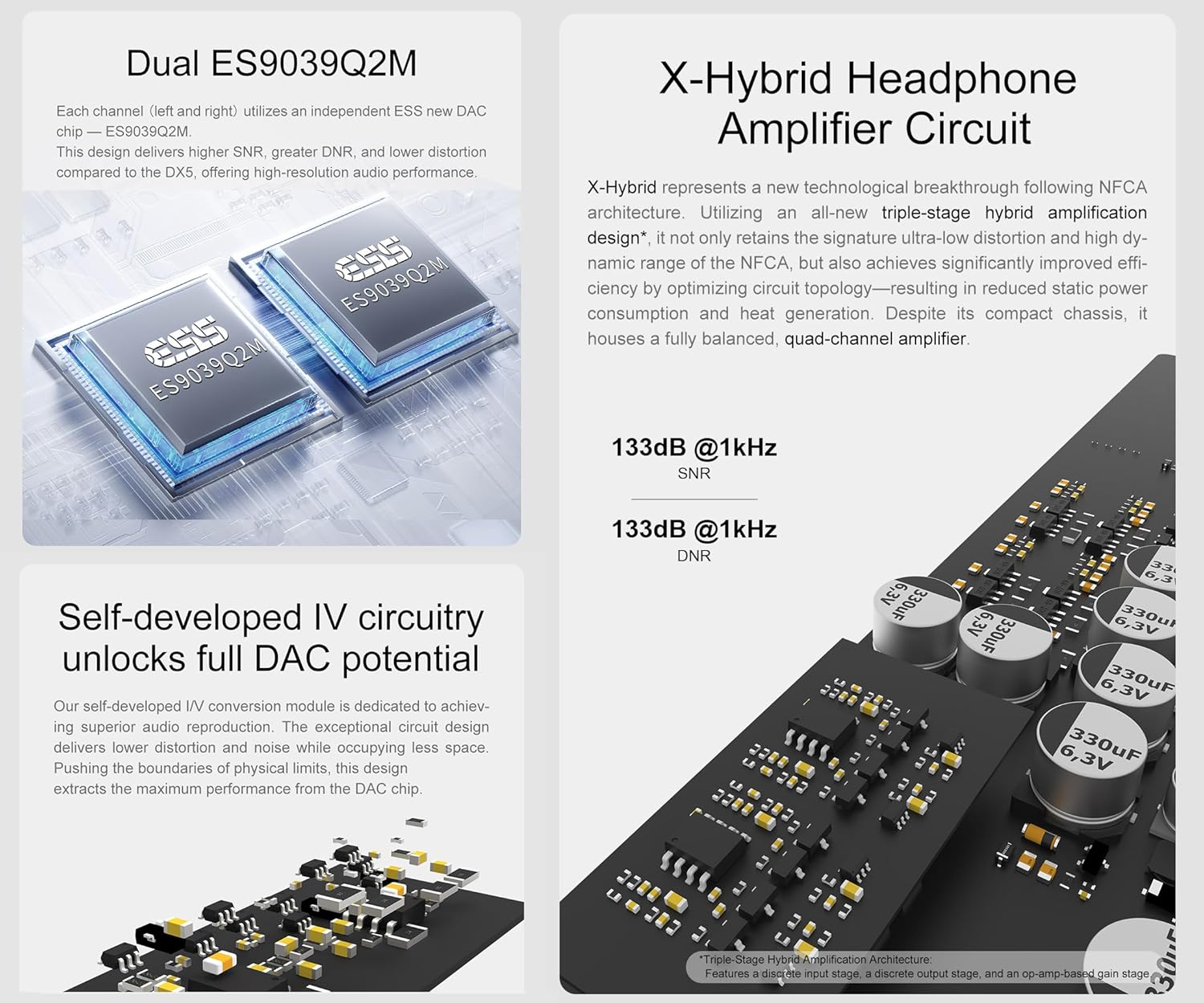
- Dual ES9039Q2M DAC Chips: Each channel utilizes an independent ESS ES9039Q2M DAC chip for lower crosstalk, improved imaging, 133dB SNR, 133dB dynamic range, and distortion as low as 0.00006%.
- X-Hybrid Headphone AmpCircuito lificatore: Features an original triple-stage ibrido amp circuit (discrete input, op-amp gain, discrete output) for high efficiency, improved thermals, and precise delivery. Power output peaks at 7600mW x2 into 16Ω.
- Ampia compatibilità con le cuffie: Equipped with 6.35mm single-ended, 4.4mm balanced, and 4-pin XLR headphone jacks, suitable for low-sensitivity headphones to high-sensitive IEMs with a low noise floor of 1.8uVrms.
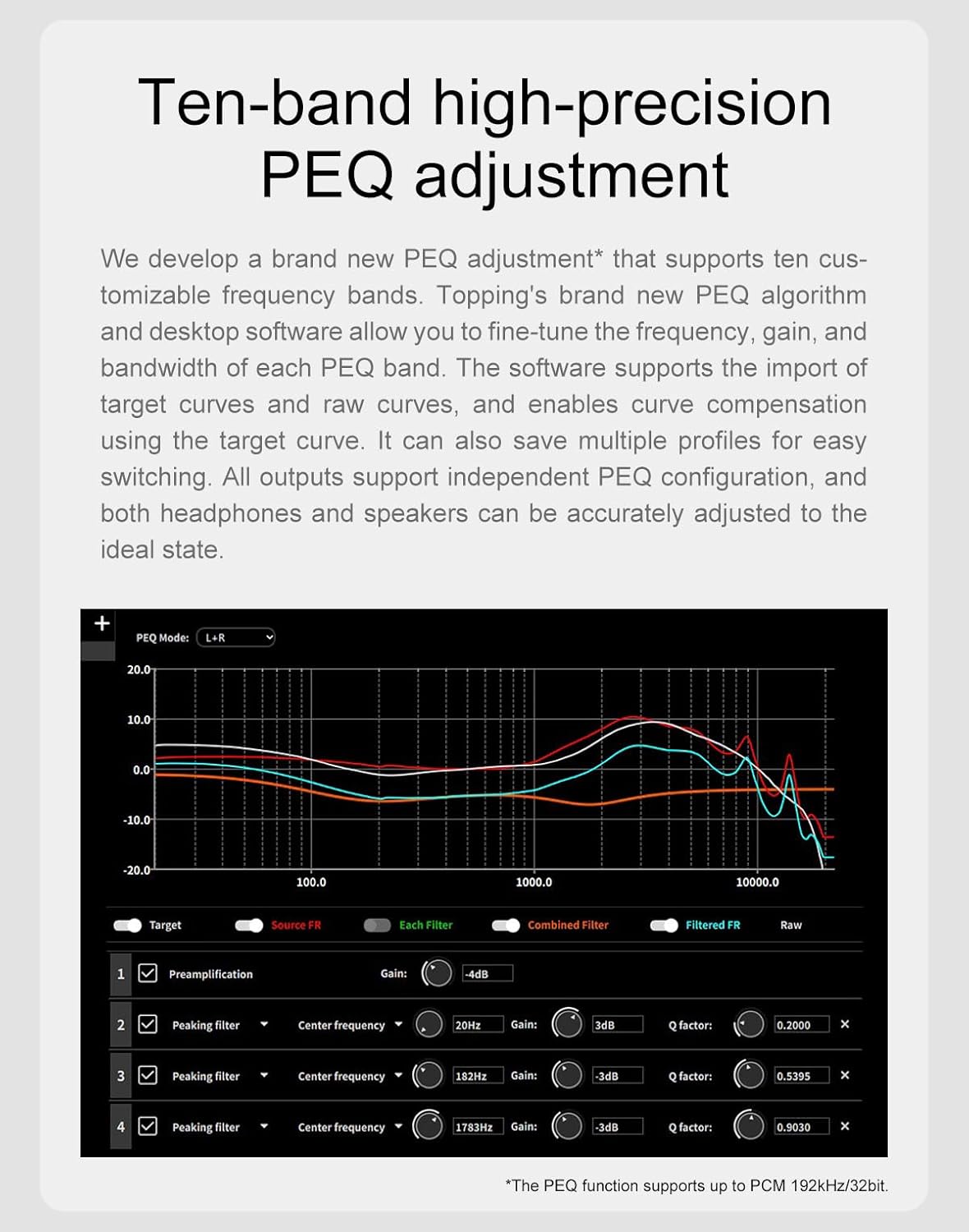
- PEQ ad alta precisione a 10 bande: Desktop software allows tweaking 10 independent frequency bands (frequency, gain, Q-factor adjustment). Multiple profiles can be saved, and EQ can be applied independently to speakers and headphones.
- Connettività wireless LDAC: Equipped with QCC5125 chip, supporting Bluetooth 5.1 and up to 96kHz/24bit. Fully supports LDAC, aptX-Adaptive, aptX HD, AAC, and SBC audio encodings for high-quality wireless audio.



Video ufficiale del prodotto: Oltreview
3. Collegamenti e configurazione
Proper connection of your DX5II is crucial for optimal performance. Follow these steps to set up your device.
Pannello frontale suview
- 4-pin XLR Headphone Output Jack: For balanced headphone connections.
- 6.35mm Headphone Output Jack: For single-ended headphone connections.
- 4.4mm Balanced Headphone Output Jack: For balanced headphone connections.
- Schermo: Displays current status, settings, and UI.
- Ricevitore del telecomando: Per comandi remoti a infrarossi.
- Pulsante Menu: Accede al menu di configurazione.
- Pulsante di ingresso: Switches input channels.
- Pulsante Home: Switches home page display modes.
- Volume Knob & User-defined Button: Rotates to adjust volume; press for user-defined functions.
Pannello posteriore suview
- Uscita XLR bilanciata: For balanced line output to ampdiffusori acustici o altoparlanti attivi.
- Single-ended RCA Output: For single-ended line output to ampdiffusori acustici o altoparlanti attivi.
- Ingresso USB: Connects to a computer or other USB audio source.
- Optical SPDIF Input: Connects to optical audio sources.
- Coaxial SPDIF Input: Connects to coaxial audio sources.
- Ingresso Bluetooth: Per lo streaming audio wireless.
- 12V Trigger IN/OUT (3.5mm jack): For synchronized power control with other devices.
- Power Input (AC 100-277V 50/60Hz): Si collega all'alimentazione CA.
- Interruttore di alimentazione: Accende/spegne il dispositivo.

Connecting to Input Sources
The DX5II supports USB, Coaxial, Optical, and Bluetooth inputs. Connect your audio source to the corresponding input port on the rear panel.
Collegamento delle cuffie
Three types of headphone jacks are available on the front panel: 6.35mm single-ended, 4.4mm balanced, and 4-pin XLR balanced. Connect your headphones to the appropriate jack.
Connessione a Ampo altoparlanti attivi
Use XLR or RCA cables to connect the DX5II to your amplifiers or active speakers. Ensure to turn off all devices before making connections to avoid damage.
Connessione trigger 12V
The 12V Trigger IN/OUT allows the DX5II to be activated by other devices or to activate other devices via a 3.5mm AUX cable. This enables synchronized power on/off with compatible equipment.
Official Product Video: User Manual Walkthrough
4. Istruzioni per l'uso
Familiarize yourself with the operational controls and settings of your DX5II.
Power On & Off / Standby Operation
- Accensione: Press the power switch on the rear panel.
- Stand-by: Short press the volume knob on the front panel or use the remote control to enter standby. Press again to exit.
Impostazione del volume
- Disattiva/Attiva audio: Press the mute button on the remote control.
- Regolazione del volume: Rotate the volume knob on the front panel or use the volume buttons on the remote control.
Impostazioni di input
The DX5II supports multiple input channels. You can choose between auto-detect or manual selection in the setup menu. Use the Input button on the front panel or remote to switch between active inputs.
Impostazioni di uscita
The device allows preselection of commonly used output channels. Options include All (Headphone Outputs), All (Line Outputs), HPA SE (6.35mm), HPA BAL (4.4mm/4-pin XLR), LO SE (RCA), and LO BAL (XLR).
PCM Filter Setting
The DX5II offers various PCM filter options (F-1 to F-8) to fine-tune the sound characteristics.
PEQ Configuration
The 10-band high-precision PEQ can be configured via desktop software. You can save up to 5 custom configurations and apply them offline.
Aurora UI Display
The 2.0-inch full-color screen offers various display modes (Normal, VU, FFT) and customizable background colors. The pressable knob supports customizable functions.
5. Risoluzione Dei Problemi
If you encounter any issues with your DX5II, refer to the following common problems and solutions:
- Nessun suono: Check power supply, input selection, cable connections, and upstream devices.
- H/M/L blinks, others are off (Firmware exception): Unplug and re-plug the power cable, then flash the firmware again.
- HML and H/L blinks alternately (Input voltage is high/low): Utilizzare l'adattatore di alimentazione incluso.
- HML and M blinks alternately (Positive and negative voltage anomalies): Check power supply, disconnect other devices, and reboot.
- Blinks only the current gain LED (Headphone ampil circuito del lificatore emette una tensione CC anomalatage): Change the song or turn down the volume.
Per ulteriore assistenza, contattare l'assistenza clienti.
Official Product Video: Troubleshooting Guide
6. Specifiche
General Attributes
| Attributo | Valore |
|---|---|
| Dimensioni misurate | 19.0cm x 15.5cm x 4.4cm (including protruding parts) |
| Peso | 945g |
| Potenza in ingresso | 100-277 V CA 50 Hz / 60 Hz |
| Ingresso segnale | USB/BT/OTTICO/COASSIALE |
| Uscita di linea | XLR/RCA |
| Jack di uscita per cuffie | 6.35mm headphone output jack, 4.4mm headphone output jack, 4-PIN-XLR headphone output jack |
| Altri connettori | 12V Trigger In (3.5mm jack), 12V Trigger Out (3.5mm jack) |
| Portata Bluetooth | >10 milioni |
| Display | LCD 2inch |
| Controllare | 3 buttons + multifunction knob + Remote control |
| Consumo energetico in standby | <1.3Settembre |
| Consumo energetico | <6Settembre |
DX5 II DAC Parameters (LineOut/USB In@96kHz)
| Parametro | RCA | XLR |
|---|---|---|
| THD+N @1kHz (peso A) | <0.00008% | <0.00006% |
| THD @20-20kHz 90kBw | <0.0005% | <0.00015% |
| SNR @1kHz (A-peso) | 128 dB | 132 dB |
| Gamma dinamica a 1 kHz (peso A) | 128 dB | 132 dB |
| Risposta in frequenza | 20Hz-20kHz (±0.3dB), 20Hz-40kHz (±1.0dB) | 20Hz-20kHz (±0.3dB), 20Hz-40kHz (±1.0dB) |
| Livello di uscita | 2.5 Vrm @ 0 dBFS | 5.0 Vrm @ 0 dBFS |
| Rumore @A-wt | <1.1uVrms | <1.3uVrms |
| Crosstalk di canale | -135 dB a 1 kHz | -147 dB a 1 kHz |
| Bilanciamento del canale | 0.3 dB | 0.3 dB |
| Impedenza di uscita | 50Ω | 100Ω |
Nota: i dati sopra riportati sono il risultato del test nel laboratorio TOPPING in condizioni AC220V 50Hz.
Cuffie DX5 II Amplifier Specifications (USB In@96kHz)
| Parametro | Jack per cuffie da 6.35 mm | 4.4mm/4-pin XLR headphone jack |
|---|---|---|
| THD+N @1kHz (peso A) | <0.00008% @Output=20mW (32Ω), <0.00007% @Output=22mW (300Ω) | <0.00007% @Output=85mW (32Ω), <0.00007% @Output=85mW (300Ω) |
| THD @20-20kHz (90kBw) | <0.0005% @Output=20mW (32Ω), <0.0005% @Output=22mW (300Ω) | <0.0005% @Output=85mW (32Ω), <0.0005% @Output=90mW (300Ω) |
| SNR @MAX OUT 1kHz (A-peso) | 131 dB | 133 dB |
| Gamma dinamica a 1 kHz (peso A) | 131 dB | 133 dB |
| Risposta in frequenza | 20Hz-20kHz (±0.3dB), 20Hz-40kHz (±1.0dB) | 20Hz-20kHz (±0.3dB), 20Hz-40kHz (±1.0dB) |
| Livello di uscita | 7.2Vpp @G=L, 24.2Vpp @G=H | 15.0Vpp @G=L, 48.6Vpp @G=H |
| Rumore (A-wt) | <2.5uVrms @G=H, <1.1uVrms @G=L | <4.3uVrms @G=H, <1.8uVrms @G=L |
| Crosstalk di canale | -127 dB a 1 kHz | -143 dB a 1 kHz |
| Guadagno | G=L 8.6dB (Vrms/FS), G=H 18.7dB (Vrms/FS) | G=L 14.6dB (Vrms/FS), G=H 24.7dB (Vrms/FS) |
| Bilanciamento del canale | 0.3 dB | 0.3 dB |
| Impedenza di uscita | <0.1Ω | <0.1Ω |
| Potenza di uscita | 3300mW x 2 @16Ω THD+N<1%, 2200mW x 2 @32Ω THD+N<1%, 1160mW x 2 @64Ω THD+N<1%, 250mW x 2 @300Ω THD+N<1%, 120mW x 2 @600Ω THD+N<1% | 7600mW x 2 @16Ω THD+N<1%, 6400mW x 2 @32Ω THD+N<1%, 4300mW x 2 @64Ω THD+N<1%, 990mW x 2 @300Ω THD+N<1%, 490mW x 2 @600Ω THD+N<1% |
| Impedenza di carico | > 8 Ω | > 8 Ω |
Nota: i dati sopra riportati sono il risultato del test nel laboratorio TOPPING in condizioni AC220V 50Hz.
7. Precauzioni di sicurezza
- Non tenere l'unità in un ambiente caldo e umido né colpirla con forza.
- L'apertura della custodia invalida immediatamente la garanzia!
- Solo per uso interno.
- Topping non si assume alcuna responsabilità per eventuali perdite o danni derivanti direttamente o indirettamente dal guasto del DX5 II.
- Ai fini del miglioramento, le specifiche sono soggette a modifiche senza preavviso.
8. Garanzia e supporto
Hificollege aims for 100% customer satisfaction. We offer authoritative certification, ensuring 100% authenticity of all products sold. Our support team is ready to answer any questions 24/7. We provide more than 1 year of quality restoration, covering repair and shipping costs. We also offer a lowest price match within 30 days.