1. Introduzione
Thank you for choosing the Soundstream WRX-4.300 4-Channel Car Amplificatore. Questo ampLifier è progettato per offrire prestazioni audio potenti e chiare per l'impianto audio del tuo veicolo. Questo manuale fornisce informazioni essenziali per la corretta installazione, il funzionamento e la manutenzione del tuo amplifier. Please read it thoroughly before attempting installation or use.
2. Informazioni sulla sicurezza
Durante l'installazione e il funzionamento, osservare sempre le seguenti precauzioni di sicurezza:
- Prima di qualsiasi intervento elettrico, scollegare il terminale negativo della batteria del veicolo.
- Assicurarsi che tutti i cavi siano correttamente instradati e fissati per evitare danni o cortocircuiti.
- Utilizzare cavi di calibro appropriato per i collegamenti di alimentazione, messa a terra e altoparlanti, come specificato.
- Installare il amplifier in a well-ventilated area, away from direct sunlight, heat sources, or moisture.
- Non azionare il amplifier se è danneggiato o malfunzionante. Consultare la sezione risoluzione dei problemi o contattare l'assistenza.
- Per ottenere prestazioni e sicurezza ottimali si consiglia l'installazione da parte di un professionista.
3. Contenuto della confezione
Verifica che il pacco contenga i seguenti articoli:
- Soundstream WRX-4.300 Amppiù vivace
- Viti di montaggio
- High-Level Input Harnesses (2)
- Manuale del proprietario
- Fusibili di ricambio

Image: Contents of the Soundstream WRX-4.300 package, showing the amplifier, wiring harnesses, mounting screws, and the owner's manual.
4. Prodotto finitoview
The Soundstream WRX-4.300 is a compact Class D 4-channel amplifier designed for versatility and high performance. It features adjustable crossovers, gain controls, and the ability to operate in full-range or bridged modes.
4.1 Controlli del pannello superiore
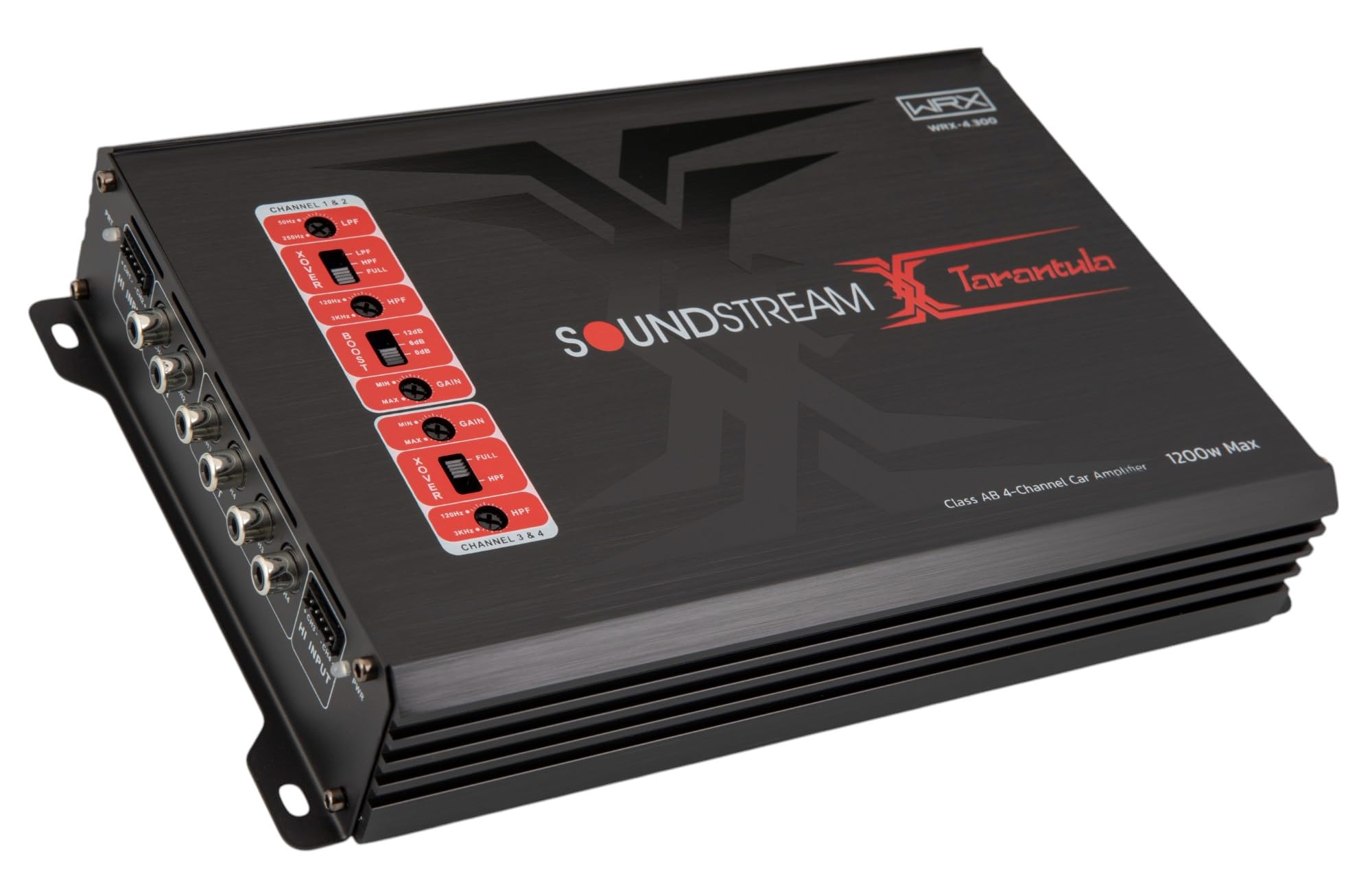
Immagine: in alto view of the WRX-4.300 amplifier, highlighting the control panel with gain, crossover, and boost settings for channels 1&2 and 3&4.
- X-OVER (Crossover) Switches: Select between LPF (Low Pass Filter), FULL (Full Range), or HPF (High Pass Filter) for each channel pair.
- LPF/HPF Frequency Controls: Adjust the cutoff frequency for the selected crossover mode.
- BOOST (Bass Boost) Control: Adjust the bass boost level for channels 3&4.
- Controlli GAIN: Adjust the input sensitivity for each channel pair to match the output of your head unit.
4.2 Input and Output Terminals

Immagine: Posteriore view of the WRX-4.300 amplifier, showing the RCA input and output jacks, and high-level input connectors for channels 1&2 and 3&4.

Immagine: Posteriore view of the WRX-4.300 amplifier, displaying the power (GND, REM, +12V), fuse, and speaker output terminals (CH1, CH2, CH3, CH4).
- CIAO INGRESSO: Connects to your head unit's speaker outputs for high-level input.
- IN (RCA Input): Connects to your head unit's RCA pre-outs for low-level input.
- OUT (RCA Output): Provides a pass-through RCA signal for connecting additional amplificatori.
- GND (Terra): Si collega alla massa del telaio del veicolo.
- REM (telecomando): Connects to the head unit's remote turn-on lead.
- +12V (Alimentazione): Connects directly to the vehicle's positive battery terminal.
- FUSIBILE: Contains replaceable fuses for protection.
- CH1-CH4 (Speaker Outputs): Connects to your speakers or subwoofers.
5. Configurazione e installazione
Una corretta installazione è fondamentale per le prestazioni e la longevità del tuo amplificatore. In caso di dubbi su alcuni passaggi, consultare un installatore professionista.
5.1 Montaggio del Amppiù vivace
- Choose a mounting location that is dry, well-ventilated, and away from direct heat or moisture. Ensure sufficient airflow around the ampdissipatore di calore del dissipatore.
- Mark the mounting holes using the amplifier come modello.
- Praticare dei fori pilota per le viti di montaggio.
- Mettere in sicurezza il amplifier utilizzando le viti di montaggio fornite.
5.2 Collegamenti di cablaggio
Assicurarsi che tutti i collegamenti siano sicuri e adeguatamente isolati per evitare cortocircuiti.
5.2.1 Cablaggio di alimentazione
- Terra (GND): Connect a short, heavy-gauge wire (e.g., 8 AWG or larger) from the amplifier's GND terminal to a clean, unpainted metal point on the vehicle's chassis.
- Remoto (REM): Collegare un filo di calibro più piccolo (ad esempio, 18 AWG) dal amplifier's REM terminal to the remote turn-on output of your head unit.
- +12V (Alimentazione): Connect a heavy-gauge wire (e.g., 8 AWG or larger) from the amplifier's +12V terminal directly to the positive terminal of the vehicle's battery. Install an in-line fuse holder (not included) within 18 inches (45 cm) of the battery.
5.2.2 Signal Input (RCA or High-Level)
- Ingresso RCA: Use high-quality RCA cables to connect the head unit's pre-out jacks to the amplifier's IN (RCA Input) jacks.
- Input di alto livello: If your head unit does not have RCA outputs, use the provided high-level input harnesses. Connect the harnesses to your head unit's speaker wires and then plug them into the amplifier's HI INPUT connectors.
5.2.3 Cablaggio degli altoparlanti
- Collega i tuoi altoparlanti a amplifier's CH1, CH2, CH3, and CH4 speaker output terminals.
- Assicurarsi che la polarità sia corretta (+ con + e - con -) per tutti i collegamenti degli altoparlanti.
- For 4-channel operation, connect one speaker to each channel.
- For 2-channel (bridged) operation, connect speakers across channel pairs (e.g., CH1+ and CH2- for one speaker). Refer to the operating instructions for details on bridged mode.
6. Istruzioni per l'uso
Una volta installato, segui questi passaggi per configurare e utilizzare il tuo amppiù vivace.
6.1 Configurazione iniziale e regolazione del guadagno
- Turn the GAIN controls on the amplifier to their minimum (fully counter-clockwise) position.
- Imposta il volume dell'unità principale a circa il 75% del suo livello massimo.
- Aumentare lentamente il controllo GAIN sul amplifier until you hear distortion, then back it off slightly until the sound is clear.
- Repeat for all active channel pairs.
6.2 Impostazioni crossover
The crossover filters allow you to direct specific frequency ranges to your speakers or subwoofers.
- PIENO: Per gli altoparlanti full-range, consentono il passaggio di tutte le frequenze.
- HPF (filtro passa alto): For mid-range or tweeter speakers, allowing only frequencies above the set point to pass. Adjust the HPF frequency control to the desired cutoff.
- LPF (filtro passa basso): For subwoofers, allowing only frequencies below the set point to pass. Adjust the LPF frequency control to the desired cutoff.
6.3 potenziamento dei bassi
The BASS BOOST control (for channels 3&4) allows you to enhance low frequencies. Use this feature sparingly to avoid distortion or speaker damage. Start with the boost at minimum and increase gradually if desired.
6.4 Funzionamento in modalità bridge
The WRX-4.300 can be bridged to provide higher power output to fewer channels, typically for subwoofers. When bridging, connect the speaker's positive terminal to the positive output of one channel (e.g., CH1+) and the speaker's negative terminal to the negative output of the adjacent channel (e.g., CH2-). Ensure the connected speakers have an impedance compatible with bridged operation (typically 4 ohms minimum).
7. Manutenzione
Minimal maintenance is required for your amppiù vivace.
- Pulizia: Pulire periodicamente il ampl'esterno del filtro con un panno morbido e asciutto. Non utilizzare prodotti chimici aggressivi o detergenti abrasivi.
- Sostituzione fusibile: Se il amplifier does not power on, check the fuses. Always replace blown fuses with new ones of the exact same type and rating to prevent damage.
- Ventilazione: Assicurare il amplifier's heatsink fins remain clear of obstructions to maintain proper cooling.
8. Risoluzione Dei Problemi
Se riscontri problemi con il tuo amplifier, fare riferimento ai seguenti problemi comuni e alle relative soluzioni:
| Problema | Possibile causa | Soluzione |
|---|---|---|
| Amplifier does not power on (PWR LED off) | Fusibile bruciato, collegamento di alimentazione/terra scadente, nessun segnale remoto. | Check and replace fuses. Verify +12V, GND, and REM connections. Ensure head unit is on. |
| Amplifier powers on but no sound | Incorrect input connection, speaker wiring issues, gain too low, head unit muted. | Check RCA/high-level input cables. Verify speaker connections and polarity. Increase gain. Check head unit volume/mute. |
| Suono distorto | Guadagno impostato su un valore troppo alto, impostazioni di crossover non corrette, altoparlanti danneggiati. | Reduce gain. Adjust crossover frequencies. Inspect speakers for damage. |
| Amplifier goes into protection mode (PRT LED on) | Overheating, short circuit in speaker wiring, impedance too low. | Permettere amplifier to cool. Check speaker wiring for shorts. Ensure speaker impedance is within amplifier's limits. |
| Engine noise/whining sound | Poor ground connection, RCA cables routed near power wires, ground loop. | Migliorare la connessione di terra. Allontanare i cavi RCA dai cavi di alimentazione. Valutare l'utilizzo di un isolatore di terra. |
9. Specifiche
Key technical specifications for the Soundstream WRX-4.300 amplificatore:
- Potenza di uscita: 1200 Watt (massimo)
- Numero di canali: 4
- AmpClasse lificatore: Classe D
- Voltage: 12 Volt (CA)
- Materiale: Alluminio
- Tipo di montaggio: Montaggio in superficie
- Dimensioni del prodotto (L x P x A): 7.2 x 6.69 x 1.97 pollici
- Peso dell'articolo: 2.2 libbre
- Numero modello: WRX-4.300
- Codice UPC: 709483072411
10. Garanzia e supporto
Soundstream products are designed for reliability and performance. For warranty information, please refer to the warranty card included with your product or visit the official Soundstream website. For technical support or service inquiries, please contact Soundstream customer service through their official channels.