1. Introduzione e oltreview
The VENTION Powerhive Laptop Power Bank is a high-capacity, fast-charging portable power solution designed to keep your devices powered on the go. With a 20000mAh battery and up to 165W total output, it can charge laptops, smartphones, tablets, and other USB-powered devices efficiently. Its intelligent digital display provides real-time information, and integrated cables enhance convenience.

Image 1.1: VENTION Powerhive Laptop Power Bank with integrated strap.
2. Caratteristiche del prodotto
- Ricarica rapida universale: Supports fast charging for a wide range of devices including MacBook, iPhone 16 Pro, iPad Pro, Galaxy S25 Ultra, Dell, and HP laptops. Features USB-C1 (up to 100W), USB-C2 (up to 65W), and USB-A (up to 60W) ports for simultaneous charging.
- Alta capacità: 20000mAh battery capacity, capable of charging a MacBook Air 13 approximately 1.3 times or an iPhone 16 up to 4 times. Designed for long-term durability with over 80% battery health remaining after 1000 charging cycles.
- Uscita potente: Total maximum output of 165W, allowing two laptops to be charged simultaneously.
- Cavi integrati: Includes two built-in USB-C cables. One functions as a reinforced carrying strap, tested for durability, and the other provides 240W high-speed charging.
- Protezione di sicurezza avanzata: Monitors temperature 200 times per second and incorporates 9 layers of protection including over-discharge, overheat, overcurrent, short-circuit, overcharge, overvoltage, recovery, overpower, and flame-retardant casing.
- Smart TFT Color Display: Displays detailed information such as battery level, voltage, current, temperature, and charging cycles.
- Interactive Emoji Indicators: Features animated emojis that reflect real-time status like battery level, standby, overheating, or fast charging.

Immagine 2.1: Interno view illustrating the 20000mAh high-capacity battery cells.
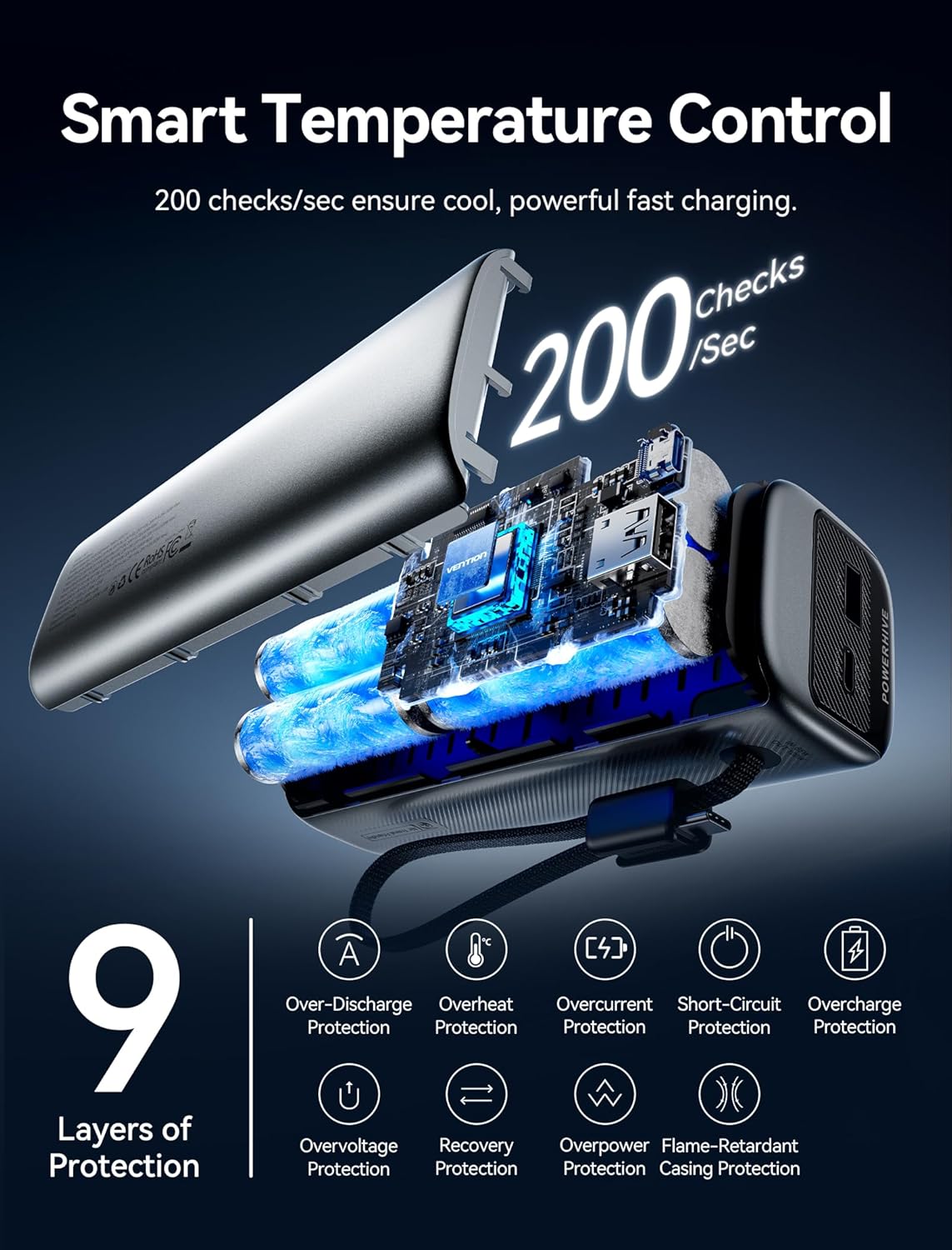
Image 2.2: Diagram showing smart temperature control and the 9 layers of protection for safe charging.
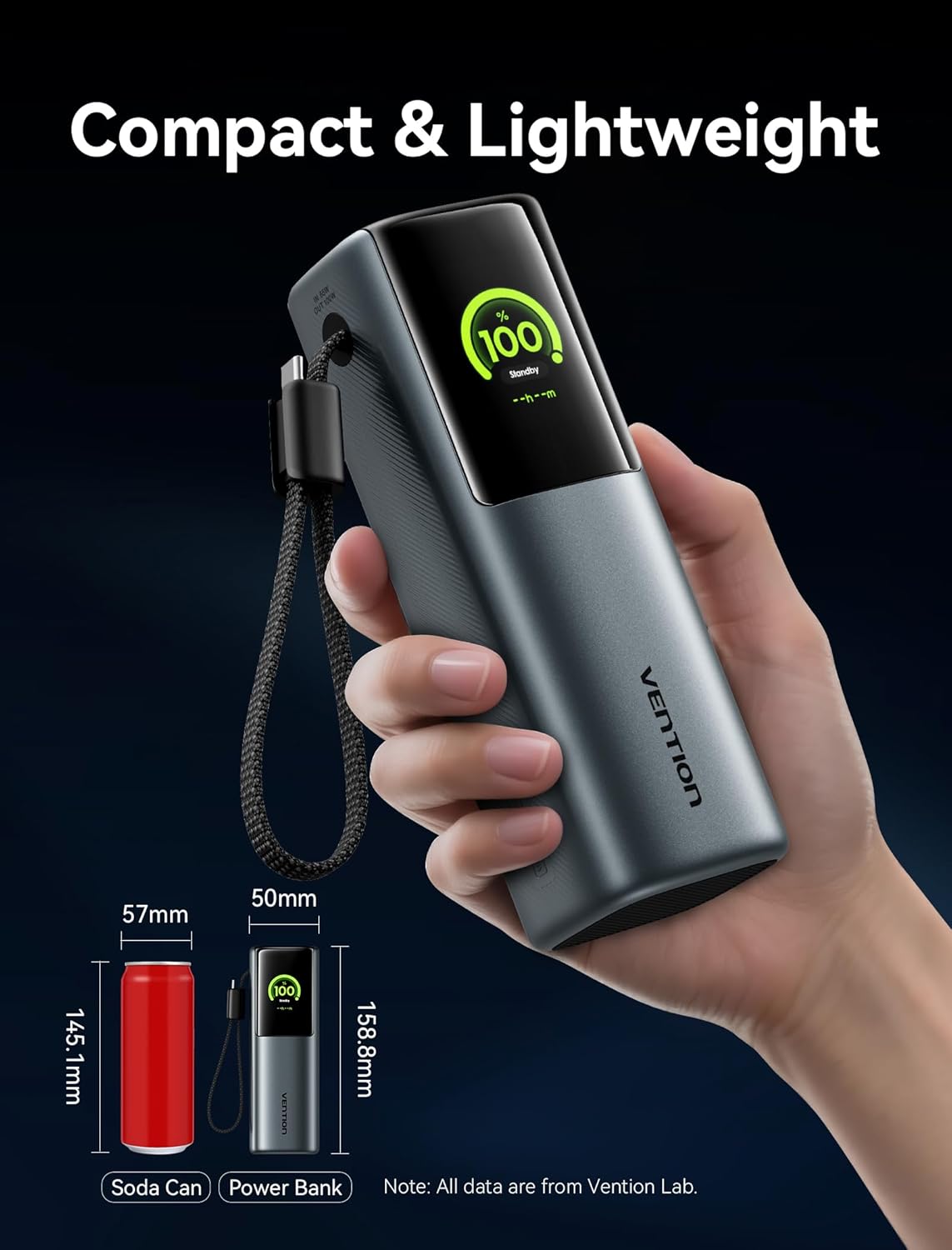
Image 2.3: The power bank's compact size, comparable to a soda can, demonstrating its portability.

Immagine 2.4: Passoview of device compatibility, including laptops, phones, game consoles, and low-current devices.
3. Contenuto della confezione
Si prega di controllare la confezione per verificare la presenza dei seguenti elementi:
- VENTION Powerhive Laptop Power Bank (FKFH0)
- Integrated USB-C cables (2)
- Flannel storage pouch
- Manuale dell'utente (questo documento)
4. Impostazione
4.1 Ricarica iniziale del Power Bank
Before first use, fully charge your VENTION Powerhive power bank. Connect the power bank to a suitable power adapter (not included) using one of the integrated USB-C cables or an external USB-C cable. The digital display will show the charging progress.
4.2 Collegamento dei dispositivi
To charge your devices, simply connect them to the appropriate output port (USB-C1, USB-C2, or USB-A) on the power bank using their respective charging cables. The power bank will automatically detect the connected device and begin charging.
5. Istruzioni per l'uso
5.1 Ricarica dei dispositivi
The VENTION Powerhive power bank supports charging up to three devices simultaneously. For optimal fast charging, ensure your device and cable support the power bank's output capabilities.
- Ricarica di un singolo dispositivo: Connect your device to any available USB-C or USB-A port. The power bank will deliver the maximum compatible power.
- Ricarica di più dispositivi: Connect up to three devices to the USB-C1, USB-C2, and USB-A ports. The power bank will intelligently distribute the total 165W output.

Image 5.1: Charging a MacBook Pro using the power bank's high-speed USB-C output.

Image 5.2: Illustrates the capability to charge two laptops concurrently with distributed power.
5.2 Comprensione del display digitale
The TFT color display provides comprehensive real-time information:
- Livello della batteria: Mostra la percentuale residua della batteriatage.
- Stato di carica: Indicates input/output wattage, voltage, e corrente.
- Temperatura: Displays the internal temperature of the power bank.
- Cicli di ricarica: Tracks the number of charging cycles the battery has undergone.
- Tempo stimato: Shows estimated time to full charge or discharge.

Image 5.3: Various display modes of the Smart TFT screen, showing battery, charging, and temperature data.

Immagine 5.4: Es.amples of interactive emoji indicators on the display, reflecting different operational states.
5.3 Linee guida per la sicurezza
The power bank is equipped with multiple safety protections. To ensure safe operation:
- Evitare temperature estreme.
- Do not expose to water or excessive humidity.
- Non smontare o tentare di riparare il dispositivo.
- Utilizzare solo cavi di ricarica e adattatori compatibili.
- Tenere fuori dalla portata dei bambini.
5.4 Video ufficiale del prodotto
Video 5.5: An official product video from Vention Official Store showcasing the Powerhive 20000mAh 165W Power Bank's features and design.
6. Manutenzione
Per garantire la longevità e le prestazioni ottimali del tuo power bank:
- Magazzinaggio: Conservare il power bank in un luogo fresco e asciutto, lontano dalla luce solare diretta e da temperature estreme.
- Pulizia: Utilizzare un panno morbido e asciutto per pulire l'esterno. Non utilizzare detergenti liquidi o spray.
- Cura della batteria: For best battery health, avoid completely draining the power bank frequently. Recharge it regularly, especially if it will be stored for an extended period.
- Custodia protettiva: Utilize the included flannel storage pouch to protect the power bank from scratches and minor impacts during travel.
7. Risoluzione Dei Problemi
If you encounter issues with your VENTION Powerhive power bank, please refer to the following common solutions:
| Problema | Possibile causa | Soluzione |
|---|---|---|
| La power bank non si ricarica | Charging cable or adapter faulty; power bank fully charged; connection issue. | Try a different cable and adapter. Ensure connections are secure. Check display for charge status. |
| Il dispositivo non si ricarica dal power bank | Power bank battery low; device cable faulty; incompatible device; power bank in standby mode. | Recharge the power bank. Use a different device cable. Ensure device is compatible. Check power bank display for output. |
| Ricarica lenta | Cable or adapter not supporting fast charging; multiple devices connected; device not supporting fast charging. | Use a compatible 5A/100W PD cable and adapter. Disconnect other devices. Verify device fast charging capability. |
| Il display non funziona o mostra errori | Software glitch; overheating; internal issue. | Disconnect all devices and cables, then reconnect. Allow power bank to cool down if hot. If issue persists, contact support. |
If the problem persists after attempting these solutions, please contact VENTION customer support for further assistance.
8. Specifiche
| Caratteristica | Dettaglio |
|---|---|
| Dimensioni del prodotto | 6.5 x 2.2 x 2 pollici |
| Peso dell'articolo | 1.39 libbre |
| Numero di modello | FKFH0 |
| Tipo di batteria | 4 batterie da 9 V (incluse) |
| Capacità della batteria | 20000 mAh |
| Voltage | 3.7 Volt |
| Tipo di connettore | USB tipo A, USB tipo C |
| Caratteristiche speciali | Fast Charging, Digital Display, Emoji Animation, Integrated USB-C Cables |
| Produttore | VENZIONE |
| Data prima disponibilità | 13 giugno 2025 |
9. Garanzia e supporto
For warranty information and customer support, please refer to the official VENTION webo contattare direttamente il servizio clienti. Conservare la ricevuta d'acquisto come prova d'acquisto per eventuali reclami in garanzia.
VENTION Official Store: Visit VENTION Store on Amazon


