1. Introduzione
Welcome to the user manual for your Doro Leva E22 4G flip phone. This guide provides essential information on how to set up, operate, and maintain your new phone. Designed with ease of use in mind, the Doro Leva E22 features a large screen, contrasting keys, and loud, clear sound, making it ideal for seniors. Please read this manual carefully to ensure optimal performance and longevity of your device.
2. Contenuto della confezione
Si prega di selezionare la casella per i seguenti elementi:
- Doro Leva E22 4G Flip Phone
- Stazione di ricarica
- Cavo USB di tipo C.
- Batteria
- Guida rapida
3. Telefono sopraview
Familiarize yourself with the physical components of your Doro Leva E22 phone.
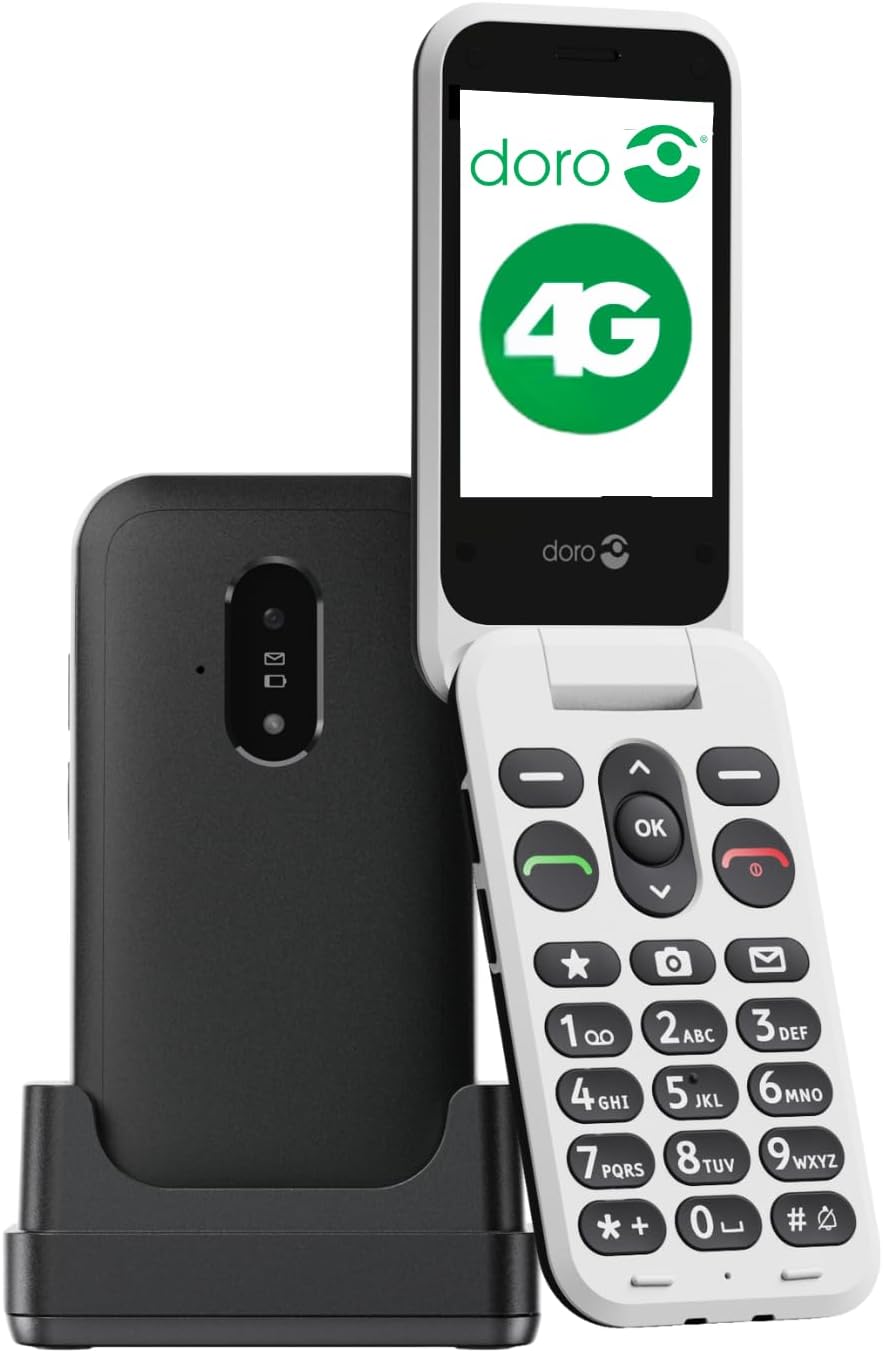
Image 3.1: Doro Leva E22 phone with charging station.
The Doro Leva E22 is a simple and user-friendly 4G flip phone. It features a Doro Secure Button for emergencies, allows answering and hanging up calls with a simple flip, and is compatible with hearing aids. Enjoy clear and powerful sound, along with large keys that offer voice feedback for easier dialing.

Image 3.2: Key features of the Doro Leva E22.
The phone offers a simple menu interface, a built-in camera, a flashlight, and is splash-resistant (IP54 rated).

Image 3.3: User interface and additional features.
The ergonomic design ensures comfortable handling. Make calls, send SMS, and take photos easily thanks to the well-spaced and high-contrast keys, and the large screen. The included charging station ensures your phone is always in a known location and charged.

Image 3.4: Ergonomic design and Doro Secure Button.
The phone also supports speed dial for favorite contacts, quick access to the camera, and messages.

Image 3.5: Speed dial functionality.

Image 3.6: Ergonomic design of the closed phone.
4. Impostazione
4.1. Inserimento della scheda SIM
- Rimuovere con cautela la cover posteriore del telefono.
- Locate the SIM card slot. The Doro Leva E22 supports a single SIM card.
- Inserire la scheda SIM con i contatti dorati rivolti verso il basso e l'angolo tagliato allineato con lo slot.
- Assicurarsi che la scheda SIM sia saldamente inserita.
4.2. Inserimento della batteria
- After inserting the SIM card, place the battery into the battery compartment, aligning the gold contacts on the battery with the contacts in the phone.
- Gently press down until the battery is seated securely.
- Riposizionare il coperchio posteriore, assicurandosi che scatti in posizione.
4.3. Ricarica del telefono
- Connect the USB Type-C cable to the charging station.
- Plug the other end of the USB cable into a power adapter (not always included) and then into a wall outlet.
- Place your Doro Leva E22 phone into the charging station. Ensure it is properly seated and the charging indicator appears on the screen.
- For initial use, charge the phone for at least 2-3 hours.
5. Funzionamento di base
5.1. Accensione/Spegnimento
- Per accendere: Press and hold the red End Call/Power button (usually marked with a red phone icon) until the Doro logo appears.
- Per spegnere: Press and hold the red End Call/Power button until the power-off options appear on the screen. Select 'Power off' and confirm.
5.2. Effettuare e ricevere chiamate
- Effettuare una chiamata: Inserire il numero di telefono utilizzando la tastiera e premere il pulsante verde Chiama (solitamente contrassegnato dall'icona di un telefono verde).
- Risposta a una chiamata: Quando il telefono squilla, apri lo sportellino o premi il pulsante verde Chiama.
- Terminare una chiamata: Chiudere lo sportellino o premere il pulsante rosso Termina chiamata.
5.3. Invio e ricezione di messaggi (SMS)
- Utilizzare i tasti di navigazione per accedere al menu "Messaggi".
- Seleziona "Nuovo messaggio" o "Crea messaggio".
- Inserisci il numero del destinatario o selezionalo dai tuoi contatti.
- Digitare il messaggio utilizzando la tastiera.
- Premere 'Invia'.
5.4. Gestione dei contatti
- Vai al menu "Contatti" o "Rubrica".
- Puoi aggiungere nuovi contatti, modificare quelli esistenti o eliminare voci.
- Use the speed dial feature to assign frequently called numbers to specific keys (e.g., 2-9).
5.5. Regolazione del volume
Use the dedicated volume buttons on the side of the phone to adjust call volume, ringtone volume, and media volume.
6. Funzionalità avanzate
6.1. Utilizzo della fotocamera
Your Doro Leva E22 is equipped with a 0.3-megapixel camera.
- Access the camera from the main menu or via a dedicated shortcut key if available.
- Inquadra il tuo scatto utilizzando lo schermo.
- Press the 'OK' button or the designated camera button to take a picture.
- Le foto vengono salvate nella galleria del telefono.
6.2. Doro Secure Button (SOS Function)
The Doro Secure Button is located on the back of the phone and is designed for emergencies.
- Impostare: Before using, configure emergency contacts in the phone's settings.
- Attivazione: In an emergency, press and hold the Doro Secure Button for a few seconds. The phone will automatically call and send an SMS to your pre-set emergency contacts.
6.3. Torcia elettrica
Per maggiore praticità, il telefono è dotato di torcia integrata.
- Access the flashlight function from the main menu or by pressing a dedicated shortcut key (refer to your Quick Start Guide for specific key assignments).
6.4. Compatibilità con gli apparecchi acustici
The Doro Leva E22 is designed to be compatible with hearing aids, providing a clearer audio experience for users with hearing impairments.
7. Manutenzione
7.1. Pulizia del telefono
- Utilizzare un panno morbido e privo di lanugine per pulire lo schermo e il corpo del telefono.
- Evitare l'uso di prodotti chimici aggressivi, detergenti abrasivi o spray aerosol.
- Ensure the phone is powered off and disconnected from the charger before cleaning.
7.2. Cura della batteria
- Evitare di esporre la batteria a temperature estreme.
- Non forare, smontare o modificare la batteria.
- If the battery appears damaged or swollen, discontinue use and replace it with an authorized Doro battery.
8. Risoluzione Dei Problemi
Se riscontri problemi con il tuo Doro Leva E22, prova le seguenti soluzioni:
| Problema | Possibile soluzione |
|---|---|
| Il telefono non si accende | Ensure the battery is charged. Connect to the charging station and wait a few minutes before attempting to power on. Check if the battery is correctly inserted. |
| Non è possibile effettuare/ricevere chiamate | Check if the SIM card is correctly inserted and activated. Ensure you have network coverage. Restart the phone. |
| Scarsa qualità del suono | Adjust the volume using the side buttons. Ensure the speaker/microphone is not blocked. If using a hearing aid, ensure compatibility settings are correct. |
| La batteria si scarica rapidamente | Reduce screen brightness. Close unused applications. Limit background data usage. Ensure the phone is not in an area with very weak signal, which can increase battery consumption. |
If the problem persists, please refer to the Doro support websito o contattare il servizio clienti.
9. Specifiche
- Nome modello: Leva E22
- Numero modello: 8991
- Marca: Doro
- Colore: Nero/Bianco
- Sistema operativo: MOCOR OS
- Dimensioni dello schermo: 2.8 pollici
- Connettività: 4G, LTE
- Porta di ricarica: USB tipo C
- Risoluzione della fotocamera: 0.3 Megapixels (Effective Fixed Resolution)
- Slot per scheda SIM: SIM singola
- Operatore wireless: VoiceStream Wireless Service Provider (Note: Compatibility may vary by region/carrier)
- Caratteristiche speciali: Doro Secure Button, Large Contrasting Keys, Loud & Clear Sound, HD Voice, Hearing Aid Compatible, Flashlight, Splash-resistant (IP54)
10. Garanzia e supporto
Your Doro Leva E22 4G flip phone comes with a standard manufacturer's warranty. Please refer to the warranty card included in your package for specific terms and conditions, including warranty duration and coverage details.
For technical support, troubleshooting assistance, or to inquire about spare parts, please visit the official Doro website or contact Doro customer service directly. Contact information can typically be found on the Doro websito o nella confezione del prodotto.
Supporto online: www.doro.com/support (Example link, please verify official Doro support page)


