1. Introduzione
The Flashpoint Zoom Li-Ion V480C is a high-performance on-camera flash designed for Canon cameras, offering advanced features for professional and enthusiast photographers. This flash integrates with the Flashpoint R2 wireless system, providing versatile lighting control. Key features include a Guide Number of GN50, rapid 1.7-second recycle time, TTL auto flash, manual flash modes, and 2.4GHz wireless control.

Image 1.1: Flashpoint Zoom Li-Ion V480C with an overview of its main features.
2. Componenti inclusi
Verifica che tutti i seguenti elementi siano inclusi nel tuo pacchetto:
- Flashpoint Zoom Li-on Compact V480 Flash
- VB22 7.2 V / 2200 mAh Rechargeable Li-ion Battery Pack
- Caricabatterie
- Mini supporto
- Custodia protettiva
3. Prodotto finitoview
Familiarize yourself with the various parts of your Flashpoint V480C flash unit.

Immagine 3.1: Fronte e lato view of the Flashpoint V480C with numbered components.
- Catchlight Panel (White)
- Built-in Wide Angle Diffuser
- Testa flash
- LED di modellazione Lamp
- Sensore fotocellula
- Anello di bloccaggio
- Scarpa calda
- Cavo di sincronizzazione Jack
- Schermo tattile
- Porta di aggiornamento del firmware USB-C
- Pulsante di accensione
- Pulsante Imposta
- Seleziona Componi
- Pulsante test/indicatore di riciclo
- Fibbia di fissaggio per hot shoe
4. Impostazione
4.1. Installazione e ricarica della batteria
The Flashpoint V480C uses a VB22 7.2V / 2200mAh rechargeable Li-ion battery pack. Ensure the battery is fully charged before first use.
- To install the battery, slide open the battery compartment cover located on the side of the flash unit.
- Insert the VB22 Li-ion battery pack, ensuring the contacts align correctly.
- Chiudere il coperchio del vano batteria finché non scatta saldamente in posizione.
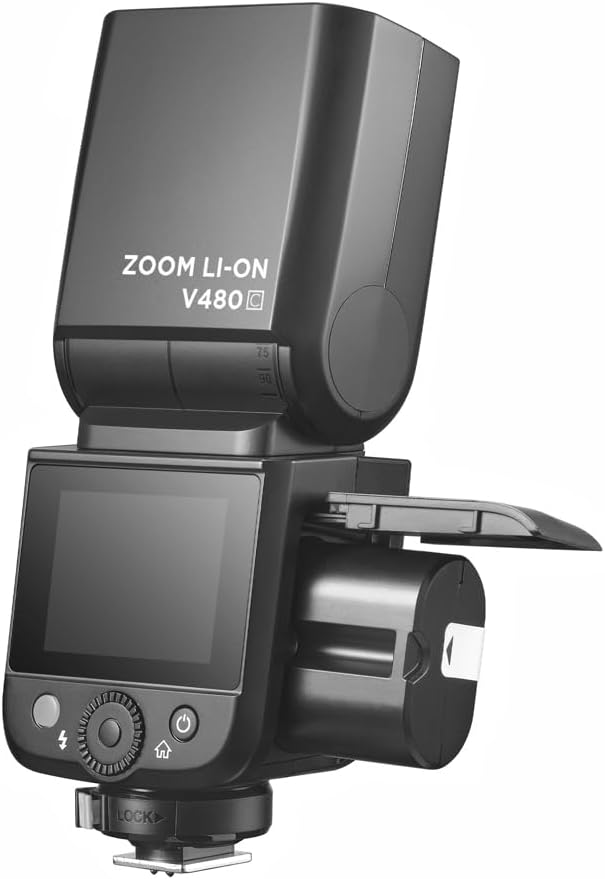
Image 4.1: Battery compartment open for installation.
To charge the battery, use the provided battery charger. Connect the battery to the charger and plug the charger into a power outlet. The indicator light on the charger will show the charging status.
4.2. Montaggio del flash sulla fotocamera
The V480C is designed to mount onto a camera's hot shoe.
- Assicurati che la fotocamera sia spenta.
- Slide the flash's hot shoe (7) into your camera's hot shoe mount.
- Rotate the Hot Shoe Fixing Buckle (15) clockwise to secure the flash firmly in place. Do not overtighten.
5. Utilizzo del flash
5.1. Accensione/spegnimento e controlli di base
To power on the flash, press and hold the Power Switch Button (11) until the screen illuminates. To power off, press and hold the same button.
The V480C features a crisp color touchscreen (9) and tactile buttons for intuitive control.

Image 5.1: Touchscreen and button interface for adjusting flash settings.
- Set Button (12): Utilizzato per confermare le selezioni o accedere alle opzioni del menu.
- Select Dial (13): Rotate to navigate menus and adjust values.
- Test Button / Recycle Indicator (14): Press to fire a test flash. The indicator light shows when the flash is ready to fire.
5.2. Modalità flash
The V480C supports various flash modes:
- Flash automatico TTL: Regola automaticamente la potenza del flash per un'esposizione corretta.
- Flash manuale: Allows manual control over flash power output (1/1 to 1/256 in 1/3 stop increments).
- Multi Flash (Stroboscopico): Emette una serie di rapidi lampi durante una singola esposizione per catturare più movimenti.
5.3. Wireless Operation (R2 System)
The V480C features built-in 2.4GHz R2 wireless functionality, allowing it to act as a master or slave unit within the Flashpoint R2 system. It supports 4 groups and 32 channels with a transmission range of up to 100m.

Immagine 5.2: Es.ample of 2.4GHz R2 wireless integration in a studio environment.
Refer to the on-screen menu for setting master/slave modes, group assignments, and channel selection.
5.4. Sincronizzazione ad alta velocità (HSS)
High-Speed Sync allows the flash to synchronize with shutter speeds up to 1/8000s, enabling you to use flash with wide apertures in bright conditions or to freeze fast motion.

Image 5.3: Demonstration of High-Speed Sync (HSS) capability.
Activate HSS through the flash's menu or your camera's flash control settings.
5.5. Modellazione LED Lamp
The built-in LED Modeling Lamp (4) provides continuous light for focusing in low-light conditions or for previewing lighting effects. Adjust its brightness through the flash's menu.
5.6. Aggiornamento del firmware
The Flashpoint V480C supports firmware updates via its USB-C Firmware Upgrade Port (10). Visit the Flashpoint websito per il firmware e le istruzioni più recenti.
6. Manutenzione
6.1. Pulizia
To clean the flash unit, use a soft, dry cloth. For stubborn dirt, a slightly damp È possibile utilizzare un panno, seguito da un panno asciutto. Non utilizzare detergenti aggressivi o solventi.
6.2. Conservazione
When not in use for extended periods, remove the battery from the flash unit. Store the flash in a cool, dry place, away from direct sunlight and extreme temperatures. Use the provided protective case for storage and transport.
7. Risoluzione Dei Problemi
If you encounter issues with your Flashpoint V480C, refer to the following common problems and solutions:
- Il flash non si attiva:
- Assicurarsi che il flash sia acceso e saldamente montato sulla slitta a contatto caldo della fotocamera.
- Check battery level; recharge if necessary.
- Verify camera and flash settings are compatible (e.g., flash enabled in camera menu).
- If using wireless, ensure master and slave units are on the same channel and group.
- Incorrect exposure (too dark/too bright):
- In TTL mode, check for Flash Exposure Compensation (FEC) settings on both flash and camera.
- In modalità Manuale, regola la potenza di uscita del flash.
- Ensure flash head zoom matches lens focal length or is set to auto.
- Flash recycle time is slow:
- Battery may be low; recharge or replace.
- High power settings naturally result in longer recycle times.
- Problemi di connessione wireless:
- Ensure all units are within range (100m).
- Verificare la presenza di interferenze da altri dispositivi a 2.4 GHz.
- Verify channel and group settings are identical on all units.
If problems persist, consult the Flashpoint support websito o contattare il servizio clienti.
8. Specifiche
| Modello | V480C |
| Numero guida | GN50 (ISO 100, in metri) |
| Riciclare il tempo | ca. 1.7 secondi |
| Modalità flash | TTL, Manuale, Multi |
| Funzione wireless | Padrone, schiavo, spento |
| wireless Range | Circa. 100m |
| Canali | 32 (1-32) |
| Gruppi | 4 (A, B, C, D) |
| Sincronizzazione ad alta velocità | Fino a 1/8000 |
| Fonte di alimentazione | VB22 Li-ion Battery (7.2V / 2200mAh) |
| Dimensioni | 6.54" x 2.8" x 1.93" (16.6 x 7.1 x 4.9 cm) |
| Peso (con batteria) | 12.7 oz (360g) |
| Supporti compatibili | Canone |
9. Garanzia e supporto
For warranty information, technical support, or service inquiries, please refer to the documentation provided with your purchase or visit the official Flashpoint websito. Conservare la prova d'acquisto per eventuali reclami in garanzia.


