Introduzione
This manual provides essential information for the setup, operation, and maintenance of your Hisense 100U8Q Mini LED Pro Smart TV. Please read it thoroughly to ensure proper use and to maximize your viewesperienza di acquisizione.
Informazioni importanti sulla sicurezza
Seguire sempre le precauzioni di sicurezza di base quando si utilizza questo prodotto per ridurre il rischio di incendi, scosse elettriche e lesioni. Conservare questo manuale per riferimento futuro.
- Non ostruire le aperture di ventilazione.
- Non installare vicino a fonti di calore.
- Proteggere il cavo di alimentazione per evitare che venga calpestato o schiacciato.
- Utilizzare solo accessori/componenti specificati dal produttore.
- Affidare tutti gli interventi di assistenza a personale qualificato.
Cosa c'è nella scatola
Verificare che tutti i componenti siano presenti:
- Hisense 100U8Q Mini LED Pro Smart TV
- Telecomando
- In piedi
- Manuale d'uso
Impostare
1. Assemblaggio del supporto
Carefully place the TV screen-down on a soft, flat surface. Attach the stand to the TV using the provided screws, ensuring it is securely fastened.

Image: Hisense 100U8Q TV with stand dimensions. This image illustrates the physical dimensions of the 100-inch TV, including its width, height, and depth, both with and without the stand. It also shows the VESA wall mount size (1000x600 mm) and product weight (73.2 kg with stand, 70.7 kg without stand).
Nota: For wall mounting, use a VESA compatible bracket (1000x600 mm) and consult a professional installer.
2. Collegamento di periferiche
Connect your devices (e.g., gaming consoles, soundbars, cable boxes) to the appropriate ports on the back of the TV. The Hisense 100U8Q features multiple HDMI 2.1 ports for high-speed connectivity.

Immagine: Posteriore view of the Hisense 100U8Q TV showing various input/output ports. These include USB, CI Card Slot, Headphone, AV Input, HDMI 2.1 (including eARC), ANT (x2), Digital Audio Out, Ethernet, and Type-C.
- HDMI 2.1: For high-resolution and high-refresh-rate devices (e.g., gaming consoles, PCs).
- USB: Per collegare unità flash USB per la riproduzione di contenuti multimediali.
- Collegamento Ethernet: Per una connessione Internet cablata.
- Tipo-C: For versatile connectivity, sharing, and charging.
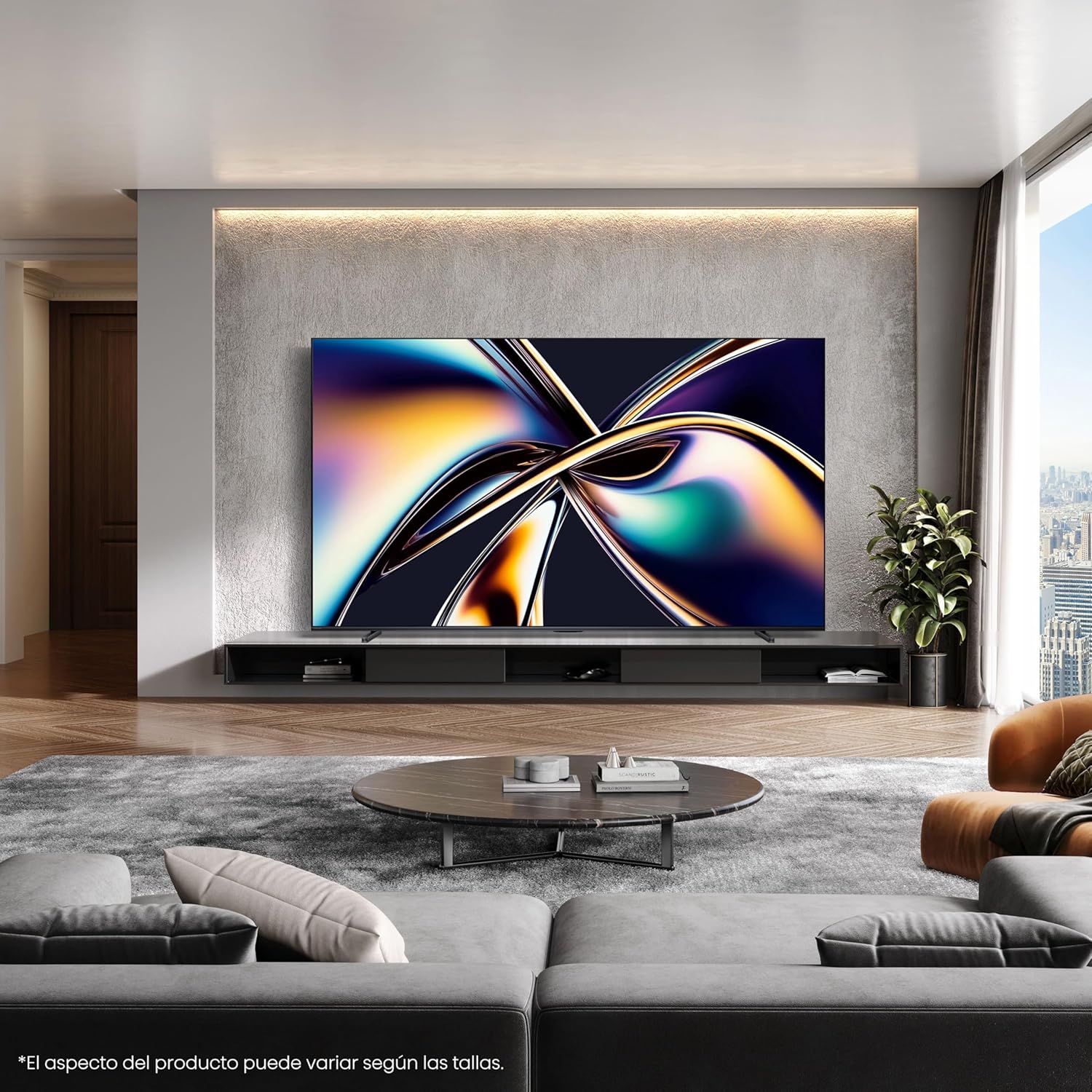
Immagine: Primo piano view of the Type-C port on the side of the Hisense 100U8Q TV, highlighting its modern and versatile connectivity option.
3. Accensione iniziale e connessione di rete
Plug the TV into a power outlet. Follow the on-screen instructions to select your language, connect to your Wi-Fi network (or use Ethernet), and complete the initial setup process.
Istruzioni per l'uso
1. Funzioni di controllo remoto
The included remote control allows you to navigate the TV's interface, adjust settings, and access smart features. The remote is solar-powered and can also be charged via USB-C.

Image: The Hisense TV remote control, featuring dedicated buttons for popular streaming services like Netflix, YouTube, and Disney+, voice control capabilities, a solar panel for charging, and a USB-C charging port.
- Pulsante di accensione: Accende/spegne la TV.
- Tastierino di navigazione (Su/Giù/Sinistra/Destra/OK): Per la navigazione e la selezione del menu.
- Volume su/giù: Regola il livello del suono.
- Pulsante di controllo vocale: Activates voice commands (e.g., "Alexa built-in", "VIDAA Voice").
- Pulsanti di accesso rapido: Accesso diretto ai servizi di streaming più diffusi.
2. Funzionalità Smart TV (sistema operativo VIDAA)
Your Hisense 100U8Q runs on the VIDAA OS, offering a user-friendly interface for accessing apps, streaming services, and smart home integration.

Image: The Hisense Smart TV home screen, displaying various streaming applications and content recommendations. It highlights integration with Apple HomeKit, Apple AirPlay, ConnectLife, Alexa built-in, and VIDAA Voice.
- App Store: Scarica e installa applicazioni aggiuntive.
- Controllo vocale: Utilizza i comandi vocali per la navigazione, la ricerca di contenuti e il controllo della casa intelligente.
- Content Availability: Note that content and application availability may vary by region.
3. Gaming Mode (Ultra 165Hz)
For an optimized gaming experience, activate the Ultra Game Mode 165Hz. This mode reduces input lag and provides smoother graphics.
Video: This video demonstrates how to use the Game Bar feature on a Hisense TV. It shows connecting a gaming device, launching the Game Menu, checking FPS and HDR status, selecting Game Picture Mode for optimized visuals, adjusting screen ratio and position, and enabling FreeSync, Aim Point, and Map Zoom for enhanced gaming. This feature is crucial for utilizing the 165Hz refresh rate effectively.
- Connect your gaming device to an HDMI 2.1 port.
- Access the Game Menu to view FPS, HDR status, and adjust settings like Game Picture Mode, Screen Ratio, and AMD FreeSync.
- Utilize features like Aim Point and Map Zoom for competitive gaming.
Video: This video showcases Hisense TV technology, focusing on features like Mini-LED PRO for pure blacks and stellar brightness, Hi-View AI Engine PRO for intelligent scene recognition and remastering, 165Hz Ultra Game Mode for smooth gaming, 4.1.2 Multi-channel Surround Sound for immersive audio, and Anti-Reflection PRO for minimal light intrusion. It also highlights the TV's QLED colors and AI-powered energy saving.
4. Audio Settings (4.1.2 Multi-channel Sound)
The TV features 4.1.2 multi-channel sound with lateral speakers, rear subwoofers, and upward-firing speakers for an immersive audio experience with Dolby Atmos support.
- Access audio settings through the TV menu to customize sound profiles.
- Ensure Dolby Atmos content is played for the full immersive effect.
Manutenzione
1. Pulizia dello schermo
Pulire delicatamente lo schermo con un panno morbido, asciutto e privo di lanugine. Per macchie ostinate, strofinare leggermenteampLavare il panno con acqua o con un detergente specifico per schermi. Evitare prodotti chimici aggressivi.
2. Pulizia del telecomando
Wipe the remote with a soft, dry cloth. For the solar panel, ensure it is clean and exposed to light for optimal charging.
3. Aggiornamenti software
Il televisore potrebbe ricevere aggiornamenti software automatici. Assicurati che il televisore sia connesso a Internet per ricevere questi aggiornamenti, che migliorano le prestazioni e aggiungono nuove funzionalità.
Risoluzione dei problemi
| Problema | Possibile soluzione |
|---|---|
| Nessun potere | Controlla che il cavo di alimentazione sia collegato saldamente al televisore e alla presa a muro. Prova una presa diversa. |
| Nessuna immagine/suono | Verify correct input source. Check HDMI/audio cable connections. Restart connected devices. |
| Telecomando non funzionante | Ensure the remote is charged (solar or USB-C). Check for obstructions between the remote and TV. |
| Scarsa connessione Wi-Fi | Move the router closer to the TV or use a wired Ethernet connection. Restart the router. |
If problems persist, consult the full online user manual or contact Hisense customer support.
Specifiche
| Caratteristica | Dettaglio |
|---|---|
| Numero di modello | 100U8Q |
| Dimensioni dello schermo | 100 pollici |
| Tecnologia di visualizzazione | Mini LED |
| Risoluzione | 4K |
| Frequenza di aggiornamento | Frequenza 165 Hz |
| Caratteristiche speciali | Game Mode, Hi-View AI PRO Processor, 4.1.2 Multi-channel Sound, Anti-Reflection PRO |
| Connettività | Bluetooth, HDMI, Wi-Fi, Type-C |
| Dimensioni (con supporto) | 223.9 x 128.1 x 4.3 cm (circa 88.1 x 50.4 x 1.7 pollici) |
| Peso (con supporto) | 73.2 kg (circa 161.4 libbre) |
| Supporto a parete VESA | 1000x600 millimetri |
| Valutazione dell'efficienza energetica | F |
Per informazioni dettagliate sull'energia, fare riferimento al database EPREL dell'UE: https://eprel.ec.europa.eu/qr/2378016

Image: The EU Energy Label for the Hisense 100U8Q TV, showing its energy efficiency class F, power consumption (127 kWh/1000h for SDR, 380 kWh/1000h for HDR), and screen dimensions.
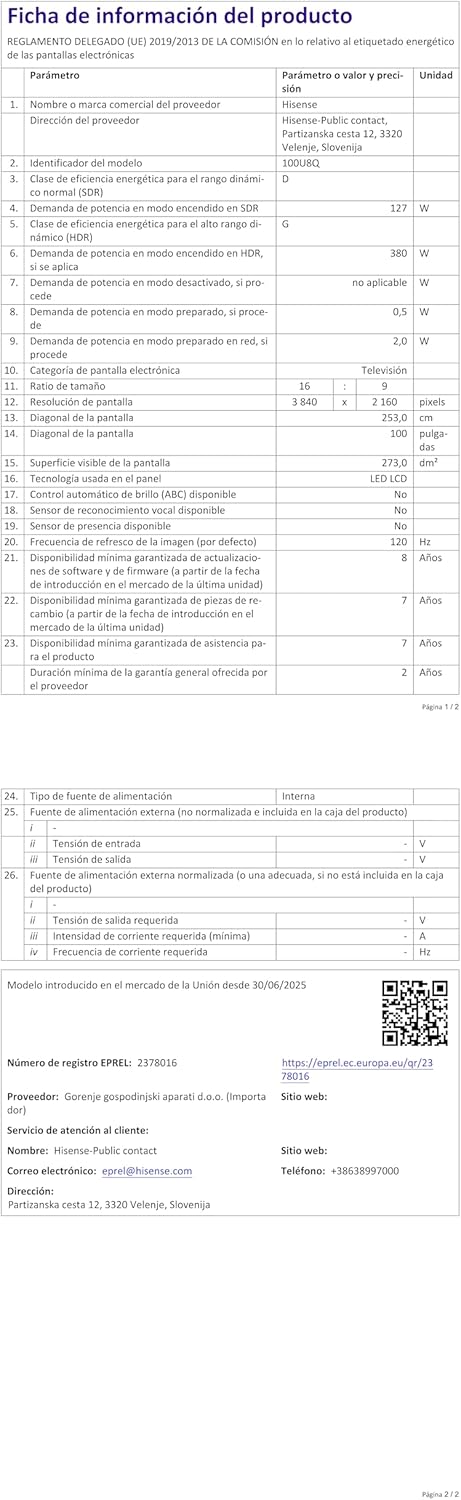
Image: The product information sheet for the Hisense 100U8Q TV, detailing various technical specifications, energy consumption, and warranty information in a tabular format.
Garanzia e supporto
Hisense provides a standard warranty for its products. Please refer to the warranty card included with your TV or visit the official Hisense websito per termini e condizioni dettagliati.
- Periodo di garanzia: Typically 2 years for parts and labor.
- Assistenza clienti: For technical assistance or service requests, contact Hisense customer support. Contact details can be found on the product information sheet or Hisense's official websito.
- Risorse online: Visitare il Negozio del marchio Hisense per ulteriori informazioni e supporto sul prodotto.


