1. Introduzione
The VIOFO A329S is a high-performance 3-channel dash camera system designed to record comprehensive video footage of your vehicle's surroundings and interior. It features 4K resolution for the front camera, 2K for the cabin camera with a 210° fisheye lens, and 2K for the rear camera. Equipped with STARVIS 2 sensors across all channels, it delivers enhanced clarity and reduced noise in various lighting conditions. Advanced features include Wi-Fi 6 connectivity for fast file transfers, power-saving parking mode, smart voice control, and integrated GPS functionality.

Immagine: Oltreview of the VIOFO A329S 3-Channel Dash Cam system, including the main unit, cabin camera, rear camera, CPL filter, and a smartphone displaying the live view interfaccia.
2. Contenuto della confezione
Verify that all items listed below are present in your package. If any items are missing or damaged, please contact VIOFO customer support.
- Fotocamera frontale (unità principale)
- Telecamera posteriore
- Fisheye Cabin Camera
- Dual Type-C Car Charger (3.5m)
- Cavo dati di tipo C
- Fisheye Cabin Camera Cable (1m)
- Cavo della telecamera posteriore (6 m)
- Front Camera Circular Polarizing Lens (CPL)
- Windshield Static Stickers (3x)
- Spare Adhesive Stickers (1 Set)
- Strumento di rimozione delle rifiniture
- Adesivo di avvertimento
- Carta del servizio post vendita
- Manuale dell'utente e Guida rapida
- GPS Module with sticker

Image: Detailed illustration of the VIOFO A329S package contents, including the main camera, rear camera, cabin camera, various cables, car charger, CPL filter, mounting accessories, and documentation.
3. Configurazione e installazione
Follow these steps for proper installation of your VIOFO A329S dash camera system.
3.1 Prepararsi per l'installazione
- Clean the windshield area where the cameras will be mounted to ensure optimal adhesion.
- Determine the optimal placement for the front, cabin, and rear cameras to ensure clear views and minimal obstruction to your driving.
- Ensure the vehicle's engine is off before beginning installation.
3.2 Montaggio della fotocamera anteriore
- Apply a static windshield sticker to the desired location on your front windshield, typically behind the rearview mirror. This helps protect your windshield and allows for easier removal.
- Attach the front camera's adhesive mount to the static sticker. Press firmly for 30 seconds.
- Slide the main camera unit onto the mounted bracket.
- Connect the power cable from the dual Type-C car charger to the front camera.

Image: An illustration demonstrating the ideal placement of the front camera near the rearview mirror, the cabin camera, and the rear camera on the back window, along with cable routing.
3.3 Installing the Cabin Camera
- Mount the fisheye cabin camera to the front windshield, ensuring it has a clear view dell'interno del veicolo.
- Connect the 1m cabin camera cable to the main front camera unit.
3.4 Installazione della telecamera posteriore
- Mount the rear camera on your vehicle's rear window, ensuring a clear view della strada dietro.
- Route the 6m rear camera cable from the rear camera to the main front camera unit. Use the trim removal tool to neatly tuck the cable along the headliner and pillar trim.

Image: A visual guide showing how the front, cabin, and rear cameras are connected to the main dash cam unit and how the main unit receives power from the car charger.
3.5 Collegamento dell'alimentazione
- Plug the dual Type-C car charger into your vehicle's 12V DC power outlet.
- Connect the Type-C power cable from the charger to the main front camera unit.
- Importante: Do not use mobile phone chargers or cables to power the dash cam, as they may not provide sufficient power.
3.6 Installing the CPL Filter
- The included Circular Polarizing Lens (CPL) attaches to the front camera lens.
- Rotate the CPL filter to reduce reflections and glare from the windshield and road surfaces, enhancing video clarity.

Image: A visual comparison demonstrating the effect of the Circular Polarizing Lens (CPL) on video quality, showing reduced reflections on the windshield when the CPL is used.
4. Istruzioni per l'uso
4.1 Accensione/Spegnimento
- The dash cam will automatically power on and begin recording when connected to power and the vehicle's ignition is turned on.
- Si spegnerà automaticamente poco dopo lo spegnimento del motore.
4.2 Modalità di registrazione
The A329S supports 3-channel recording:
- Fotocamera frontale: Records in 4K resolution at 30 frames per second (fps).
- Telecamera di cabina: Records in 2K resolution with a 210° ultra-wide fisheye lens.
- Telecamera posteriore: Records in 2K resolution.
All channels utilize STARVIS 2 sensors for enhanced low-light performance and reduced motion blur.

Image: A demonstration of the VIOFO A329S's 3-channel recording capability, displaying simultaneous views from the 4K front camera, 2K cabin camera, and 2K rear camera.

Image: A visual comparison highlighting the superior low-light performance and reduced noise of STARVIS 2 sensors used in the VIOFO A329S compared to other sensor technologies.
4.3 Modalità parcheggio
The A329S features an Impact Detection Power Saving Parking Mode. When the vehicle is turned off, the camera enters a low-power standby state. Upon detecting a collision, it instantly begins recording to capture the event.
- This mode requires a VIOFO HK4 or HK6 Hardwire Kit (sold separately) for continuous power supply when the vehicle is off.
- The hardwire kit prevents battery drain by monitoring your vehicle's battery voltage.

Image: The VIOFO A329S dash cam mounted in a vehicle, depicting its power-saving parking mode feature which activates recording upon impact detection.
4.4 Connettività Wi-Fi 6
The dash cam integrates Wi-Fi 6 technology for fast wireless communication with the VIOFO smartphone application. This allows for:
- Dal vivo preview dei feed delle telecamere.
- Quick downloading of recorded videos (e.g., a 1-minute 4K video in under 10 seconds).
- Adjusting camera settings.
- Firmware updates via the app.
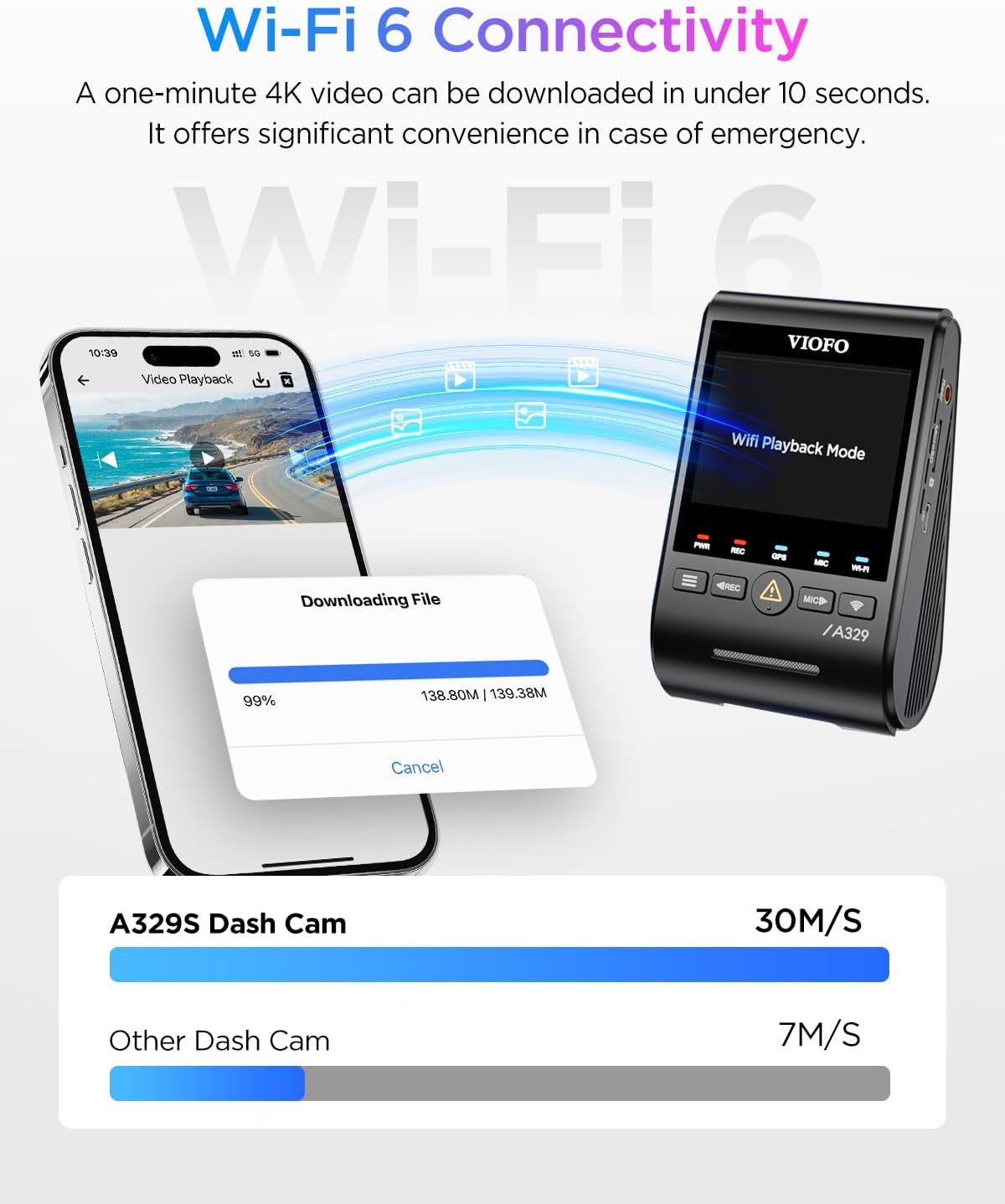
Image: A smartphone displaying the VIOFO app interface during a video download, illustrating the high-speed data transfer capabilities of Wi-Fi 6 with the A329S dash cam.
4.5 Controllo vocale intelligente
Operate key functions hands-free using voice commands. Supported commands include:
- "Scatta una foto"
- "Avvia registrazione" / "Interrompi registrazione"
- "Attiva Wi-Fi" / "Disattiva Wi-Fi"
- "Blocca il video"
The camera provides clear audio notifications for setting changes and memory card errors.
4.6 Funzionalità GPS
The built-in GPS module supports four global navigation satellite systems (GPS, BeiDou, Galileo, and GLONASS). This provides accurate data for:
- Posizione del veicolo
- Velocità
- Dati temporali
Questa informazione può essere viewed during video playback on the VIOFO App or VIOFO PC player.

Image: A split image illustrating the GPS tracking feature of the VIOFO A329S, showing vehicle location and speed on a map, alongside examples of smart voice control commands.
4.7 Opzioni di archiviazione
The A329S supports high-capacity storage solutions:
- MicroSD cards up to 512GB.
- External SSDs up to 4TB (requires optional VIOFO Type-C SSD cable).
Nota: MicroSD card and SSD storage are not included. VIOFO recommends using industrial-grade microSD cards for optimal performance and durability.

Image: The VIOFO A329S dash cam displaying its support for both microSD cards and external SSDs, with an illustration of an SSD connected to the device.
5. Manutenzione
Proper maintenance ensures the longevity and optimal performance of your dash camera.
- Pulizia: Regularly clean the camera lenses with a soft, lint-free cloth. Avoid abrasive materials or harsh chemicals.
- Aggiornamenti del firmware: Periodically check the VIOFO website for firmware updates. Firmware updates typically need to be downloaded to a computer and manually transferred to the dash cam via the microSD card. Refer to the VIOFO website for detailed instructions on the update process.
- Scheda di memoria: Format your microSD card regularly (e.g., once a month) within the camera's settings to prevent data corruption and ensure smooth recording. Replace the microSD card every 6-12 months, especially if using a non-industrial grade card, as continuous overwriting can degrade performance.
- Magazzinaggio: Quando non viene utilizzata per lunghi periodi, conservare la dash cam in un luogo fresco e asciutto, lontano dalla luce solare diretta.
6. Risoluzione Dei Problemi
If you encounter issues with your VIOFO A329S, refer to the following common troubleshooting steps:
- La fotocamera non si accende:
- Ensure the car charger is securely plugged into the 12V outlet and the camera.
- Verify the vehicle's 12V outlet is functioning.
- Confirm you are using the original VIOFO car charger and cable.
- Recording Errors / Freezing:
- Format the microSD card within the camera's settings.
- Ensure you are using a high-endurance, industrial-grade microSD card from a reputable brand.
- Try a different microSD card to rule out card failure.
- Verificare la presenza dell'ultimo aggiornamento del firmware e installarlo.
- Problemi di connessione Wi-Fi:
- Assicurarsi che il Wi-Fi sia abilitato sulla dash cam.
- Riavvia sia la dash cam che lo smartphone.
- Confirm your phone is connected to the dash cam's Wi-Fi network.
- Temporarily disable mobile data on your phone if it interferes with the Wi-Fi connection.
- Poor Video Quality / Glare:
- Pulisci le lenti della fotocamera.
- Adjust the CPL filter by rotating it to minimize reflections.
- Ensure the windshield is clean.
- Modalità parcheggio non funzionante:
- Verify that a VIOFO HK4 or HK6 Hardwire Kit is correctly installed and connected.
- Check the hardwire kit's voltage cut-off settings.
If problems persist, consult the detailed user manual or contact VIOFO customer support.
7. Specifiche
| Caratteristica | Dettaglio |
|---|---|
| Modello | A329S 3CH |
| Risoluzione della fotocamera frontale | 4K (3840x2160) a 30 fps |
| Risoluzione della telecamera della cabina | 2K (2560x1440) a 30 fps |
| Risoluzione della telecamera posteriore | 2K (2560x1440) a 30 fps |
| Sensori di immagine | Front: STARVIS 2 IMX678; Cabin/Rear: STARVIS 2 IMX675 |
| Cabin Camera Angle | 210 gradi (Fisheye) |
| Connettività | Wi-Fi 6 (5GHz band), Type-C, USB 3.0 |
| GPS | Built-in, supports GPS, BeiDou, Galileo, GLONASS |
| Supporto di archiviazione | MicroSD up to 512GB; External SSD up to 4TB |
| Caratteristiche speciali | Impact Detection Power Saving Parking Mode, Smart Voice Control, CPL Filter (included) |
| Dimensioni dello schermo | 2.4 pollici |
| Dimensioni del prodotto | 2.4 cm L x 1.7 cm P x 3.9 cm A |
| Peso dell'articolo | 1.96 libbre |
8. Garanzia e supporto
VIOFO is committed to providing reliable products and customer satisfaction.
- Garanzia: The product typically comes with a 24-month warranty. Please refer to the After-Sales Service Card included in your package for specific terms and conditions.
- Resi: In genere è disponibile una politica di reso di 30 giorni.
- Assistenza clienti: For technical assistance, warranty claims, or any inquiries, please contact VIOFO customer support. Contact details are usually provided on the After-Sales Service Card or the official VIOFO websito.