Introduzione
The Beats Solo 4 are wireless Bluetooth on-ear headphones designed for a premium audio experience. They offer compatibility with both Apple and Android devices, extended battery life, and advanced audio features like Personalized Spatial Audio. This manual provides detailed instructions for setting up, operating, maintaining, and troubleshooting your Beats Solo 4 headphones.
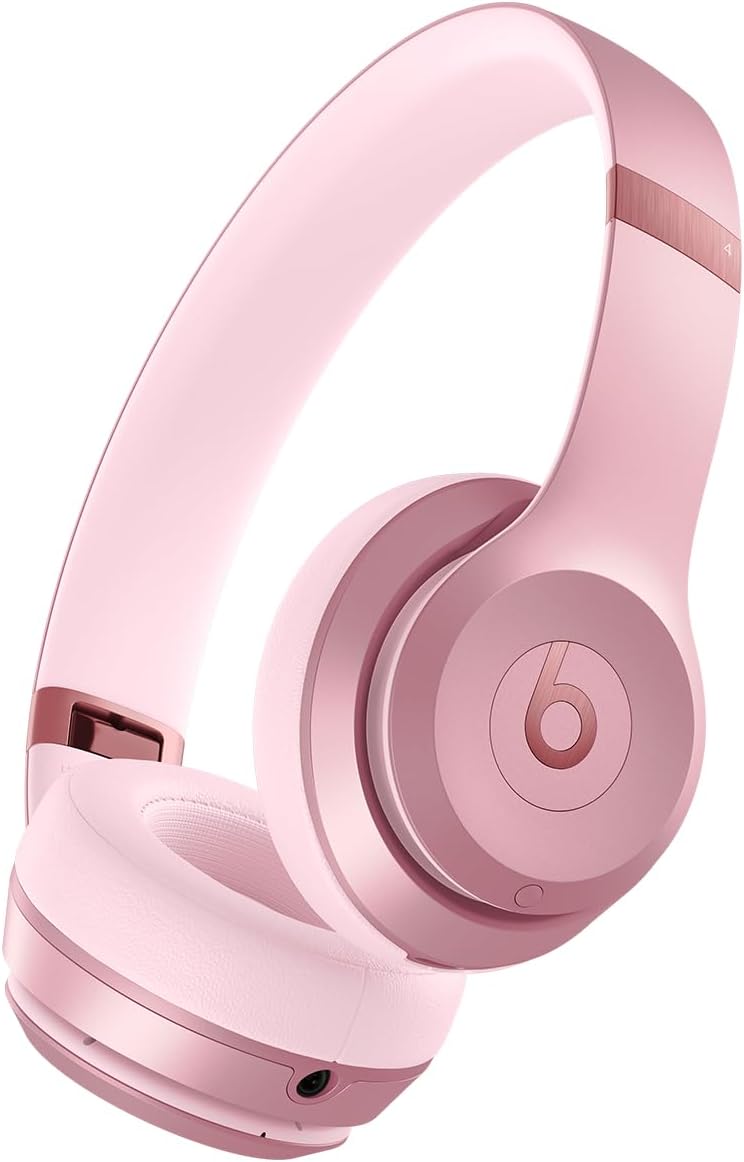
Immagine: Frontale view of the Beats Solo 4 Wireless Headphones in Metallic Pink.
Cosa c'è nella scatola
Upon unboxing your Beats Solo 4 headphones, verify that all the following components are included:
- Cuffie Beats Solo 4
- Custodia protettiva
- USB-C to USB-C cable for charging and audio (USB-C power adapter sold separately)
- Cavo audio analogico da 3.5 mm
- Guida rapida e scheda di garanzia
Impostare
1. Ricarica delle cuffie
Before initial use, ensure your Beats Solo 4 headphones are fully charged. Connect the provided USB-C to USB-C cable to the charging port on the headphones and to a compatible USB-C power adapter (sold separately) or a USB-C port on a computer.
- A 10-minute charge provides up to 5 hours of playback (Fast Fuel feature).
- Una carica completa garantisce fino a 50 ore di autonomia della batteria.

Image: Visual representation of the 50-hour battery life capability of the Beats Solo 4 headphones.
2. Associazione con il dispositivo (Bluetooth)
The Beats Solo 4 headphones offer dual compatibility for one-touch pairing with both iOS and Android devices.
For iOS Devices (Apple):
- Assicurati che il Bluetooth sia abilitato sul tuo dispositivo iOS.
- Power on your Beats Solo 4 headphones.
- Hold your Beats Solo 4 near your unlocked iOS device.
- Follow the on-screen prompts to connect. This will automatically set up your headphones with all devices signed into your iCloud account.
Per dispositivi Android:
- Download the Beats app from the Google Play Store (optional, but recommended for full features).
- Assicurati che il Bluetooth sia abilitato sul tuo dispositivo Android.
- Power on your Beats Solo 4 headphones.
- Open the Beats app or go to your device's Bluetooth settings.
- Select "Beats Solo 4" from the list of available devices to pair.

Image: The Beats Solo 4 headphones demonstrating Apple and Android compatibility with a smartphone.
Utilizzo delle cuffie
Controlli
The Beats Solo 4 headphones feature intuitive on-ear controls for managing audio playback, calls, and voice assistant interaction.
- Controllo del volume: Use the dedicated volume buttons on the ear cup.
- Controllo della riproduzione: Press the 'b' button for play/pause, double-press for next track, triple-press for previous track.
- Gestione delle chiamate: Press the 'b' button to answer/end calls.
- Assistente vocale: Press and hold the 'b' button to activate Siri or your device's voice assistant.
Caratteristiche audio
Audio spaziale personalizzato
Experience immersive sound with dynamic head tracking. This feature creates a theater-like experience, making it sound as if audio is coming from all around you. Compatible hardware and software are required. For Apple devices, an iPhone with TrueDepth camera is needed to create a personal profile for Spatial Audio.

Image: Visual representation of Personalized Spatial Audio, showing sound emanating from multiple directions around the headphones.
Audio senza perdita
The Beats Solo 4 supports lossless audio playback via the included USB-C or 3.5 mm audio cables. This allows for high-fidelity audio transmission without compression, providing a richer listening experience. Compatible lossless content from supported apps/services is required.

Image: A user wearing Beats Solo 4 headphones, highlighting the lossless audio capability via wired connection.
Manutenzione
Proper care and maintenance will extend the lifespan of your Beats Solo 4 headphones.
- Pulizia: Use a soft, dry, lint-free cloth to clean the headphones. Do not use abrasive cleaners or sprays.
- Magazzinaggio: When not in use, store the headphones in the provided protective case to prevent scratches and damage. The foldable design makes them compact for storage.
- Umidità: The Beats Solo 4 are not water resistant. Avoid exposure to liquids, moisture, or extreme humidity.
- Temperatura: Non esporre le cuffie a temperature estreme.

Image: The Beats Solo 4 headphones in their folded, compact state, suitable for storage in the protective case.
Risoluzione dei problemi
If you encounter issues with your Beats Solo 4 headphones, try the following solutions:
| Problema | Possibile soluzione |
|---|---|
| Le cuffie non si accendono | Assicurati che le cuffie siano completamente cariche. Collegale a una fonte di alimentazione tramite il cavo USB-C. |
| Impossibile associare il dispositivo |
|
| Nessun suono o volume basso |
|
| Scarsa qualità delle chiamate |
|
| Headphones not responding | Perform a factory reset (refer to the Quick Start Guide for specific instructions on how to reset your Beats Solo 4). |
Specifiche
| Caratteristica | Dettaglio |
|---|---|
| Nome del modello | Battiti Solo 4 |
| Tecnologia di connettività | Wireless (Bluetooth Class 1) |
| Versione Bluetooth | 5.3 |
| Portata Bluetooth | Fino a 100 metri |
| Durata della batteria | Fino a 50 ore |
| Ricarica rapida del carburante | Una carica di 10 minuti fornisce fino a 5 ore di riproduzione |
| Ingresso audio | USB-C audio, 3.5 mm analog input |
| Posizionamento dell'orecchio | Sull'orecchio |
| Peso | 7.65 once / 217 g |
| Dimensioni (L x P x A) | 6.9 pollici x 6.2 pollici x 2.7 pollici (17.7 cm x 15.8 cm x 6.8 cm) |
| Tipo di controllo | Controllo del volume, Controllo app, Controllo pulsanti, Siri, Controllo touch, Controllo vocale |
| Livello di resistenza all'acqua | Non resistente all'acqua |
| Componenti inclusi | Headphones, Protective Case, USB-C to USB-C cable, 3.5 mm audio cable, Quick Start Guide, Warranty Card |
Garanzia e supporto
Your Beats Solo 4 headphones come with a limited warranty. Please refer to the included Warranty Card for detailed terms and conditions, including coverage period and how to make a claim.
For additional support, frequently asked questions, or to contact customer service, please visit the official Beats support websito. Puoi trovare maggiori informazioni anche sul Beats Store su Amazon.
Note: This manual does not include information on AppleCare+ protection plans, which are separate service agreements.
Informazioni importanti sulla sicurezza
Read all safety information before using your Beats Solo 4 headphones to avoid injury. Do not listen at high volume levels for long periods to prevent hearing damage. Do not use headphones while driving or cycling, or in situations where inability to hear ambient sounds could be dangerous.


