1. Introduzione
This manual provides detailed instructions for the safe and effective use of your Retevis EZTalk 4S Waterproof Two Way Radio. Please read this manual thoroughly before operating the device and retain it for future reference.
1.1 Prodotto finitoview
The Retevis EZTalk 4S is a robust, IP68-rated waterproof and floating GMRS two-way radio designed for outdoor activities such as kayaking, fishing, rafting, and boating. It features long-distance communication, a long-lasting battery, NOAA weather alerts, and an emergency alarm function.

Figure 1.1: Retevis EZTalk 4S Product Details and Components
1.2 Contenuto della confezione
Assicurati che tutti gli articoli siano presenti nel pacco. Se qualche articolo risulta mancante o danneggiato, contatta il rivenditore.
- EZTalk 4S walkie talkie *2
- 2000mAh Li-ion Battery & Base charger *2
- Type-C Charging cable & Adapter *2
- Belt clip & Lanyard *2
- Manuale d'uso *1

Figura 1.2: Contenuto della confezione
2. Caratteristiche del prodotto
2.1 IP68 Waterproof & Floating Design
The EZTalk 4S is rated IP68, providing complete protection against dust and water immersion up to 1 meter for 2 hours. Its floating design ensures that if dropped in water, the radio will float to the surface for easy retrieval.
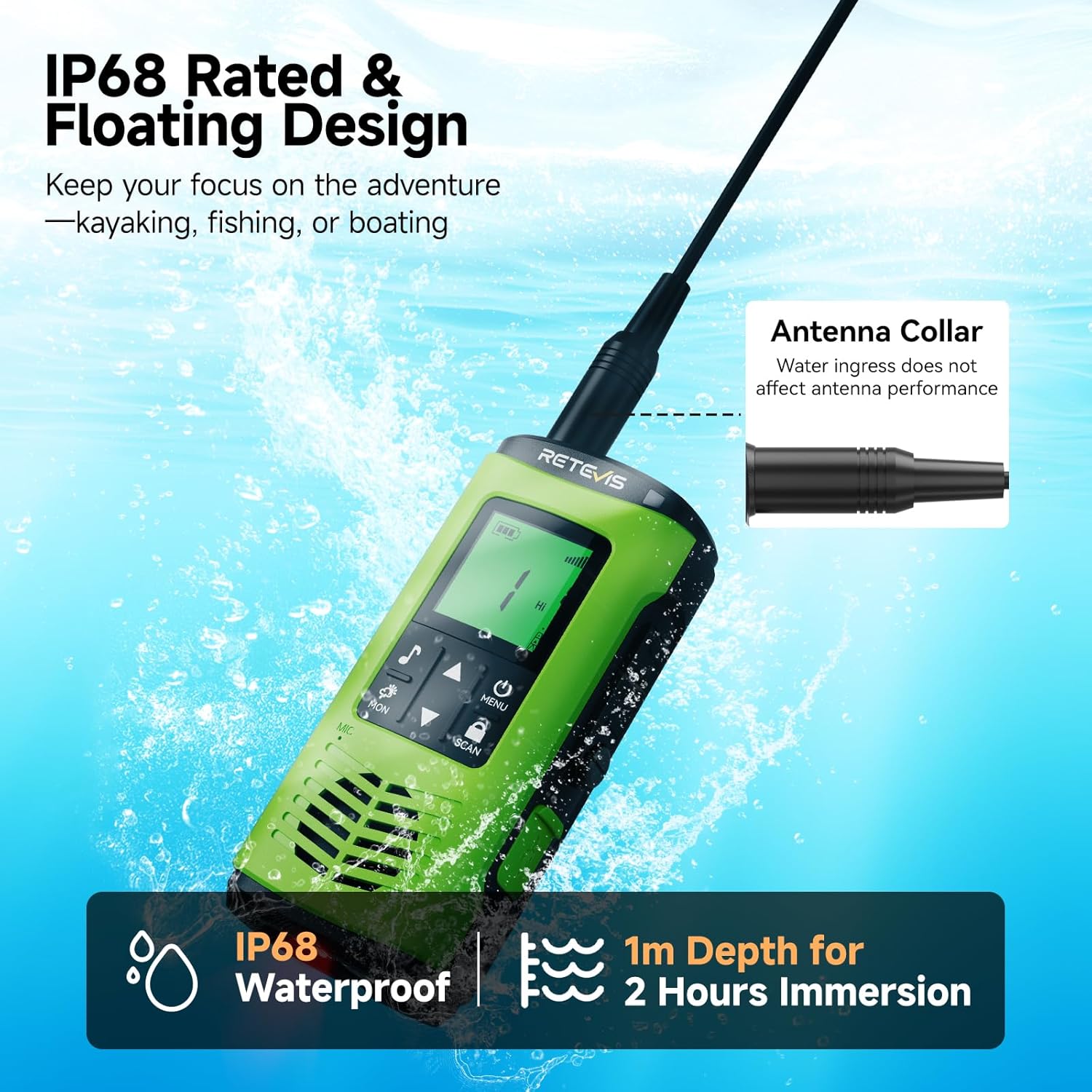
Figure 2.1: IP68 Waterproof and Floating Capability

Figure 2.2: Corrosion-Proof Design for Water Environments
Video 2.1: Demonstration of Retevis EZTalk 4S Waterproof and Floating Capabilities
2.2 Long Range Communication
Experience clear and reliable communication over extended distances. The EZTalk 4S offers a communication range of up to 4.7 km in urban areas and an impressive 10 km on open water.

Figure 2.3: Extended Communication Range
2.3 Long-Lasting Battery & Charging
Equipped with a 2000mAh battery, the radio provides over 17 hours of continuous use and up to 100 hours of standby time. It supports flexible charging options: direct Type-C cable charging or convenient dock charging.

Figure 2.4: Battery Life and Charging Options
Video 2.2: Demonstration of Dual Charging Options (Type-C and Base Charging)
2.4 Avvisi meteo NOAA
Stay informed about changing weather conditions with access to 12 NOAA weather channels, providing real-time updates and alerts.

Figure 2.5: NOAA Weather Alert Functionality
2.5 Allarme di emergenza
In emergency situations, activate the alarm function to alert others to your location or need for assistance.

Figura 2.6: Funzione di allarme di emergenza
2.6 Torcia elettrica
The radio includes a built-in LED flashlight for illumination in low-light conditions. It also features a water-activated LED that lights up automatically if the radio falls into water, aiding in retrieval.

Figura 2.7: Torcia LED integrata
2.7 Drenaggio delle vibrazioni
After submersion, the vibration drainage function can be activated to expel water from the speaker, ensuring clear audio quality.

Figure 2.8: Vibration Drainage Function
2.8 Blocco a chiave
Prevent accidental changes to settings by activating the key lock feature.

Figure 2.9: Key Lock Feature
2.9 High/Low Power Adjustment
Adjust the transmission power between High (for extended range) and Low (for longer battery life) as needed.

Figure 2.10: High/Low Power Adjustment
2.10 30 Channels
The radio supports 30 GMRS channels, allowing for flexible communication options.

Figure 2.11: 30 Available Channels
Video 2.3: Oltreview of Retevis EZTalk 4S Features and Functions
3. Impostazione
3.1 Installazione e ricarica della batteria
- Assicurarsi che la radio sia spenta prima di installare o rimuovere la batteria.
- Align the battery with the compartment on the back of the radio and press firmly until it clicks into place.
- To charge, connect the Type-C cable directly to the radio or place the radio in the charging dock. The LED indicator will show charging status.
- A full charge typically takes 3 hours via Type-C.
3.2 Attaching Belt Clip & Lanyard
- Fissare la clip da cintura all'apposita fessura sul retro della radio.
- Thread the lanyard through the loop on the radio for secure carrying.
4. Istruzioni per l'uso
4.1 Accensione/spegnimento
- Per accendere, tieni premuto il tasto Accensione/Menu pulsante finché il display non si illumina.
- Per spegnere, tenere premuto il pulsante Accensione/Menu pulsante finché il display non si spegne.
4.2 Selezione del canale
- Utilizzare il Up E Giù arrow buttons to navigate through the available channels.
- Premere il tasto Menu button to confirm your selection or access further channel settings.
4.3 Regolazione del volume
- The volume can typically be adjusted using the Up E Giù arrow buttons when not in menu mode.
4.4 Push-to-Talk (PTT)
- Per trasmettere, tenere premuto il tasto PTT pulsante situato sul lato della radio. Parlare chiaramente nel microfono.
- Rilasciare il PTT pulsante per ricevere.
4.5 Monitoring Channels (MON)
- Premere il tasto LUNEDÌ button to temporarily disable squelch and listen for weak signals on the current channel.
4.6 Scanning Channels (SCAN)
- Premere il tasto SCANSIONE button to activate channel scanning. The radio will cycle through active channels.
- Premere SCANSIONE di nuovo per interrompere la scansione.
4.7 Utilizzo della torcia
- Premere brevemente il tasto Chiave della torcia elettrica (refer to Figure 1.1) to cycle through white light, red light, and off.
4.8 Activating Emergency Alarm
- Premere il tasto dedicato Pulsante di chiamata di emergenza (refer to Figure 1.1) to activate the emergency alarm.
4.9 Radio meteorologica NOAA
- Access NOAA weather channels through the menu to receive real-time weather updates and alerts. Consult the radio's on-screen menu for specific navigation.
4.10 Adjusting Power Level (High/Low)
- Navigate to the power setting in the menu to switch between High (Hi) and Low (Lo) transmission power.
4.11 Funzione di blocco dei tasti
- Premere e tenere premuto il tasto Scansione/Blocco button to lock or unlock the keypad. A lock icon will appear on the display when activated.
4.12 Vibration Drainage Function
- If the radio has been submerged, briefly press the side key (refer to Figure 1.1) to activate the vibration drainage function, which helps expel water from the speaker.
Video 4.1: Detailed Features and Operation of Retevis EZTalk 4S
5. Manutenzione
5.1 Pulizia
- Pulire la radio con un panno morbido, damp stoffa. Non utilizzare prodotti chimici aggressivi o detergenti abrasivi.
- Assicurarsi che tutte le porte siano asciutte prima di caricare o utilizzare gli accessori.
5.2 Conservazione
- Conservare la radio in un luogo fresco e asciutto, lontano dalla luce solare diretta e da temperature estreme.
- Se si prevede di non utilizzarlo per lunghi periodi, rimuovere la batteria.
5.3 Cura della batteria
- Evitare di sovraccaricare o scaricare completamente la batteria.
- Per preservare la salute della batteria, caricarla regolarmente, anche se la radio non viene utilizzata frequentemente.
6. Risoluzione Dei Problemi
| Problema | Possibile causa | Soluzione |
|---|---|---|
| La radio non si accende | Batteria scarica o scarica; batteria non installata correttamente | Caricare la batteria; Reinstallare la batteria correttamente |
| Impossibile trasmettere o ricevere | Incorrect channel; Out of range; Low battery; Squelch level too high | Verify channel settings; Move closer to other radios; Charge battery; Adjust squelch level |
| Scarsa qualità audio | Water in speaker; Out of range; Obstructions | Use vibration drainage; Move closer; Clear obstructions |
| La tastiera non risponde | Key lock is active | Deactivate key lock (refer to section 4.11) |
7. Specifiche
| Caratteristica | Dettaglio |
|---|---|
| Numero di modello | EZTalk 4S |
| Peso dell'articolo | 9.9 once |
| Dimensioni del prodotto | 1.61"P x 2.44"L x 5.35"A |
| Batterie | Sono necessarie 2 batterie C (incluse) |
| Numero di canali | 30 |
| Gamma di frequenza | GMRS |
| Portata massima di conversazione | 3 miglia (tipico, varia a seconda del terreno) |
| Livello di resistenza all'acqua | IP68 impermeabile |
| Voltage | 7.4 Volt |
| Caratteristiche speciali | 2000mAh rechargeable battery, Floating design, IP68 waterproof, Long Range GMRS, NOAA, Emergency Alarm, Type-C Charging |
8. Garanzia e supporto
8.1 Informazioni sulla garanzia
Retevis provides a 2-year warranty for the radio body and a 1-year warranty for accessories. A 30-day no-reason return policy is also available.
8.2 Assistenza post-garanzia
Beyond the warranty period, maintenance services are still offered. Buyers are responsible for any corresponding costs.
8.3 Assistenza clienti
Per qualsiasi domanda o necessità di supporto, contatta il servizio clienti Retevis su Amazon. Le risposte vengono solitamente fornite entro 12 ore.


