1. Introduzione
This manual provides detailed instructions for the operation and maintenance of your Tangxi 4K WiFi Action Camera. This camera is designed for capturing high-quality 4K video and 40MP photos, featuring a 1.3-inch HD screen, a 180° rotatable lens, and 135° ultra-wide viewing angle. It supports APP control and WiFi connectivity for enhanced usability, making it suitable for various sports and vlogging activities.
2. Caratteristiche del prodotto
- Ultra Wide 135° Viewangolo di ing: Records clear 4K ultra HD images with a 135° wide angle. The 1.3-inch HD screen allows for easy adjustment of recording angles.
- Rotatable Lens and APP Control: The 180° rotatable lens ensures precise recording of sounds and images. The companion APP allows for video flipping and control.
- WiFi Connectivity with Real-Time Viewin: Built-in WiFi enables connection to the action camera via an APP on your phone for real-time playback and video downloads.
- Secure Small Memory Card Storage: Supports up to 256GB small memory card for data storage and transfers. Videos can be replayed and streamed by date, time, or image.
- Versatile Mounting and Wearability: Features a clamp for wearability and compatibility with multiple mounts, including bike and car suction mounts.
- Batteria a lunga durata: Built-in high-capacity battery ensures extended power for recording.
- Luce di riempimento a LED: Provides illumination for clear video recording in low light conditions, offering a full-color effect during the day and clear picture quality at night.
3. Impostazione
3.1. Carica della batteria
Before first use, fully charge the camera's built-in battery. Connect the camera to a power source using the provided Type-C USB cable. The charging indicator will show the charging status.

Image: The camera's Type-C charging port, highlighting its built-in high-capacity battery for long-lasting power.
3.2. Inserimento di una scheda di memoria
The camera supports small memory cards (TF cards) up to 256GB. Insert the memory card into the designated slot with the contacts facing the correct direction. Ensure the card is securely seated.

Immagine: Lato della fotocamera view showing the TF card slot, indicating support for up to 256GB storage.
3.3. Accensione/Spegnimento
Press and hold the power button to turn the camera on or off. The 1.3-inch HD screen will illuminate upon startup.
4. Istruzioni per l'uso
4.1. Registrazione di base
Once powered on, the camera is ready to record. Use the buttons on the side of the camera to navigate menus and start/stop recording. The 1.3-inch HD screen provides a live view and allows for angle adjustments.

Image: The camera's 1.3-inch HD screen showing a live video feed, demonstrating the ability to adjust the viewangolo di ing.
4.2. Rotatable Lens
The camera features a 180° rotatable lens. This allows you to adjust the lens direction to capture various angles, whether for static or dynamic scenes. Ensure the lens is securely positioned before recording.

Immagine: Un fronte view of the Tangxi 4K WiFi Action Camera, highlighting its 180° rotatable lens for flexible recording.
4.3. WiFi Connectivity and APP Control
To connect the camera to your smartphone via WiFi:
- Download the dedicated APP for the Tangxi 4K WiFi Action Camera from your device's app store.
- Turn on the camera's WiFi function (refer to the camera's on-screen menu for specific steps).
- Open the APP on your smartphone and follow the instructions to connect to the camera's WiFi network.
- Una volta connesso, puoi view pippo in tempo realetage, control recording, and download videos directly to your phone. The APP also allows you to flip the video display if needed.

Image: The camera wirelessly connected to a smartphone, demonstrating real-time viewe controllo tramite l'applicazione mobile.
4.4. Registrazione in loop
The camera supports loop recording, which automatically overwrites the oldest video files when the memory card is full. This ensures continuous recording without manual intervention. You can typically adjust the loop recording duration in the camera settings.

Image: A visual representation of the loop recording function, showing how the camera manages storage by overwriting older files.
4.5. Low Light Recording (LED Fill Light)
For recording in low light environments or at night, the camera is equipped with an LED fill light. Activate this feature through the camera's menu to enhance visibility and capture clear, colorful footage during the day and clear images at night.

Image: The camera's LED fill light in action, illustrating its capability to record clear video in both bright and low-light conditions.
4.6. Opzioni di montaggio
The camera includes a clamp for easy attachment to clothing or gear. It is also compatible with various third-party mounts such as bike mounts and car suction cup mounts, offering flexibility for different recording scenarios.
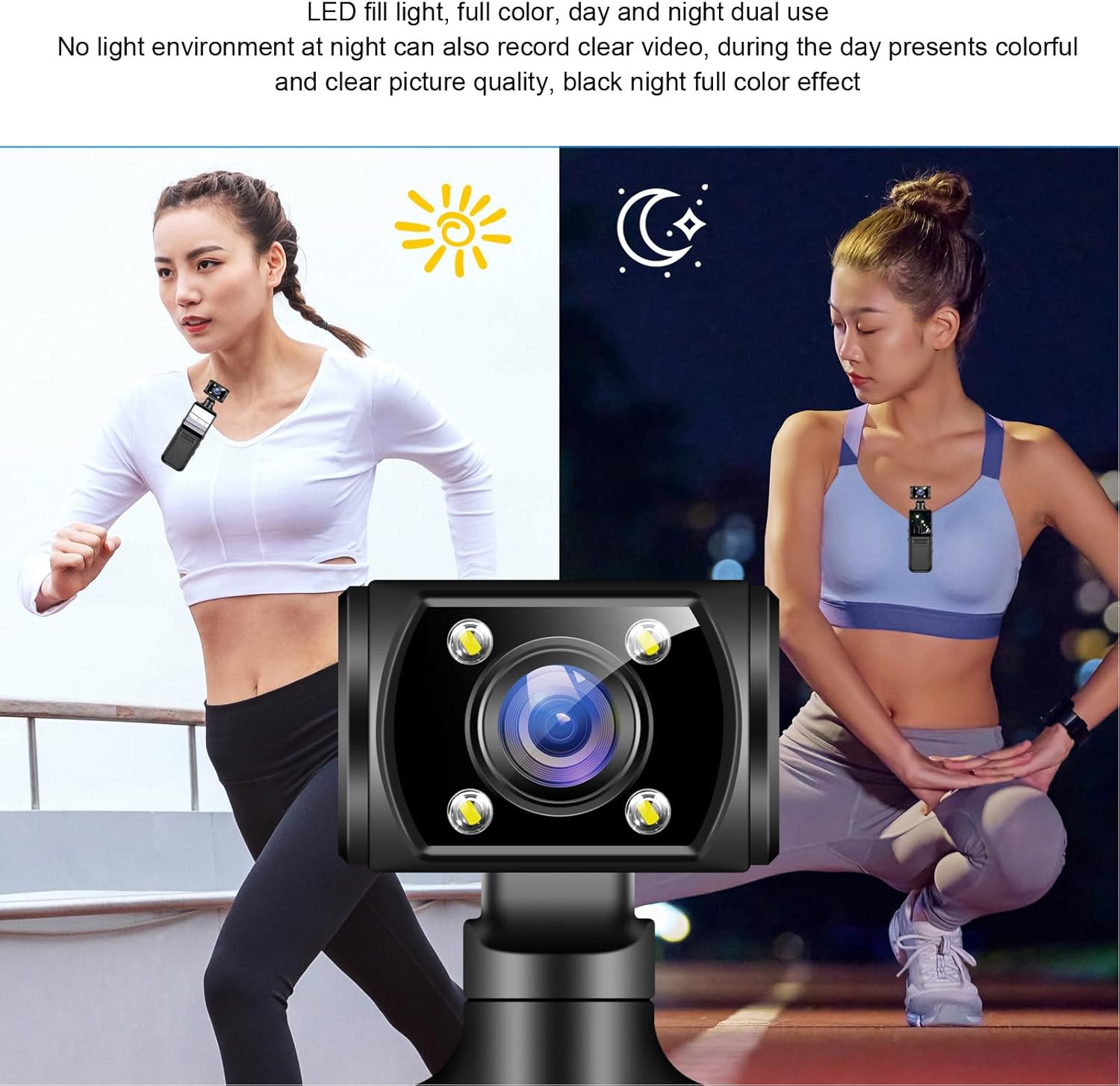
Image: The camera attached to a backpack strap using its integrated back clip, demonstrating its wearability and portability for outdoor activities.
5. Manutenzione
- Pulizia: Utilizzare un panno morbido e asciutto per pulire il corpo macchina. Per l'obiettivo, utilizzare un panno e una soluzione specifici per la pulizia delle lenti. Evitare materiali abrasivi o sostanze chimiche aggressive.
- Magazzinaggio: Conservare la fotocamera in un luogo fresco e asciutto, lontano dalla luce solare diretta e da temperature estreme. Rimuovere la scheda di memoria se si prevede di non utilizzarla per periodi prolungati.
- Cura della batteria: To prolong battery life, avoid fully discharging the battery frequently. Charge the camera periodically if not in use for a long time.
- Aggiornamenti del firmware: Controllare il produttore website or the companion APP for any available firmware updates to ensure optimal performance and new features.
6. Risoluzione Dei Problemi
| Problema | Possibile causa | Soluzione |
|---|---|---|
| La fotocamera non si accende. | Batteria scarica; batteria difettosa; problema con il pulsante di accensione. | Charge the camera fully. Ensure the power button is pressed correctly. |
| Cannot connect to WiFi/APP. | WiFi not enabled; incorrect APP settings; interference. | Ensure camera WiFi is on. Restart camera and phone. Check APP permissions. |
| Errore della scheda di memoria. | Scheda non inserita correttamente; scheda incompatibile; scheda danneggiata. | Reinsert the card. Try a different compatible card. Format the card (this will erase data). |
| Scarsa qualità video/immagine. | Dirty lens; low light without fill light; incorrect settings. | Clean the lens. Activate LED fill light in low light. Adjust resolution settings. |
7. Specifiche
| Caratteristica | Dettaglio |
|---|---|
| Marca | Tangxi |
| Nome del modello | Tangxipwkasmd14n |
| Tipo di videocamera | Action Camera |
| Risoluzione di acquisizione video | 4K |
| Tecnologia del sensore fotografico | CMOS |
| Dimensioni dello schermo | 1.3 pollici |
| Tecnologia di connettività | Wifi |
| Caratteristiche speciali | WiFi Connectivity, APP Control, Rotatable Lens |
| Apertura massima | 2.8 anni |
| Formato di acquisizione video | MP4 |
| Peso dell'articolo | 6.4 once |
| Dimensioni del pacco | 6.3 x 3.15 x 1.97 pollici |
8. Garanzia e supporto
For warranty information and customer support, please refer to the documentation included with your product or visit the official Tangxi websito. Puoi anche contattare direttamente il venditore per assistenza.
Venditore: Tangxi
Politica di ritorno: Politica di rimborso/sostituzione di 30 giorni (come da informazioni sui vincitori della Buybox di Amazon).
