1. Prodotto finitoview
The Vormooi V15 is a compact and portable digital voice recorder designed for high-quality audio capture in various environments, including lectures, meetings, and classes. It features a large internal storage capacity and advanced noise reduction technology.
Caratteristiche principali:
- Massive 64GB built-in memory: Stores up to 750 hours of voice recordings in WAV and MP3 formats.
- Design compatto e portatile: Pro ultra sottilefile (0.25 x 1.3 x 2.2 inches) and lightweight (0.7 ounces) for maximum portability.
- Batteria ricaricabile a lunga durata: Provides extended recording sessions.
- Riduzione del rumore AI: Equipped with an intelligent 2155P AI chip for enhanced noise cancellation and pure recording.
- Registrazione attivata dalla voce (VAR): Intelligently skips silent passages to save memory and time.
- Funzionamento semplice: One-button recording and saving.
- Compatibilità universale: Connects via USB Type-C to Windows and macOS computers.

Image: Key features of the Vormooi V15 recorder, including its recording capacity, memory, and battery life.
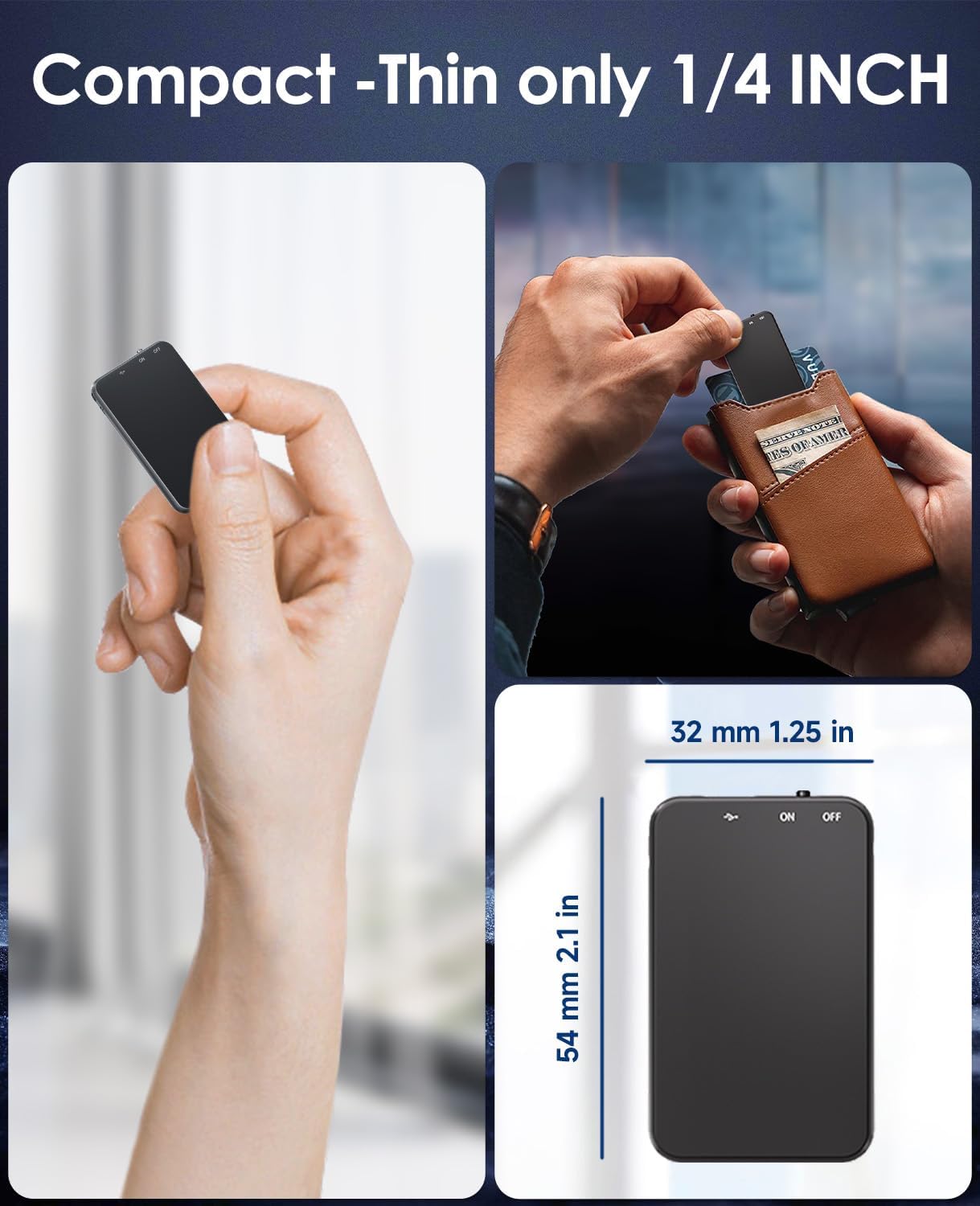
Image: Demonstrates the compact and thin design of the Vormooi V15, showing its small dimensions and portability.

Image: Illustrates the advanced AI noise cancellation technology and supported recording formats (MP3, WAV) of the V15 recorder.
2. Contenuto della confezione
Dopo aver aperto la confezione, assicurarsi che tutti gli articoli siano presenti e in buone condizioni:
- 1 x Vormooi V15 Digital Voice Recorder
- 1 cavo USB Type-C (per la ricarica e il trasferimento dati)
- 1 x Manuale utente (questo documento)
3. Impostazione
3.1 Ricarica del dispositivo
Before first use, fully charge the Vormooi V15 recorder. Connect the included USB Type-C cable to the recorder's Type-C port and the other end to a USB power adapter (not included) or a computer's USB port. The indicator light will show charging status.
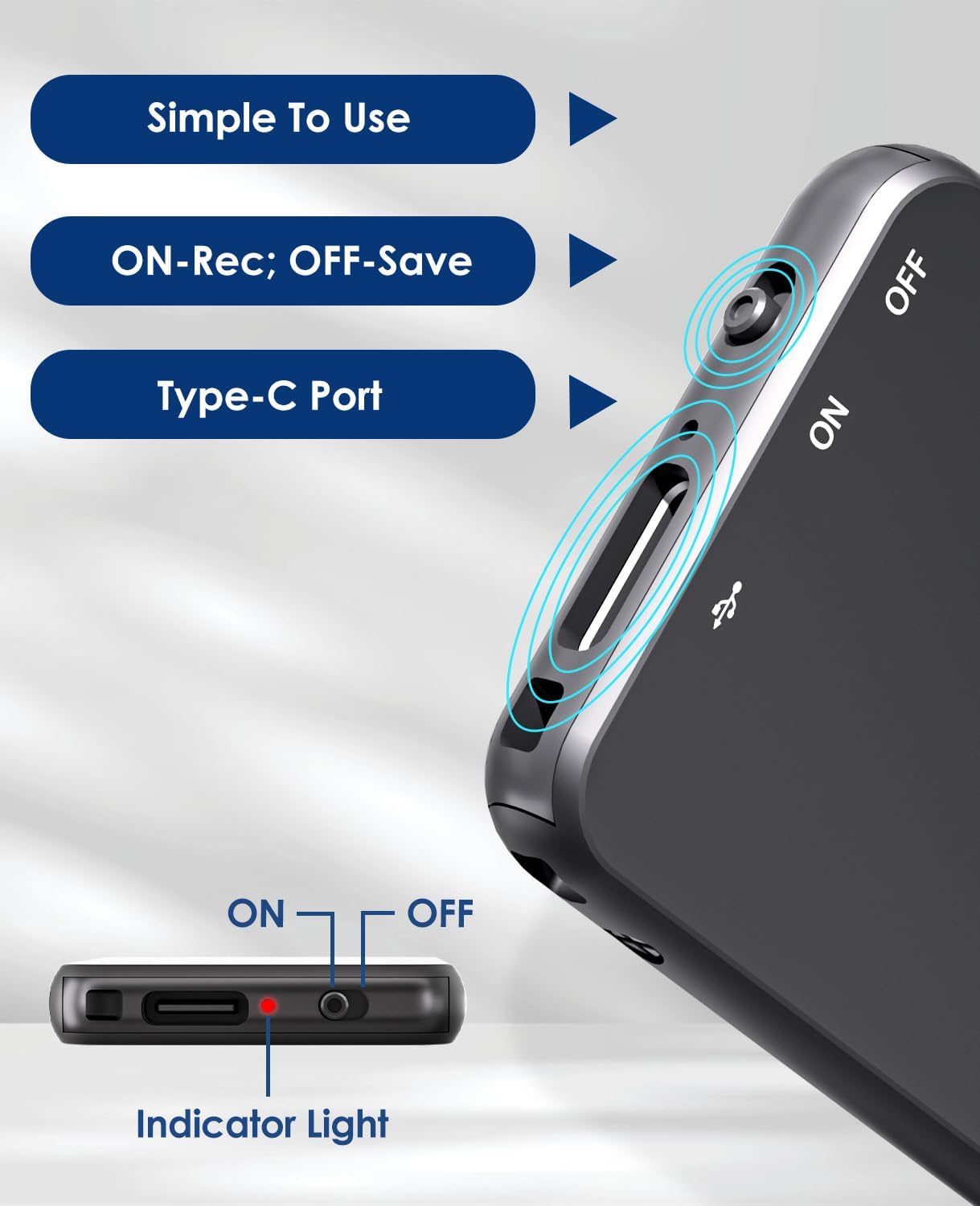
Image: Details of the recorder's side, highlighting the ON/OFF switch, Type-C port, and indicator light for simple operation.
3.2 Accensione/Spegnimento
To power on the device, slide the ON/OFF switch to the "ON" position. To power off, slide it to the "OFF" position. The indicator light will briefly illuminate.
4. Istruzioni per l'uso
4.1 Registrazione audio
To start recording, simply slide the ON/OFF switch to the "ON" position. The device will automatically begin recording. The indicator light may flash or change color to indicate recording status. To stop recording and save the file, far scorrere l'interruttore in posizione "OFF".
4.2 Voice-Activated Recording (VAR)
The V15 features a voice-activated recording function. When enabled, the recorder will automatically pause recording during periods of silence and resume when sound is detected, optimizing memory usage. The sensitivity of the voice activation can be adjusted (though specific instructions for adjustment are not provided in the product images, it's a common feature).

Image: Depicts the Voice-Activated Recording (VAR) feature, illustrating how it saves memory by skipping silent blanks and showing different sensitivity levels.
4.3 Trasferimento Files al Computer
Connect the Vormooi V15 to your computer using the provided USB Type-C cable. The device will appear as a removable storage device (like a USB drive). You can then drag and drop your recorded audio files (MP3 or WAV format) to your computer. The device is compatible with Windows and macOS operating systems.

Image: Shows the Type-C connection and compatibility with Windows, Mac, and Linux operating systems for easy file trasferimento.
4.4 Riproduzione
While the device supports playback, specific controls for direct playback (e.g., built-in speaker, headphone jack) are not detailed in the provided information. Typically, playback is done by connecting headphones to the device's headphone jack (if available) or by transferring files to a computer and playing them there.
Note: The product specifications mention "Headphones Jack: 1", confirming the presence of a jack for direct playback.
5. Manutenzione
- Pulizia: Per pulire il dispositivo, utilizzare un panno morbido e asciutto. Non utilizzare detergenti liquidi o solventi.
- Magazzinaggio: Conservare il registratore in un luogo fresco e asciutto, lontano dalla luce solare diretta e da temperature estreme.
- Cura della batteria: Per prolungare la durata della batteria, evitare di scaricarla completamente frequentemente. Caricare il dispositivo regolarmente, anche se non viene utilizzato per periodi prolungati.
- Backup dei dati: Esegui regolarmente il backup delle registrazioni importanti sul tuo computer per evitare la perdita di dati.
6. Risoluzione Dei Problemi
- Il dispositivo non si accende: Assicurarsi che la batteria sia carica. Collegare a una fonte di alimentazione e riprovare.
- Impossibile registrare: Controllare se la memoria è piena. Trasferire filesul tuo computer per liberare spazio.
- Scarsa qualità di registrazione: Ensure the microphone is not obstructed. Reduce background noise. Check if AI Noise Reduction is functioning.
- Dispositivo non riconosciuto dal computer: Try a different USB port or cable. Ensure the device is powered on. Restart your computer.
- Reimpostazione del dispositivo: If the device becomes unresponsive, locate the small "RESET" hole (often requiring a pin or paperclip) and gently press it to restart the device.

Immagine: Fronte e retro views of the V15, indicating the location of the reset button and overall dimensions.
7. Specifiche
| Caratteristica | Dettaglio |
|---|---|
| Numero di modello | V15 |
| Capacità di archiviazione | 64 GB |
| Capacità di registrazione | Fino a 750 ore |
| Formati di registrazione | WAV, MP3 |
| Dimensioni del prodotto | 0.25 x 1.3 x 2.2 pollici (0.25"P x 1.3"L x 2.2"A) |
| Peso dell'articolo | 0.705 once (20 grammi) |
| Tipo di batteria | Lithium-ion (1 A battery included) |
| Durata della batteria | 40-50 ore (circa) |
| Porta di ricarica | USB di tipo C |
| Microfono | Incorporato |
| Presa per cuffie | 1 |
| Dispositivi compatibili | Windows/macOS Computer |
| Produttore | Vormoi |
8. Garanzia e supporto
For warranty information and technical support, please refer to the documentation included with your purchase or visit the official Vormooi websito. Conservare la prova d'acquisto per eventuali reclami in garanzia.
For further assistance, you may contact Vormooi customer service through their official channels. Details are typically found on the product packaging or the brand's official online presence.
9. Uso previsto
The Vormooi V15 Digital Voice Recorder is intended for personal and professional audio recording purposes, including but not limited to:
- Recording lectures and academic presentations.
- Documenting business meetings and conferences.
- Conducting interviews.
- Capturing personal memos and ideas.

Immagine: Examples of typical usage scenarios for the V15 recorder, such as in classes, interviews, meetings, and for personal notes.


