1. Introduzione
This manual provides essential instructions for the proper setup, operation, and maintenance of your KYOCERA DuraXV Extreme+ E4811 ultra-rugged flip phone. Designed for durability, this device features IP68 dust and waterproof rating, MIL-STD-810G protection, 4G LTE connectivity, and a 5MP camera. Please read this manual thoroughly before using your device to ensure optimal performance and longevity.
2. Contenuto della confezione
Verifica che il pacco contenga i seguenti articoli:
- KYOCERA DuraXV Extreme+ E4811 Handset
- Adattatore di alimentazione
- Cavo USB
- Batteria (preinstallata o separata)
3. Disposizione del dispositivo
Familiarize yourself with the physical components of your DuraXV Extreme+ E4811.
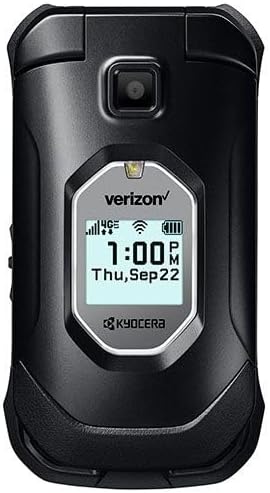
Figura 3.1: Davanti view of the KYOCERA DuraXV Extreme+ E4811 in its closed position, displaying the external screen with time and network status.
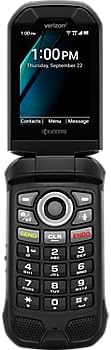
Figura 3.2: Davanti view of the KYOCERA DuraXV Extreme+ E4811 in its open position, revealing the main display and the physical keypad with navigation buttons.

Figura 3.3: Indietro view of the KYOCERA DuraXV Extreme+ E4811 in its open position, showing the rear casing and charging contacts.
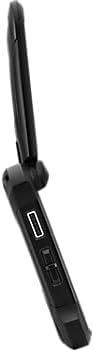
Figura 3.4: Lato view of the KYOCERA DuraXV Extreme+ E4811, highlighting the USB charging port and other side buttons.
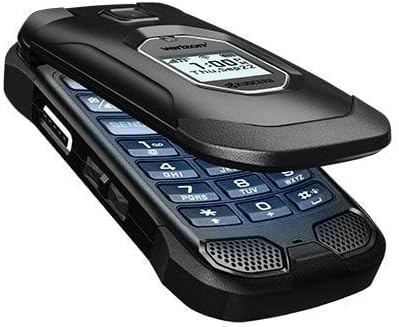
Figura 3.5: Angolato view of the KYOCERA DuraXV Extreme+ E4811 in its open state, providing a perspective of both the display and keypad.
4. Impostazione
4.1. Installazione e ricarica della batteria
- If the battery is not pre-installed, remove the back cover of the phone.
- Align the battery (1770 mAh) contacts with the phone's terminals and gently press it into place.
- Riposizionare la cover posteriore, assicurandosi che sia ben chiusa per garantire la resistenza all'acqua e alla polvere.
- Collega il cavo USB alla porta di ricarica del telefono e all'adattatore di alimentazione. Collega l'adattatore a una presa a muro.
- Allow the phone to charge fully before initial use. The charging indicator will show progress.
4.2. Installazione della scheda SIM
Your DuraXV Extreme+ E4811 requires a Nano-SIM card for cellular service.
- Spegnere il telefono e rimuovere la cover posteriore.
- Individua lo slot della scheda SIM.
- Insert the Nano-SIM card with the gold contacts facing down and the notched corner aligned with the slot. Push until it clicks into place.
- Riposiziona la cover posteriore.
4.3. Accensione/Spegnimento
- Per accendere: Tenere premuto il pulsante di accensione/fine chiamata finché lo schermo non si illumina.
- Per spegnere: Press and hold the Power/End Call button, then select 'Power off' from the options on the screen.
5. Istruzioni per l'uso
5.1. Navigazione di base
Use the directional pad and center select button to navigate menus and select options. The 'Send' button initiates calls, and the 'End' button terminates calls or returns to the home screen.
5.2. Effettuare e ricevere chiamate
- Per effettuare una chiamata: Enter the phone number using the keypad and press the 'Send' button.
- Per rispondere a una chiamata: When the phone rings, press the 'Send' button.
- Per terminare una chiamata: Press the 'End' button.
5.3. Invio e ricezione di messaggi
- Dal menu principale, vai all'applicazione "Messaggi".
- Select 'New Message' to compose a text message. Enter the recipient's number and your message.
- Press the 'Send' option to transmit the message.
- Received messages will appear as notifications on the screen and can be accessed through the 'Messages' application.
5.4. Utilizzo della fotocamera
Your phone is equipped with a 5MP camera.
- Open the 'Camera' application from the main menu.
- Inquadra il soggetto utilizzando il display.
- Press the center select button or a dedicated camera button (if available) to capture a photo.
5.5. Connectivity (Bluetooth, Wi-Fi, 4G LTE)
- Bluetooth: Access Bluetooth settings from the main menu to pair with compatible devices like headsets or car kits.
- Wifi: Connect to available Wi-Fi networks via the settings menu to access the internet without using cellular data.
- 4G LTE: The phone automatically connects to the 4G LTE network for high-speed data and calls, provided a valid SIM card and service plan are active.
6. Manutenzione
- Pulizia: Utilizzare un morbido, damp panno per pulire l'esterno del telefono. Evitare prodotti chimici aggressivi o materiali abrasivi.
- Resistenza all'acqua e alla polvere: The phone is IP68 rated. Ensure all port covers are securely closed to maintain water and dust resistance. Do not expose the phone to saltwater or other liquids. If exposed to water, rinse with fresh water and dry thoroughly.
- Cura della batteria: Avoid extreme temperatures. Do not puncture or disassemble the battery. Use only approved chargers.
- Protezione ambientale: The phone is MIL-STD-810G compliant, offering protection against drops, shock, vibration, and extreme weather conditions. However, avoid unnecessary harsh treatment.
7. Risoluzione Dei Problemi
If you encounter issues with your phone, refer to the following common solutions:
- Il telefono non si accende: Ensure the battery is charged. Connect the phone to the charger and attempt to power on after a few minutes.
- Nessun segnale di rete: Check that the SIM card is correctly inserted. Move to an area with better network coverage. Contact your service provider if the issue persists.
- Impossibile effettuare/ricevere chiamate: Verify that you have active cellular service. Check call barring settings. Ensure the phone is not in Airplane Mode.
- Screen is Unresponsive: If the screen is frozen, try performing a soft reset by removing and reinserting the battery (if accessible) or holding the Power button for an extended period.
- Scarsa qualità audio: Check the volume settings. Ensure the speaker or earpiece is not obstructed.
8. Specifiche
| Caratteristica | Specificazione |
|---|---|
| Numero di modello | E4811 |
| Sistema operativo | Androide 11.0 |
| Modello CPU | MediaTek Helio |
| Velocità della CPU | 2 GHz |
| Memoria RAM | 2 GB |
| Memoria interna | 16 GB |
| Risoluzione dello schermo | 480x800 |
| Telecamera posteriore | 5 MP |
| Capacità della batteria | 1770 mAh |
| Connettività | 4G LTE, Wi-Fi, Bluetooth |
| Valutazioni di durabilità | IP68 Dust & Waterproof, MIL-STD-810G |
| Fattore di forma | Capovolgere |
| Presa audio | 3.5 millimetri |
| Peso dell'articolo | 8 once |
9. Garanzia e supporto
Your KYOCERA DuraXV Extreme+ E4811 is covered by a manufacturer's warranty. For specific warranty terms and conditions, please refer to the warranty card included with your product or visit the official KYOCERA website. For technical support, product registration, or further assistance, please visit the KYOCERA support page or contact their customer service directly.
Supporto online: www.kyoceramobile.com/support/


